sketchucation logo sketchucation
    • 登入
    Oops, your profile's looking a bit empty! To help us tailor your experience, please fill in key details like your SketchUp version, skill level, operating system, and more. Update and save your info on your profile page today!
    🔌 Smart Spline | Fluid way to handle splines for furniture design and complex structures. Download

    [req] soften/divide geometry (by angle)

    已排程 已置頂 已鎖定 已移動 Plugins
    29 貼文 7 Posters 4.3k 瀏覽 7 Watching
    正在載入更多貼文
    • 從舊到新
    • 從新到舊
    • 最多點贊
    回覆
    • 在新貼文中回覆
    登入後回覆
    此主題已被刪除。只有擁有主題管理權限的使用者可以查看。
    • jeff hammondJ 離線
      jeff hammond
      最後由 編輯

      just in case this isn't common knowledge already, the way to get the edges to do that with subdivide and smooth is to have offset lines from the edges (not via the SU offset tool though -- the lines need to run edge to edge)

      [flash=500,405:1jpuaj8l]http://www.youtube-nocookie.com/v/jPRb7QhzvYs&hl=en&fs=1&rel=0&color1=0x2b405b&color2=0x6b8ab6&border=1[/flash:1jpuaj8l]

      anyone know of a better way?

      dotdotdot

      1 條回覆 最後回覆 回覆 引用 0
      • jeff hammondJ 離線
        jeff hammond
        最後由 編輯

        @xrok1 said:

        @chris fullmer said:

        Yeah, something like being able to subdivide a selection, and then smooth it out a bit?

        yes but the selection of what you divide would be based on an angle not a selection. imagine a script that physically does what appears to happen when you "soften/smooth edges".

        does anyone really use soften/smooth like that? if i'm using soften/smooth, my goal is always to soften everthing.. i've never set it to where some lines remain visible..
        just curious

        [edit] unless you mean something like the eraser tool/option key in which case i will soften just a line or two.. i think if you did that with actual subdivison, there'd be some weird geometry where the round meets a sharp edge.

        dotdotdot

        1 條回覆 最後回覆 回覆 引用 0
        • X 離線
          xrok1
          最後由 編輯

          subdivide and smooth already does it but with sds it divides the whole mesh so you get smooth results but wayyy too much geometry when it only needs smoothing in a few places. what if i wanted to subdivide any edge under 30 deg. and leave the rest of the mesh undivided?

          “There are three classes of people: those who see. Those who see when they are shown. Those who do not see.”

          http://www.Twilightrender.com try it!

          1 條回覆 最後回覆 回覆 引用 0
          • jeff hammondJ 離線
            jeff hammond
            最後由 編輯

            @xrok1 said:

            what if i wanted to subdivide any edge under 30 deg. and leave the rest of the mesh undivided?

            that's where the weird geometry happens.. somehow the round has to meet the sharp.. here's a mockup of what i'm talking about..

            sub1edge.skp

            dotdotdot

            1 條回覆 最後回覆 回覆 引用 0
            • W 離線
              Whaat
              最後由 編輯

              @xrok1 said:

              subdivide and smooth already does it but with sds it divides the whole mesh so you get smooth results but wayyy too much geometry when it only needs smoothing in a few places. what if i wanted to subdivide any edge under 30 deg. and leave the rest of the mesh undivided?

              (I'm thinking about it.... 🤓 )

              SketchUp Plugins for Professionals

              1 條回覆 最後回覆 回覆 引用 0
              • X 離線
                xrok1
                最後由 編輯

                hey, nice to hear from you Whaat! 😄 I was hoping you'd be around. It would be an awsome addition to an already great script if you could pull this off. it would make your must have a must, must have! 😛 even though i already have it 😆

                “There are three classes of people: those who see. Those who see when they are shown. Those who do not see.”

                http://www.Twilightrender.com try it!

                1 條回覆 最後回覆 回覆 引用 0
                • X 離線
                  xrok1
                  最後由 編輯

                  @unknownuser said:

                  @xrok1 said:

                  what if i wanted to subdivide any edge under 30 deg. and leave the rest of the mesh undivided?

                  that's where the weird geometry happens.. somehow the round has to meet the sharp.. here's a mockup of what i'm talking about..

                  [attachment=1:kukhoxs1]<!-- ia1 -->sub1edge.skp<!-- ia1 -->[/attachment:kukhoxs1]

                  maybe something like this could be worked out:[attachment=0:kukhoxs1]<!-- ia0 -->cap.jpg<!-- ia0 -->[/attachment:kukhoxs1]
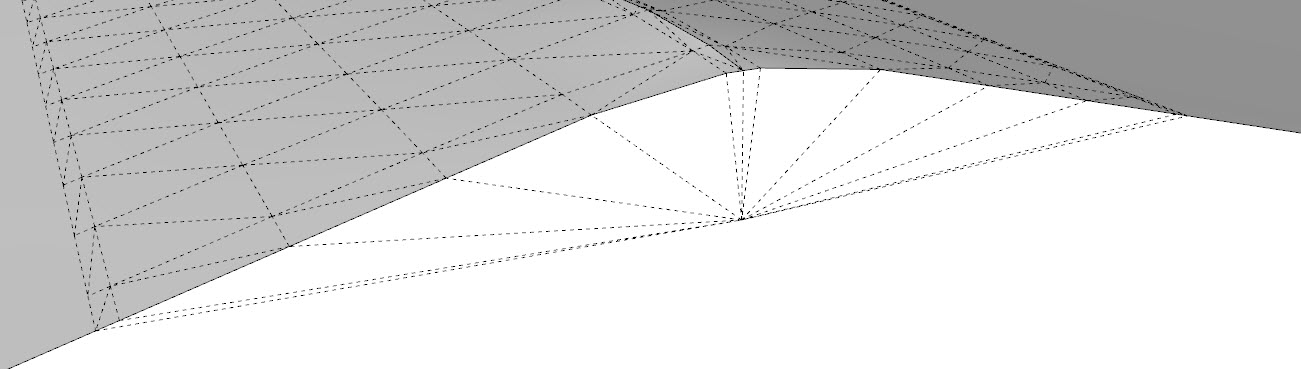

                  cap.jpg

                  “There are three classes of people: those who see. Those who see when they are shown. Those who do not see.”

                  http://www.Twilightrender.com try it!

                  1 條回覆 最後回覆 回覆 引用 0
                  • X 離線
                    xrok1
                    最後由 編輯

                    or this:cap.jpg

                    “There are three classes of people: those who see. Those who see when they are shown. Those who do not see.”

                    http://www.Twilightrender.com try it!

                    1 條回覆 最後回覆 回覆 引用 0
                    • jeff hammondJ 離線
                      jeff hammond
                      最後由 編輯

                      there's probably a good solution for it and it might not even matter in many cases.

                      the thing that made me think about it was imagining doing this on a curved wall.
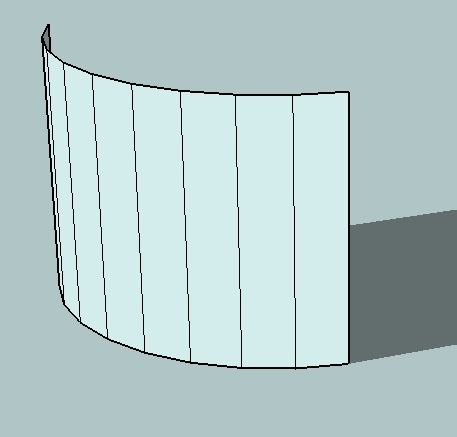
                      wall.jpg

                      i guess it could just round off the top some?? or you'd have a wavy wall.

                      [edit] and really, this exact situation would be better served by normal soften/smooth... i'm just curious about how it would work.. that's all

                      dotdotdot

                      1 條回覆 最後回覆 回覆 引用 0
                      • X 離線
                        xrok1
                        最後由 編輯

                        in that case you might need a crease tool? or it could work like round edge, or you could just use round edge.

                        “There are three classes of people: those who see. Those who see when they are shown. Those who do not see.”

                        http://www.Twilightrender.com try it!

                        1 條回覆 最後回覆 回覆 引用 0
                        • jeff hammondJ 離線
                          jeff hammond
                          最後由 編輯

                          i know this isn't the same as xrok's request but it seems like it would have the same underlying structure:

                          [flash=660,525:31qmg8iy]http://www.youtube.com/v/B9u0ulHoMU4&hl=en&fs=1&rel=0&color1=0x2b405b&color2=0x6b8ab6&border=1[/flash:31qmg8iy]

                          dotdotdot

                          1 條回覆 最後回覆 回覆 引用 0
                          • X 離線
                            xrok1
                            最後由 編輯

                            hey thats pretty sweet too, what is it? round edge by bezier?

                            “There are three classes of people: those who see. Those who see when they are shown. Those who do not see.”

                            http://www.Twilightrender.com try it!

                            1 條回覆 最後回覆 回覆 引用 0
                            • jeff hammondJ 離線
                              jeff hammond
                              最後由 編輯

                              @xrok1 said:

                              hey thats pretty sweet too, what is it? round edge by bezier?

                              nah, that ruby can't handle the weird intersection.. here's what it looks like in this circumstance..

                              http://homepage.mac.com/jeffhammond/.Public/scf/bezierroundedge.jpg

                              i wish the youtube video was clearer so you could see the drop down 😄

                              http://homepage.mac.com/jeffhammond/.Public/scf/mock_blend.jpg

                              but no.. no such ruby.. i just used a little movie magic.. there's really a hidden group which had a dose of subdivide/smooth.. i made the selection then acted like i clicked on a ruby but really, i unhid the group..
                              i'll attach the skp.. the idea is to keep most of the object flat but certain places could be subdivided.. pretty much what this thread is about but being used in a different circumstance.. (open it and go shift/command/E -- or however you unhide things on windows)


                              awesome_rb.skp

                              dotdotdot

                              1 條回覆 最後回覆 回覆 引用 0
                              • X 離線
                                xrok1
                                最後由 編輯

                                that would be a subd@90deg. 😛

                                hears a thread where we're discussing what you did http://www.sketchucation.com/forums/scf/viewtopic.php?f=15&t=18073

                                “There are three classes of people: those who see. Those who see when they are shown. Those who do not see.”

                                http://www.Twilightrender.com try it!

                                1 條回覆 最後回覆 回覆 引用 0
                                • A 離線
                                  archmolding
                                  最後由 編輯

                                  @unknownuser said:

                                  just in case this isn't common knowledge already, the way to get the edges to do that with subdivide and smooth is to have offset lines from the edges (not via the SU offset tool though -- the lines need to run edge to edge)

                                  [flash=500,405:3f3optb9]http://www.youtube-nocookie.com/v/jPRb7QhzvYs&hl=en&fs=1&rel=0&color1=0x2b405b&color2=0x6b8ab6&border=1[/flash:3f3optb9]

                                  anyone know of a better way?

                                  Jeff, I wanted to ask you how you took that line and placed it on the other side of the surface in the same spot as the other side. (in your video) Ive been using the tape measure tool all this time to measure in equally on both sides then moving a copy to the other side. How did you do that with out measuring with the tape tool?

                                  could you email me?
                                  arch_molding@sbcglobal.net

                                  Thank you
                                  -Jesse

                                  http://www.archmolding.net

                                  1 條回覆 最後回覆 回覆 引用 0
                                  • X 離線
                                    xrok1
                                    最後由 編輯

                                    i imagine jeff knew the dimensions of his rectangle and just typed in the measurement to get it where he wanted.

                                    “There are three classes of people: those who see. Those who see when they are shown. Those who do not see.”

                                    http://www.Twilightrender.com try it!

                                    1 條回覆 最後回覆 回覆 引用 0
                                    • A 離線
                                      archmolding
                                      最後由 編輯

                                      Oh yeah I guess if he already knew the width he just did the math in his head, and typed it in...makes sense..Just when i thought there was some new trick... 😄

                                      http://www.archmolding.net

                                      1 條回覆 最後回覆 回覆 引用 0
                                      • jeff hammondJ 離線
                                        jeff hammond
                                        最後由 編輯

                                        yeah, i just mathed it..
                                        i can't remember the exact dimensions here but probably something like a 6' square.. copy/moved the first line in 6" then moved it another five feet .. i'm a fan of the value control box 😄

                                        dotdotdot

                                        1 條回覆 最後回覆 回覆 引用 0
                                        • A 離線
                                          archmolding
                                          最後由 編輯

                                          thank you Jeff. Awesome forum. Ive got lots to learn here. 👍

                                          http://www.archmolding.net

                                          1 條回覆 最後回覆 回覆 引用 0
                                          • jeff hammondJ 離線
                                            jeff hammond
                                            最後由 編輯

                                            here are two other ways you could do it which will be quicker than the tape measure.

                                            [i tried to make sure to use the toolbar so you'd know which tools i was using.. it would be a lot faster with shortcuts]

                                            the first one shows a square and rotate/copy

                                            the second one is a rectangle with offset/line inferencing (ie- i was holding the shift key while on the outer perimeter which allows me to get a perpendicular lock)

                                            [flash=640,400:2317m0jm]http://www.youtube.com/v/GEJsgVd0zyE&hl=en&fs=1&rel=0&color1=0x006699&color2=0x54abd6&border=1[/flash:2317m0jm]

                                            dotdotdot

                                            1 條回覆 最後回覆 回覆 引用 0
                                            • 1
                                            • 2
                                            • 1 / 2
                                            • 第一個貼文
                                              最後的貼文
                                            Buy SketchPlus
                                            Buy SUbD
                                            Buy WrapR
                                            Buy eBook
                                            Buy Modelur
                                            Buy Vertex Tools
                                            Buy SketchCuisine
                                            Buy FormFonts

                                            Advertisement