sketchucation logo sketchucation
    • Login
    Oops, your profile's looking a bit empty! To help us tailor your experience, please fill in key details like your SketchUp version, skill level, operating system, and more. Update and save your info on your profile page today!
    ⚠️ Update | Sketchucation Tools 5.0.8 released with licensing improvements and bugfixes Download

    [Plugin][$] FredoScale - v3.7c - 19 Aug 26


    Scheduled Pinned Locked Moved Plugins
    1.2k Posts 347 Posters 3.2m Views 345 Watching
    Loading More Posts
    • Oldest to Newest
    • Newest to Oldest
    • Most Votes
    Reply
    • Reply as topic
    Log in to reply
    This topic has been deleted. Only users with topic management privileges can see it.
    • E
      elfis
      last edited by

      @fredo6 said:

      In Sketchup, a group just copied behaves like Components...

      ...unless you just edit (i.e. double click) the group you copied.

      This is probably for optimization.

      Fredo

      Hi, thanks for the answer . Before I have never have this problem, I found small fix on this "model" by removing group of objects inside this group.
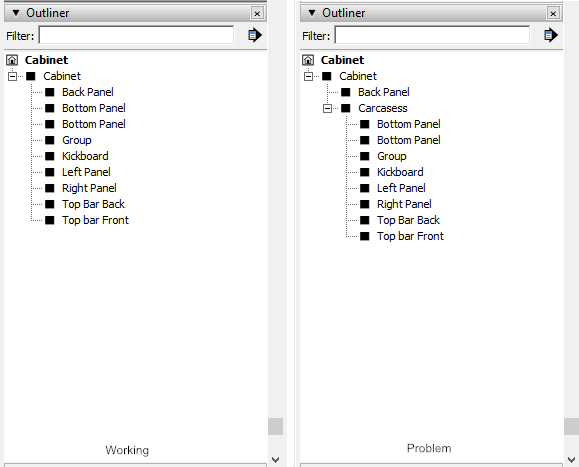

      Group Tree

      1 Reply Last reply
      Reply Quote 0
      • array81A
        array81
        last edited by

        I installed the last version but I have only the "box" tools, no "target" tools. Any ideas?

        1 Reply Last reply
        Reply Quote 0
        • Dave RD
          Dave R
          last edited by

          @array81 said:

          I installed the last version but I have only the "box" tools, no "target" tools. Any ideas?

          They don't show even after you enabled them and restarted SketchUp?
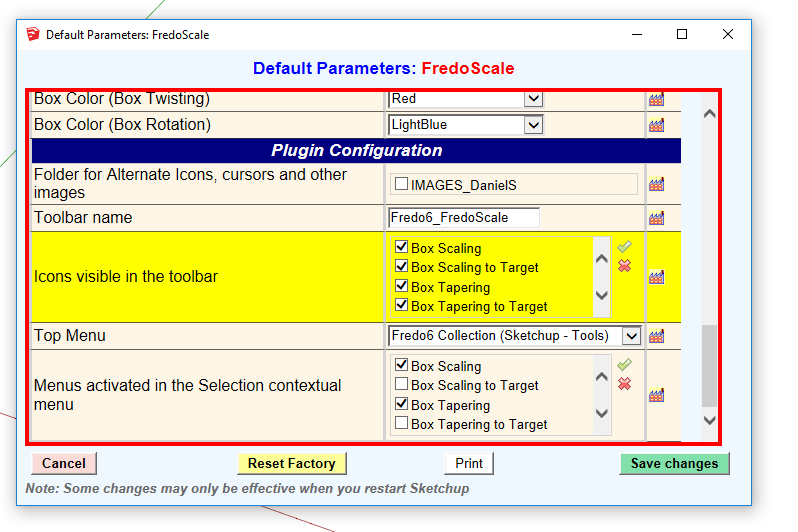
          Screenshot - 3_18_2017 , 4_56_38 PM.png

          Etaoin Shrdlu

          %

          (THERE'S NO PLACE LIKE)

          G28 X0.0 Y0.0 Z0.0

          M30

          %

          1 Reply Last reply
          Reply Quote 0
          • G
            georgeoakblaster
            last edited by

            Hi,

            Is there a way to get the dimension tags to update after you resize using the 'box stretching' feature? At the moment I re-add them manually to get them to update to the correct measurement.

            Thanks for this great plugin Fredo.

            1 Reply Last reply
            Reply Quote 0
            • Dave RD
              Dave R
              last edited by

              @georgeoakblaster said:

              Hi,

              Is there a way to get the dimension tags to update after you resize using the 'box stretching' feature? At the moment I re-add them manually to get them to update to the correct measurement.

              Thanks for this great plugin Fredo.

              Like this?
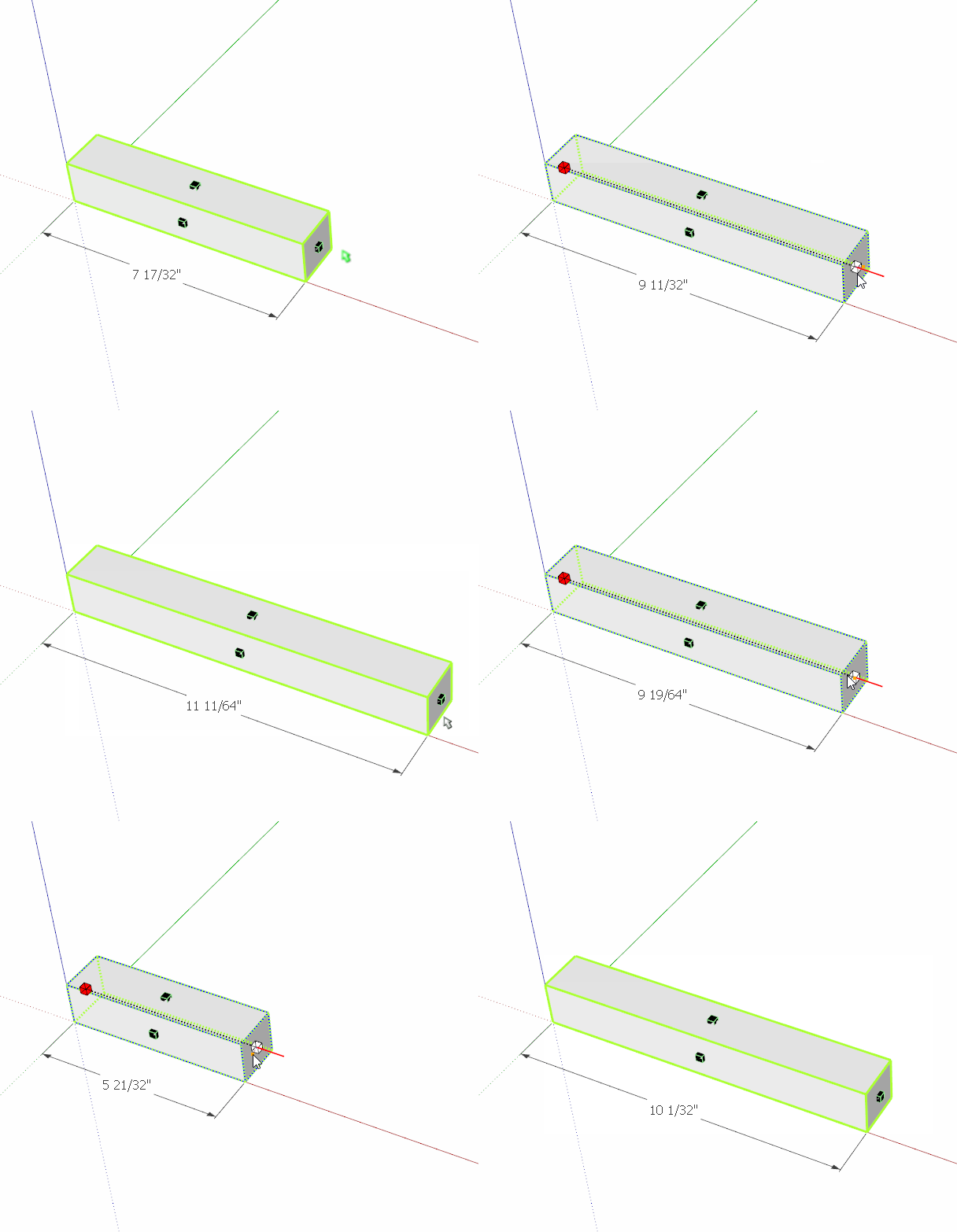
              stretch.gif

              Etaoin Shrdlu

              %

              (THERE'S NO PLACE LIKE)

              G28 X0.0 Y0.0 Z0.0

              M30

              %

              1 Reply Last reply
              Reply Quote 0
              • G
                georgeoakblaster
                last edited by

                Thanks,

                I should have mentioned this is when using 'enter new dimensions' which is on the right click dialogue box.

                George

                1 Reply Last reply
                Reply Quote 0
                • Dave RD
                  Dave R
                  last edited by

                  Maybe you could post a screen shot of what you are trying to describe because it isn't clear.

                  The New Dimension window is intended to allow you to type in the new dimension.

                  What is the "dimension tag" you refer to?

                  Etaoin Shrdlu

                  %

                  (THERE'S NO PLACE LIKE)

                  G28 X0.0 Y0.0 Z0.0

                  M30

                  %

                  1 Reply Last reply
                  Reply Quote 0
                  • K
                    kevsterman
                    last edited by

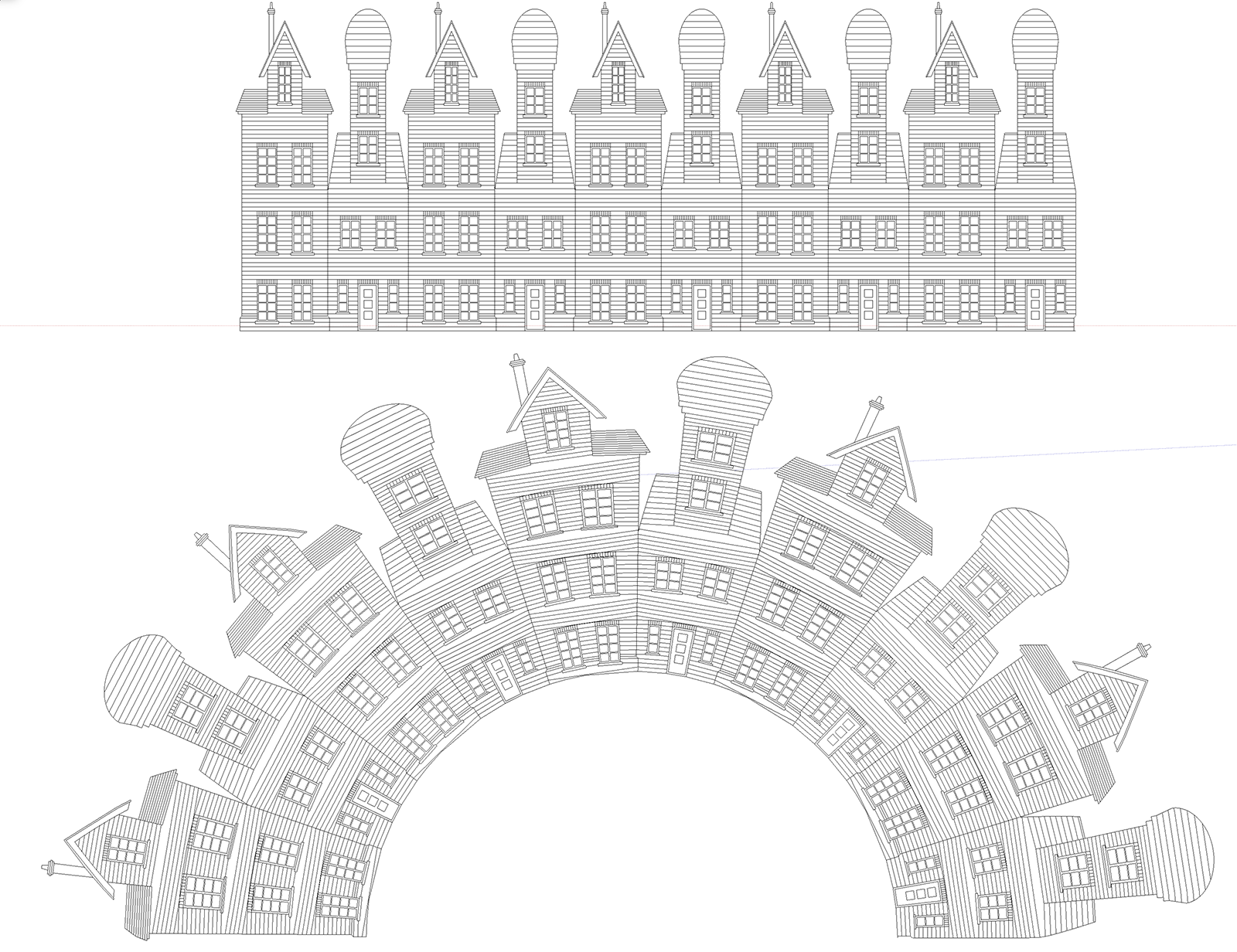
                    Hey guys. I've recently discovered radial bend and its just brilliant. Its really helping me with some illustrations I'm doing. I was wondering if there's a way for the materials to bend as well as the model. So far the materials either stay the same or go a bit skew-whiff, they don't bend in the same directions as the face they're on. Any way of doing this?

                    "Avoid keeping more than 3 items on your desk that you can't fit into your mouth."

                    1 Reply Last reply
                    Reply Quote 0
                    • fredo6F
                      fredo6
                      last edited by

                      @kevsterman said:

                      Hey guys. I've recently discovered radial bend and its just brilliant. Its really helping me with some illustrations I'm doing. I was wondering if there's a way for the materials to bend as well as the model. So far the materials either stay the same or go a bit skew-whiff, they don't bend in the same directions as the face they're on. Any way of doing this?

                      Unfortunately, Radial Bend creates a lot of new faces and triangulation due to slicing. So, reconstructing the original texturing would be kind of big headache!
                      In general, texturing should be done on final shapes.

                      Fredo

                      1 Reply Last reply
                      Reply Quote 0
                      • K
                        kevsterman
                        last edited by

                        Ok thanks Fredo. That's good to know πŸ‘

                        "Avoid keeping more than 3 items on your desk that you can't fit into your mouth."

                        1 Reply Last reply
                        Reply Quote 0
                        • K
                          kevsterman
                          last edited by

                          Hi guys. I have another question regarding radial bend. As you can see from the image all of the lines denoting brickwork haven't bended as I was expecting. I'm not sure why. Is it a parameter problem or maybe something to do with the model? Its probably something really easy I'm missing πŸ˜•

                          Screenshot 2017-08-10 13.03.15.png

                          "Avoid keeping more than 3 items on your desk that you can't fit into your mouth."

                          1 Reply Last reply
                          Reply Quote 0
                          • robertWanR
                            robertWan
                            last edited by

                            Why? 😞
                            https://youtu.be/FgNyfpZPVfA

                            Robert

                            1 Reply Last reply
                            Reply Quote 0
                            • fredo6F
                              fredo6
                              last edited by

                              @robertwan said:

                              Why? 😞
                              https://youtu.be/FgNyfpZPVfA

                              Robert

                              'By default', FredoScale Stretching makes the component unique before operating on it.
                              The issue is that I did not provision an option to apply to all instances instead.

                              Fredo

                              1 Reply Last reply
                              Reply Quote 0
                              • Dave RD
                                Dave R
                                last edited by

                                Is there any way around it? I expect so. Upload your SKP so we can see what you've got so far.

                                Etaoin Shrdlu

                                %

                                (THERE'S NO PLACE LIKE)

                                G28 X0.0 Y0.0 Z0.0

                                M30

                                %

                                1 Reply Last reply
                                Reply Quote 0
                                • L
                                  Lorand
                                  last edited by

                                  File attached.


                                  FScale test.skp

                                  1 Reply Last reply
                                  Reply Quote 0
                                  • L
                                    Lorand
                                    last edited by

                                    Hi all,

                                    Great plugin like all Fredo6 ones, thank you sir.

                                    Problem: Imagine a simple Chinese lamp - equilateral triangles at the top and bottom and FredoScale TWIST for elegantly getting the surfaces between them - but the TWIST function twists around the axis of the boundary box not the axis through the centers of the bottom and top triangles and the result is skewed. Same goes for any odd sided polygons: those two centers are different. Is there any way to use TWIST and get the "expected" result?

                                    Thank you in advance,
                                    Lorand

                                    1 Reply Last reply
                                    Reply Quote 0
                                    • Dave RD
                                      Dave R
                                      last edited by

                                      I see what you're getting at. It happens with shapes whose sections have an odd number of sides. It's due to the way they fit in their bounding box. I don't know if it's something Fredo can modify but an immediate solution to get around it is to put the triangle in the center of a square.
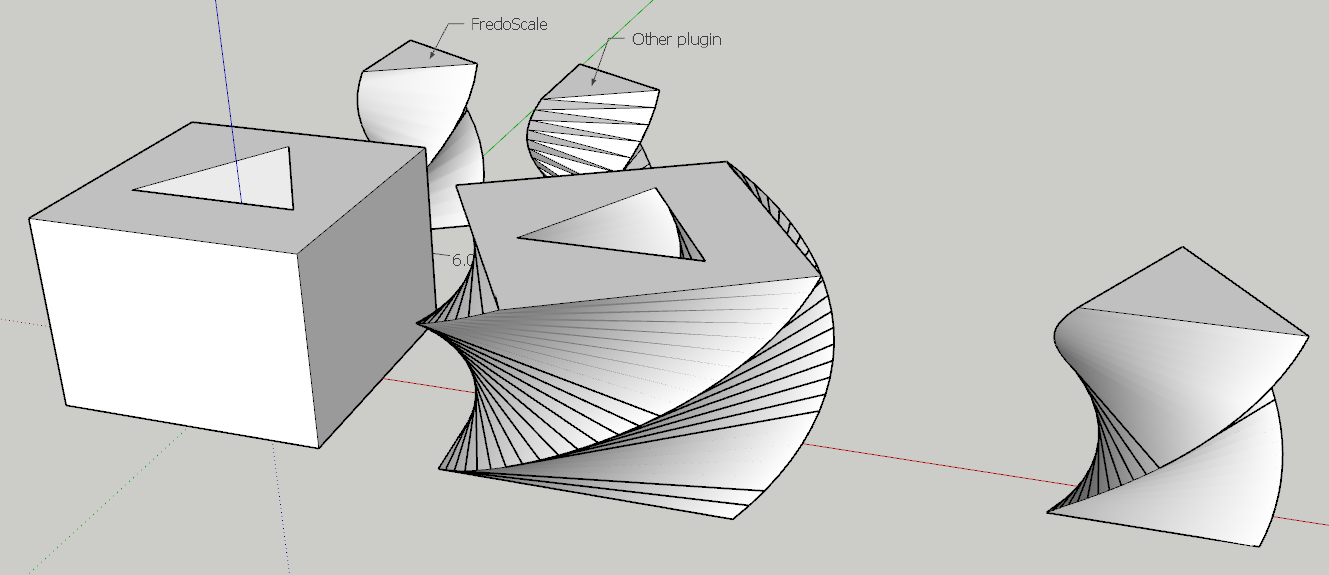
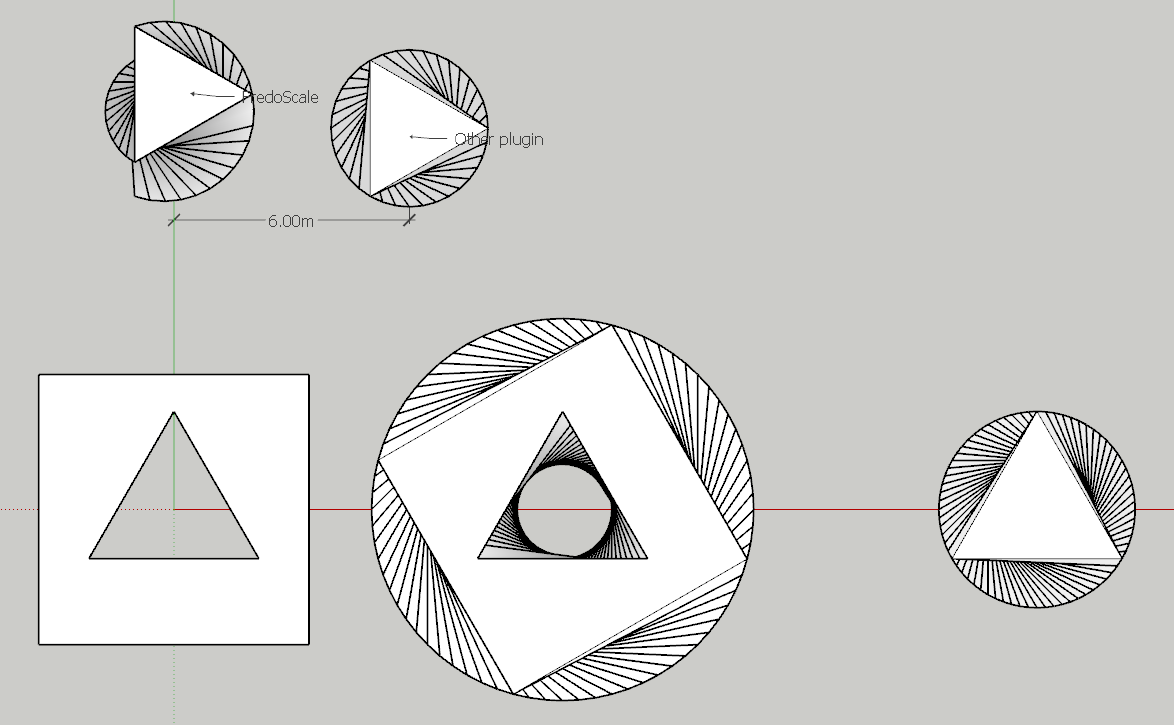
                                      Screenshot - 11_1_2017 , 4_11_43 AM.png

                                      Screenshot - 11_1_2017 , 4_13_05 AM.png

                                      Etaoin Shrdlu

                                      %

                                      (THERE'S NO PLACE LIKE)

                                      G28 X0.0 Y0.0 Z0.0

                                      M30

                                      %

                                      1 Reply Last reply
                                      Reply Quote 0
                                      • L
                                        Lorand
                                        last edited by

                                        Nice idea, thank you. Lorand

                                        1 Reply Last reply
                                        Reply Quote 0
                                        • J
                                          jtri
                                          last edited by

                                          I am using the Radial Bend tool to model a "splayed" end of an object. A couple of questions. I know it is just a few steps to copy and flip a face and then finish the end, but was wondering if I missed a command in the tool that would allow this to be done off a center line so that you could use a model, bend one face and the opposite face would bend the same but in the opposite direction? If there a better tool I should consider for this type of modeling please let me know.
                                          Thanks for a great tool and all the support


                                          Splay end.skp

                                          1 Reply Last reply
                                          Reply Quote 0
                                          • Dave RD
                                            Dave R
                                            last edited by

                                            I don't know of a tool that would do what you ask. I think using an extension to bend the surface would be more work than just drawing the curves before extruding it.

                                            By the way, how did you draw this and manage to get all the faces inside out?

                                            Etaoin Shrdlu

                                            %

                                            (THERE'S NO PLACE LIKE)

                                            G28 X0.0 Y0.0 Z0.0

                                            M30

                                            %

                                            1 Reply Last reply
                                            Reply Quote 0

                                            Hello! It looks like you're interested in this conversation, but you don't have an account yet.

                                            Getting fed up of having to scroll through the same posts each visit? When you register for an account, you'll always come back to exactly where you were before, and choose to be notified of new replies (either via email, or push notification). You'll also be able to save bookmarks and upvote posts to show your appreciation to other community members.

                                            With your input, this post could be even better πŸ’—

                                            Register Login
                                            • 1
                                            • 2
                                            • 55
                                            • 56
                                            • 57
                                            • 58
                                            • 59
                                            • 59 / 59
                                            • First post
                                              Last post
                                            Buy SketchPlus
                                            Buy SUbD
                                            Buy WrapR
                                            Buy eBook
                                            Buy Modelur
                                            Buy Vertex Tools
                                            Buy SketchCuisine
                                            Buy FormFonts

                                            Advertisement