sketchucation logo sketchucation
    • Login
    Oops, your profile's looking a bit empty! To help us tailor your experience, please fill in key details like your SketchUp version, skill level, operating system, and more. Update and save your info on your profile page today!
    ⚠️ Update | Sketchucation Tools 5.0.8 released with licensing improvements and bugfixes Download

    [Plugin][$] FredoScale - v3.7c - 19 Aug 26


    Scheduled Pinned Locked Moved Plugins
    1.2k Posts 347 Posters 3.2m Views 345 Watching
    Loading More Posts
    • Oldest to Newest
    • Newest to Oldest
    • Most Votes
    Reply
    • Reply as topic
    Log in to reply
    This topic has been deleted. Only users with topic management privileges can see it.
    • kenK
      ken
      last edited by

      @dave r said:

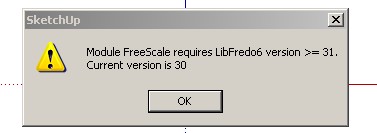
      Ken, did you install LibFredo6 version 3.1? It is linked to in the first post of the thread.

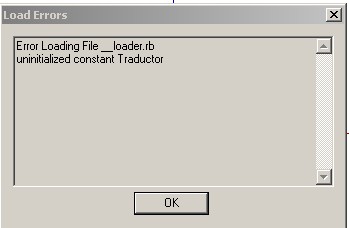
      Yes, I did install LibFredo6 version 3.1. However, I didn't remove all of the old program, I just renamed the directories until I was sure this version would work.

      Now, however, I did remove all of the old directories, I now have this error.

      Working my way to total victory.

      Thanks for the replies

      Ken

      ScreenHunter_04 Mar. 29 11.39.jpg

      Fight like your the third monkey on Noah's Ark gangway.

      1 Reply Last reply
      Reply Quote 0
      • F
        farukahmet
        last edited by

        This is just.. just... i mean... 😲 😲 😲

        1 Reply Last reply
        Reply Quote 0
        • majidM
          majid
          last edited by

          Thanx so much , very^1000 thank you Fredo πŸ‘ , and for your generosity.... very appreciated. your plugins are a BEND in sketchup path..
          yours truely , majid

          My inspiring A, B, Sketches book: https://sketchucation.com/shop/books/intermediate/2612-alphabet-inspired-sketches--inspiring-drills-for-architects--3d-artists-and-designers-

          1 Reply Last reply
          Reply Quote 0
          • free agentF
            free agent
            last edited by

            you are a genius, i use your rubies daily and would have dropped sketchup a while ago if it wasnt for such awsome scripts, thank you.

            a small request, could cadfather do your icons again, i liked his work with "Tools on Surface" and "BZ_Toolbar"... no offence

            Google tisk tisk

            http://i167.photobucket.com/albums/u143/FreeAgent84/bug.gif

            1 Reply Last reply
            Reply Quote 0
            • fredo6F
              fredo6
              last edited by

              @unknownuser said:

              @dave r said:

              Ken, did you install LibFredo6 version 3.1? It is linked to in the first post of the thread.

              Yes, I did install LibFredo6 version 3.1. However, I didn't remove all of the old program, I just renamed the directories until I was sure this version would work.

              Now, however, I did remove all of the old directories, I now have this error.

              Working my way to total victory.

              Thanks for the replies

              Ken

              Ken,

              Do not remove or rename anything. Just install the Library LibFredo6 3.1 and FreeScale 2.0, as indicated.
              Then, if it works, you may want to remove the folders LIBFREDO6_Dir_30 and FREESCALE_Dir_10, but it does not really matter you do it right away, as they will never be loaded.

              Fredo

              1 Reply Last reply
              Reply Quote 0
              • W
                wolfy
                last edited by

                Fredo, you are truly amazing!! β˜€ Thanks so much for all your hard work, dedication and generosity!!!

                1 Reply Last reply
                Reply Quote 0
                • O
                  otb designworks
                  last edited by

                  awesome awesome awesome!!!

                  Fredo, if it wasn't for you, I think I would have left SU in my dust ages ago.

                  Just simply fantastic and thank you!!

                  Cheers, Chuck

                  OTB Designworks is on Youtube

                  6 core nMP, 32 gig RAM, (2) D700 GPU's, dual monitors

                  1 Reply Last reply
                  Reply Quote 0
                  • ely862meE
                    ely862me
                    last edited by

                    This is
                    http://www.webdeveloper.com/animations/bnifiles/dmfire.gif
                    .....

                    Well done....i m still wondering what is sketchup going to become with such smart people like Fredo..

                    Thanks a lot!

                    Elisei

                    Elisei (sketchupper)


                    Before no life was done on Earth it was THE LIFE ITSELF...GOD
                    Come and See EliseiDesign

                    1 Reply Last reply
                    Reply Quote 0
                    • fredo6F
                      fredo6
                      last edited by

                      to all users

                      First of all thanks very much for your warm encouragements. Note that the reward should also go to the SU team, for the native capability of the 3D application and for the design of the API, which is quite powerful (and of course the choice of Ruby). Stretch is actually simply based on the functionality of the native Move tool, and the other deformations just rely on the capability of Sketchup to transform faces and edges when you move vertices.

                      A few remarks based on comments received:

                      1. For Bend, I would recommend that you configure the slicer with a 'negative' number. This allows to adjust automatically the number of slices based on the angle. With a small angle, you will only get a few slices. The convention is based on a 12-sides circle (360 degree). For instance "-3" corresponds to a circle of 36 edges.

                      2. The slicer is based on the Sketchup "Intersect With" functionality(to answer a question from Whaat). Unfortunately, the API method does not seem to be able to cut lonely edges. If you have some in your model, they wont be smoothly bent and could even create some geometric mess.

                      3. Plane Shear is a simple transformation, but it also 'shears' the axes of the components, so that they are no longer orthogonal. Although in most cases you do not have to bother, it might be that some scripts encounter problems with those components if they assume that the axes are orthogonal. Just in case, though I don't have any script in mind!

                      4. I forgot to mention the "Make Unique" function. All transformations manage it automatically, but again, it easy to mess up or get bugsplat with too quick Undos. So if you know for sure that you want to transform complex sets of embedded components, you can use the Make Unique function once for all.

                      5. I recommend you watch the edges generated by Bend and Twist with slicer on. By default, they are created as soft and smooth, so the surface may look smooth. It is good however to check the details to avoid late surprise. In most cases, you should avoid to deform twice the same area.

                      6. The protractor plane-lock works in Toggle mode. You do not need to keep the Shift key down. Lock is also set when pressing arrow Up, Left, Right for the axes. Arrow Down will unlock the plane.

                      7. For the Donation, there is a menu in FreeScale. So you do not need to care about the HTML file. Thanks for those who already donated. Again, the script is totally free.

                      Please do not hesitate to report bugs and problems so that I can improve the plugin for all.

                      Fredo

                      PS: by the way, if some knows how to embed a YouTube video within a message!

                      1 Reply Last reply
                      Reply Quote 0
                      • soloS
                        solo
                        last edited by

                        @unknownuser said:

                        PS: by the way, if some knows how to embed a YouTube video within a message!

                        I embedded the youtube video in your original post.

                        http://www.solos-art.com

                        If you see a toilet in your dreams do not use it.

                        1 Reply Last reply
                        Reply Quote 0
                        • urgenU
                          urgen
                          last edited by

                          ---Thanks!!!!! πŸ‘
                          ------Thanks!!!!! πŸ‘
                          ----------Thanks!!!!! πŸ‘ πŸ˜„

                          --pupil forever...------

                          1 Reply Last reply
                          Reply Quote 0
                          • PixeroP
                            Pixero
                            last edited by

                            Fantastic!
                            I was waiting for the bend tool and now we got the others as well.
                            Then the stretch tool. Just wow! What a timesaver.
                            I'm shocked at what you can do by yourself.

                            It would be quite interesting to be a fly in the SU teams office when they see this plugin. πŸ˜‰
                            Google team shame on you +2.

                            1 Reply Last reply
                            Reply Quote 0
                            • S
                              sepo
                              last edited by

                              "1) For Bend, I would recommend that you configure the slicer with a 'negative' number. This allows to adjust automatically the number of slices based on the angle. With a small angle, you will only get a few slices. The convention is based on a 12-sides circle (360 degree). For instance "-3" corresponds to a circle of 36 edges."

                              How do you do that? I do not seem to have any GUI. In your video there is one.

                              1 Reply Last reply
                              Reply Quote 0
                              • thomthomT
                                thomthom
                                last edited by

                                @unknownuser said:

                                1. Plane Shear is a simple transformation, but it also 'shears' the axes of the components, so that they are no longer orthogonal. Although in most cases you do not have to bother, it might be that some scripts encounter problems with those components if they assume that the axes

                                I might be working on one at the moment. A script that generates a second cutout for cutout components so you can cut through double faced walls. I haven't checked yet, but I have a suspicion that it might not work out the position properly. So I'll see if I can account for this.

                                Thomas Thomassen β€” SketchUp Monkey & Coding addict
                                List of my plugins and link to the CookieWare fund

                                1 Reply Last reply
                                Reply Quote 0
                                • soloS
                                  solo
                                  last edited by

                                  Hit the tab button

                                  http://www.solos-art.com

                                  If you see a toilet in your dreams do not use it.

                                  1 Reply Last reply
                                  Reply Quote 0
                                  • fredo6F
                                    fredo6
                                    last edited by

                                    One thing I forgot to repeat and insist on.

                                    All transformations in FreeScale are purely geometric. So they totally ignore the behavior of Dynamic Components.

                                    I simply hope it does not mess up anything however.
                                    Personally, I have not played yet with Dynamic Components (I don't have the Pro version) and I have found nothing in the API allowing to inspect or act on such DC behaviors.

                                    Please tell me if you encounter any problem between FreeScale and Dynamic Components.

                                    Fredo

                                    1 Reply Last reply
                                    Reply Quote 0
                                    • S
                                      sepo
                                      last edited by

                                      Cheers Solo
                                      😳

                                      1 Reply Last reply
                                      Reply Quote 0
                                      • soloS
                                        solo
                                        last edited by

                                        Works great for rigging too, see Matrix bullet dodge timelapse.


                                        http://img27.imageshack.us/img27/6888/matrixmoves.gif

                                        http://www.solos-art.com

                                        If you see a toilet in your dreams do not use it.

                                        1 Reply Last reply
                                        Reply Quote 0
                                        • D
                                          dacad
                                          last edited by

                                          That's cool solo, but don't you mean posing solo?:)

                                          That gave me an idea for an update to ffd plugin for use in posing characters, if we could just place the ffd points in the mesh instead of the standart box position they appear. Is that possible? πŸ˜„

                                          1 Reply Last reply
                                          Reply Quote 0
                                          • soloS
                                            solo
                                            last edited by

                                            DacaD, Posing and rigging, same thing.
                                            What would be great is to be able to select a spot and make joints, then using the bend option it only bend at the joint.

                                            however what we have now works pretty good.


                                            http://img27.imageshack.us/img27/7100/neobend.jpg

                                            http://www.solos-art.com

                                            If you see a toilet in your dreams do not use it.

                                            1 Reply Last reply
                                            Reply Quote 0

                                            Hello! It looks like you're interested in this conversation, but you don't have an account yet.

                                            Getting fed up of having to scroll through the same posts each visit? When you register for an account, you'll always come back to exactly where you were before, and choose to be notified of new replies (either via email, or push notification). You'll also be able to save bookmarks and upvote posts to show your appreciation to other community members.

                                            With your input, this post could be even better πŸ’—

                                            Register Login
                                            • 1
                                            • 2
                                            • 3
                                            • 4
                                            • 5
                                            • 58
                                            • 59
                                            • 3 / 59
                                            • First post
                                              Last post
                                            Buy SketchPlus
                                            Buy SUbD
                                            Buy WrapR
                                            Buy eBook
                                            Buy Modelur
                                            Buy Vertex Tools
                                            Buy SketchCuisine
                                            Buy FormFonts

                                            Advertisement