sketchucation logo sketchucation
    • Conectarse
    Oops, your profile's looking a bit empty! To help us tailor your experience, please fill in key details like your SketchUp version, skill level, operating system, and more. Update and save your info on your profile page today!
    šŸ”Œ Smart Spline | Fluid way to handle splines for furniture design and complex structures. Download

    [Plugin][$] FredoScale - v3.6a - 01 Apr 24


    Programado Fijo Cerrado Movido Plugins
    1.1k Mensajes 345 Posters 2.4m Visitas 342 Watching
    Cargando mƔs mensajes
    • MĆ”s antiguo a mĆ”s nuevo
    • MĆ”s nuevo a mĆ”s antiguo
    • Mayor nĆŗmero de Votos
    Responder
    • Responder como tema
    Accede para responder
    Este tema ha sido borrado. Solo los usuarios que tengan privilegios de administración de temas pueden verlo.
    • pilouP Desconectado
      pilou
      Última edición por

      No problem! šŸ˜„

      Frenchy Pilou
      Is beautiful that please without concept!
      My Little site :)

      1 Respuesta Última respuesta Responder Citar 0
      • mariochaM Desconectado
        mariocha
        Última edición por

        Working with dynamic components, I find that scaling by clicking 2 points also "redraws" the dyn. component; for instance, the fixed lenghts or widths of inner parts are applied immediately. Scaling by typing a ratio does not redraw, so one has to right-click the compo and select Dynamic Component and Redraw to get the parts to their desired dimensions.
        I often use the first function of FredoScale to scale to a precise dimension. My wish is that FredoScale would be enhanced with an automatic dyn. compo. redraw before exiting.

        %(#008000)[Mario C.
        Every rule has exceptions, but some.]

        1 Respuesta Última respuesta Responder Citar 0
        • B Desconectado
          BeePee
          Última edición por

          ISSUES SKINNING A TWISTED PART

          Hi All, I love Fredo Scale and Curviloft. However, while the results look great on screen, I'm wanting to export the parts for 3D printing. I'm finding there are LOTS of healing issues with the parts I've altered using these plugins.

          I attach a JPEG and STL of the part I'm trying to skin and place in a box section. It's a short bar twisted 180 degrees. It's actually one of an intended series of these inside of a harmonica comb intended to re-direct air from an upper to a lower reedplate, hence the small size).

          You can see from the STL that the twisted bar has lots of holes on the outside edges, and skinning doesn't fix these. When I export to my 3D printer software the part looks a real mess and won't print.

          Can one of you experts check the file and let me know how to overcome this?

          Thanks! Brendan

          1 Respuesta Última respuesta Responder Citar 0
          • D Desconectado
            driven
            Última edición por

            @beepee said:

            ...
            I attach a JPEG and STL of the part ...

            hi Brendan
            no files attached, but for most of these types of operations in SU you need to scale up 100 times, do the transforms, thens scale back down for export...
            SU can't make tiny triangles, but can use and export them if they are scaled down from existing larger ones...

            that's most likely your issue..
            john

            learn from the mistakes of others, you may not live long enough to make them all yourself...

            1 Respuesta Última respuesta Responder Citar 0
            • B Desconectado
              BeePee
              Última edición por

              John - sorry for the delayed reply, I couldn't see my post when I first looked but came back later and saw your advice.

              I followed it and hey presto, it worked! I scaled up massively, did the twisting and skinning, and after scaling down to the correct size, it stayed healed and looks fine in my 3D printer slicing software.

              Thanks so much šŸ˜„

              Cheers, Brendan

              1 Respuesta Última respuesta Responder Citar 0
              • J Desconectado
                jgt1942
                Última edición por

                How about a video with english audio. I've watched the existing videos and have not found them helpful because I really don't know what is being done.

                How do I scale an object to a desired dimension. Example I have a 6" dia pipe and I want it to be 5" dia. I click the center handle and attempt to get the desired dia but cannot lock in on the desired 5".

                jgt

                1 Respuesta Última respuesta Responder Citar 0
                • pilouP Desconectado
                  pilou
                  Última edición por

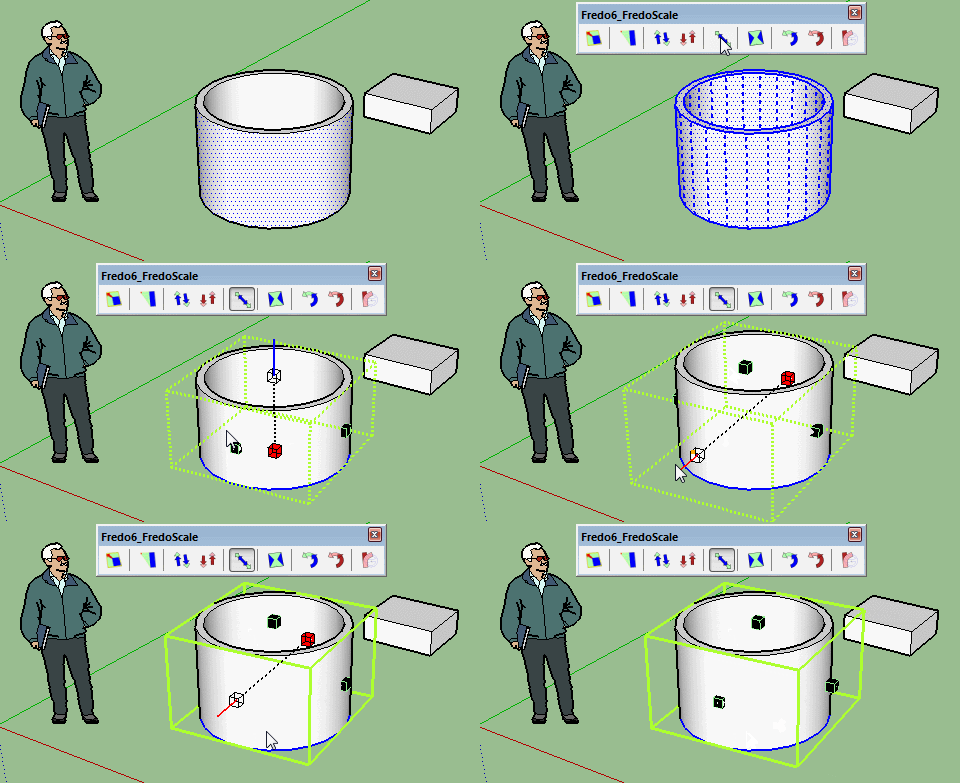
                  It's me or we can only "Stretch" a Pipe in "vertical" Z ?
                  bugy.gif

                  Frenchy Pilou
                  Is beautiful that please without concept!
                  My Little site :)

                  1 Respuesta Última respuesta Responder Citar 0
                  • fredo6F Desconectado
                    fredo6
                    Última edición por

                    Pilou,

                    You have to explode the curves of the cylinder

                    Fredo

                    1 Respuesta Última respuesta Responder Citar 0
                    • pbacotP Desconectado
                      pbacot
                      Última edición por

                      I use Fredoscale Stretch A LOT to make different versions of the same window type. I wonder if these modifications would be difficult or impossible--and if they might happen someday:

                      1. If nested components are unchanged in the operation have them stay the same definition.
                      2. If nested components are changed in the operation, make them "unique" with new name (how it works now).
                      3. Do this for all nested components. (At present I am not sure what rules apply. If I have components, say a muntins in a sash, and I stretch the window: The sash which is used in other windows might not change in those non-operation components (it becomes unigue), but the muntins might be affected in those other windows--which isn't desirable.)
                      4. If multiple instances of the same component are changed in the operation AND they remain identical to one another--make them unique from the old version but the share the same definition (e.g. two identical window components in the same assembly).

                      oh, and an aside: Is there a way to have the divider always on by default? It never is and the hot key doesn't work for me (on a Mac).

                      Thank you for the wonderful plugins. I use them A LOT. šŸ˜„

                      MacOSX MojaveSketchUp Pro v19 Twilight v2 Thea v3 PowerCADD

                      1 Respuesta Última respuesta Responder Citar 0
                      • fredo6F Desconectado
                        fredo6
                        Última edición por

                        These suggested enhancements can be done and make a lot of sense actually.
                        I think that the current behavior if that all components and nested components are made unique.

                        Indeed I have to dive again into the code which is now old for me.

                        For the divider, you have an option in the Default Parameters dialog box to enable or disable the Divider (and also the slicer for Bend) by default.

                        Fredo

                        1 Respuesta Última respuesta Responder Citar 0
                        • D Desconectado
                          Dcch
                          Última edición por

                          ayuda no puedo instalar el plugin me da error indandome que no tengo la actualizacion, gracias de antemano

                          1 Respuesta Última respuesta Responder Citar 0
                          • fredo6F Desconectado
                            fredo6
                            Última edición por

                            NEW RELEASE: FredoScale v2.8a - 13 Nov 15

                            FredoScale 2.8a is a maintenance release for bug fixing

                            See main post of this thread for Download.

                            Fredo

                            1 Respuesta Última respuesta Responder Citar 0
                            • dereiD Desconectado
                              derei
                              Última edición por

                              FredoScale doesn't allow absolute input? I must admit, I never tried before, but as the native SketchUp Scale tool accepts absolute input (scale to 100mm -> will scale to match size, not the scaling ratio), I just needed to scale very precisely with FredoScale and it seems to not work like that.

                              Please confirm. Thanks

                              DESIGNER AND ARTIST DEREI.UK

                              1 Respuesta Última respuesta Responder Citar 0
                              • pbacotP Desconectado
                                pbacot
                                Última edición por

                                Yeah it does. (not the same method as SU tool though)

                                MacOSX MojaveSketchUp Pro v19 Twilight v2 Thea v3 PowerCADD

                                1 Respuesta Última respuesta Responder Citar 0
                                • dereiD Desconectado
                                  derei
                                  Última edición por

                                  @pbacot said:

                                  Yeah it does. (not the same method as SU tool though)

                                  Would you please tell me how, then? šŸ’š
                                  Much appreciated.

                                  DESIGNER AND ARTIST DEREI.UK

                                  1 Respuesta Última respuesta Responder Citar 0
                                  • massimoM Desconectado
                                    massimo Moderator
                                    Última edición por

                                    @derei said:

                                    @pbacot said:

                                    Yeah it does. (not the same method as SU tool though)

                                    Would you please tell me how, then? šŸ’š
                                    Much appreciated.

                                    -Pick a tool;
                                    -click on a handle. You can press CTRL if you want to scale symmetrically from the centre;
                                    -press TAB key;
                                    -input a measure;
                                    -click OK or press ENTER.

                                    1 Respuesta Última respuesta Responder Citar 0
                                    • E Desconectado
                                      etzaelpinon
                                      Última edición por

                                      -it Dies pretty easily when organic components selected and or when a small group of drawings selected.

                                      1 Respuesta Última respuesta Responder Citar 0
                                      • TIGT Desconectado
                                        TIG Moderator
                                        Última edición por

                                        @etzaelpinon said:

                                        -it Dies pretty easily when organic components selected and or when a small group of drawings selected.
                                        An example or two would help...
                                        Otherwise Fredo would need to rely entirely on his ESP...

                                        TIG

                                        1 Respuesta Última respuesta Responder Citar 0
                                        • S Desconectado
                                          sasasaps
                                          Última edición por

                                          Hello everyone,

                                          Amazing plugin! But, the more I use it I go finding some problems, I don“t know if they are common bugs or just limitations of the plugin.

                                          I usually have problems at exploding, grouping or regrouping geometry that has been sheared preaviously (I have just noticed it when using "shear").

                                          The reshaped elements or components return to their original shape, (previous to FredoScale), after doing any of the operations listed:

                                          • after exploding a reshaped group. (sometimes)
                                          • after "copying-pasting out" a plane from a reshaped group.
                                          • after grouping a set of reshaped groups.
                                          1 Respuesta Última respuesta Responder Citar 0
                                          • D Desconectado
                                            dozer157
                                            Última edición por

                                            Download LINK? -_-

                                            1 Respuesta Última respuesta Responder Citar 0
                                            • 1
                                            • 2
                                            • 42
                                            • 43
                                            • 44
                                            • 45
                                            • 46
                                            • 56
                                            • 57
                                            • 44 / 57
                                            • First post
                                              Last post
                                            Buy SketchPlus
                                            Buy SUbD
                                            Buy WrapR
                                            Buy eBook
                                            Buy Modelur
                                            Buy Vertex Tools
                                            Buy SketchCuisine
                                            Buy FormFonts

                                            Advertisement





