sketchucation logo sketchucation
    • Conectarse
    Oops, your profile's looking a bit empty! To help us tailor your experience, please fill in key details like your SketchUp version, skill level, operating system, and more. Update and save your info on your profile page today!
    🔌 Smart Spline | Fluid way to handle splines for furniture design and complex structures. Download

    [Plugin][$] FredoScale - v3.6a - 01 Apr 24


    Programado Fijo Cerrado Movido Plugins
    1.1k Mensajes 345 Posters 2.4m Visitas 342 Watching
    Cargando más mensajes
    • Más antiguo a más nuevo
    • Más nuevo a más antiguo
    • Mayor número de Votos
    Responder
    • Responder como tema
    Accede para responder
    Este tema ha sido borrado. Solo los usuarios que tengan privilegios de administración de temas pueden verlo.
    • fredo6F Desconectado
      fredo6
      Última edición por

      @ar-51 said:

      Hi, I install Libfredo6,RoundCorner and Fredoscal, but I'm unable to use them in SketchUp.
      When I click on Tools>FredoScale noting happens. I also get no response when I click on Window>Libfredo6>Default Parameter.

      Do you have the icons in the Toolbar?

      Otherwise, can you turn the Ruby console on, and then select the menu LibFredo6 Default Parameters.

      Finally, can you check the content of the folders FREDOSCALE_Dir_20, etc... to verify they correspond to the footprint of the doc.

      Fredo

      1 Respuesta Última respuesta Responder Citar 0
      • D Desconectado
        d12dozr
        Última edición por

        Fredo,

        Thank you for one of the most brilliant tools in Sketchup, I use FredoScale regularly.

        I am wondering if you could add the option to Box Stretching of multiple stretch dividers spaced equally by default, but also with the ability to manually adjust their position as well? Each portion would be stretched equally. This would be especially useful on say a window with multiple panes where now I stretch in two or more steps. Maybe the user could add dividers with F5 or subtract dividers with F6.

        Just an idea, and thanks again for all of your tools 😄

        3D Printing with SketchUp Book
        http://goo.gl/f7ooYh

        1 Respuesta Última respuesta Responder Citar 0
        • J Desconectado
          Jim
          Última edición por

          Hi Niels,

          A common problem happens when extracting the .zip files. Be sure to keep the folder hierarchy when extracting them.

          Can you post a screen-shot of your Plugins folder?

          Also, please post the error message.

          Hi

          1 Respuesta Última respuesta Responder Citar 0
          • GaieusG Desconectado
            Gaieus
            Última edición por

            Windows tends to want to create a whole subfolder for the extracted files. I guess what Jim says is NOT to extract them into this additional subfolder but straight under the Plugins folder (keeping any folder hierarchy insidethe zip intact).

            Now the question arises - if this is the problem, SU should not recognise the plugin at all so there should not be any error messages. Did you also install the LibFredo library?

            Gai...

            1 Respuesta Última respuesta Responder Citar 0
            • bmikeB Desconectado
              bmike
              Última edición por

              Been playing with the 'bend' portion of this plugin.
              Took the straight version and made it into the bent version.
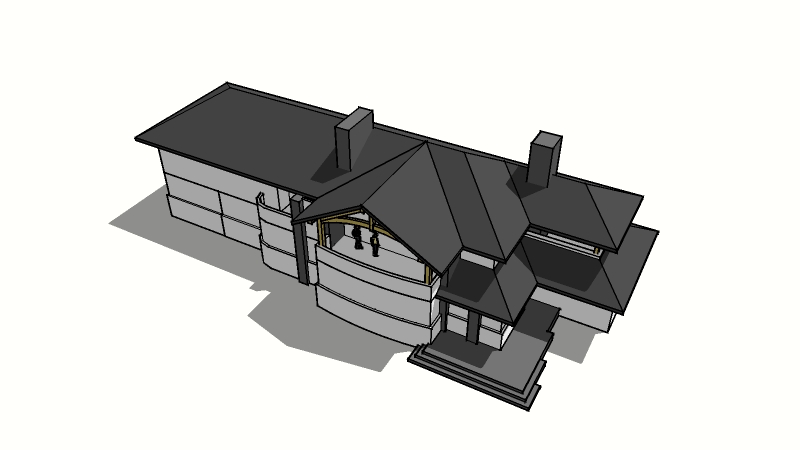
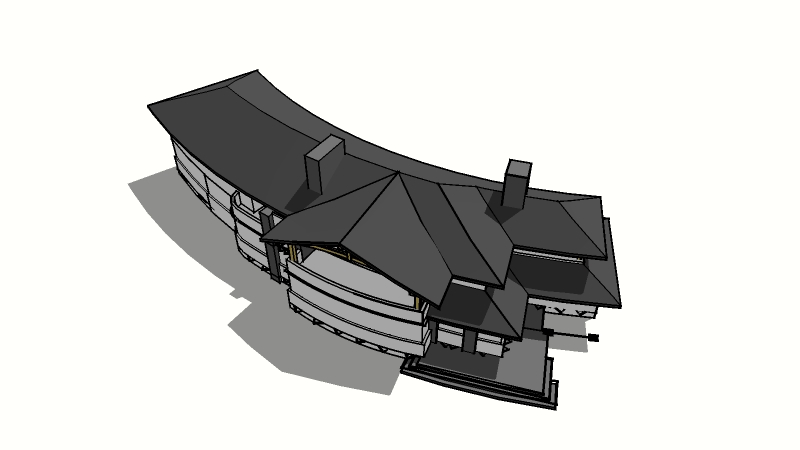
              http://lh5.ggpht.com/_0jkA5M3PGcY/S6fQwKc17WI/AAAAAAAAO5I/6GU41QET1Uk/s800/lakehouse-3-14-10.jpg

              http://lh5.ggpht.com/_0jkA5M3PGcY/S6fQqVX4bPI/AAAAAAAAO5E/5_bPdJRwL34/s800/lakehouse-3-14-10-bend.jpg

              I included the original 2d floorplans embedded in the model.
              Crashed the machine a few times - but I cleaned it up, simplified the original a bit... and it worked.

              I'd love to understand the math on getting the bend to meet a particular arc or radius. I drew a circle of the correct diameter and then eyeballed the model to get it close... which is good enough to see if clients are interested in the massing / concept - and I was even able re-link to LayOut so my views were pretty close and required minimal tweaking...

              mike beganyi design + consulting llc

              1 Respuesta Última respuesta Responder Citar 0
              • pilouP Desconectado
                pilou
                Última edición por

                and you have 6 curvatures possible from a straight volume 😉

                Frenchy Pilou
                Is beautiful that please without concept!
                My Little site :)

                1 Respuesta Última respuesta Responder Citar 0
                • A Desconectado
                  AR-51
                  Última edición por

                  @unknownuser said:

                  @ar-51 said:

                  Hi, I install Libfredo6,RoundCorner and Fredoscal, but I'm unable to use them in SketchUp.
                  When I click on Tools>FredoScale noting happens. I also get no response when I click on Window>Libfredo6>Default Parameter.

                  Do you have the icons in the Toolbar?

                  Otherwise, can you turn the Ruby console on, and then select the menu LibFredo6 Default Parameters.

                  Finally, can you check the content of the folders FREDOSCALE_Dir_20, etc... to verify they correspond to the footprint of the doc.

                  Fredo

                  Thanks Fredo for the response. I don't have the icons in the Toolbar and when I run LibFredo6 Default Parameters, I get this error message:

                  LibFredo6 Default Parameters.
                  Error: #<SyntaxError: (eval):1116: compile error
                  (eval):1116: syntax error
                  LibFredo6 Default Parameters.
                  ^>
                  (eval):1116

                  I'm going to check the folder again to make sure the files are in other.

                  Thanks

                  Edit:
                  It seems like LibFredo6 is installed, it just wont respond to some commands. I'm able to access (about,documentation and check for update)from window/Fredo6-setting, but I get no response if I click on the other options.

                  Thanks

                  1 Respuesta Última respuesta Responder Citar 0
                  • D Desconectado
                    Daniel S
                    Última edición por

                    At the Official SketchUp Blog they post about this great plugin:

                    http://sketchupdate.blogspot.com/2010/04/discovering-magic-and-wonder-of.html
                    👍 👍 👍

                    Daniel S

                    1 Respuesta Última respuesta Responder Citar 0
                    • C Desconectado
                      chucky99
                      Última edición por

                      Hi
                      can someone tell me where to find plugins in sk 7.1
                      I installed freescale in the plugins in google/sk7/plugins,they are there and unzipped
                      but to plugins in sk7.1 in window dropdown or tools
                      dropdown. must be doing sometinnn wrong
                      thanks
                      chuck

                      1 Respuesta Última respuesta Responder Citar 0
                      • P Desconectado
                        palphd
                        Última edición por

                        for some reason, i keep getting a bug splat when i try to use radial bending and change the number of slices... everything else seems to work fine though. any ideas? it used to work fine 😞

                        1 Respuesta Última respuesta Responder Citar 0
                        • fredo6F Desconectado
                          fredo6
                          Última edición por

                          @palphd said:

                          for some reason, i keep getting a bug splat when i try to use radial bending and change the number of slices... everything else seems to work fine though. any ideas? it used to work fine 😞

                          Could you post the model or send it to me via PM so that I have a look

                          Thanks

                          Fredo

                          1 Respuesta Última respuesta Responder Citar 0
                          • S Desconectado
                            SnowTiger
                            Última edición por

                            I can't wait to try this plugin. I could have used this countless times in the past.
                            Before I go screwing things up though, I have a question.

                            When Extracting the files into the Plugins Folder, should the zip file create a Plugin Specific Folder ? OR Do we have to create a folder into which these files get extracted ? OR Do we simply drag all the files into the default plugins folder amongst all other plugin files ?

                            I ask because I did the latter or ended up with the latter but I see a Plugin Specific Folder called "LibFredo6 Dir 34" indicated in the following post :
                            http://forums.sketchucation.com/viewtopic.php?f=180&t=17947#p144178

                            Thanks in Advance

                            1 Respuesta Última respuesta Responder Citar 0
                            • P Desconectado
                              palphd
                              Última edición por

                              @unknownuser said:

                              @palphd said:

                              for some reason, i keep getting a bug splat when i try to use radial bending and change the number of slices... everything else seems to work fine though. any ideas? it used to work fine 😞

                              Could you post the model or send it to me via PM so that I have a look

                              Thanks

                              Fredo

                              thanks for the response, freedo! sure thing... it's actually not any particular model. i attached a tall box form that i just tried to no avail (changed the slice setting to 6). the pic show as far as i can get with the process, but once i designate a rotation angle, it shuts down every time, no matter what shape, model, etc.

                              by the way, i just installed updated sketchup 6 pro to version 6.4.265 recently if that makes a difference.
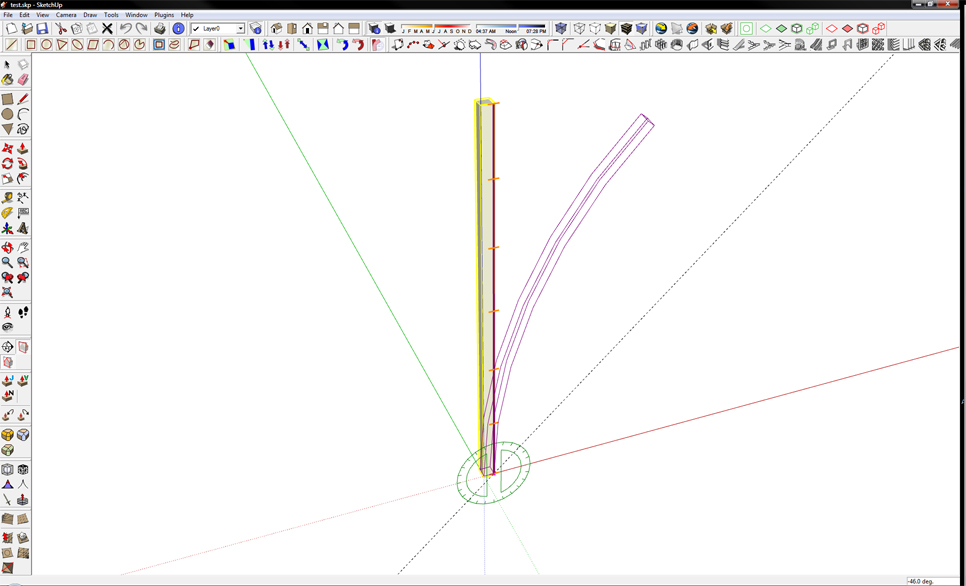

                              test01.jpg


                              model

                              1 Respuesta Última respuesta Responder Citar 0
                              • GaieusG Desconectado
                                Gaieus
                                Última edición por

                                Hi Chris,

                                Just drag and drop. There will be "bare" rb files directly under the main plugins folder and there will be some subfolders, too. Just do NOT let Windows create a main, containing subfolder under plugins (as it generally tends to do from the archive name).

                                Gai...

                                1 Respuesta Última respuesta Responder Citar 0
                                • S Desconectado
                                  SnowTiger
                                  Última edición por

                                  Thanks kindly Gaieus ... again.
                                  You are truly one handy fellow. I have learned much from you, both directly and indirectly.
                                  Keep up the great work .. both helping others and with your future modeling endeavors.
                                  Keep on keeping on.

                                  1 Respuesta Última respuesta Responder Citar 0
                                  • P Desconectado
                                    palphd
                                    Última edición por

                                    i think i figured out my problem. i noticed that every time the curves were being computed in radially bending, the outliner box would tweak out just before su crashed... the next time, i closed the outliner box, tried it again and voila - everything worked fine. must not be able to handle the rapid, real time changing of groups, etc.

                                    1 Respuesta Última respuesta Responder Citar 0
                                    • GaieusG Desconectado
                                      Gaieus
                                      Última edición por

                                      @palphd said:

                                      ...must not be able to handle the rapid, real time changing of groups, etc.

                                      That may wellhave been the case - as many plugins that create a great deal of geometry in a short time tend to crash or at least hang SU when the Outliner is active.

                                      Gai...

                                      1 Respuesta Última respuesta Responder Citar 0
                                      • P Desconectado
                                        palphd
                                        Última edición por

                                        @gaieus said:

                                        @palphd said:

                                        ...must not be able to handle the rapid, real time changing of groups, etc.

                                        That may wellhave been the case - as many plugins that create a great deal of geometry in a short time tend to crash or at least hang SU when the Outliner is active.

                                        thanks gaieus... it's probably a topic that's been discussed at length in various threads, but i had been previously unaware. good to know. shut that outliner down and all is well!

                                        1 Respuesta Última respuesta Responder Citar 0
                                        • fredo6F Desconectado
                                          fredo6
                                          Última edición por

                                          In SU6, there are reported crash with the outliner box.
                                          This has been fixed in SU7, where the outliner box refresh is suspended.
                                          I think I indicated this somewhere in the documentation, but it's good to refresh all minds.

                                          Thanks

                                          Fredo

                                          1 Respuesta Última respuesta Responder Citar 0
                                          • S Desconectado
                                            SnowTiger
                                            Última edición por

                                            I keep getting a loading error when I open SU.
                                            Can someone please tell me how to attach an image (screen shot of error) that is presently on my desktop ?

                                            1 Respuesta Última respuesta Responder Citar 0
                                            • 1
                                            • 2
                                            • 19
                                            • 20
                                            • 21
                                            • 22
                                            • 23
                                            • 56
                                            • 57
                                            • 21 / 57
                                            • First post
                                              Last post
                                            Buy SketchPlus
                                            Buy SUbD
                                            Buy WrapR
                                            Buy eBook
                                            Buy Modelur
                                            Buy Vertex Tools
                                            Buy SketchCuisine
                                            Buy FormFonts

                                            Advertisement


