sketchucation logo sketchucation
    • 登入
    Oops, your profile's looking a bit empty! To help us tailor your experience, please fill in key details like your SketchUp version, skill level, operating system, and more. Update and save your info on your profile page today!
    🔌 Smart Spline | Fluid way to handle splines for furniture design and complex structures. Download

    [Plugin][$] FredoScale - v3.6a - 01 Apr 24


    已排程 已置頂 已鎖定 已移動 Plugins
    1.1k 貼文 345 Posters 2.4m 瀏覽 342 Watching
    正在載入更多貼文
    • 從舊到新
    • 從新到舊
    • 最多點贊
    回覆
    • 在新貼文中回覆
    登入後回覆
    此主題已被刪除。只有擁有主題管理權限的使用者可以查看。
    • M 離線
      mike_in_ky
      最後由 編輯

      Chris...

      I was successful in installing Fredoscale 2.0 and worked with it a little. It's just what I wanted. Thanks for your help.

      Mike

      1 條回覆 最後回覆 回覆 引用 0
      • S 離線
        swzaw
        最後由 編輯

        Thanks...It's wonderful Tool.

        1 條回覆 最後回覆 回覆 引用 0
        • bagateloB 離線
          bagatelo
          最後由 編輯

          Is it possible to access and to use the tools of great FREEDO for other scripts, enlarging Google Sketchup's API or something like this?

          While the cat's away, the mice will play

          1 條回覆 最後回覆 回覆 引用 0
          • fredo6F 離線
            fredo6
            最後由 編輯

            @bagatelo said:

            Is it possible to access and to use the tools of great FREEDO for other scripts, enlarging Google Sketchup's API or something like this?

            Do you have anything specific in mind?

            Fredo

            1 條回覆 最後回覆 回覆 引用 0
            • A 離線
              alz
              最後由 編輯

              Hi Fredo6 --

              Fantastic script, love being able to scale non-axis aligned!

              When scaling, I saw the global unit position is displayed in the status bar as it scales. For example, taking a big box and scaling it down displays [~500] when it passes 500 in the Z-axis.

              Is it possible to have the distance moved display as well? So, if the box's top face was at 700z and was scaled down to 500z, the status bar would also display [-200].

              Or, better yet -- Have an option to swap the scale percentage in the VCB for unit distance. So, instead of the VCB saying 0.71, it would say -200. Having this option lets objects be scaled by the model unit for exact face location (rather than eyeballing a percentage).

              😄

              1 條回覆 最後回覆 回覆 引用 0
              • A 離線
                arjunmax09
                最後由 編輯

                i'm having a problem using the bender tool in freedo scale... for instance.. in case of bending a cuboid...when the protractor comes.... instead of bending my cuboid .... it changes into a wedge....like a ramp...what shd. i do??

                when you fail at something....you haven't really failed...you've found one way the thing will not work out

                1 條回覆 最後回覆 回覆 引用 0
                • J 離線
                  Jim
                  最後由 編輯

                  Tap the F4 key - that will turn on segments.

                  Hi

                  1 條回覆 最後回覆 回覆 引用 0
                  • H 離線
                    harshal kshatriya
                    最後由 編輯

                    thanks man.......
                    i love it.........
                    it working. 👍 👍 👍

                    1 條回覆 最後回覆 回覆 引用 0
                    • A 離線
                      arjunmax09
                      最後由 編輯

                      @jim said:

                      Tap the F4 key - that will turn on segments.

                      nothing happens, it opens the layer palette... I've attached a video of what happens when i try to bend an object..it will show what exactly goes wrong.....


                      Problems using fredoscale bender.zip

                      when you fail at something....you haven't really failed...you've found one way the thing will not work out

                      1 條回覆 最後回覆 回覆 引用 0
                      • C 離線
                        chrisjk
                        最後由 編輯

                        Another way to turn slicing on is to use the right click context menu once the shape is selected with the bender tool.

                        Chris

                        1 條回覆 最後回覆 回覆 引用 0
                        • A 離線
                          AR-51
                          最後由 編輯

                          Hi, I install Libfredo6,RoundCorner and Fredoscal, but I'm unable to use them in SketchUp.
                          When I click on Tools>FredoScale noting happens. I also get no response when I click on Window>Libfredo6>Default Parameter.

                          Can anyone with Window Vista help me? I don't get the option to unzip when I download the folders.

                          Thanks for the help.

                          Cannot access Fredoscal or RoundCorner from Tools>Fredo6 Collections.
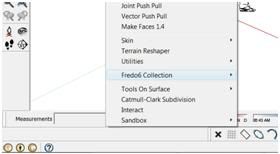
                          http://i601.photobucket.com/albums/tt93/Bestworldphoto/Sketch.jpg

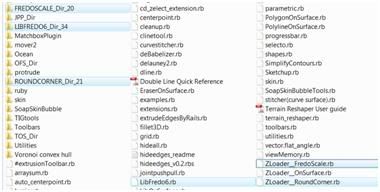
                          Plug in foulder

                          http://i601.photobucket.com/albums/tt93/Bestworldphoto/Plugin.jpg

                          1 條回覆 最後回覆 回覆 引用 0
                          • fredo6F 離線
                            fredo6
                            最後由 編輯

                            @ar-51 said:

                            Hi, I install Libfredo6,RoundCorner and Fredoscal, but I'm unable to use them in SketchUp.
                            When I click on Tools>FredoScale noting happens. I also get no response when I click on Window>Libfredo6>Default Parameter.

                            Do you have the icons in the Toolbar?

                            Otherwise, can you turn the Ruby console on, and then select the menu LibFredo6 Default Parameters.

                            Finally, can you check the content of the folders FREDOSCALE_Dir_20, etc... to verify they correspond to the footprint of the doc.

                            Fredo

                            1 條回覆 最後回覆 回覆 引用 0
                            • D 離線
                              d12dozr
                              最後由 編輯

                              Fredo,

                              Thank you for one of the most brilliant tools in Sketchup, I use FredoScale regularly.

                              I am wondering if you could add the option to Box Stretching of multiple stretch dividers spaced equally by default, but also with the ability to manually adjust their position as well? Each portion would be stretched equally. This would be especially useful on say a window with multiple panes where now I stretch in two or more steps. Maybe the user could add dividers with F5 or subtract dividers with F6.

                              Just an idea, and thanks again for all of your tools 😄

                              3D Printing with SketchUp Book
                              http://goo.gl/f7ooYh

                              1 條回覆 最後回覆 回覆 引用 0
                              • J 離線
                                Jim
                                最後由 編輯

                                Hi Niels,

                                A common problem happens when extracting the .zip files. Be sure to keep the folder hierarchy when extracting them.

                                Can you post a screen-shot of your Plugins folder?

                                Also, please post the error message.

                                Hi

                                1 條回覆 最後回覆 回覆 引用 0
                                • GaieusG 離線
                                  Gaieus
                                  最後由 編輯

                                  Windows tends to want to create a whole subfolder for the extracted files. I guess what Jim says is NOT to extract them into this additional subfolder but straight under the Plugins folder (keeping any folder hierarchy insidethe zip intact).

                                  Now the question arises - if this is the problem, SU should not recognise the plugin at all so there should not be any error messages. Did you also install the LibFredo library?

                                  Gai...

                                  1 條回覆 最後回覆 回覆 引用 0
                                  • bmikeB 離線
                                    bmike
                                    最後由 編輯

                                    Been playing with the 'bend' portion of this plugin.
                                    Took the straight version and made it into the bent version.
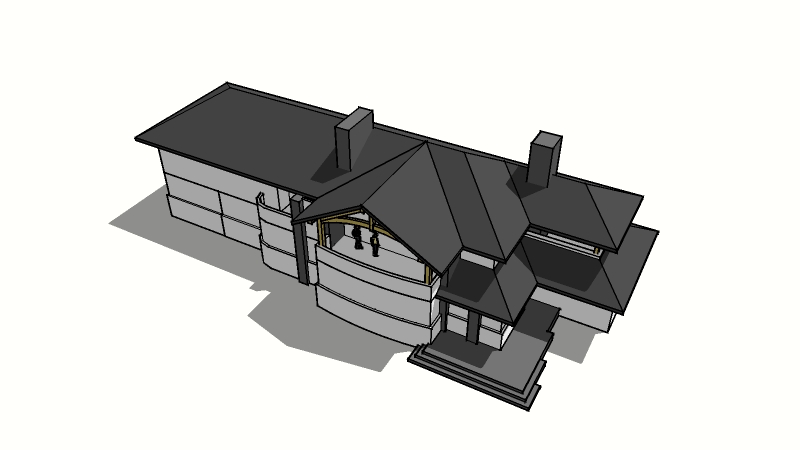
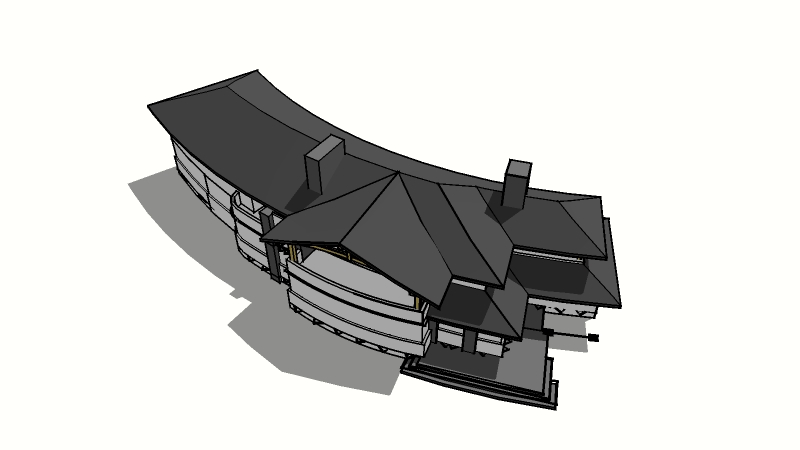
                                    http://lh5.ggpht.com/_0jkA5M3PGcY/S6fQwKc17WI/AAAAAAAAO5I/6GU41QET1Uk/s800/lakehouse-3-14-10.jpg

                                    http://lh5.ggpht.com/_0jkA5M3PGcY/S6fQqVX4bPI/AAAAAAAAO5E/5_bPdJRwL34/s800/lakehouse-3-14-10-bend.jpg

                                    I included the original 2d floorplans embedded in the model.
                                    Crashed the machine a few times - but I cleaned it up, simplified the original a bit... and it worked.

                                    I'd love to understand the math on getting the bend to meet a particular arc or radius. I drew a circle of the correct diameter and then eyeballed the model to get it close... which is good enough to see if clients are interested in the massing / concept - and I was even able re-link to LayOut so my views were pretty close and required minimal tweaking...

                                    mike beganyi design + consulting llc

                                    1 條回覆 最後回覆 回覆 引用 0
                                    • pilouP 離線
                                      pilou
                                      最後由 編輯

                                      and you have 6 curvatures possible from a straight volume 😉

                                      Frenchy Pilou
                                      Is beautiful that please without concept!
                                      My Little site :)

                                      1 條回覆 最後回覆 回覆 引用 0
                                      • A 離線
                                        AR-51
                                        最後由 編輯

                                        @unknownuser said:

                                        @ar-51 said:

                                        Hi, I install Libfredo6,RoundCorner and Fredoscal, but I'm unable to use them in SketchUp.
                                        When I click on Tools>FredoScale noting happens. I also get no response when I click on Window>Libfredo6>Default Parameter.

                                        Do you have the icons in the Toolbar?

                                        Otherwise, can you turn the Ruby console on, and then select the menu LibFredo6 Default Parameters.

                                        Finally, can you check the content of the folders FREDOSCALE_Dir_20, etc... to verify they correspond to the footprint of the doc.

                                        Fredo

                                        Thanks Fredo for the response. I don't have the icons in the Toolbar and when I run LibFredo6 Default Parameters, I get this error message:

                                        LibFredo6 Default Parameters.
                                        Error: #<SyntaxError: (eval):1116: compile error
                                        (eval):1116: syntax error
                                        LibFredo6 Default Parameters.
                                        ^>
                                        (eval):1116

                                        I'm going to check the folder again to make sure the files are in other.

                                        Thanks

                                        Edit:
                                        It seems like LibFredo6 is installed, it just wont respond to some commands. I'm able to access (about,documentation and check for update)from window/Fredo6-setting, but I get no response if I click on the other options.

                                        Thanks

                                        1 條回覆 最後回覆 回覆 引用 0
                                        • D 離線
                                          Daniel S
                                          最後由 編輯

                                          At the Official SketchUp Blog they post about this great plugin:

                                          http://sketchupdate.blogspot.com/2010/04/discovering-magic-and-wonder-of.html
                                          👍 👍 👍

                                          Daniel S

                                          1 條回覆 最後回覆 回覆 引用 0
                                          • C 離線
                                            chucky99
                                            最後由 編輯

                                            Hi
                                            can someone tell me where to find plugins in sk 7.1
                                            I installed freescale in the plugins in google/sk7/plugins,they are there and unzipped
                                            but to plugins in sk7.1 in window dropdown or tools
                                            dropdown. must be doing sometinnn wrong
                                            thanks
                                            chuck

                                            1 條回覆 最後回覆 回覆 引用 0
                                            • 1
                                            • 2
                                            • 3
                                            • 4
                                            • 5
                                            • 56
                                            • 57
                                            • 1 / 57
                                            • 第一個貼文
                                              最後的貼文
                                            Buy SketchPlus
                                            Buy SUbD
                                            Buy WrapR
                                            Buy eBook
                                            Buy Modelur
                                            Buy Vertex Tools
                                            Buy SketchCuisine
                                            Buy FormFonts

                                            Advertisement