sketchucation logo sketchucation
    • 登入
    Oops, your profile's looking a bit empty! To help us tailor your experience, please fill in key details like your SketchUp version, skill level, operating system, and more. Update and save your info on your profile page today!
    🔌 Smart Spline | Fluid way to handle splines for furniture design and complex structures. Download

    [Plugin][$] FredoScale - v3.6a - 01 Apr 24


    已排程 已置頂 已鎖定 已移動 Plugins
    1.1k 貼文 345 Posters 2.4m 瀏覽 342 Watching
    正在載入更多貼文
    • 從舊到新
    • 從新到舊
    • 最多點贊
    回覆
    • 在新貼文中回覆
    登入後回覆
    此主題已被刪除。只有擁有主題管理權限的使用者可以查看。
    • J 離線
      jpurdy77
      最後由 編輯

      unable to use plugin fredoscale on a mac, is there a help/ instructions on what to do.

      thanks

      1 條回覆 最後回覆 回覆 引用 0
      • Chris FullmerC 離線
        Chris Fullmer
        最後由 編輯

        Hi James, re-read the first post of this thread. It describes a lot. And it has a .pdf file that includes installation help.

        Or if you were a bit more specific, more specific help might returned too. Its unclear if you just can't find the downlaod file, can't figure out how to install it, or can't use the tools once its installed. Plenty of places people tend to get lost in the process.

        Chris

        Lately you've been tan, suspicious for the winter.
        All my Plugins I've written

        1 條回覆 最後回覆 回覆 引用 0
        • J 離線
          jpurdy77
          最後由 編輯

          ok, well i tried for a hour or so and im running a mac, the help is for windows or so it seems. downloaded it but cant seem to get it running in sketch up. must be something wrong, thus a mac step y step guid would help.

          James

          1 條回覆 最後回覆 回覆 引用 0
          • Chris FullmerC 離線
            Chris Fullmer
            最後由 編輯

            ok, so you're looking for installation help then, right? Where did you place the files? Perhaps you could take screenshot of the plugins folder if that is where youn put them?

            Chris

            Lately you've been tan, suspicious for the winter.
            All my Plugins I've written

            1 條回覆 最後回覆 回覆 引用 0
            • M 離線
              mics_54
              最後由 編輯

              Edit postDelete postReport this postReply with quoteRe: [Plugin Library] LibFredo6 - v3.4b - 11 Nov 09
              by mics_54 on Sun Dec 13, 2009 6:54 pm

              I hope this is the right place to post a question about fredo scale.

              I find the tool very useful and will start by thanking you for making it. I would like to thank you with a donation when things are more fiscally condusive.

              Now, I build cabinetry etc and often a face frame on a cabinet will have multiple drawers. I have used fredoscale to stretch the cabinets to a taller dimension (or shorter as the case may be) with complete success with all members maintaining their original dimensions except the height or width. However on face fronts with multiple openings I can not find a way to stretch the front taller and have the openings for multiple drawers increase uniformly.

              Can FS do this or am I asking too much at this time? I just wondered if I wasn't using the tool to it's capabilities.
              tia!

              1 條回覆 最後回覆 回覆 引用 0
              • fredo6F 離線
                fredo6
                最後由 編輯

                @mics_54 said:

                However on face fronts with multiple openings I can not find a way to stretch the front taller and have the openings for multiple drawers increase uniformly.

                Maybe a picture would help to understand the exact issue you have.

                Just in case, did you try with the Divider (key F4)? This allows positioning the pivot stretch plane where you need.

                Fredo

                1 條回覆 最後回覆 回覆 引用 0
                • M 離線
                  mics_54
                  最後由 編輯

                  @unknownuser said:

                  Just in case, did you try with the Divider (key F4)? This allows positioning the pivot stretch plane where you need.

                  No I didn't and I thought I saw something regarding that but I couldn't find it again. I am assuming there is only one stretch plane so I would need to use it 4 times on a face front with four openings. Here is an image the front and cabinet.
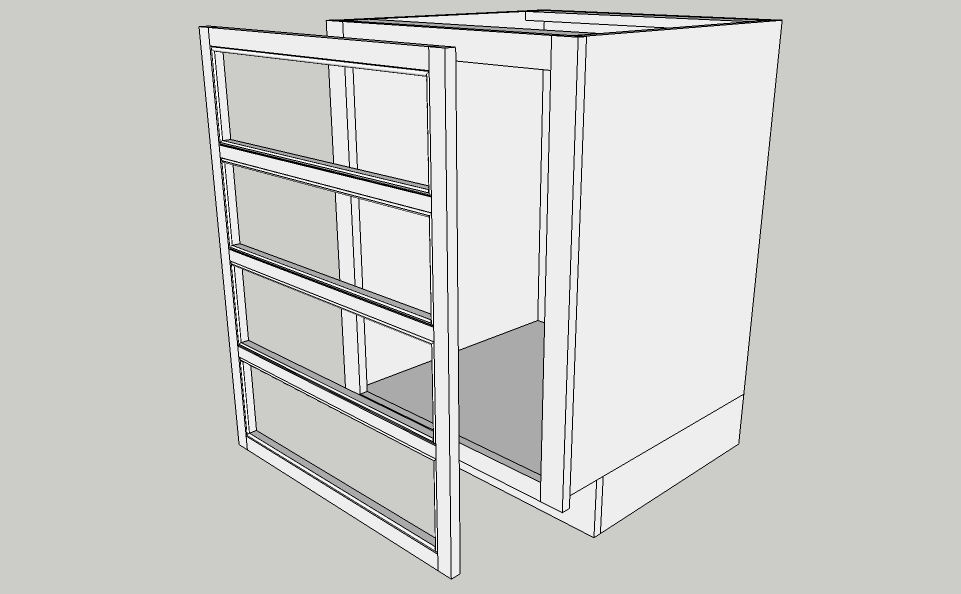

                  Base Cabinet Study.jpg

                  1 條回覆 最後回覆 回覆 引用 0
                  • M 離線
                    mics_54
                    最後由 編輯

                    Fredo, I found the video and it answered my questions thanks. I guess I would have to calculate the adjustmet in the size of each drawer opening and resize the front accordingly x4.
                    Thanks again.

                    1 條回覆 最後回覆 回覆 引用 0
                    • Y 離線
                      ygcl
                      最後由 編輯

                      Well,but don`t download.

                      1 條回覆 最後回覆 回覆 引用 0
                      • zieiosZ 離線
                        zieios
                        最後由 編輯

                        ok
                        koooooooooooooooooooooooooooooooooooooooooooooooooooooool

                        1 條回覆 最後回覆 回覆 引用 0
                        • M 離線
                          mike_in_ky
                          最後由 編輯

                          Hi...

                          I'm a newbie to SketchUp. I was looking at this topic and thought this plugin would benefit me in what I want to do with SU. I can't figure out how to download the plugin (FredoScale 2.0h).

                          Thanks,

                          mike_in_ky

                          1 條回覆 最後回覆 回覆 引用 0
                          • Chris FullmerC 離線
                            Chris Fullmer
                            最後由 編輯

                            Hi Mike, it is in the very first post of this thread. Also read all the instructions. There is another file you will need to download and install along with this one to get it to all work,

                            Chris

                            Lately you've been tan, suspicious for the winter.
                            All my Plugins I've written

                            1 條回覆 最後回覆 回覆 引用 0
                            • M 離線
                              mike_in_ky
                              最後由 編輯

                              Chris...

                              Thanks. I finally found it and downloaded. I'll try installing later today.

                              Mike

                              1 條回覆 最後回覆 回覆 引用 0
                              • M 離線
                                mike_in_ky
                                最後由 編輯

                                Chris...

                                I was successful in installing Fredoscale 2.0 and worked with it a little. It's just what I wanted. Thanks for your help.

                                Mike

                                1 條回覆 最後回覆 回覆 引用 0
                                • S 離線
                                  swzaw
                                  最後由 編輯

                                  Thanks...It's wonderful Tool.

                                  1 條回覆 最後回覆 回覆 引用 0
                                  • bagateloB 離線
                                    bagatelo
                                    最後由 編輯

                                    Is it possible to access and to use the tools of great FREEDO for other scripts, enlarging Google Sketchup's API or something like this?

                                    While the cat's away, the mice will play

                                    1 條回覆 最後回覆 回覆 引用 0
                                    • fredo6F 離線
                                      fredo6
                                      最後由 編輯

                                      @bagatelo said:

                                      Is it possible to access and to use the tools of great FREEDO for other scripts, enlarging Google Sketchup's API or something like this?

                                      Do you have anything specific in mind?

                                      Fredo

                                      1 條回覆 最後回覆 回覆 引用 0
                                      • A 離線
                                        alz
                                        最後由 編輯

                                        Hi Fredo6 --

                                        Fantastic script, love being able to scale non-axis aligned!

                                        When scaling, I saw the global unit position is displayed in the status bar as it scales. For example, taking a big box and scaling it down displays [~500] when it passes 500 in the Z-axis.

                                        Is it possible to have the distance moved display as well? So, if the box's top face was at 700z and was scaled down to 500z, the status bar would also display [-200].

                                        Or, better yet -- Have an option to swap the scale percentage in the VCB for unit distance. So, instead of the VCB saying 0.71, it would say -200. Having this option lets objects be scaled by the model unit for exact face location (rather than eyeballing a percentage).

                                        😄

                                        1 條回覆 最後回覆 回覆 引用 0
                                        • A 離線
                                          arjunmax09
                                          最後由 編輯

                                          i'm having a problem using the bender tool in freedo scale... for instance.. in case of bending a cuboid...when the protractor comes.... instead of bending my cuboid .... it changes into a wedge....like a ramp...what shd. i do??

                                          when you fail at something....you haven't really failed...you've found one way the thing will not work out

                                          1 條回覆 最後回覆 回覆 引用 0
                                          • J 離線
                                            Jim
                                            最後由 編輯

                                            Tap the F4 key - that will turn on segments.

                                            Hi

                                            1 條回覆 最後回覆 回覆 引用 0
                                            • 1
                                            • 2
                                            • 3
                                            • 4
                                            • 5
                                            • 6
                                            • 7
                                            • 56
                                            • 57
                                            • 5 / 57
                                            • 第一個貼文
                                              最後的貼文
                                            Buy SketchPlus
                                            Buy SUbD
                                            Buy WrapR
                                            Buy eBook
                                            Buy Modelur
                                            Buy Vertex Tools
                                            Buy SketchCuisine
                                            Buy FormFonts

                                            Advertisement