sketchucation logo sketchucation
    • 登入
    Oops, your profile's looking a bit empty! To help us tailor your experience, please fill in key details like your SketchUp version, skill level, operating system, and more. Update and save your info on your profile page today!
    🔌 Smart Spline | Fluid way to handle splines for furniture design and complex structures. Download

    [Plugin][$] FredoScale - v3.6a - 01 Apr 24


    已排程 已置頂 已鎖定 已移動 Plugins
    1.1k 貼文 345 Posters 2.4m 瀏覽 342 Watching
    正在載入更多貼文
    • 從舊到新
    • 從新到舊
    • 最多點贊
    回覆
    • 在新貼文中回覆
    登入後回覆
    此主題已被刪除。只有擁有主題管理權限的使用者可以查看。
    • P 離線
      pichuneke
      最後由 編輯

      I have started the translation to spanish. Don't worry Fredo6 😉

      Forgive my spanglish...

      1 條回覆 最後回覆 回覆 引用 0
      • P 離線
        putnik
        最後由 編輯

        Incredible set of tools! Thank you Fredo6! Thank you Daniel S for the alt icons too

        http://keshas.info

        1 條回覆 最後回覆 回覆 引用 0
        • majidM 離線
          majid
          最後由 編輯

          hi all!
          if I was mr. GOOGLE...then i'd ...Fredo6...
          what is best fit in blank area? please say your opinion 😄
          thanx again Fredo6

          My inspiring A, B, Sketches book: https://sketchucation.com/shop/books/intermediate/2612-alphabet-inspired-sketches--inspiring-drills-for-architects--3d-artists-and-designers-

          1 條回覆 最後回覆 回覆 引用 0
          • E 離線
            Ecuadorian
            最後由 編輯

            I'll propose another phrase:
            Fredo should be Google's VP of product development.

            -Miguel Lescano
            Subscribe to my house plans YouTube channel! (30K+ subs)

            1 條回覆 最後回覆 回覆 引用 0
            • Chris FullmerC 離線
              Chris Fullmer
              最後由 編輯

              Oh you guys are funny. Sketchup is great because @Last set out to make a 3d modeler that everyone can use. And they did a smashup job of it. Then they were genius enough to implement an API that outside developers could take advantage of to extend SU cappabilities. That was all @Last's product development and direction, not Google. So if you want a modeler that has all the bells and whistels and tickboxes and options and sliders and confusion and complex instruction books, then those exist. It was @Last's idea to limit the toolset, not Google's. But it does seem like Google has carrying that ideology forward.

              Chris

              And for the record, I love these tools and all the plugins. And I would not be opposed to Google having an advanced toolset that could be enabled with the Pro version. But they would have to figure out how to make it not be overwhelming, and they would have to be implenented with the simplicity of all other SU toools (Which I think Fredo has achieved 100%)

              Lately you've been tan, suspicious for the winter.
              All my Plugins I've written

              1 條回覆 最後回覆 回覆 引用 0
              • L 離線
                linea
                最後由 編輯

                Thanks Fredo!

                1 條回覆 最後回覆 回覆 引用 0
                • fredo6F 離線
                  fredo6
                  最後由 編輯

                  to ALL USERS

                  I just published the first upgrade, 2.0b.
                  The file is attached to the main post of this thread, along with some release notes
                  see http://www.sketchucation.com/forums/scf/viewtopic.php?f=180&t=17948#p144180

                  Note that you also need to upgrade LibFredo6 to version 3.1b

                  Fredo

                  1 條回覆 最後回覆 回覆 引用 0
                  • free agentF 離線
                    free agent
                    最後由 編輯

                    Fredo i see you've made line cleanup automatic, and to keep the lines is something you would turn on and off, could you make it the other way around, as those extra lines are necessary for texturing, also if u make a special bend and realize u didnt want the extra lines u can clean it with a number external rubies already written, but if u make that special bend without lines and realize u did want line there's no way to add those lines by ruby.

                    http:i167.photobucket.comalbumsu143FreeAgent84bug.gif

                    1 條回覆 最後回覆 回覆 引用 0
                    • fredo6F 離線
                      fredo6
                      最後由 編輯

                      You have the option to do or not the clean up by calling the Slicing parameter dialog box (pressing TAB or contextual menu), but the choice must be made before, I am afraid.

                      The only thing I'll do is also to add the slicing parameters in the Default settings, so that your default choice are persistent across sessions.

                      Fredo

                      PS: by the way, your case of texturing is, as I remember, why I did not do it in the first place (and then forgot to offer it as an option).

                      1 條回覆 最後回覆 回覆 引用 0
                      • T 離線
                        tomislavm
                        最後由 編輯

                        THANK YOU Fredo!!!!!!
                        How can You make something that good for free?

                        1 條回覆 最後回覆 回覆 引用 0
                        • pilouP 離線
                          pilou
                          最後由 編輯

                          @unknownuser said:

                          How can You make something that good for free?

                          @Thomislavm: Maybe you don't know the pleasure of coding and after glory has no price 😉

                          Frenchy Pilou
                          Is beautiful that please without concept!
                          My Little site :)

                          1 條回覆 最後回覆 回覆 引用 0
                          • E 離線
                            Ecuadorian
                            最後由 編輯

                            You can also read the interview with Fredo in CatchUp magazine:
                            http://www.sketchucation.com/old/forums/scf/catchup/2008/may/p45-46/index.htm

                            -Miguel Lescano
                            Subscribe to my house plans YouTube channel! (30K+ subs)

                            1 條回覆 最後回覆 回覆 引用 0
                            • FrederikF 離線
                              Frederik
                              最後由 編輯

                              Thank you so much, Frederic...!!
                              http://www.kerkythea.net/users/Frederik/Anim-Icons/praise.gif

                              Cheers
                              Kim Frederik

                              1 條回覆 最後回覆 回覆 引用 0
                              • W 離線
                                watkins
                                最後由 編輯

                                Dear Fredo,

                                You are one generous and talented man. Thank you!

                                Regards,
                                Bob

                                1 條回覆 最後回覆 回覆 引用 0
                                • D 離線
                                  davidheim1
                                  最後由 編輯

                                  I have a Mac running OS X 10.4. I can download FreeScale but can't install it. I seem to be missing a plug in folder. What am I doing wrong? What do I need to do to get FreeScale to run on a Mac?
                                  Thanks.
                                  David Heim

                                  1 條回覆 最後回覆 回覆 引用 0
                                  • Dave RD 離線
                                    Dave R
                                    最後由 編輯

                                    David, have you installed other plugins?

                                    If you want, call me. I'll walk you through it.

                                    Dave

                                    Etaoin Shrdlu

                                    %

                                    (THERE'S NO PLACE LIKE)

                                    G28 X0.0 Y0.0 Z0.0

                                    M30

                                    %

                                    1 條回覆 最後回覆 回覆 引用 0
                                    • Dave RD 離線
                                      Dave R
                                      最後由 編輯

                                      I thought I was so smart I just installed Freescale and LibFredo on my Mac. I got the following message on starting up SketchUp.

                                      /Library/Application Support/Google SketchUp 7/SketchUp/Plugins/LIBFREDO6_Dir_31/Lib6Core_31.rb:298:in mkdir': Permission denied - /Library/Application Support/Google SketchUp 7/SketchUp/Plugins/DEFPARAM_DirError Loading File ZLoader__FreeScale.rb /Library/Application Support/Google SketchUp 7/SketchUp/Plugins/LIBFREDO6_Dir_31/Lib6Core_31.rb:298:in mkdir': Permission denied - /Library/Application Support/Google SketchUp 7/SketchUp/Plugins/DEFPARAM_Dir

                                      I assume this is a problem related to permissions on my Mac but I don't see where to change that. Any help would be appreciated. Thank you.

                                      Edit: Problem solved. I had to give myself administrator privileges.

                                      Etaoin Shrdlu

                                      %

                                      (THERE'S NO PLACE LIKE)

                                      G28 X0.0 Y0.0 Z0.0

                                      M30

                                      %

                                      1 條回覆 最後回覆 回覆 引用 0
                                      • EarthMoverE 離線
                                        EarthMover
                                        最後由 編輯

                                        Finally had a second from the chaos of spring in the landscape world to pop on here and imagine my surprise to find this precious jewel, hatched by the amazing mind of Fredo6!!! Thanks so much for your generosity in giving away your most valuable time.

                                        The bend tool is mind blowing....easier than bonzai's. Makes me think that potentially a path deformation plugin is now possible.

                                        3D Artist at Clearstory 3D Imaging
                                        Guide Tool at Winning With Sketchup
                                        Content Creator at Skapeup

                                        1 條回覆 最後回覆 回覆 引用 0
                                        • I 離線
                                          idraft
                                          最後由 編輯

                                          😮 my god, this will be fantastic! thank you very much indeed. Cant wait to give it a bash.
                                          cheers Jeff

                                          1 條回覆 最後回覆 回覆 引用 0
                                          • takesh hT 離線
                                            takesh h
                                            最後由 編輯

                                            Hi Fredo, here is Japanese language pack for your FreeScale plugin.
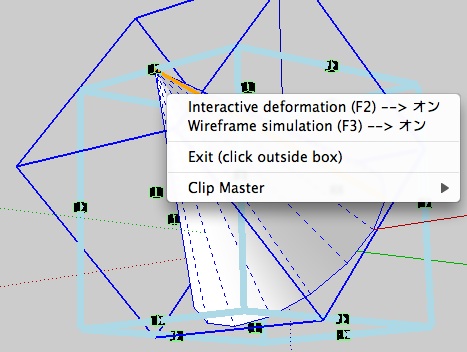
                                            Funny thing is that I couldn't find where many of my translations are used.
                                            I also noticed none of tooltips or most of context menu (shown in the attached pic) are not translated, at least on Mac OSX.
                                            These are the first place where people get ideas of what the ruby is about, so I think they should be translated too, no?

                                            Thanks for all your hard work to help SU catch the current of the world.
                                            Without people like you, SU would have been obsolete software long time ago.
                                            pic.jpg


                                            LibFredo6_JA.lang.zip

                                            1 條回覆 最後回覆 回覆 引用 0
                                            • 1
                                            • 2
                                            • 3
                                            • 4
                                            • 5
                                            • 56
                                            • 57
                                            • 3 / 57
                                            • 第一個貼文
                                              最後的貼文
                                            Buy SketchPlus
                                            Buy SUbD
                                            Buy WrapR
                                            Buy eBook
                                            Buy Modelur
                                            Buy Vertex Tools
                                            Buy SketchCuisine
                                            Buy FormFonts

                                            Advertisement








