[Plugin Library] LibFredo6 - v16.4a - 11 Nov 26



-
-
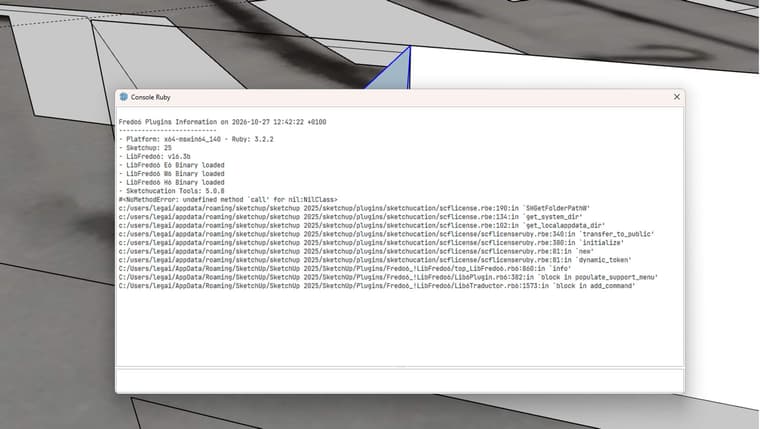
Somethings is wrong is the installation of Sketchucation Tools.
Could you- go to the Plugin directory: c:/users/legai/appdata/roaming/sketchup/sketchup 2025/sketchup/plugins
- Delete the folder Sketchucation
- Reinstall Sketchucation tools from the Sketchucation site
Please advise if this does not work.
-
Thanks, it's working now.
First, I deleted it, then I modified the signature authorisation in the warehouse extension. It was a signature issue.
In SketchUp:
Extensions → Extension Manager
Click the ️ Extension Manager Settings icon.
You'll find “Extension Loading Policy” / “Extension Loading Preferences.”
Select:
“Approve Unidentified Extensions”
Restart SketchUp. -
Bonjour
Avec la version 16.3b la fenêtre traduction n'apparait plus sur tout les plugins frtedo6 -
@ID3D
which plugins for instance? -
@fredo6 please find attached.
Fredo6 Plugins Information on 2026-11-06 09:14:12 +0100- Platform: x64-mingw32 - Ruby: 2.2.4
- Sketchup: 17.2.2555
- LibFredo6: v16.1g
- LibFredo6 G6 Binary loaded
- LibFredo6 E6 Binary NOT loaded
- Sketchucation Tools: 5.0.8
- SCFLicense: v7.5a - 80
- Fredo6 Plugins
Curviloft v2.0a - licensed FULL: 262837 - HE1772082497.0K
FredoScale v3.7c
JointPushPull v4.9a - licensed FULL: 263124 - HE1772082497.0K
RoundCorner v3.4a - licensed FULL: 263401 - HE1772082497.0K - SCFLicense directory present
Signature File: 2026-02-26 06:08:17 +0100
Curviloft: 2026-02-26 06:08:26 +0100
JointPushPull: 2026-02-26 10:15:01 +0100
RoundCorner: 2026-03-02 12:08:45 +0100
-
Hi, everyone. Running SU2027 on Mac. Have LibFredo6 installed. Installed several tools, including Curviloft. The menu bars appear, with clickable icons, but nothing happens when I click them.
I have restarted, rebooted, uninstalled, reinstalled, installed LibFredo6 first, checked for updates, etc. None of that makes any difference.
Any idea why? Thanks!
-
Hi, all. I'm running SU2027. I have LibFredo6 installed. I had several Fredo extensions installed, but have backed it off just to Curviloft as I troubleshoot.
The toolbars are present, buttons are there, but when pressed they do nothing. I have uninstalled, reinstalled, rebooted, etc., and none of that has changed anything.
Any ideas? Thanks.
-
Could you open the Ruby console before launching a plugin. If there are error showing up, copy and paste the text here.
-
Hi, Fredo.
Never mind! I found the problem. I just reinstalled Sketchucation Tools and voilà, everything came to life. Sorry about that!
-
NEW RELEASE: LibFredo6 v16.4a - 11 Nov 26
LibFredo6 16.4a is a maintenance release. It includes changes related to:
- Compatibility SU2027
- Technical adjustments
- Bug Fixing
If you use LordOfTheToolbars, please upgrade it to LordOfTheToolbars v4.2a. Otherwise, LOTT will not be activated
Requirements: SU2017 and above
See plugin home page of LibFredo6 for Download of LibFredo6.
-
Hello! @fredo6 I’d like to know if there will be a bundle for the 2027 version soon. Thxx
-
Hi Fredo, hi everyone,
I have just installed SketchUp 2027 and I am unable to get LibFredo6 or any of the FredoBundle plugins to work.
I downloaded and installed the latest version of LibFredo6 (v16.4a) together with the latest versions of the FredoBundle plugins. The plugins are installed, the toolbars appear, but none of the tools work.
In SketchUp's Extension Manager, LibFredo6 appears with:
- Version: 1.0
- Author: (blank)
- Description: (blank)
I also get the following error:
NameError (uninitialized constant E6B)For comparison, I am running the same plugins on SketchUp 2026 without any issues.
Has anyone experienced the same problem with SketchUp 2027?
Extension Errors Report
SketchUp: 27.0.267
OS: Windows 11
Ruby: 3.4.9
Extension: Fredo6 LibFredo6 (1.0)
Error: NameError (uninitialized constant E6B)
C:/Users/user/AppData/Local/Temp/Fredo6__loader_top_1794588161.rb:1:in '<top (required)>'
C:/Program Files/SketchUp/SketchUp 2027/SketchUp/Tools/extensions.rb:209:in 'Sketchup.require'
C:/Program Files/SketchUp/SketchUp 2027/SketchUp/Tools/extensions.rb:209:in 'SketchupExtension#load'
C:/Users/user/AppData/Roaming/SketchUp/SketchUp 2027/SketchUp/Plugins/Fredo6_!LibFredo6.rb:153:in 'Sketchup.register_extension'
C:/Users/user/AppData/Roaming/SketchUp/SketchUp 2027/SketchUp/Plugins/Fredo6_!LibFredo6.rb:153:in 'LibFredo6_Loader.process'
C:/Users/user/AppData/Roaming/SketchUp/SketchUp 2027/SketchUp/Plugins/Fredo6_!LibFredo6.rb:164:in 'module:LibFredo6_Loader'
C:/Users/user/AppData/Roaming/SketchUp/SketchUp 2027/SketchUp/Plugins/Fredo6_!LibFredo6.rb:31:in '<top (required)>'
Any help would be greatly appreciated.
Thank you!
-
It might be a problem of installation where the main file Fredo6_!LibFredo6.rb has not been replaced. I don't know how you installed it.
Could you go to the plugin directory, and erase:
- Fredo6_!LibFredo6.rb file
- Fredo6_!LibFredo6 subfolder
And then reinstall LibFredo6.
Hello! It looks like you're interested in this conversation, but you don't have an account yet.
Getting fed up of having to scroll through the same posts each visit? When you register for an account, you'll always come back to exactly where you were before, and choose to be notified of new replies (either via email, or push notification). You'll also be able to save bookmarks and upvote posts to show your appreciation to other community members.
With your input, this post could be even better 💗
Register Login


Advertisement