sketchucation logo sketchucation
    • Login
    Oops, your profile's looking a bit empty! To help us tailor your experience, please fill in key details like your SketchUp version, skill level, operating system, and more. Update and save your info on your profile page today!
    ⚠️ Update | Sketchucation Tools 5.0.8 released with licensing improvements and bugfixes Download

    [Plugin Library] LibFredo6 - v16.2b - 22 Sep 26


    Scheduled Pinned Locked Moved Plugins
    2.2k Posts 583 Posters 9.0m Views 585 Watching
    Loading More Posts
    • Oldest to Newest
    • Newest to Oldest
    • Most Votes
    Reply
    • Reply as topic
    Log in to reply
    This topic has been deleted. Only users with topic management privileges can see it.
    • fredo6F
      fredo6
      last edited by

      NEW RELEASE: LibFredo6 v16.0a - 08 Aug 26

      LibFredo6 16.0a is a maintenance release. It includes changes related to:

      • Bug Fixing for ThruPaint (visibility of palette)

      Requirements: SU2017 and above

      See plugin home page of LibFredo6 for Download of LibFredo6.

      Main Post of the LibFredo6 thread

      1 Reply Last reply
      Reply Quote 0
      • fredo6F
        fredo6
        last edited by

        NEW RELEASE: LibFredo6 v16.0b - 19 Aug 26

        LibFredo6 16.0b is a maintenance release. It includes changes related to:

        • Bug Fixing for dialogs when V-Ray is present

        Requirements: SU2017 and above

        See plugin home page of LibFredo6 for Download of LibFredo6.

        Main Post of the LibFredo6 thread

        1 Reply Last reply
        Reply Quote 0
        • pep75P
          pep75
          last edited by

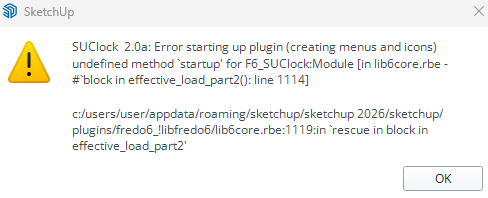
          Schermafbeelding 2026-08-27 102436.png

          After the update I got this error...Sketchup also won't boot! When I uninstall all Fredo-plugins Sketchup start-up again. Does anyone else has this problem?

          Rich O BrienR 1 Reply Last reply
          Reply Quote 0
          • Rich O BrienR
            Rich O Brien Moderator @pep75
            last edited by

            @pep75 said:

            Does anyone else has this problem?

            No, did you try uodating SUClock to 3.1?

            Link Preview Image
            SketchUp Plugins | PluginStore | SketchUcation

            SketchUp Plugin and Extension Store by SketchUcation provides free downloads of hundreds of SketchUp extensions and plugins

            favicon

            (sketchucation.com)

            Download the free D'oh Book for SketchUp πŸ“–

            1 Reply Last reply
            Reply Quote 0
            • pep75P
              pep75
              last edited by

              No! I don't even know what SUclock is...:( But when I remove all the FREDO-plugins Sketchup start normal again.

              1 Reply Last reply
              Reply Quote 0
              • Rich O BrienR
                Rich O Brien Moderator
                last edited by

                If you look at your error message it references SUClock 2.0

                Download the free D'oh Book for SketchUp πŸ“–

                1 Reply Last reply πŸ‘
                Reply Quote 0
                • pep75P
                  pep75
                  last edited by

                  Thanks, but it also refers to Libfredo6. πŸ˜•

                  1 Reply Last reply
                  Reply Quote 0
                  • fredo6F
                    fredo6
                    last edited by

                    NEW RELEASE: LibFredo6 v16.1a - 31 Aug 26

                    LibFredo6 16.1a is a maintenance release. It includes changes related to:

                    • Future compatibility (SU2027)
                    • Bug Fixing, possibly for Mac

                    Requirements: SU2017 and above

                    See plugin home page of LibFredo6 for Download of LibFredo6.

                    Main Post of the LibFredo6 thread

                    RienkR 1 Reply Last reply
                    Reply Quote 0
                    • RienkR
                      Rienk @fredo6
                      last edited by

                      @fredo6

                      Hi Fredo since today 2 september I updated version LibFredo6 V16.0a 8 aug 2026 to the latest LibFredo6 V16.1a but all your plugins dont work anymore. Where can I find the prior version. I would love to get this old one. Because this version workes for me fine. I was working with curviloft and since the latest version it don't work.

                      I am working on the PC with SketchUp 2026. There is no error message but it does nothing. I tried several times to start SkectUp but it still doesn't do nothing.
                      I tried several of your plugins but they doesnt start

                      With regars,

                      Rienk

                      M 1 Reply Last reply
                      Reply Quote 1
                      • fredo6F
                        fredo6
                        last edited by

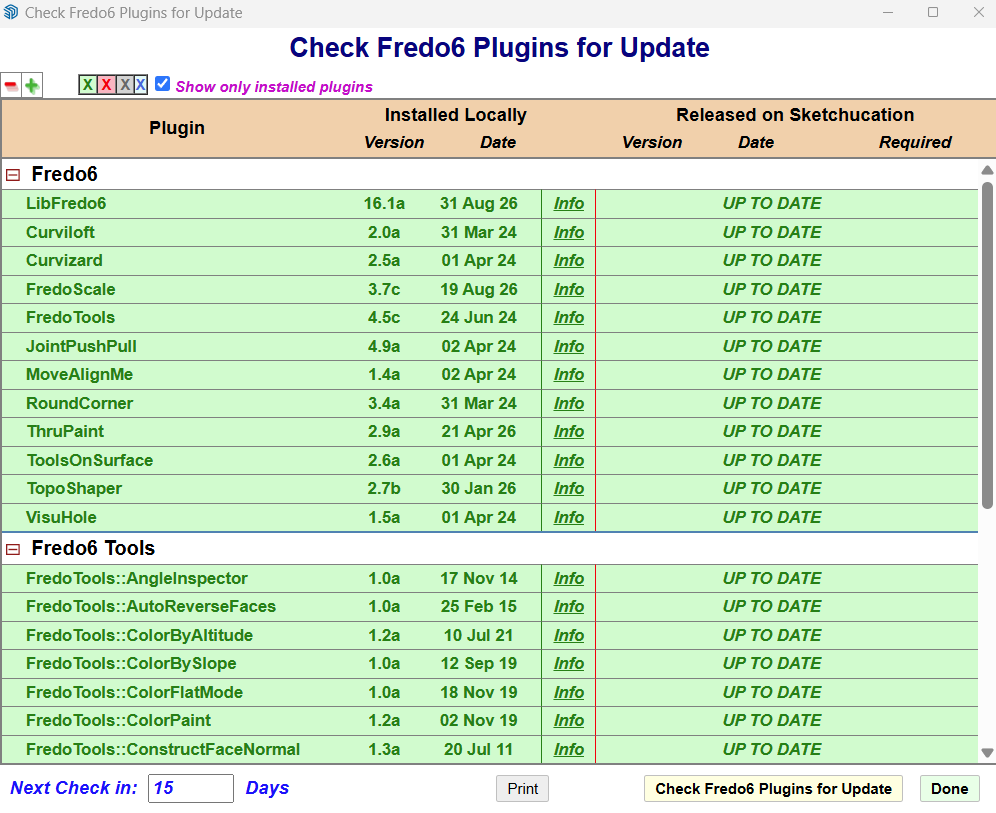
                        When you start Sketchup, do you see the menus for the plugins. Do you see the menu Window > LibFredo6 settings.....?

                        RienkR 2 Replies Last reply
                        Reply Quote 0
                        • RienkR
                          Rienk
                          last edited by

                          Yes you mean the window check Fredo6 Plugins for Update?

                          1 Reply Last reply
                          Reply Quote 0
                          • RienkR
                            Rienk @fredo6
                            last edited by

                            @fredo6 libfredo6.png

                            1 Reply Last reply
                            Reply Quote 0
                            • RienkR
                              Rienk @fredo6
                              last edited by

                              @fredo6

                              You mean the dialog window "check Fredo6 Plugins for Update?

                              I started SketchUp again and It seems to work fine with your plugins.
                              Thanks for your reply.

                              Rienk

                              1 Reply Last reply
                              Reply Quote 0
                              • M
                                MDVolle @Rienk
                                last edited by

                                @Rienk My plugins also stopped working correctly with the latest tools update - curviloft is not generating mesh and it appears that edge picker has a typo in it but I can't edit the code

                                TIGT 1 Reply Last reply
                                Reply Quote 0
                                • TIGT
                                  TIG Moderator @MDVolle
                                  last edited by

                                  @MDVolle
                                  Please explain what's not working, any errors, any Ruby Console errors etc.
                                  What is this 'typo' - tell us [ @fredo6 ] so he can fix it...

                                  TIG

                                  1 Reply Last reply
                                  Reply Quote 0
                                  • K
                                    kashintsev
                                    last edited by

                                    Hi @fredo6 and all,

                                    After two hours of trying to fix the Fredo update-check crash (spoiler β€” fixed it), here's what I found. Might be useful for pep75/Rienk/MDVolle above too, since it looks like the same class of issue.

                                    Setup: macOS 26.6, tested side-by-side across three SketchUp installs on the same Mac β€” SketchUp 2025, SketchUp 2026 and SketchUp 2027, each with its own LibFredo6 16.1a (+ FredoTools + JointPushPull) installed via Sketchucation Tools.

                                    Symptom (SketchUp 2025 and SketchUp 2026 β€” identical on both): the "Check Fredo6 Plugins for Update" dialog opens completely blank (no version table, no icon, nothing), and the Ruby Console shows:

                                    !LibFredo6: Error when requiring Binary .../Fredo6_!LibFredo6/Binaries/Mac_32/bin_body_Lib6G6.bundle - dlopen(...) tried: '.../bin_body_Lib6G6.bundle' (code signature invalid in <...> '.../bin_body_Lib6G6.bundle' (errno=1) sliceOffset=0x00054000, codeBlobOffset=0x000500B0, codeBlobSize=0x00004CE0), ... - .../bin_body_Lib6G6.bundle
                                    #<NoMethodError: undefined method register_from_key' for Traductor::ChromiumWdlg:Class> .../body_lib6chromiumwdlg.rbe:1498:in show'
                                    .../body_lib6upgrade.rbe:864:in initialize__' .../lib6upgrade.rbe:161:in initialize'
                                    .../lib6upgrade.rbe:154:in new' .../lib6upgrade.rbe:154:in show'
                                    .../lib6upgrade.rbe:66:in time_for_check?' .../top_libfredo6.rbe:514:in block in after_startup'

                                    So the update dialog can't fully init because the ChromiumWdlg engine's native module (bin_body_Lib6G6.bundle) fails to dlopen β€” macOS rejects its code signature at runtime.

                                    Important: SketchUp 2027, with the literal same LibFredo6 16.1a files, has no problem at all β€” dialog renders fine, no console errors. So this doesn't look like a corrupted download or a bad LibFredo6 build; it looks like SketchUp 2025/2026 vs. 2027 differ in how they enforce code-signing/library validation for third-party native bundles at dlopen time.

                                    What did NOT fix it (ruling out a leftover-config issue on my end):

                                    1. Fully quit SketchUp.
                                    2. Removed every Fredo6 folder + .rb loader from Plugins (LibFredo6, FredoTools, JointPushPull).
                                    3. Deleted every orphaned Fredo6 key from the SketchUp prefs plist (ALToolPalette_Fredo6_, Fredo6_CheckForUpdateWarning.) β€” leftovers from older Fredo tools removed previously.
                                    4. Reinstalled LibFredo6 16.1a completely fresh via Sketchucation Tools.
                                      Exact same blank dialog / same console error on the totally clean install.

                                    What DID fix it (local workaround): re-signing every .bundle under Fredo6_!LibFredo6/Binaries with a local ad-hoc signature:

                                    find ".../Fredo6_!LibFredo6/Binaries" -name "*.bundle" -exec codesign --force --deep --sign - {} ;

                                    After this, the dialog renders completely and the console is clean. codesign -dv on the original file actually reported the signature as valid (TeamIdentifier 66M89AU23J, properly signed 31 Aug 2026) β€” it's specifically the runtime dlopen/library-validation check inside SketchUp 2025/2026 that rejects it, not a malformed file.

                                    This is obviously just a workaround I have to redo after every LibFredo6 update/reinstall, not a real fix β€” posting in case it helps track down why 2025/2026 reject it while 2027 doesn't.

                                    1 Reply Last reply
                                    Reply Quote 0
                                    • fredo6F
                                      fredo6
                                      last edited by

                                      @kashintsev

                                      Thanks for the description.

                                      For whatever reason, the .bundle binary files fail to load for a question of signing and this only concerns SU2026. Note that in SU2027, the .bundle has the same name but is different, as it is for Ruby 3.4, versus Ruby 3.2 for SU2026).

                                      Could you try with LibFredo6 v16.1g, just published and advise if this gets better.

                                      1 Reply Last reply
                                      Reply Quote 0
                                      • fredo6F
                                        fredo6
                                        last edited by

                                        NEW RELEASE: LibFredo6 v16.1g - 11 Sep 26

                                        LibFredo6 16.1g is a maintenance release. It includes changes related to:

                                        • Future compatibility (SU2027)
                                        • Bug Fixing for Mac in SU2026

                                        Requirements: SU2017 and above

                                        See plugin home page of LibFredo6 for Download of LibFredo6.

                                        Main Post of the LibFredo6 thread

                                        1 Reply Last reply
                                        Reply Quote 0
                                        • fredo6F
                                          fredo6
                                          last edited by

                                          NEW RELEASE: LibFredo6 v162a - 22 Sep 26

                                          LibFredo6 162a is a maintenance release. It includes changes related to:

                                          • Adjustments for compatibility SU2027
                                          • Bug Fixing

                                          If you use LordOfTheToolbars, please upgrade it to v4.0a. Otherwise, LOTT will not be activated


                                          Requirements: SU2017 and above

                                          See plugin home page of LibFredo6 for Download of LibFredo6.

                                          Main Post of the LibFredo6 thread

                                          1 Reply Last reply
                                          Reply Quote 0
                                          • fredo6F
                                            fredo6
                                            last edited by

                                            NEW RELEASE: LibFredo6 v16.2b - 22 Sep 26

                                            LibFredo6 16.2b is a maintenance release. It includes changes related to:

                                            • Adjustments for compatibility SU2027
                                            • Bug Fixing

                                            If you use LordOfTheToolbars, please upgrade it to LordOfTheToolbars v4.0a. Otherwise, LOTT will not be activated


                                            Requirements: SU2017 and above

                                            See plugin home page of LibFredo6 for Download of LibFredo6.

                                            Main Post of the LibFredo6 thread

                                            1 Reply Last reply
                                            Reply Quote 0

                                            Hello! It looks like you're interested in this conversation, but you don't have an account yet.

                                            Getting fed up of having to scroll through the same posts each visit? When you register for an account, you'll always come back to exactly where you were before, and choose to be notified of new replies (either via email, or push notification). You'll also be able to save bookmarks and upvote posts to show your appreciation to other community members.

                                            With your input, this post could be even better πŸ’—

                                            Register Login
                                            • 1
                                            • 2
                                            • 3
                                            • 4
                                            • 5
                                            • 112
                                            • 113
                                            • 2 / 113
                                            • First post
                                              Last post
                                            Buy SketchPlus
                                            Buy SUbD
                                            Buy WrapR
                                            Buy eBook
                                            Buy Modelur
                                            Buy Vertex Tools
                                            Buy SketchCuisine
                                            Buy FormFonts

                                            Advertisement