sketchucation logo sketchucation
    • 로그인
    Oops, your profile's looking a bit empty! To help us tailor your experience, please fill in key details like your SketchUp version, skill level, operating system, and more. Update and save your info on your profile page today!
    🚨 Skimp | 25% Off until March 30 Buy Now

    [Plugin Library] LibFredo6 - v15.9a - 25 Mar 26


    예약됨 고정됨 잠김 이동됨 Plugins
    2.2k 게시물 577 작성자 4.3m 조회수 579 Watching
    게시물 더 불러오는 중
    • 오래된 순
    • 최신 순
    • 가장 많은 투표
    답글
    • 토픽으로 답글
    로그인 후 답글 작성
    이 토픽은 삭제되었습니다. 토픽 관리 권한이 있는 사용자만 볼 수 있습니다.
    • fredo6F 오프라인
      fredo6
      마지막 수정자:

      @william_wang said:

      Intall LibFredo6 v10.7a but plugins not running

      Do you have a menu entry Window > LibFredo6 settings...?

      1 답글 마지막 답글 답글 인용 0
      • Gus RG 오프라인
        Gus R
        마지막 수정자:

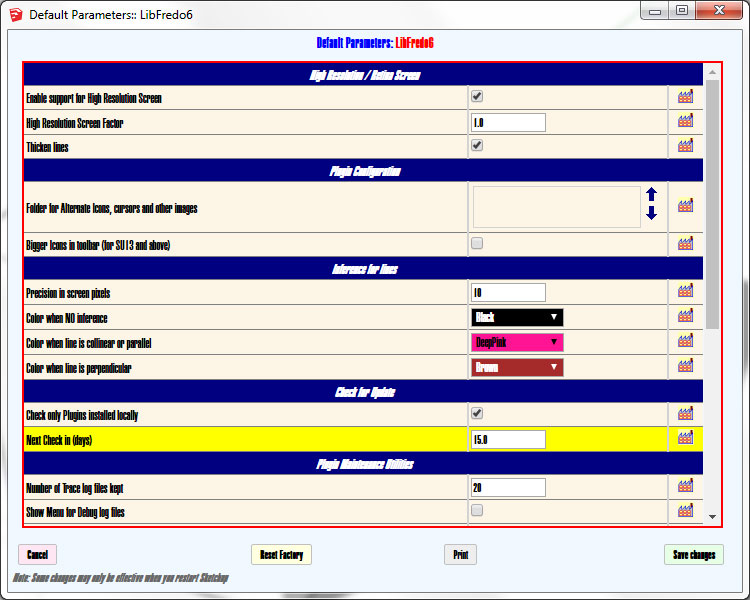
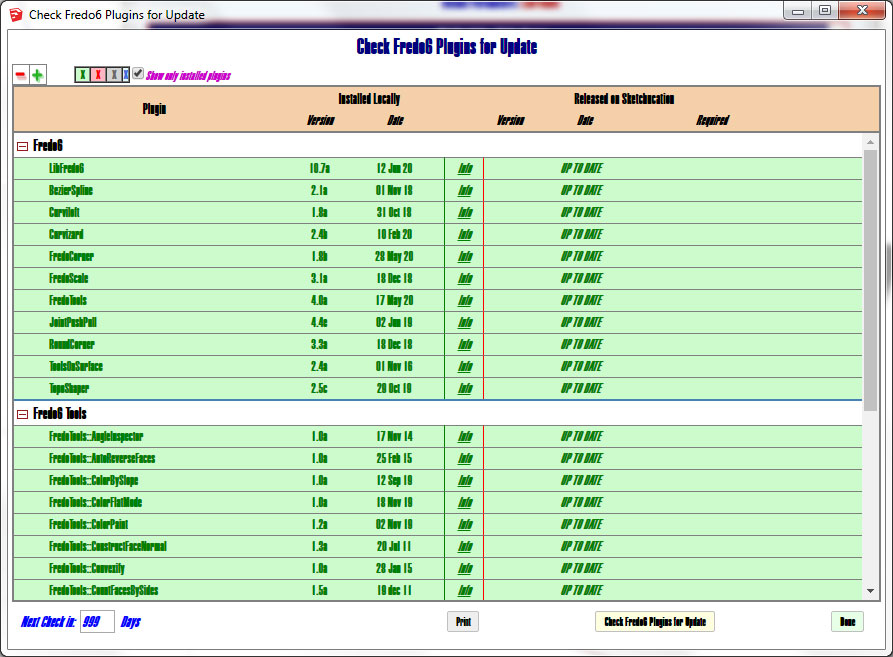
        Not a critical issue but is there any way to tweak the font sizes for the interface windows? Seems like I was able to do that using standard Windows zoom keyboard commands. Here's some examples. Hard to read.
        LF1.jpg


        LF2.jpg

        www.instagram.com/gusrobatto/

        www.facebook.com/gusrobatto

        www.flickr.com/photos/gusrobatto

        1 답글 마지막 답글 답글 인용 0
        • fredo6F 오프라인
          fredo6
          마지막 수정자:

          @GusR

          Strange. It seems you don't have some fonts installed and default to Arial Narrow Black.

          Did this happen with v10.7a only ?

          What do you get for dialog boxes used by other plugins than mine?

          1 답글 마지막 답글 답글 인용 0
          • Gus RG 오프라인
            Gus R
            마지막 수정자:

            @fredo6 said:

            @GusR

            Strange. It seems you don't have some fonts installed and default to Arial Narrow Black.

            Did this happen with v10.7a only ?

            What do you get for dialog boxes used by other plugins than mine?

            I have Arial Narrow. It's Windows 7 Pro if that matters. Was fine before v10.7a.

            Other dialog boxes are fine.

            www.instagram.com/gusrobatto/

            www.facebook.com/gusrobatto

            www.flickr.com/photos/gusrobatto

            1 답글 마지막 답글 답글 인용 0
            • fredo6F 오프라인
              fredo6
              마지막 수정자:

              Best would be Tahoma or Helvetica.

              With Windows 7, there may be many problems. This one is related to the change I made for some dialog boxes (like Check Plugins for Update) to rely on the recent API (HtmlDialog), because the old one (WebDialog) is being deprecated.

              So, there is little I can do with this.

              Fredo

              1 답글 마지막 답글 답글 인용 0
              • OxerO 오프라인
                Oxer
                마지막 수정자:

                Hi Fredo,
                I installed LibFredo 10.7a on SU2017 & macOS 10.13.6 and when I try to 'Check Fredo6 Plugins for Update', SketchUp crash.
                The rest of functions work fine and the Tools too.

                "The result is the end what is important is the process" by Oxer
                http://www.oxervision.blogspot.com/

                1 답글 마지막 답글 답글 인용 0
                • fredo6F 오프라인
                  fredo6
                  마지막 수정자:

                  @oxer said:

                  Hi Fredo,
                  I installed LibFredo 10.7a on SU2017 & macOS 10.13.6 and when I try to 'Check Fredo6 Plugins for Update', SketchUp crash.
                  The rest of functions work fine and the Tools too.

                  Thanks for advising. Actually I get it on Catalina too. I will investigate.

                  I converted some of the LibFredo6 dialogs to HtmlDialog (instead of WebDialog), which is the 'new' framework for web dialogs since SU2017 (and recommended). There are plenty of problems and this could be one more.

                  1 답글 마지막 답글 답글 인용 0
                  • OxerO 오프라인
                    Oxer
                    마지막 수정자:

                    Ok, thanks for the info.

                    "The result is the end what is important is the process" by Oxer
                    http://www.oxervision.blogspot.com/

                    1 답글 마지막 답글 답글 인용 0
                    • fredo6F 오프라인
                      fredo6
                      마지막 수정자:

                      I found the issue. Another discrepancy in HtmlDialog between Mac and Windows, and only for SU2017.

                      I'll release tomorrow morning

                      Thanks again for signaling.

                      Fredo

                      1 답글 마지막 답글 답글 인용 0
                      • A 오프라인
                        alecabcas
                        마지막 수정자:

                        I have that problem.

                        Error Loading File Fredo6_!LibFredo6.rb
                        Error: #<NameError: uninitialized constant LibFredo6_Loader::LibFredo6>
                        C:/Users/usuario/AppData/Roaming/SketchUp/SketchUp 2020/SketchUp/Plugins/Fredo6_!LibFredo6.rb:65:in process' C:/Users/usuario/AppData/Roaming/SketchUp/SketchUp 2020/SketchUp/Plugins/Fredo6_!LibFredo6.rb:72:in module:LibFredo6_Loader'
                        C:/Users/usuario/AppData/Roaming/SketchUp/SketchUp 2020/SketchUp/Plugins/Fredo6_!LibFredo6.rb:30:in `<top (required)>'

                        Several times I tried to reinstall sketchup as admin and tried to repair sketchup...
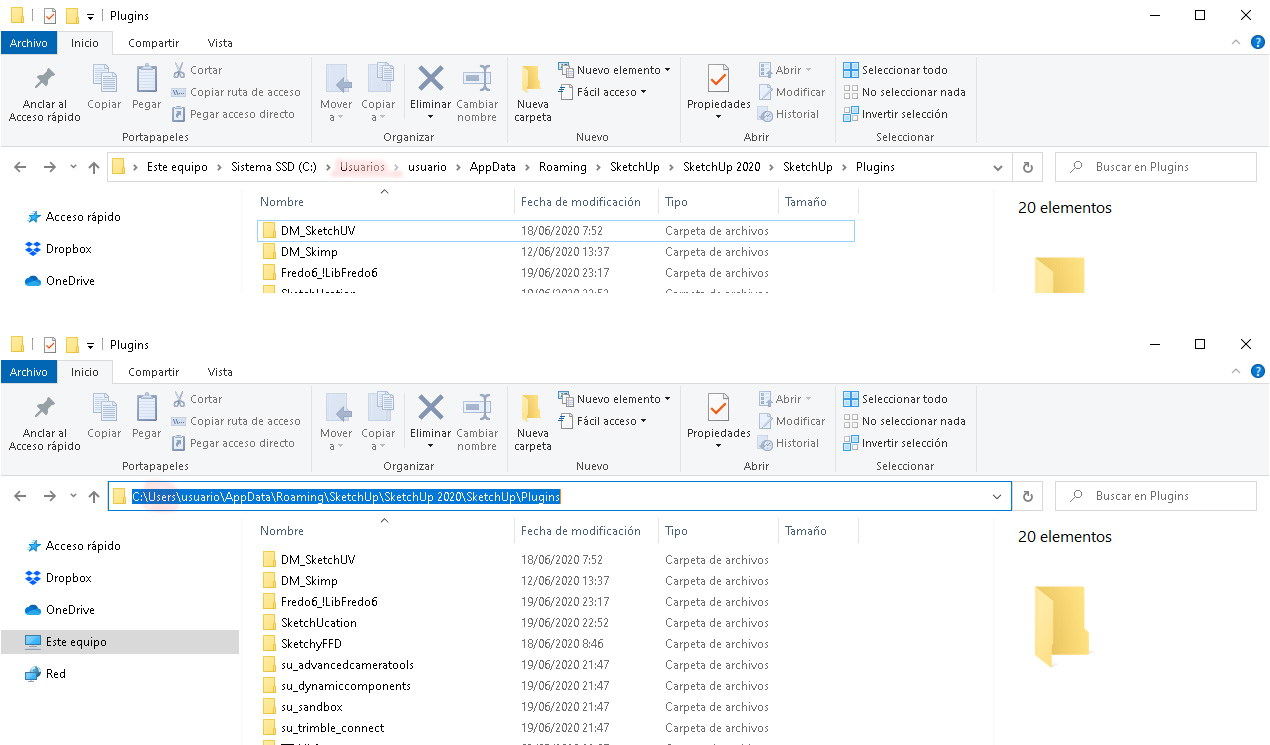
                        Could it be the problem? If is it, how can I fix it?

                        1 답글 마지막 답글 답글 인용 0
                        • fredo6F 오프라인
                          fredo6
                          마지막 수정자:

                          @alecabcas

                          Strange issue. There is something wrong in the installation of LibFredo6 (probably not Sketchup).

                          Could you cleanup the LibFredo6 top file and subfolder and re-install a fresh copy, maybe LibFredo6 v10.8a, just released.

                          Fredo

                          1 답글 마지막 답글 답글 인용 0
                          • A 오프라인
                            alecabcas
                            마지막 수정자:

                            Hi Fredo6,

                            Thanks for the reply.

                            After uninstall and repair Sketchup by the way, and restart the PC, I have installed the v10.8a (then I have closed sketchup) but I have the same problem...I installed the plugin with the ExtensionStore

                            Error Loading File Fredo6_!LibFredo6.rb
                            Error: #<NameError: uninitialized constant LibFredo6>
                            C:/Users/usuario/AppData/Roaming/SketchUp/SketchUp 2020/SketchUp/Plugins/Fredo6_!LibFredo6.rb:65:in process' C:/Users/usuario/AppData/Roaming/SketchUp/SketchUp 2020/SketchUp/Plugins/Fredo6_!LibFredo6.rb:72:in module:LibFredo6_Loader'
                            C:/Users/usuario/AppData/Roaming/SketchUp/SketchUp 2020/SketchUp/Plugins/Fredo6_!LibFredo6.rb:30:in `<top (required)>'

                            So, could be the problem that I have the folder "users" with the name "usuarios" and the path would be broken? Just like I showed in the picture of the first comment? (attached again)
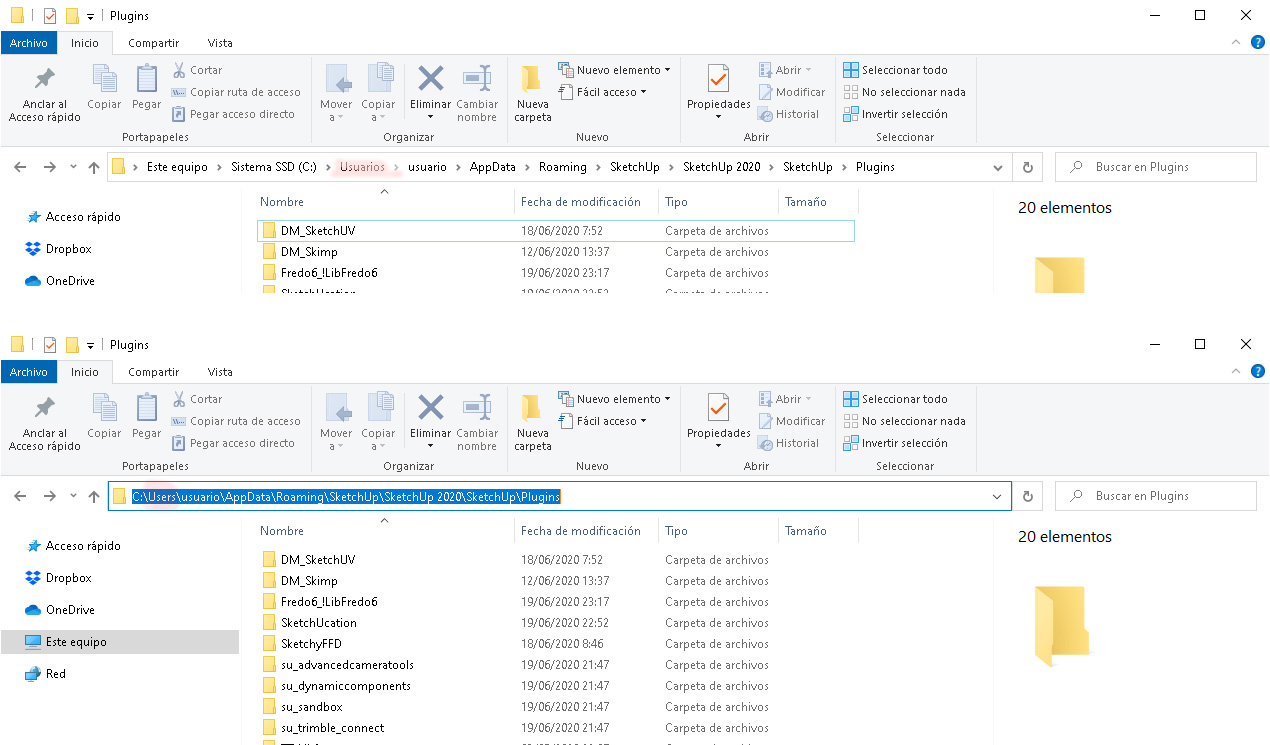

                            Folder_ name_USUARIOS.jpg

                            1 답글 마지막 답글 답글 인용 0
                            • TIGT 오프라인
                              TIG Moderator
                              마지막 수정자:

                              It might be that SketchUp v2020 has not been installed properly ?
                              Try doing a 'Repair' [see below], then reinstall the LibFredo again.
                              Restart SketchUp and see if that has helped...

                              To 'Repair' SketchUp do the following...
                              Whilst you are logged into Windows as your normal user-account [usuario] ensure that SketchUp & Layout are both closed.
                              Find the SketchUp installer's exe file - usually in your Downloads folder...
                              Select that file's icon, right-click > context-menu > "Run as administrator"
                              When prompted choose "Repair".
                              When it completes SketchUp should run with all of its permissions set properly.

                              Doing a 'Repair' should not affect any of your settings or customizations...

                              Reinstall the LibFredo too...

                              Installing from an exe in any other way will cause unpredictable permission problems - like you report.
                              So never double-click any installer's exe file to 'Run' it.
                              Even if your user-account has admin powers it is not the same thing.

                              There have been a few reports about things suddenly going wrong - they seem to relate to a recent Windows auto-update breaking users' permissions. I know that SketchUp are investigating as it seems to permanently break some Windows users' accounts !

                              Report back...

                              TIG

                              1 답글 마지막 답글 답글 인용 0
                              • A 오프라인
                                alecabcas
                                마지막 수정자:

                                @tig said:

                                It might be that SketchUp v2020 has not been installed properly ?
                                Try doing a 'Repair' [see below], then reinstall the LibFredo again.
                                Restart SketchUp and see if that has helped...

                                To 'Repair' SketchUp do the following...
                                Whilst you are logged into Windows as your normal user-account [usuario] ensure that SketchUp & Layout are both closed.
                                Find the SketchUp installer's exe file - usually in your Downloads folder...
                                Select that file's icon, right-click > context-menu > "Run as administrator"
                                When prompted choose "Repair".
                                When it completes SketchUp should run with all of its permissions set properly.

                                Doing a 'Repair' should not affect any of your settings or customizations...

                                Reinstall the LibFredo too...

                                Installing from an exe in any other way will cause unpredictable permission problems - like you report.
                                So never double-click any installer's exe file to 'Run' it.
                                Even if your user-account has admin powers it is not the same thing.

                                There have been a few reports about things suddenly going wrong - they seem to relate to a recent Windows auto-update breaking users' permissions. I know that SketchUp are investigating as it seems to permanently break some Windows users' accounts !

                                Report back...

                                Thanks Tig!
                                I've already repair few times sketchup as admin, and also I have reinstall sketchup few times as admin, anyway just now I've repaired again skethup... Nothing new and sitll the same error. So I'm going to report it as you say. Ah I installed the plugin by both ways including the StoreExtension

                                1 답글 마지막 답글 답글 인용 0
                                • S 오프라인
                                  standox44
                                  마지막 수정자:

                                  I translated all the plugins into Russian. Are you interested in these translations?

                                  1 답글 마지막 답글 답글 인용 0
                                  • fredo6F 오프라인
                                    fredo6
                                    마지막 수정자:

                                    @standox44 said:

                                    I translated all the plugins into Russian. Are you interested in these translations?

                                    Many thanks. This must have been a lot of work.

                                    The best thing is to send me the corresponding .lang file(s) so that I can integrate them in the regular releases.

                                    Fredo

                                    1 답글 마지막 답글 답글 인용 0
                                    • V 오프라인
                                      victoriagaylard
                                      마지막 수정자:

                                      Hi there,
                                      I am trying to upload FredoScale and RoundCorner to SketchUp.
                                      I have watched your install video on YouTube and tried several times to upload first, LibFredo6 and then the two extensions. When I do this, it says it's uploaded fine.
                                      I then close SketchUp and re-open it.
                                      Everytime I do this, I get a message to say LibFredo6 is missing from the PlugIns folder and then when I open the Extension Manager, I get the attached message that the signature is invalid.
                                      Can you please advise me how to fix this?
                                      Thanks
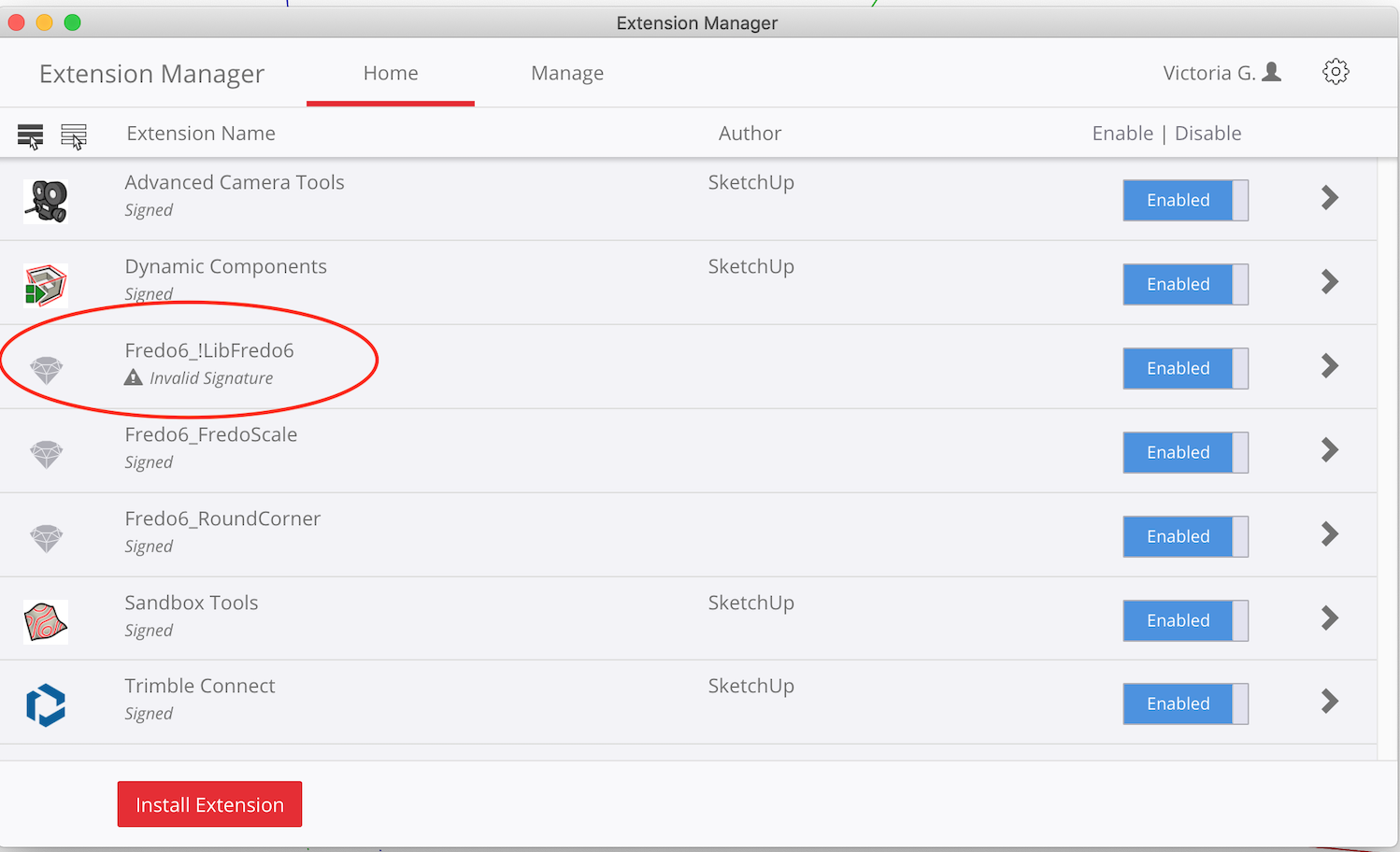

                                      ExtensionManager.png

                                      1 답글 마지막 답글 답글 인용 0
                                      • TIGT 오프라인
                                        TIG Moderator
                                        마지막 수정자:

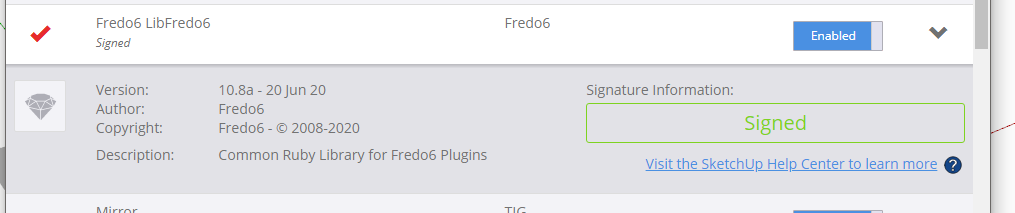
                                        LibFredo is signed.
                                        Capture.PNG
                                        You haven't clearly explained how you installed it or the other two Fredo extensions.
                                        Let's start again from the beginning.
                                        You will have downloaded three RBZ files for these extensions.
                                        Use the red-button on the bottom-left of the Extension Manager dialog - visible in your screenshot -
                                        to 'Install Extension'.
                                        Navigate to, and select an RBZ and it'll be auto-installed.
                                        Repeat for the remaining RBZ files.
                                        Restart SketchUp and sync everything.
                                        What does the Extension Manager dialog say now ?
                                        Expand the LibFredo item to see its details... is it the same version as my screenshot ?
                                        It you have incorrectly manually placed files into a location other than your Users/.../Plugins folder it might be causing issues and these should be removed too...

                                        TIG

                                        1 답글 마지막 답글 답글 인용 0
                                        • fredo6F 오프라인
                                          fredo6
                                          마지막 수정자:

                                          NEW RELEASE: LibFredo6 v10.9a - 02 Jul 20

                                          LibFredo6 10.9a fixes a problem with the animation rendering of VRay 4.2 and Animator


                                          Requirements: SU2017 and above

                                          See plugin home page of LibFredo6 for Download of LibFredo6.

                                          Main Post of the LibFredo6 thread

                                          Fredo

                                          1 답글 마지막 답글 답글 인용 0
                                          • fredo6F 오프라인
                                            fredo6
                                            마지막 수정자:

                                            NEW RELEASE: LibFredo6 v10.8a - 20 Jun 20

                                            LibFredo6 10.8a is a maintenance release, with bug fixing and adjustments mostly for Mac (dialogs)


                                            Requirements: SU2017 and above

                                            See plugin home page of LibFredo6 for Download of LibFredo6.

                                            Main Post of the LibFredo6 thread

                                            Fredo

                                            1 답글 마지막 답글 답글 인용 0

                                            Hello! It looks like you're interested in this conversation, but you don't have an account yet.

                                            Getting fed up of having to scroll through the same posts each visit? When you register for an account, you'll always come back to exactly where you were before, and choose to be notified of new replies (either via email, or push notification). You'll also be able to save bookmarks and upvote posts to show your appreciation to other community members.

                                            With your input, this post could be even better 💗

                                            등록 로그인
                                            • 1
                                            • 2
                                            • 78
                                            • 79
                                            • 80
                                            • 81
                                            • 82
                                            • 110
                                            • 111
                                            • 80 / 111
                                            • 첫 게시물
                                              마지막 게시물
                                            Buy SketchPlus
                                            Buy SUbD
                                            Buy WrapR
                                            Buy eBook
                                            Buy Modelur
                                            Buy Vertex Tools
                                            Buy SketchCuisine
                                            Buy FormFonts

                                            Advertisement