sketchucation logo sketchucation
    • 로그인
    Oops, your profile's looking a bit empty! To help us tailor your experience, please fill in key details like your SketchUp version, skill level, operating system, and more. Update and save your info on your profile page today!
    🚨 Skimp | 25% Off until March 30 Buy Now

    [Plugin Library] LibFredo6 - v15.9a - 25 Mar 26


    예약됨 고정됨 잠김 이동됨 Plugins
    2.2k 게시물 577 작성자 4.3m 조회수 579 Watching
    게시물 더 불러오는 중
    • 오래된 순
    • 최신 순
    • 가장 많은 투표
    답글
    • 토픽으로 답글
    로그인 후 답글 작성
    이 토픽은 삭제되었습니다. 토픽 관리 권한이 있는 사용자만 볼 수 있습니다.
    • pep75P 오프라인
      pep75
      마지막 수정자:

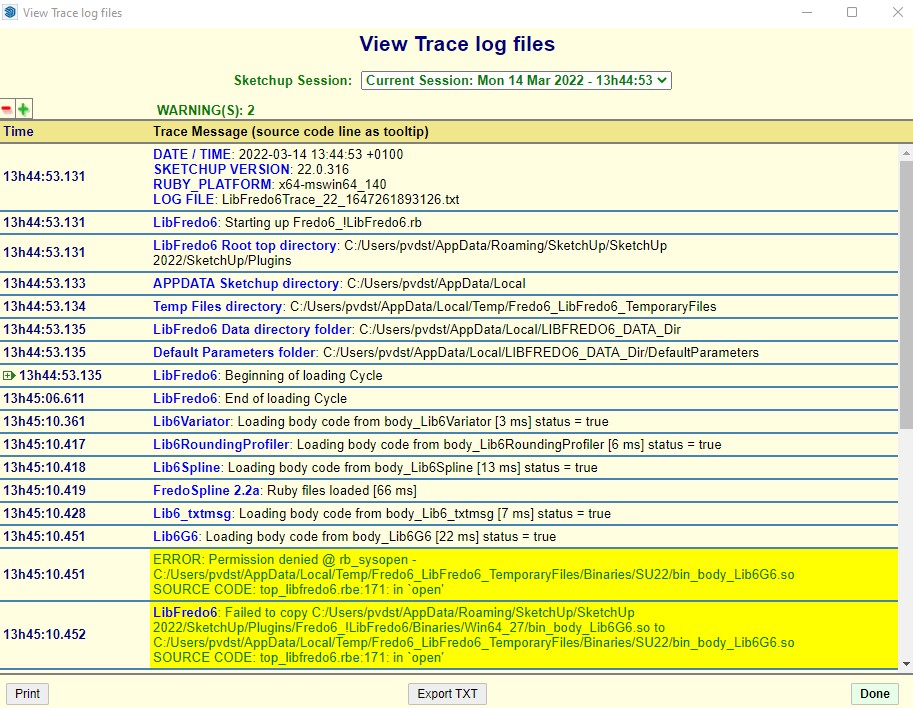
      Screenshot 2022-03-14 135124.jpg

      1 답글 마지막 답글 답글 인용 0
      • pep75P 오프라인
        pep75
        마지막 수정자:

        I deleted the Fredo plugins folder, temporary fils, re-installed all plugins but still have the same issue.

        1 답글 마지막 답글 답글 인용 0
        • pep75P 오프라인
          pep75
          마지막 수정자:

          Thanks!

          I'm working with SU 22.0.216. Latest version.

          1 답글 마지막 답글 답글 인용 0
          • fredo6F 오프라인
            fredo6
            마지막 수정자:

            @pep75 said:

            I deleted the Fredo plugins folder, temporary fils, re-installed all plugins but still have the same issue.

            It looks like it is a problem of access rights.

            When upgrading Sketchup 2022, did you install with 'Run As Administrator'?

            1 답글 마지막 답글 답글 인용 0
            • Dave RD 오프라인
              Dave R
              마지막 수정자:

              @pep75 said:

              ...re-installed all plugins but still have the same issue.

              The permission denied message would imply to me that SketchUp 2022 has not been installed correctly. Close SketchUp, find the downloaded installer, right click on it, and choose Run as administrator. When offered the options, choose Repair.

              Etaoin Shrdlu

              %

              (THERE'S NO PLACE LIKE)

              G28 X0.0 Y0.0 Z0.0

              M30

              %

              1 답글 마지막 답글 답글 인용 0
              • pep75P 오프라인
                pep75
                마지막 수정자:

                Thanks for a the help but I'm a bit embarassed to say that I didn't know the updates are not free anymore. I ordered the package deal, installed the updated Extension Store and now everything works like a charm....

                Excuser moi!

                1 답글 마지막 답글 답글 인용 0
                • V 오프라인
                  virolan
                  마지막 수정자:

                  After LibFredo6 v12.4a, many fredo plugins no longer work at all (FredoSpline, FredoScale, JointPushPull, etc.). When I click the plugin icon, nothing happens anymore. When I reinstall the old version (12.4a) back, everything works greate.
                  I have licenses for these plugins, so what happened to these LibFredo6 updates? I'm still using sketchup version 2019 because it worked fine for me so far. What could be the problem?

                  1 답글 마지막 답글 답글 인용 0
                  • A 오프라인
                    Anne O Grady
                    마지막 수정자:

                    After more than ten years of free distribution, some of Fredo's plugins have become paid extensions.

                    Precisely, these are:
                    RoundCorner
                    JointPushPull
                    Curviloft
                    FredoScale
                    ToolsOnSurface
                    TopoShaper
                    Curvizard
                    VisuHole
                    The transition will take place as of March 1st, 2022.

                    After a 30-day free-trial period, these extensions will require a Sketchucation license.
                    Price is USD 12 per plugin, or USD 40 for the bundle of all 8 plugins. Sketchucation Premium members have a significant discount on this pricing.

                    IMPORTANT: You need to install or upgrade to Sketchucation Extension Store v4.2.4 or above.

                    This is the original post on 27th Feb 2022
                    http://sketchucation.com/forums/viewtopic.php?p=677933#p677933

                    1 답글 마지막 답글 답글 인용 0
                    • V 오프라인
                      virolan
                      마지막 수정자:

                      Oh... My Sketchucation Extension Store seemed to be old version, so I upgraded it, then plugins started working again. I thought this update would show up in that Sketchup Extension Manager as well, but no.

                      Thank you!

                      1 답글 마지막 답글 답글 인용 0
                      • Dave RD 오프라인
                        Dave R
                        마지막 수정자:

                        @virolan said:

                        I thought this update would show up in that Sketchup Extension Manager as well, but no.

                        The SketchUp Extension Manager only shows available updates for extensions from the SketchUp Extensions Warehouse.

                        Etaoin Shrdlu

                        %

                        (THERE'S NO PLACE LIKE)

                        G28 X0.0 Y0.0 Z0.0

                        M30

                        %

                        1 답글 마지막 답글 답글 인용 0
                        • fredo6F 오프라인
                          fredo6
                          마지막 수정자:

                          NEW RELEASE: LibFredo6 v12.8a - 17 Mar 22

                          LibFredo6 12.8a tentatively corrects problems related to the creation of menus for my plugins. Some users experience an error preventing the plugins to load correctly. Since I am not able to reproduce, I made some changes 'blindly', hoping this would improve the situation.


                          Requirements: SU2017 and above

                          See plugin home page of LibFredo6 for Download of LibFredo6.

                          Main Post of the LibFredo6 thread

                          Fredo

                          1 답글 마지막 답글 답글 인용 0
                          • qwertyasQ 오프라인
                            qwertyas
                            마지막 수정자:

                            all fredo6 plugins stopped to work after last fredo6 lib update. Sketchup 2020.
                            To test if the problem is related to other plugins, I removed all my plugins from the plugin folder, and installed only sketchucation. From sketchucation plugin I installed fredo cuviloft and fredo6 lib (newest = 12.8a) and restarted Sketchup. Curviloft does not work. You can click on any of the icons but the tool does not initialize (standard cursor and prompt still visible)
                            https://ibb.co/QN3Dyb0

                            1 답글 마지막 답글 답글 인용 0
                            • Dave RD 오프라인
                              Dave R
                              마지막 수정자:

                              @qwertyas said:

                              all fredo6 plugins stopped to work after last fredo6 lib update.

                              What operating system? I'm not seeing any problems with amy of Fredo6's extensions after the latest update.

                              Etaoin Shrdlu

                              %

                              (THERE'S NO PLACE LIKE)

                              G28 X0.0 Y0.0 Z0.0

                              M30

                              %

                              1 답글 마지막 답글 답글 인용 0
                              • fredo6F 오프라인
                                fredo6
                                마지막 수정자:

                                @qwertyas said:

                                all fredo6 plugins stopped to work after last fredo6 lib update. Sketchup 2020.
                                To test if the problem is related to other plugins, I removed all my plugins from the plugin folder, and installed only sketchucation. From sketchucation plugin I installed fredo cuviloft and fredo6 lib (newest = 12.8a) and restarted Sketchup. Curviloft does not work. You can click on any of the icons but the tool does not initialize (standard cursor and prompt still visible)
                                https://ibb.co/QN3Dyb0

                                Could you open the Ruby Console before lunching Curviloft

                                1 답글 마지막 답글 답글 인용 0
                                • qwertyasQ 오프라인
                                  qwertyas
                                  마지막 수정자:

                                  is there a place where I can download previous versions of the plugins (and not the very old ones - for 2017 and earlier)? Thanks

                                  1 답글 마지막 답글 답글 인용 0
                                  • qwertyasQ 오프라인
                                    qwertyas
                                    마지막 수정자:

                                    @dave r said:

                                    @qwertyas said:

                                    all fredo6 plugins stopped to work after last fredo6 lib update.

                                    What operating system? I'm not seeing any problems with amy of Fredo6's extensions after the latest update.

                                    Windows 10 Home 21H1

                                    1 답글 마지막 답글 답글 인용 0
                                    • qwertyasQ 오프라인
                                      qwertyas
                                      마지막 수정자:

                                      @fredo6 said:

                                      @qwertyas said:

                                      all fredo6 plugins stopped to work after last fredo6 lib update. Sketchup 2020.
                                      To test if the problem is related to other plugins, I removed all my plugins from the plugin folder, and installed only sketchucation. From sketchucation plugin I installed fredo cuviloft and fredo6 lib (newest = 12.8a) and restarted Sketchup. Curviloft does not work. You can click on any of the icons but the tool does not initialize (standard cursor and prompt still visible)
                                      https://ibb.co/QN3Dyb0

                                      Could you open the Ruby Console before lunching Curviloft

                                      yes, here you are:
                                      Error: #<NoMethodError: undefined method visual_version' for SCFLicense:Module> c:/users/adam/appdata/roaming/sketchup/sketchup 2020/sketchup/plugins/fredo6_!libfredo6/lib6plugin.rbe:1733:in tem_context'
                                      c:/users/adam/appdata/roaming/sketchup/sketchup 2020/sketchup/plugins/fredo6_!libfredo6/lib6plugin.rbe:1709:in tem_launcher' c:/users/adam/appdata/roaming/sketchup/sketchup 2020/sketchup/plugins/fredo6_!libfredo6/lib6plugin.rbe:119:in launch_action'
                                      c:/users/adam/appdata/roaming/sketchup/sketchup 2020/sketchup/plugins/fredo6_!libfredo6/lib6plugin.rbe:244:in launch_action' c:/users/adam/appdata/roaming/sketchup/sketchup 2020/sketchup/plugins/fredo6_curviloft/bootstrap_curviloft.rbe:76:in launch_action'
                                      c:/users/adam/appdata/roaming/sketchup/sketchup 2020/sketchup/plugins/fredo6_curviloft/bootstrap_curviloft.rbe:93:in block in startup' c:/users/adam/appdata/roaming/sketchup/sketchup 2020/sketchup/plugins/fredo6_!libfredo6/lib6plugin.rbe:1460:in command_invoke'
                                      c:/users/adam/appdata/roaming/sketchup/sketchup 2020/sketchup/plugins/fredo6_!libfredo6/lib6plugin.rbe:1441:in block (2 levels) in build_config_commands' c:/users/adam/appdata/roaming/sketchup/sketchup 2020/sketchup/plugins/fredo6_!libfredo6/lib6traductor.rbe:1378:in block in add_command'

                                      Link Preview Image
                                      fredo6-console hosted at ImgBB

                                      Image fredo6-console hosted on ImgBB

                                      favicon

                                      ImgBB (ibb.co)

                                      1 답글 마지막 답글 답글 인용 0
                                      • fredo6F 오프라인
                                        fredo6
                                        마지막 수정자:

                                        @qwertyas

                                        You need to upgrade to the latest version of Sketchucation ExtensionStore v4.2.4.

                                        Apparently, you have an old version.

                                        1 답글 마지막 답글 답글 인용 0
                                        • Dave RD 오프라인
                                          Dave R
                                          마지막 수정자:

                                          @qwertyas said:

                                          Windows 10 Home

                                          Please complete your profile with that and the SketchUp version after you update the Sketchucation Extension Store as Fredo6 directed.

                                          Etaoin Shrdlu

                                          %

                                          (THERE'S NO PLACE LIKE)

                                          G28 X0.0 Y0.0 Z0.0

                                          M30

                                          %

                                          1 답글 마지막 답글 답글 인용 0
                                          • qwertyasQ 오프라인
                                            qwertyas
                                            마지막 수정자:

                                            @dave r said:

                                            @qwertyas said:

                                            Windows 10 Home

                                            Please complete your profile with that and the SketchUp version after you update the Sketchucation Extension Store as Fredo6 directed.

                                            done.
                                            Curviloft plugin is working now. Thanks!

                                            1 답글 마지막 답글 답글 인용 0

                                            Hello! It looks like you're interested in this conversation, but you don't have an account yet.

                                            Getting fed up of having to scroll through the same posts each visit? When you register for an account, you'll always come back to exactly where you were before, and choose to be notified of new replies (either via email, or push notification). You'll also be able to save bookmarks and upvote posts to show your appreciation to other community members.

                                            With your input, this post could be even better 💗

                                            등록 로그인
                                            • 1
                                            • 2
                                            • 89
                                            • 90
                                            • 91
                                            • 92
                                            • 93
                                            • 110
                                            • 111
                                            • 91 / 111
                                            • 첫 게시물
                                              마지막 게시물
                                            Buy SketchPlus
                                            Buy SUbD
                                            Buy WrapR
                                            Buy eBook
                                            Buy Modelur
                                            Buy Vertex Tools
                                            Buy SketchCuisine
                                            Buy FormFonts

                                            Advertisement