[Plugin Library] LibFredo6 - v15.8e - 15 Feb 26



-
@tig said:
Thanks Fredo.
At last we see what the old error-inducing file was...

Nice, if it were true

I deleted the six files fredo6identified, but still get the following errors:Error Loading File Fredo6_!LibFredo6.rb
Error: #<ArgumentError: invalid byte sequence in UTF-8>
C:/Users/jamesb/AppData/Roaming/SketchUp/SketchUp 2015/SketchUp/Plugins/Fredo6_!LibFredo6/Lib6Core.rb:702:inmatch' C:/Users/jamesb/AppData/Roaming/SketchUp/SketchUp 2015/SketchUp/Plugins/Fredo6_!LibFredo6/Lib6Core.rb:702:inblock (2 levels) in load_from_config'
C:/Users/jamesb/AppData/Roaming/SketchUp/SketchUp 2015/SketchUp/Plugins/Fredo6_!LibFredo6/Lib6Core.rb:701:ineach' C:/Users/jamesb/AppData/Roaming/SketchUp/SketchUp 2015/SketchUp/Plugins/Fredo6_!LibFredo6/Lib6Core.rb:701:inblock in load_from_config'
C:/Users/jamesb/AppData/Roaming/SketchUp/SketchUp 2015/SketchUp/Plugins/Fredo6_!LibFredo6/Lib6Core.rb:700:inforeach' C:/Users/jamesb/AppData/Roaming/SketchUp/SketchUp 2015/SketchUp/Plugins/Fredo6_!LibFredo6/Lib6Core.rb:700:inload_from_config'
C:/Users/jamesb/AppData/Roaming/SketchUp/SketchUp 2015/SketchUp/Plugins/Fredo6_!LibFredo6/Lib6Core.rb:1070:inblock in load_all_plugins' C:/Users/jamesb/AppData/Roaming/SketchUp/SketchUp 2015/SketchUp/Plugins/Fredo6_!LibFredo6/Lib6Core.rb:1070:ineach'
C:/Users/jamesb/AppData/Roaming/SketchUp/SketchUp 2015/SketchUp/Plugins/Fredo6_!LibFredo6/Lib6Core.rb:1070:inload_all_plugins' C:/Users/jamesb/AppData/Roaming/SketchUp/SketchUp 2015/SketchUp/Plugins/Fredo6_!LibFredo6/Lib6Core.rb:772:inload_from_config'
C:/Users/jamesb/AppData/Roaming/SketchUp/SketchUp 2015/SketchUp/Plugins/Fredo6_!LibFredo6.rb:188:instartup' C:/Users/jamesb/AppData/Roaming/SketchUp/SketchUp 2015/SketchUp/Plugins/Fredo6_!LibFredo6.rb:335:inmodule:LibFredo6'
C:/Users/jamesb/AppData/Roaming/SketchUp/SketchUp 2015/SketchUp/Plugins/Fredo6_!LibFredo6.rb:34:in `<top (required)>'These are all of the loaded plugins/extensions that have "fredo6" either in the title or within the file:
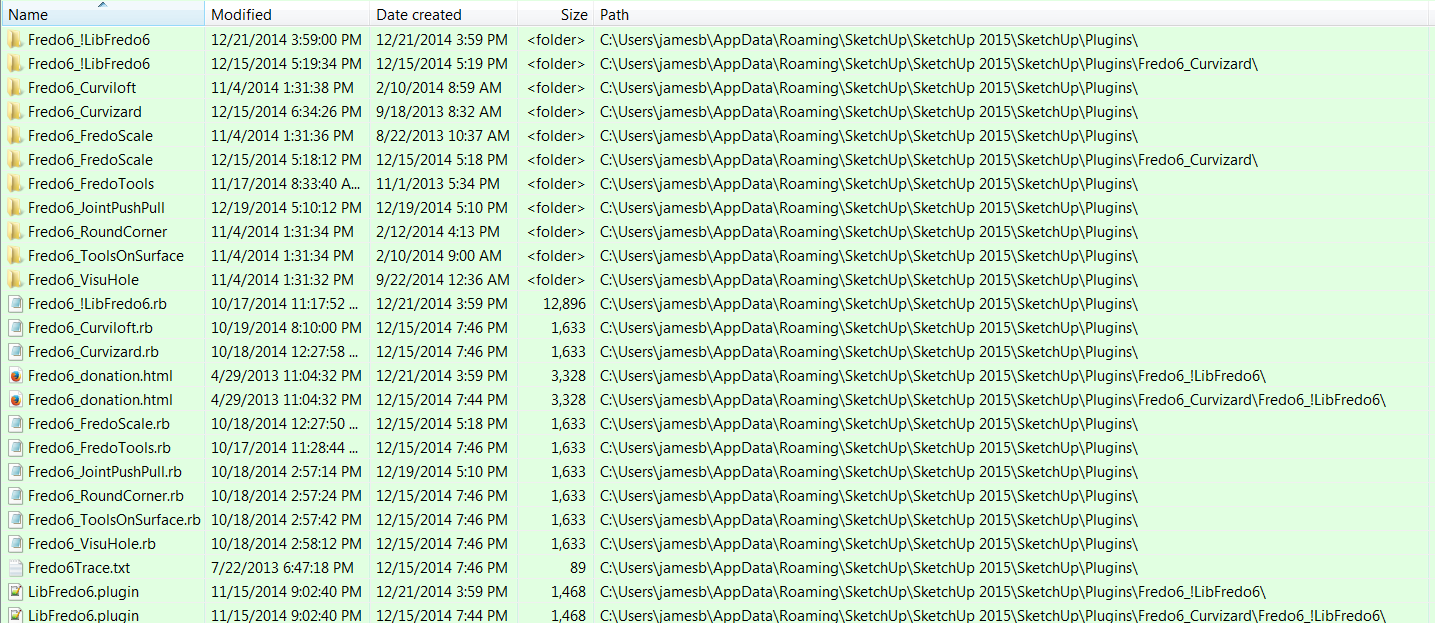
This is an Excel spreadsheet showing all of the loaded plugins/extensions except for Thea and 3dconexxion which are in C:/ProgramData/SketchUp/SketchUp 2015/SketchUp/Plugins folder.
2015 Plugins.xls -
Nil desperandum !
We will get there.

The first thing I see that's not right is that you have a copy of the 'Fredo6_!LibFredo6' folder INSIDE the 'Fredo6_Curviloft' folder.
It is not needed, it's not as shipped and should be removed.
Although I can't see how that might be affecting things !
The only 'Fredo6_!LibFredo6' folder should be in the Plugins folder.After the removal of the wrong copy can you restart to see if anything is better...
You also appear to have several OLD versions folders and files that are not needed and might cause issues... [all of Fredo's latest compatible stuff tends to now start with 'Fredo' - exceptions being '!AdditionalPluginFolders.rb' ?]
LibTraductor.rb
JPP_Dir_20
ROUNDCORNER_Dir_23
TOPOSHAPER_Dir_10
TOS_Dir_18Perhaps 'DEFPARAM_Dir' - Fredo to advise ??
You also have some files named:
cd_power_extension_m.rb
cd_power_m.rb
cd_power_n.rb
etcAre they the toolbar ones causing issues with adding 'rogue files' [can't see those files though] ??
NOT sure about 'BZ_Dir_17' or 'DOCUMENTATION_Dir' - Fredo should advise...
Also, what are the 'round_corners.rb', 'loader.rb', 'autoloader.rb' and 'AUTOLOADER_Dir' ?
These don't sound right ??You do have dozens of Plugins enabled and loading, so one of those might be throwing Fredo's Lib off unfairly...
If we are still having issues can I suggest you use the SketchUcation Plugins Manager, make a Set of the current setup [blue button], the Select all of the Enabled/Loaded plugins, except for the 'Fredo' ones, and then use the red button to Disable them. Save that set as another name...
Now restart SketchUp.
If we still get the issue with Fredo's Lib then we know it's not from an interaction with the others.
BUT if we don't have problems you can start loading back the Disabled ones a few at a time, until you break it - then you have a suspect/culprit... -
Bob,
Why don't you simply remove all my plugins files and folders, and then reinstall from the Plugin Store, checking at each step that this is OK.
Fredo
-
@fredo6 said:
Bob,
Why don't you simply remove all my plugins files and folders, and then reinstall from the Plugin Store, checking at each step that this is OK.
Fredo
ALL of your plugins are freshly installed using SketchUcation Plugin Store
-
@bob james said:
@fredo6 said:
Bob,
Why don't you simply remove all my plugins files and folders, and then reinstall from the Plugin Store, checking at each step that this is OK.
Fredo
ALL of your plugins are freshly installed using SketchUcation Plugin Store
@Bob
OK, try my suggestion first to tidy up, and then to have only Fredo's stuff loading [Plugins Manager] - if there's no issue something else is to blame and we are a step nearer catching the little varmint[s]...
You do have far more than the average number of Plugins loading, so it is quite possible something is producing weird results, so it's possible that Fredo's latest Lib is the collateral damage, and quite 'innocent'...... -
@tig said:
Nil desperandum !

.
@tig said:
The first thing I see that's not right is that you have a copy of the 'Fredo6_!LibFredo6' folder INSIDE the 'Fredo6_Curviloft' folder.
It is not needed, it's not as shipped and should be removed.
Although I can't see how that might be affecting things !
The only 'Fredo6_!LibFredo6' folder should be in the Plugins folder.
After the removal of the wrong copy can you restart to see if anything is better... .I noticed that and removed it, It had no effect.
I removed all Fredo plugins and did a fresh install using SketchUcation Plugin Store so what's there came from those installations. -
Please re-read my post...
I suggested that you Disable 'everything that is not "Fredo"' - temporarily, using the Plugins Managers Sets to make it easy...
And restarted SketchUp to see if the error remains.
Disabling the Fredo stuff might prevent that error appearing - but something that still loads might still then cause the error when the Lib is re-enabled - so we are not a step forward...IF you still get the Fredo Lib errors with only the Fredo stuff loading then it is to blame...
BUT if not something else which you currently have Disabled is actually the culprit...Since you have nothing odd about your windows-user-name or your Windows setup, you should not have these errors, IF all of your installed plugins are compatible with 'UTF-8...'
Please try my steps to see what is the culprit - I think it's NOT Fredo's Lib, but something that is interacting with it unexpectedly...
I wait to be proved wrong -
@tig said:
Please re-read my post...
I did those things before you sent that message

I'm working on your suggestions now. -
:heart_eyes:I'm happy to announce to TIG and Fredo that all is well

I deleted:- LibTraductor.rb
JPP_Dir_20
ROUNDCORNER_Dir_23
TOPOSHAPER_Dir_10
TOS_Dir_18
cd_power_extension_m.rb
cd_power_m.rb
cd_power_n.rb
Although I don't know which one was the bad guy because I deleted all of them at once. I didn't use SketchUcation Plugins Manager because I've never used it before and didn't want to mess things up by doing it incorrectly.
'BZ_Dir_17' is Bezierspline
'DOCUMENTATION_Dir' is emptyI'm sure you both are relieved as much as I that this is resolved.
Thank you both for your extra effort and patience.
- LibTraductor.rb
-
@bob james said:
ALL of your plugins are freshly installed using SketchUcation Plugin Store
But then, do you still have problems?
Fredo
-
-
NEW RELEASE: LibFredo6 v6.5a - 30 Dec 14
LibFredo6 6.5a is a release mainly for TopoShaper 2.0 (Terrain from Cloud of Points). It also fixes a few bugs, in particular for exotic setup with non-ascii usernames and Linux configuration.
See main post of this thread for Download of LibFredo6.
Fredo
-
NEW RELEASE: LibFredo6 v6.6a - 10 Jan 15
LibFredo6 6.6a is a release mainly for FredoTools::ElementStats 1.0 (Interactive Statistics on Model and Entities). It also fixes a few bugs.
See main post of this thread for Download of LibFredo6.
Fredo
-
Spanish Language LibFredo6 v6.6a
-
NEW RELEASE: LibFredo6 v6.6b - 18 Jan 15
LibFredo6 6.6b is a small update of the v6.6a release mainly for FredoTools::ElementStats 1.0 (Interactive Statistics on Model and Entities). It fixes a few bugs and some adjustments. Il also includes an update to the Spanish translation by Oxer.
See main post of this thread for Download of LibFredo6.
Fredo
-
Thank
-
Dear Fredo Curviloft not working in 2015 SU. Please help us
Thanks
-
@cemileca said:
Dear Fredo Curviloft not working in 2015 SU. Please help us
Thanks
In Fredo's absence... Have you installed the latest version from RBZ from the PluginStore ?
http://sketchucation.com/pluginstore?pln=CurviloftHave you also installed the latest version of the LibFredo ?
http://sketchucation.com/pluginstore?pln=LibFredo6Have you then restarted SketchUp to effect the updates ?
If so how is it 'not working' ?
e.g.
Not loading ?
Not functioning as expected ?
Error messages ?
etc...Help us to help you...
-
You are Super,
Plugin Working...
Thank you Very Very much for your attention and interest..
-
Hy
I install LibFredo 6.6b (SU2015) but not show the toolbar. I set the "Prefered language" EN. On SU toolbars panel not appear Fredo6 toolbar, but install other plugin that immediately appear on toolbar.Please help.






Advertisement