sketchucation logo sketchucation
    • 登入
    Oops, your profile's looking a bit empty! To help us tailor your experience, please fill in key details like your SketchUp version, skill level, operating system, and more. Update and save your info on your profile page today!
    🔌 Smart Spline | Fluid way to handle splines for furniture design and complex structures. Download

    [Plugin Library] LibFredo6 - v15.8e - 15 Feb 26


    已排程 已置頂 已鎖定 已移動 Plugins
    2.2k 貼文 573 Posters 4.2m 瀏覽 575 Watching
    正在載入更多貼文
    • 從舊到新
    • 從新到舊
    • 最多點贊
    回覆
    • 在新貼文中回覆
    登入後回覆
    此主題已被刪除。只有擁有主題管理權限的使用者可以查看。
    • danchoD 離線
      dancho
      最後由 編輯

      Hi,
      yesterday i was updated my plugin LibFredo6 to version v.4.7c
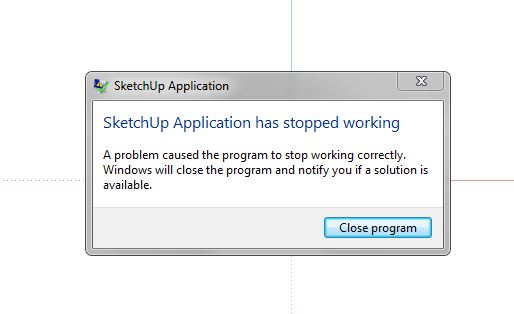
      After restarting SU there was message "Sketchup App has stopped working"

      When I change back a version 4.7a everything is ok.
      I was try with empy PLUGIN folder and put inside only LibFredo6 v.4.7c,
      and SU stop imediately.

      System: WIN 7 64bit, latest SU PRO.

      Any suggestion?

      Regards,
      Daniel

      SU.JPG

      1 條回覆 最後回覆 回覆 引用 0
      • fredo6F 離線
        fredo6
        最後由 編輯

        @dancho said:

        Hi,
        yesterday i was updated my plugin LibFredo6 to version v.4.7c
        After restarting SU there was message "Sketchup App has stopped working"

        Is this something you can reproduce systematically?

        Thanks

        Fredo

        1 條回覆 最後回覆 回覆 引用 0
        • rwarchpcR 離線
          rwarchpc
          最後由 編輯

          Hello Fredo,

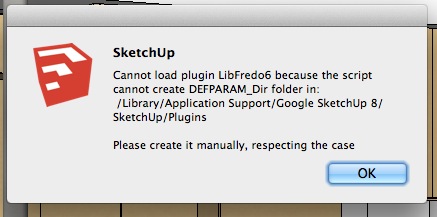
          I am trying to install LibFredo6 per your instructions and keep getting an error message, as shown in the attached screen shot. Any idea what I'm doing wrong? I am running SU pro 8 on a mac.

          Screen Shot 2013-04-23 at 10.12.41 AM.jpg

          1 條回覆 最後回覆 回覆 引用 0
          • TIGT 離線
            TIG Moderator
            最後由 編輯

            @Robert

            You do not have sufficient security-permissions to the Plugins folder - its path is given in the error-message.
            Some tools need to write logs and other temporary files into the folder or a subfolder, if you have limited rights they can't and therefore fail.
            This has been discussed oin several posts - including in this very thread.
            So you need to set your security-permissions to FULL Read/Write...
            To avoid repeating ourselves for the umpteenth time here's how...
            http://sketchucation.com/forums/viewtopic.php?p=468689#p468689

            TIG

            1 條回覆 最後回覆 回覆 引用 0
            • rwarchpcR 離線
              rwarchpc
              最後由 編輯

              Many thanks.

              RW

              1 條回覆 最後回覆 回覆 引用 0
              • M 離線
                Missy_X
                最後由 編輯

                Hmmm i have a problem suddenly that if i have libfredo 4.7c installed, my Sketchup bugsplats. Worked fine yesterday. Tried reinstalling, clearing plugin folder : sketchup works then and keeps working while i put my plugins back until i put libfredo back. Even tried clean install with just libfredo installed, no other plugins at all, crashes too .. looks confused. Can i get 4.7a somewhere still to test with ? Or anybody has any ideas what the problem might be ?

                1 條回覆 最後回覆 回覆 引用 0
                • TIGT 離線
                  TIG Moderator
                  最後由 編輯

                  It won't suddenly turn bad.
                  Have you installed something else recently.
                  That might be clashing with Fredo's normally peaceful toolsets...

                  There are several BIM tools around that add rogue observers etc that then cause issues with legit tools...
                  It's odd it's crashing with just Fredo's ??
                  Try installing his tools afresh, then add back in other tools till it breaks, you then have the clasher ???

                  TIG

                  1 條回覆 最後回覆 回覆 引用 0
                  • M 離線
                    Missy_X
                    最後由 編輯

                    Haven't installed any plugins lately.

                    Ok just tried again to make sure.

                    Step 1 : delete everything in plugin folder.
                    Step 2: start Sketchup to test : works
                    Step 3 : download libfredo 4.7c from 1st page here, unzip to plugins folder
                    Step 4 : start Sketchup to test : bugsplat

                    1 條回覆 最後回覆 回覆 引用 0
                    • TIGT 離線
                      TIG Moderator
                      最後由 編輯

                      You should NOT delete everything - some Plugins files/folders arrive with SketchUp.
                      Try reinstalling/repairing SketchUp iself.
                      Then add the Fredo-Lib...

                      If it fails again a screen shot of your Plugins folder please...

                      TIG

                      1 條回覆 最後回覆 回覆 引用 0
                      • M 離線
                        Missy_X
                        最後由 編輯

                        Ok, uninstalled and reinstalled Sketchup
                        Installed Libfredo 4.7c : seemed fine at first
                        Then went on with installing the sketchucation plugin store : bugsplat
                        Removed plugin store : still bugsplat
                        Removed libfredo 4.7c : sketchup works again
                        Installed all my plugins except libfredo 4.7c : works
                        Installed libfredo 4.7c again : bugsplat
                        Uninstalled libfredo 4.7c and installed 4.7a : works

                        I think something is wrong with 4.7c checking for updates of other plugins or something like that ?

                        1 條回覆 最後回覆 回覆 引用 0
                        • M 離線
                          Missy_X
                          最後由 編輯

                          Nevermind, same thing is happening with 4.7a now too all the sudden .. and sketchup works again when i remove it. I don't get it .. fresh install of sketchup with just libfredo works, anything else i add : bugsplat until i delete libfredo.

                          1 條回覆 最後回覆 回覆 引用 0
                          • fredo6F 離線
                            fredo6
                            最後由 編輯

                            @Missy_X

                            Do you run SU on a Mac or on Windows?

                            Fredo

                            1 條回覆 最後回覆 回覆 引用 0
                            • M 離線
                              Missy_X
                              最後由 編輯

                              Windows 7, administrator rights

                              1 條回覆 最後回覆 回覆 引用 0
                              • TIGT 離線
                                TIG Moderator
                                最後由 編輯

                                Select the Plugins folder icon: right-click > context-menu > Properties > Security > Edit.
                                Ensure everyone in the list has FULL rights...
                                OK to apply and close...
                                Being an 'admin' doesn't guarantee that the Plugins folder is [fully] writable for you - this can cause subtle issues...

                                TIG

                                1 條回覆 最後回覆 回覆 引用 0
                                • M 離線
                                  Missy_X
                                  最後由 編輯

                                  Checked and everyone has full rights

                                  1 條回覆 最後回覆 回覆 引用 0
                                  • M 離線
                                    Missy_X
                                    最後由 編輯

                                    OK nevermind, somehow rebooting my pc fixed the problem lol (yes yes, first thing everyone should try when a pc acts weird, i know ! lol)

                                    1 條回覆 最後回覆 回覆 引用 0
                                    • fredo6F 離線
                                      fredo6
                                      最後由 編輯

                                      @missy_x said:

                                      OK nevermind, somehow rebooting my pc fixed the problem lol (yes yes, first thing everyone should try when a pc acts weird, i know ! lol)

                                      Glad you recover the situation.

                                      However the problem you encountered is puzzling.

                                      Fredo

                                      1 條回覆 最後回覆 回覆 引用 0
                                      • M 離線
                                        Missy_X
                                        最後由 編輯

                                        Yes i know, i never had it happen before and it doesn't make any sense. Anyway, thank you Fredo and TIG for trying to help. 😄 All this made me realize how addicted i am to Sketchup and all the plugins you guys make. Half a day with Sketchup not working and i was going completely nuts. 😆

                                        1 條回覆 最後回覆 回覆 引用 0
                                        • fredo6F 離線
                                          fredo6
                                          最後由 編輯

                                          NEW RELEASE: LibFredo6 v4.8a - 25 Apr 13

                                          LibFredo6 4.8a is a major release dedicated to TopoShaper 1.0 (a script to generate terrain from contours).

                                          See main post of this thread for Download.

                                          Fredo

                                          1 條回覆 最後回覆 回覆 引用 0
                                          • W 離線
                                            Woody Longspike
                                            最後由 編輯

                                            @antuan said:

                                            Hi,
                                            I had Tools on surface, Fredo Scale and other Fredo plugins installed in SU 7.1 and all was working OK. Today I installed SU 8, downloaded last versions of same plugins and everything worked OK until I tried to open Default Parameters dialog. It simply didn't open for any of the plugins... I reinstall plugins, even reinstall SU... nothing, the Default Parameters doesn't open. Any idea to solve that?
                                            Thank you in advance.

                                            I seem to be experiencing the same mysterious problem. Did clean reinstall of latest SU, and only additional plugin folder plugin. Then installed LibFredo6-v4.8, & TOSv1.8 in newly made additional folder everything seems to work except Default Parameter window still doesn't open. Made new isolated additional folder on drive E:\ (an SD card) then installed LibFredo6-v4.8, & Latest Round Corner plugin there. It works but still no Default Parameter Dialog window. Will post all kinds of screenshots if need be, let me know what you need from me. O.S. = Windows XP 32 home version, Thanks in advance.


                                            1 條回覆 最後回覆 回覆 引用 0
                                            • 1
                                            • 2
                                            • 106
                                            • 107
                                            • 108
                                            • 109
                                            • 110
                                            • 108 / 110
                                            • 第一個貼文
                                              最後的貼文
                                            Buy SketchPlus
                                            Buy SUbD
                                            Buy WrapR
                                            Buy eBook
                                            Buy Modelur
                                            Buy Vertex Tools
                                            Buy SketchCuisine
                                            Buy FormFonts

                                            Advertisement