sketchucation logo sketchucation
    • 登入
    Oops, your profile's looking a bit empty! To help us tailor your experience, please fill in key details like your SketchUp version, skill level, operating system, and more. Update and save your info on your profile page today!
    🔌 Smart Spline | Fluid way to handle splines for furniture design and complex structures. Download

    [Plugin Library] LibFredo6 - v15.8e - 15 Feb 26


    已排程 已置頂 已鎖定 已移動 Plugins
    2.2k 貼文 573 Posters 4.2m 瀏覽 575 Watching
    正在載入更多貼文
    • 從舊到新
    • 從新到舊
    • 最多點贊
    回覆
    • 在新貼文中回覆
    登入後回覆
    此主題已被刪除。只有擁有主題管理權限的使用者可以查看。
    • Dave RD 離線
      Dave R
      最後由 編輯

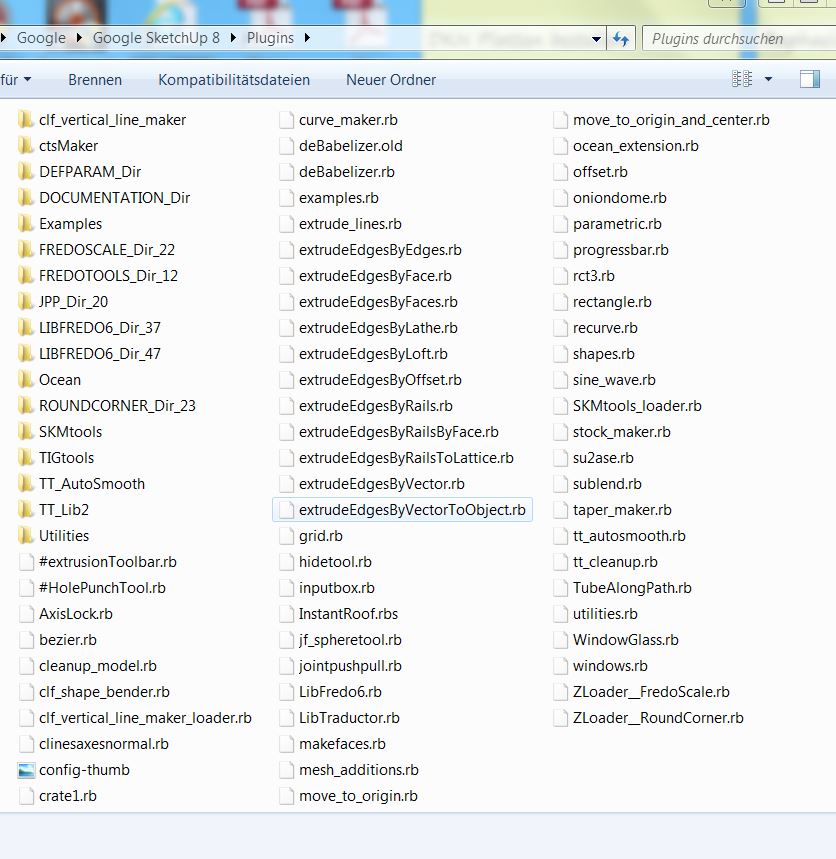
      As TIG already requested once, post a screen shot of the Plugins folder. Also post one of the LibFredo6 folder.

      It sounds like either an installation problem or a clash with some other plugin.

      Etaoin Shrdlu

      %

      (THERE'S NO PLACE LIKE)

      G28 X0.0 Y0.0 Z0.0

      M30

      %

      1 條回覆 最後回覆 回覆 引用 0
      • picky1958P 離線
        picky1958
        最後由 編輯

        @dave r said:

        As TIG already requested once, post a screen shot of the Plugins folder. Also post one of the LibFredo6 folder.

        It sounds like either an installation problem or a clash with some other plugin.

        Well, now it works! I set the computer back to before the last update und... no problem anymore!

        Strange, ha?

        Screenshot.JPG

        1 條回覆 最後回覆 回覆 引用 0
        • Dave RD 離線
          Dave R
          最後由 編輯

          So why don't you remove LIBFREDO6_Dir_37?

          And what happens if you update Windows again?

          Etaoin Shrdlu

          %

          (THERE'S NO PLACE LIKE)

          G28 X0.0 Y0.0 Z0.0

          M30

          %

          1 條回覆 最後回覆 回覆 引用 0
          • picky1958P 離線
            picky1958
            最後由 編輯

            @dave r said:

            So why don't you remove LIBFREDO6_Dir_37?

            And what happens if you update Windows again?

            Oh, yeah, I forgot about removing that one now. I did that before... but it still was not working. I took all files an folders away and then I put them back one by one, testing each time. Everything went well until I copied the new LibFredo6.rb in the folder. Like I said... now it's working well. And... I have no clue what is going to happen after a new update. Probably I will be here, screaming for help again! 😉

            1 條回覆 最後回覆 回覆 引用 0
            • picky1958P 離線
              picky1958
              最後由 編輯

              @dave r said:

              So why don't you remove LIBFREDO6_Dir_37?

              And what happens if you update Windows again?

              Sooooo... Windows updatet itself again... but wonder oh wonder... nothing bad is happened this time. SU works and LibFredo6 as well! No problems so far! ☀

              1 條回覆 最後回覆 回覆 引用 0
              • R 離線
                rayisaacs
                最後由 編輯

                not very experienced with ruby scripts. but, the ruby scripts update info directed me to this:

                [Plugin Library] LibFredo6 - v4.7a - 28 Nov 12

                how do i i downloaded it? the page says go to "zip archive". where is that?

                1 條回覆 最後回覆 回覆 引用 0
                • thomthomT 離線
                  thomthom
                  最後由 編輯

                  @rayisaacs said:

                  how do i i downloaded it? the page says go to "zip archive". where is that?

                  Go to the first post on the first page and look for the yellow Download button.

                  Thomas Thomassen — SketchUp Monkey & Coding addict
                  List of my plugins and link to the CookieWare fund

                  1 條回覆 最後回覆 回覆 引用 0
                  • KrisidiousK 離線
                    Krisidious
                    最後由 編輯

                    459,966 page views on this thread... that's got to be some kind of record.

                    By: Kristoff Rand
                    Home DesignerUnique House Plans

                    1 條回覆 最後回覆 回覆 引用 0
                    • T 離線
                      tovasafra
                      最後由 編輯

                      Can someone please help me out?

                      I have installed the libfredo6 according to instructions but i get these two messages on seketchup 8 startup:

                      Cannot load plugin LibFredo6 because the script cannot create DEFPARAM_Dir folder in:
                      /Library/Application Support/Google SketchUp 8/SketchUp/Plugins

                      Please create it manually, respecting the case

                      AND THEN

                      Error Loading File clf_color_by_slope.rb
                      undefined method file_loaded?' for main:ObjectError Loading File LibFredo6.rb undefined method average_load_time' for Traductor::Plugin:Class

                      what can i do about this? I am working on a mac with snow leopard.

                      Many thanks for your help!

                      1 條回覆 最後回覆 回覆 引用 0
                      • Dave RD 離線
                        Dave R
                        最後由 編輯

                        Make sure you have full read and write permissions established for the Plugins folder specified in the first error message. Then try restarting SketchUp and see what happens.

                        The second error message appears to be due to the fact that LibFredo6 can't complete loading so fixing the first should take care or the second. Funny, though. I didn't know that Chris had made a plugin dependent on LibFredo6.

                        Etaoin Shrdlu

                        %

                        (THERE'S NO PLACE LIKE)

                        G28 X0.0 Y0.0 Z0.0

                        M30

                        %

                        1 條回覆 最後回覆 回覆 引用 0
                        • thomthomT 離線
                          thomthom
                          最後由 編輯

                          Don't think he has - but there's two errors there. When properly formatted:

                          Error Loading File clf_color_by_slope.rb undefined methodfile_loaded?' for main:Object

                          Error Loading File LibFredo6.rb
                          undefined method average_load_time' for Traductor::Plugin:Class

                          For the first - clf_color_by_slope.rb when it says undefined methodfile_loaded?' for main:Objectit sounds like clf_color_by_slope.rbis the first .rb file to load and it doesn't include require 'sketchup.rb'` at the top.

                          The second one - I don't know... That's a fredo thing. Maybe incorrect installation?

                          Thomas Thomassen — SketchUp Monkey & Coding addict
                          List of my plugins and link to the CookieWare fund

                          1 條回覆 最後回覆 回覆 引用 0
                          • Dave RD 離線
                            Dave R
                            最後由 編輯

                            It was the line break that screwed me up.

                            Etaoin Shrdlu

                            %

                            (THERE'S NO PLACE LIKE)

                            G28 X0.0 Y0.0 Z0.0

                            M30

                            %

                            1 條回覆 最後回覆 回覆 引用 0
                            • thomthomT 離線
                              thomthom
                              最後由 編輯

                              Yea - it's an annoying and little helpful error message. ...I might bump this issue...

                              Thomas Thomassen — SketchUp Monkey & Coding addict
                              List of my plugins and link to the CookieWare fund

                              1 條回覆 最後回覆 回覆 引用 0
                              • T 離線
                                tovasafra
                                最後由 編輯

                                Thank you all for your suggestions- I realized the the color by slope plugin (separate from libfredo) that I had tried to install the day before, was also not loading and therefore also part of the error message.

                                The other plugins in my plugins folder all work, except for color by slope, and now the libfredo. The plugins folder seems kind of cluttered now. Is that ok?

                                As regards to permission, when I tried to install the libfredo, I did get the popup window asking for password in order to make changes to the plugins folder, and I gave it (since it is my own computer). I wasn't asked to give that access password in order to create any other folders or give access at any other point in the installation - and I do not know how to create the DEFPARAM_Dir folder that it asks me to create manually. (or rather, I don't trust myself to do it correctly and have things work)

                                Should I just try to do it manually? Will that work, do you think?

                                Thanks for helping a total novice!

                                1 條回覆 最後回覆 回覆 引用 0
                                • Dave RD 離線
                                  Dave R
                                  最後由 編輯

                                  You should change the permissions for the Plugins folder to Read and Write so that you don't run into these sorts of problems again when you install other plugins.

                                  Etaoin Shrdlu

                                  %

                                  (THERE'S NO PLACE LIKE)

                                  G28 X0.0 Y0.0 Z0.0

                                  M30

                                  %

                                  1 條回覆 最後回覆 回覆 引用 0
                                  • TIGT 離線
                                    TIG Moderator
                                    最後由 編輯

                                    @tovasfra

                                    You need to adjust the access-rights to your MAC's plugins folder [HD main one not the 'user' one...]
                                    They need to be FULL read/write.
                                    Some tools like Fredo's Lib need to write files to the plugins folder and if you have had to jump through hops to manually add a file there is no way the script is going to manage to do it !
                                    I think Dave_R wrote something about setting MAC folder permissions...
                                    Perhaps he can point you at it ?

                                    TIG

                                    1 條回覆 最後回覆 回覆 引用 0
                                    • Dave RD 離線
                                      Dave R
                                      最後由 編輯

                                      @tig said:

                                      I think Dave_R wrote something about setting MAC folder permissions...
                                      Perhaps he can point you at it ?

                                      I did. I'll have to find it. Or maybe remake it.

                                      Etaoin Shrdlu

                                      %

                                      (THERE'S NO PLACE LIKE)

                                      G28 X0.0 Y0.0 Z0.0

                                      M30

                                      %

                                      1 條回覆 最後回覆 回覆 引用 0
                                      • Dave RD 離線
                                        Dave R
                                        最後由 編輯

                                        Here we go.

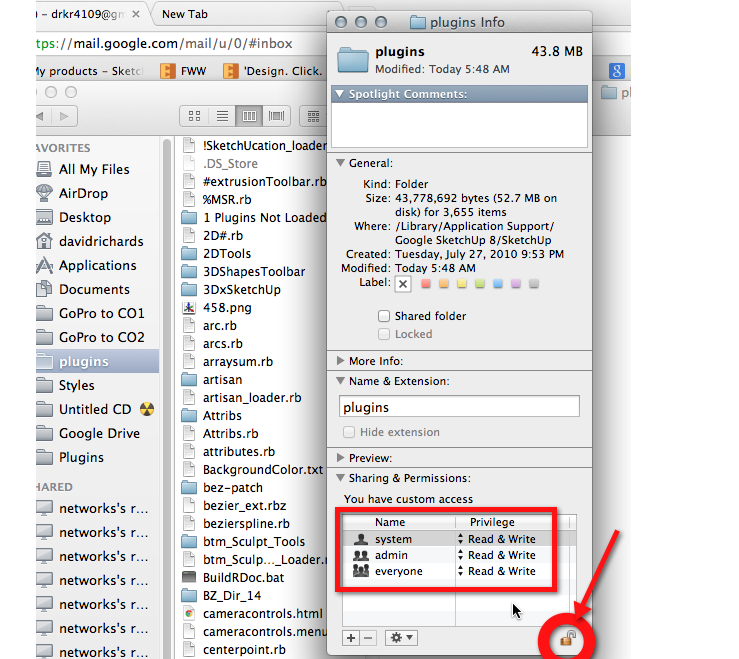
                                        Navigate to the Plugins folder, right click on it and choose Get Info. At the bottom of the window click on the Lock icon to allow changes. Enter your password as required. Then change all of the permissions to Read & Write. Close the Info box. Make sure you have already quit SketchUp and open it. LibFredo6 should now be able to create the file it needs to make.
                                        Permissions.png

                                        FWIW, I have added the Plugins folder to the Favorites column so I can easily drag plugins from the Downloads folder to Plugins without any real navigation. The Sketchucation Store plugin makes it much simpler to find and install plugins, though.

                                        Etaoin Shrdlu

                                        %

                                        (THERE'S NO PLACE LIKE)

                                        G28 X0.0 Y0.0 Z0.0

                                        M30

                                        %

                                        1 條回覆 最後回覆 回覆 引用 0
                                        • T 離線
                                          tovasafra
                                          最後由 編輯

                                          THANKS! works great now.

                                          1 條回覆 最後回覆 回覆 引用 0
                                          • danchoD 離線
                                            dancho
                                            最後由 編輯

                                            Hi,
                                            yesterday i was updated my plugin LibFredo6 to version v.4.7c
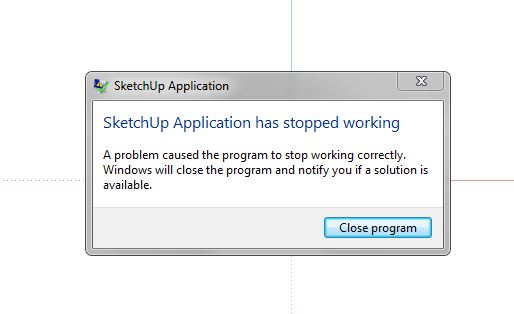
                                            After restarting SU there was message "Sketchup App has stopped working"

                                            When I change back a version 4.7a everything is ok.
                                            I was try with empy PLUGIN folder and put inside only LibFredo6 v.4.7c,
                                            and SU stop imediately.

                                            System: WIN 7 64bit, latest SU PRO.

                                            Any suggestion?

                                            Regards,
                                            Daniel

                                            SU.JPG

                                            1 條回覆 最後回覆 回覆 引用 0
                                            • 1
                                            • 2
                                            • 27
                                            • 28
                                            • 29
                                            • 30
                                            • 31
                                            • 109
                                            • 110
                                            • 29 / 110
                                            • 第一個貼文
                                              最後的貼文
                                            Buy SketchPlus
                                            Buy SUbD
                                            Buy WrapR
                                            Buy eBook
                                            Buy Modelur
                                            Buy Vertex Tools
                                            Buy SketchCuisine
                                            Buy FormFonts

                                            Advertisement