sketchucation logo sketchucation
    • 登入
    Oops, your profile's looking a bit empty! To help us tailor your experience, please fill in key details like your SketchUp version, skill level, operating system, and more. Update and save your info on your profile page today!
    🔌 Smart Spline | Fluid way to handle splines for furniture design and complex structures. Download

    [Plugin Library] LibFredo6 - v15.8e - 15 Feb 26


    已排程 已置頂 已鎖定 已移動 Plugins
    2.2k 貼文 573 Posters 4.2m 瀏覽 575 Watching
    正在載入更多貼文
    • 從舊到新
    • 從新到舊
    • 最多點贊
    回覆
    • 在新貼文中回覆
    登入後回覆
    此主題已被刪除。只有擁有主題管理權限的使用者可以查看。
    • Dave RD 離線
      Dave R
      最後由 編輯

      Others are using FredoScale with OS 10.8.1 so it isn't likely to be Fredo's files. Others have reported that the permissions for the Plugins folder have changed after upgrading the OS. Perhaps that's what has happened in your case. Make sure the Plugins folder isn't set to be Read Only.

      Etaoin Shrdlu

      %

      (THERE'S NO PLACE LIKE)

      G28 X0.0 Y0.0 Z0.0

      M30

      %

      1 條回覆 最後回覆 回覆 引用 0
      • TIGT 離線
        TIG Moderator
        最後由 編輯

        Very good point ☀
        Fredo's tools [and some other tools too] write log or temporary files etc into the Plugins folder, so if that folder's 'write' permissions are not set properly [Read/Write for all] then a tool can fail - seemingly catastrophically in your case.

        TIG

        1 條回覆 最後回覆 回覆 引用 0
        • C 離線
          cacowan
          最後由 編輯

          I checked the read and write settings, and changed "everyone" to r&w just in case it didn't see me as admin. first two tries, it worked. Then crashed the next 6 times. Went to the sketch up root folder above plugins... Made sure it and all it's contents are r&w... Rebooted sketch up... And crash. It allows me to select the tool, position the grid, and the as soon as I select the toggle on that axis... Sketchup closes. Same as always... But for two brief seconds I was smiling...

          I'll try a complete system reboot and check to make sure it's still all r&w... But any other suggestions?

          1 條回覆 最後回覆 回覆 引用 0
          • Dave RD 離線
            Dave R
            最後由 編輯

            What other plugins do you have? Perhaps there's a conflict. Do you have Sketchy Physics by any chance? It is known to wreak havoc on other plugins.

            Etaoin Shrdlu

            %

            (THERE'S NO PLACE LIKE)

            G28 X0.0 Y0.0 Z0.0

            M30

            %

            1 條回覆 最後回覆 回覆 引用 0
            • TIGT 離線
              TIG Moderator
              最後由 編輯

              Make sure the full R&W permissions 'permeate' into the changed folder's "contents" - files/subfolders/their-files etc.
              Just fixing a folder's permissions might not be enough - if for example it were to leave a log-file with read-only permissions, when it needs read AND write permissions, will cause issues...

              TIG

              1 條回覆 最後回覆 回覆 引用 0
              • C 離線
                cacowan
                最後由 編輯

                Still trying and still frustrated in geting fredoscale to work. All files are updated. Computer re-started from a cold shut down. Only other plugin is mirror. All I really need is the fredo toolset. Mirror works. I had some idea that it was the z axis that had problems, but no. Sketchup closes with any movement or attempted movement of the toggle. Every file in the plugins folder is read and write.

                What would be the correct way to remove everything and re-download and re-install? Can I just delete them from the directory? I'm not sure which files are which now that it's been extracted to the plugins folder.

                Yikes.

                1 條回覆 最後回覆 回覆 引用 0
                • C 離線
                  cacowan
                  最後由 編輯

                  Something I just noticed... sometimes.... the toggles look like the scale tools in Sketchup... like there's three across... THAT's when it crashes. If I click away, and try the tool again...sometimes... the toggles remain singular, and then (as in the last two tries) it works. If the toggles are oversize and all black... it's like the tool launched incorrectly, and the crash happens. If this is how I have to work... then so be it. Got to get these drawings out tomorrow.

                  1 條回覆 最後回覆 回覆 引用 0
                  • fredo6F 離線
                    fredo6
                    最後由 編輯

                    @cacowan said:

                    Something I just noticed... sometimes.... the toggles look like the scale tools in Sketchup... like there's three across... THAT's when it crashes. If I click away, and try the tool again...sometimes... the toggles remain singular, and then (as in the last two tries) it works. If the toggles are oversize and all black... it's like the tool launched incorrectly, and the crash happens. If this is how I have to work... then so be it. Got to get these drawings out tomorrow.

                    Cacowan,

                    I guess the "toggles" you mention are actually the "handles" for scaling

                    To understand your problem, could you clarify the following

                    1. can you check you have in the Plugins directory

                      • FREDOSCALEDir_22 folder
                      • LibFredo6.rb
                      • LIBFREDO6_DIR_46 folder
                        ..and no other file with Fredoscale in their name
                    2. Do you have one of the following plugins installed?

                      • Podium
                      • Matchbox
                      • SunPosition
                      • SketchyPhysics
                    3. Do you see the FredoScale toolbar with all icons

                    4. does the crash happen when you use the Scale tool only, or any of the other tool (Bend, Twist, Rotate, Taper, ...). By the way, which tool do you use when it crashes

                    5. Does the crash happen with any model or just a particular model

                    6. can you open the Ruby console when you play with FredoScale, in case there are messages

                    Thanks

                    Fredo

                    1 條回覆 最後回覆 回覆 引用 0
                    • guanjinG 離線
                      guanjin
                      最後由 編輯

                      I install a lot of tools and did not find any problems, work properly! Thank the LibFredo6 work! !

                      I come from China, is to learn

                      1 條回覆 最後回覆 回覆 引用 0
                      • M 離線
                        mrossk
                        最後由 編輯

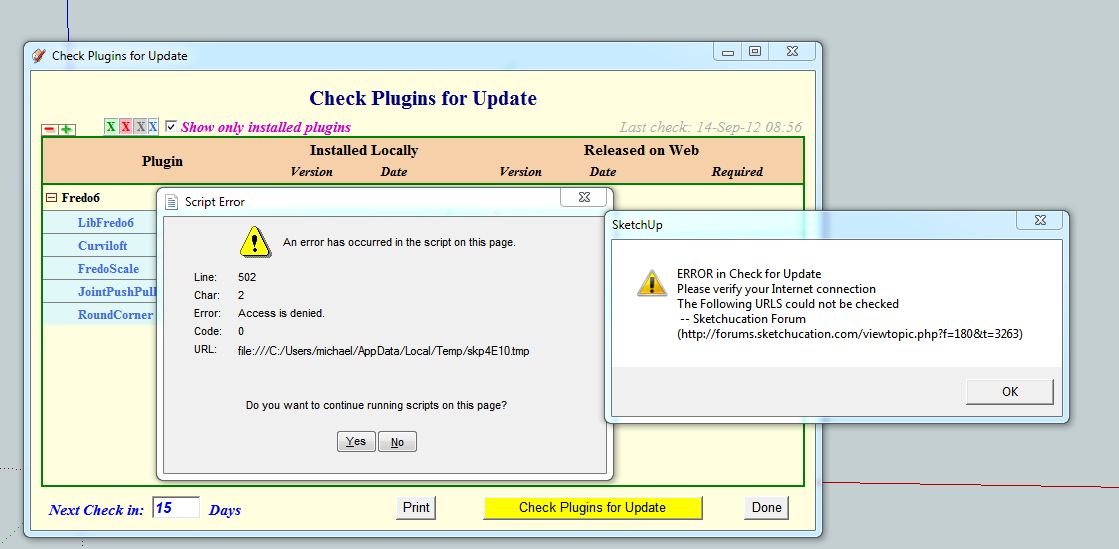
                        Hi- When I opened up Sketch-Up tonight there was the familiar "check for update" icon for the various Fredo plugins. I clicked the icon to check and recieved the following error messages:Capture.JPG

                        I've used this functionality many times without a problem. Any suggestions?

                        Thank you,
                        Michael

                        https://www.mkaplanfinefurniture.com/

                        1 條回覆 最後回覆 回覆 引用 0
                        • D 離線
                          driven
                          最後由 編輯

                          My 'guess' is it's the new forum server causing a problem... john

                          learn from the mistakes of others, you may not live long enough to make them all yourself...

                          1 條回覆 最後回覆 回覆 引用 0
                          • TIGT 離線
                            TIG Moderator
                            最後由 編輯

                            @driven said:

                            My 'guess' is it's the new forum server causing a problem... john
                            Yes, Fredo needs to update his tool's code to suit the new site address / format...

                            TIG

                            1 條回覆 最後回覆 回覆 引用 0
                            • M 離線
                              mrossk
                              最後由 編輯

                              Thanks guys. Usually things like this are me doing something dumb 😄

                              https://www.mkaplanfinefurniture.com/

                              1 條回覆 最後回覆 回覆 引用 0
                              • fredo6F 離線
                                fredo6
                                最後由 編輯

                                NEW RELEASE: LibFredo6 v4.6d - 03 Oct 12

                                LibFredo6 4.6d is a minor release which essentially fixes a problem in the functionality "Check for Updates". The issues comes from the change in URL schema of the new SKetchucation web site.

                                See main post of this thread for Download.

                                Fredo

                                1 條回覆 最後回覆 回覆 引用 0
                                • fredo6F 離線
                                  fredo6
                                  最後由 編輯

                                  @tig said:

                                  @driven said:

                                  My 'guess' is it's the new forum server causing a problem... john
                                  Yes, Fredo needs to update his tool's code to suit the new site address / format...

                                  TIG,

                                  The forum supports the old and new schemes.
                                  Unfortunately, when using Ajax (XMLHttpRequest), you need to have the new valid URL address.

                                  Fredo

                                  1 條回覆 最後回覆 回覆 引用 0
                                  • M 離線
                                    mrossk
                                    最後由 編輯

                                    Has anyone else successfully tried this? I just installed it, overwrote the exisitng files, and get the same error messages. Thank you,
                                    Michael

                                    https://www.mkaplanfinefurniture.com/

                                    1 條回覆 最後回覆 回覆 引用 0
                                    • TIGT 離線
                                      TIG Moderator
                                      最後由 編輯

                                      I still get an error.
                                      The error is because of the new SCF format, presumably the thread's code has changed... 😕
                                      Might it be TT's tools causing issues, rather than the updated Fredo tools.
                                      http://sketchucation.com/forums/viewtopic.php?p=358315#p358315
                                      Unfortunately the error message isn't very precise...
                                      😒

                                      TIG

                                      1 條回覆 最後回覆 回覆 引用 0
                                      • Dave RD 離線
                                        Dave R
                                        最後由 編輯

                                        I did it just now. It worked fine for me but told me that 4.6c is out of date. It did that after I installed 4.6d.

                                        Etaoin Shrdlu

                                        %

                                        (THERE'S NO PLACE LIKE)

                                        G28 X0.0 Y0.0 Z0.0

                                        M30

                                        %

                                        1 條回覆 最後回覆 回覆 引用 0
                                        • D 離線
                                          driven
                                          最後由 編輯

                                          hi Fredo,

                                          all working on the mac, from London... john

                                          learn from the mistakes of others, you may not live long enough to make them all yourself...

                                          1 條回覆 最後回覆 回覆 引用 0
                                          • fredo6F 離線
                                            fredo6
                                            最後由 編輯

                                            @mrossk said:

                                            Has anyone else successfully tried this? I just installed it, overwrote the exisitng files, and get the same error messages. Thank you,
                                            Michael

                                            When you call the CheckForUpdate dialog box (without updating), which version of LibFredo6 do you see ? LibFredo6 4.6c or LibFredo6 4.6d ?

                                            Fredo

                                            1 條回覆 最後回覆 回覆 引用 0
                                            • 1
                                            • 2
                                            • 93
                                            • 94
                                            • 95
                                            • 96
                                            • 97
                                            • 109
                                            • 110
                                            • 95 / 110
                                            • 第一個貼文
                                              最後的貼文
                                            Buy SketchPlus
                                            Buy SUbD
                                            Buy WrapR
                                            Buy eBook
                                            Buy Modelur
                                            Buy Vertex Tools
                                            Buy SketchCuisine
                                            Buy FormFonts

                                            Advertisement