[Plugin Library] LibFredo6 - v15.8e - 15 Feb 26



-
@ihanna said:
hello,
I just want to ask some help, I've already download those files twice but still not working, can you give me some advice? Thanks in advance.
You have to meet us half way. Give us something to help you out. We can't see your computer from here and you've given us no clue as to what you've done short of downloading the files.
 Did you extract the zip file into Program Files/ Google/Google SketchUp 8/Plugins? Did you extract them correctly? Do you have admin rights to install files into the Plugins folder?
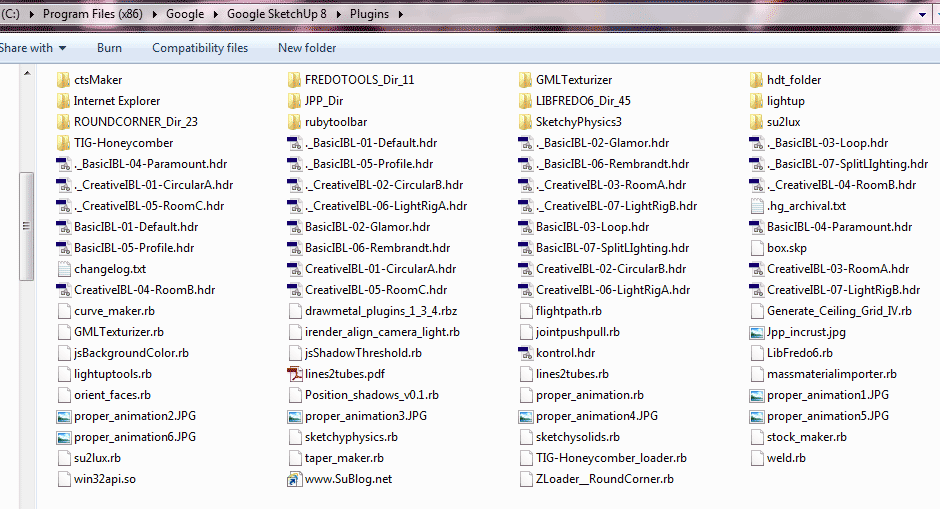
Post a screen shot of your Plugins folder showing the files installed correctly and we'll go from there.
-
These files don't do much on there own.

They are 'helpers' for many of Fredo's other tools, which don't work without the file and subfolder of files etc that form the 'Lib'...
-
Thanks you very lot ! It's Great.
-
Thanks again~

-
hi dear ferdo , I have a little question ...
.. maybe it's a bad question and I know that it takes much time for you to write these features fur us ... thanks a lot for time you spend and offering your incredible codes freely to us ... thanks ferdo ..
my question is
how to disable time tracer and updater part due to have a faster startup and a lighter SU ?
I'm a ruby newbie .. but you codes are too complex for me to trace .. .. I just wanna to know the .rb files that does these extra works ...
I'm sorry for asking these .. I believe that these parts ( specially Updater module )are very useful for all users .. and thanks for codding these parts ferdo ..

thanks
-
@the.pjt said:
my question is
how to disable time tracer and updater part due to have a faster startup and a lighter SU ?
I'm a ruby newbie .. but you codes are too complex for me to trace .. .. I just wanna to know the .rb files that does these extra works ...You don't need to edit the ruby files.
Normally, go to the CheckForUpdate dialog box and enter 999 (days) in the 'next check' field.Fredo
PS: 'Check for update' does not go to the Internet when SU Starts. It just checks the date to see if it should display the reminder, so it is very fast. The fact is that that the reminder is based on a WebDialog and the first web dialogs are used, it takes a little bit long (SU may load extra stuff or perform some operations in the background).
-
thanks feredo ... I hade done that ( 999 ) several days ago .. but I alwase see the ruby image (update check ) at start up .. how about time tracer tool ?
thanks for answer and support ferdo

-
hi Fredo, Thanks for this work you've done

I have unzipped it to my plugins folder on C:/Program Files(x86)/google/Google Sketchup 8/plugins but for some reasons I just cant find it in the menus! I have also put LibFredo6.rb in the plugins. am I missing something?
kindest regards
Disco
-

Can't seem to get the toolbar up. I've followed some of the posts and checked its in the right directory, and also ticked the box in Sketchup.
Any help would be appreciated
A.Noob lol
-
Which toolbar can't you get to display?
-
@dave r said:
Which toolbar can't you get to display?
The fredo sub menu under window. I've PM'd Fredo who has been kind enough to reply but so far I've not got to the bottom of it. I do have podium installed and fredo suggest it could be a clash with that?
Thanks for the reply Dave
-
Ah. I see. You said you couldn't get a toolbar to show which is confusing since it isn't a toolbar but a menu entry. So did you try disabling Podium and did that fix it?
-
NEW RELEASE: LibFredo6 v4.6c - 11 Jul 12
LibFredo6 4.6 is a new release which essentially support the publishing of Curvizard
See main post of this thread for Download.
Fredo
-
#---------------------------------------------------------------------------------
» [ Post in Spanish ]
#---------------------------------------------------------------------------------En este Post., Se Publicaran Las [ Traducciones al Español ] + Actualizaciones (Para los Plugins de la Fredo6Collection):
Estas Traducciones han Sido Revisadas Línea por Línea., y se han Actualizado durante Meses., para que sean lo Mas Perfectas Posibles., Además., estas Traducciones son Armoniosas entre si, y las Frases son mas Fáciles de Entender y mas Simples (En base a Muchos Días de Investigación y Experimentación)., es decir., Usan el Mismo estilo., para que los “Fredo6 Collection Plugins” sean Mas Fáciles de Entender y mas Amigables entre Si... ႿÐ!
๏̯͡๏ [ … ] Nota: Yo También Ajunto un Plugin., que enlaza este Post desde “SketchUp”: Para Buscar Actualizaciones de las Traducciones (Rápidamente)... ႿÐ!
Defisto [Dice]:
Con este Plugin se Mostrara la Siguiente Opción: Menú Ventana -> + Fredo6Collection (Es-Translations) -> Descargar Traducciones [ Español ]
Por cierto: Si deseas Debatir el Tema de las Traducciones Visita el Siguiente Enlace a un Tema en el Foro en Español:
http://forums.sketchucation.com/viewtopic.php?f=52&t=36889
PS: Ogvua... ႿÐ!
#---------------------------------------------------------------------------------
» [ Post in English ]
#---------------------------------------------------------------------------------In this Post is Published the [ Spanish Translation ] + Its [ Updates ] (for the Fredo6 Collection Plugins)
These translations have been checked line by line., and have been updated by months., to be as perfect as possible., also., these translations are harmonious with each other, and phrases are easier to understand and more simple (in Based on many days of Investigation and experimentation)., ie., wear the same style., for that the “Fredo6 Collection Plugins” are more easier to understand and more Match with each other... ႿÐ!
๏̯͡๏ [ … ] Note: I also Adjunct a plugin that links this Post from “SketchUp”: To Check for Updates of Translations (Quickly)... ႿÐ!
Defisto [Says]:
With this Plugin is will Display the Next Option: Window Menu -> + Fredo6Collection (Es-Translations) -> Download Translations [ Spanish ]
By the way: If you want to discuss the topic of translations visit the following link to a topic at the Forum in Spanish:
http://forums.sketchucation.com/viewtopic.php?f=52&t=36889
PS: Ogvua... ႿÐ!
Last Update 2011/04/23 (Version 1.1d = 100% Translate)
Last Update 2011/05/22 (Version 1.0a = 100% Translate)
Last Update 2011/05/23 (Version 0.3.2 = 100% Translate)
Last Update 2011/05/23 (Version 1.0 = 100% Translate)
Last Update 2011/05/23 (Version 1.4f = 100% Translate) - Translation Alternative !!
Last Update 2011/06/24 (Version 2.3a = 100% Translate)
Last Update 2011/07/24 (Version 2.2a = 100% Translate)
Last Update 2011/08/24 (Version 3.0a = 100% Translate)
Last Update 2011/09/06 (Version 1.8a = 100% Translate)
Last Update 2012/03/21 (Version 1.2a = 100% Translate)
Last Update 2012/03/21 (Version 1.2c = 100% Translate)
Last Update 2012/05/15 (Version 1.2a = 100% Translate)
Last Update 2012/07/15 (Version 1.0c = 100% Translate)
Last Update 2012/07/15 (Version 4.6c = 100% Translate)
-
I am really new to the plugins for Google sketchup. Can anyone tell me how to update my plugins?
-
For the external plugins go to to this page for the name of the plugin
and go to to the end of the first post of the thread address read on the list!
You will find the last Update of each plugin!And if you want the "indispensables" see my little list

-
Hi,
I know this might sound silly but I'm new to this and am having trouble with downloading the plug ins.. I want to download round corners and I thought in order to do so I needed to install the LibFred06. When it goes to download and I need to unzip it I DO NOT have a Sketchup Plugins folder option... How do I go about installing this? What do I do...
Thank You -
You do have a Plugins folder - unless you have deleted it.

It's automatically made by the Sketchup installation - it contains example scripts etc...
You will not have a Plugins Menu displayed unless you have some scripts 'active'.
Copy/Paste+<enter> this line of code into the Ruby Console [open that from Sketchup's Window menu] - it will display the path to the Plugins folder on you installation.Sketchup.find_support_file("Plugins")For a PC it's typically:
C:/Program Files/Google/Google SketchUp 8/Plugins
Make sure you have FULL security access permissions [set via properties] for all of your Sketchup folder's subfolders and their contents...I see you have v8 - with recent versions you could install archived tools using the Window>Preferences>Extensions 'load' button - BUT note that the archive needs to have a .rbz file suffix.
Thomthom has made a SimpleInstaller that does something similar, but also works on .zip archives and .rb/.rbs single files - automatically finding the Plugins folder and extracting files etc for you...
Find that in the Plugins Index - however you do need to put that into the Plugins folder and restart for it to auto-load, so we need to track down where that is... -
I tried typing Sketchup.find_support_file("Plugins") into the Ruby Console and nothing is happening?!!!!what do i do now?
-
Looks like you'll have to reinstall Sketchup - as an Admin - it should then make all missing folders/files etc.
Before that post a screen shot of your Sketchup folder showing the subfolders that you do have...
It's just weird.





Advertisement