sketchucation logo sketchucation
    • 登入
    Oops, your profile's looking a bit empty! To help us tailor your experience, please fill in key details like your SketchUp version, skill level, operating system, and more. Update and save your info on your profile page today!
    🔌 Smart Spline | Fluid way to handle splines for furniture design and complex structures. Download

    [Plugin Library] LibFredo6 - v15.8e - 15 Feb 26


    已排程 已置頂 已鎖定 已移動 Plugins
    2.2k 貼文 573 Posters 4.2m 瀏覽 575 Watching
    正在載入更多貼文
    • 從舊到新
    • 從新到舊
    • 最多點贊
    回覆
    • 在新貼文中回覆
    登入後回覆
    此主題已被刪除。只有擁有主題管理權限的使用者可以查看。
    • fredo6F 離線
      fredo6
      最後由 編輯

      NEW RELEASE: LibFredo6 v10.3b - 30 Apr 20

      LibFredo6 10.3b is a maintenance release for cosmetic adjustments.


      See plugin home page of LibFredo6 for Download of LibFredo6.

      Main Post of the LibFredo6 thread

      Fredo

      1 條回覆 最後回覆 回覆 引用 0
      • F 離線
        fedser
        最後由 編輯

        @unknownuser said:

        SU2020 does the registration correctly for me on three different computers. Are you certain you installed SketchUp correctly?

        The problem only occurs with a clean installation. If you have installed SU19 or SU19 + SU20 together or are doing an update, then there will be no problem. Keys will already be registered. Maybe my installer is broken, but other users have the same problem. Now there is a solution ...

        1 條回覆 最後回覆 回覆 引用 0
        • fredo6F 離線
          fredo6
          最後由 編輯

          NEW RELEASE: LibFredo6 v10.4a - 16 May 20

          LibFredo6 10.4a is a major maintenance release, with bug fixing and cosmetic adjustments, some for Mac OSX.


          See plugin home page of LibFredo6 for Download of LibFredo6.

          Main Post of the LibFredo6 thread

          Fredo

          1 條回覆 最後回覆 回覆 引用 0
          • T 離線
            TBoy
            最後由 編輯

            Fredo6, there is a tool in your plugin to show load times for plugins called 'Performances'.
            Is it possible to track the load times for any plugin - not only yours?

            1 條回覆 最後回覆 回覆 引用 0
            • fredo6F 離線
              fredo6
              最後由 編輯

              @tboy said:

              Fredo6, there is a tool in your plugin to show load times for plugins called 'Performances'.
              Is it possible to track the load times for any plugin - not only yours?

              General answer is No.

              If you use my plugin AdditionalPluginFolders, which allows loading extensions from alternative directories (useful to share plugins between Sketchup versions), then you could see the load time for any plugin loaded, mine and others.

              You just need to go to Window > LibFredo6 Settings... > View Trace Log files, and in the dialog box, scroll and expand the item AdditionalPluginFolders. Below an example from my machine. You see that WorkPlane (by TIG) took 26 ms to load.

              Trace Log AdditionalPluginFolder.png

              1 條回覆 最後回覆 回覆 引用 0
              • fredo6F 離線
                fredo6
                最後由 編輯

                NEW RELEASE: LibFredo6 v10.4b - 17 May 20

                LibFredo6 10.4b is a maintenance release, with bug fixing and cosmetic adjustments, some for Mac OSX and support of FredoTools 4.0a


                See plugin home page of LibFredo6 for Download of LibFredo6.

                Main Post of the LibFredo6 thread

                Fredo

                1 條回覆 最後回覆 回覆 引用 0
                • M 離線
                  masloprojekt
                  最後由 編輯

                  I think this update caused SUClock (which is brilliant btw) to stop working. Is it possible or should i look for a reason elsewhere? Thank You !

                  EDIT:

                  It looks like the time is counting correctly, but it doesn't display the watch.

                  1 條回覆 最後回覆 回覆 引用 0
                  • S 離線
                    signup
                    最後由 編輯

                    When drawing guide lines with draw tools in version 8.9b, they are divided automatically into segments like what you see in this gif
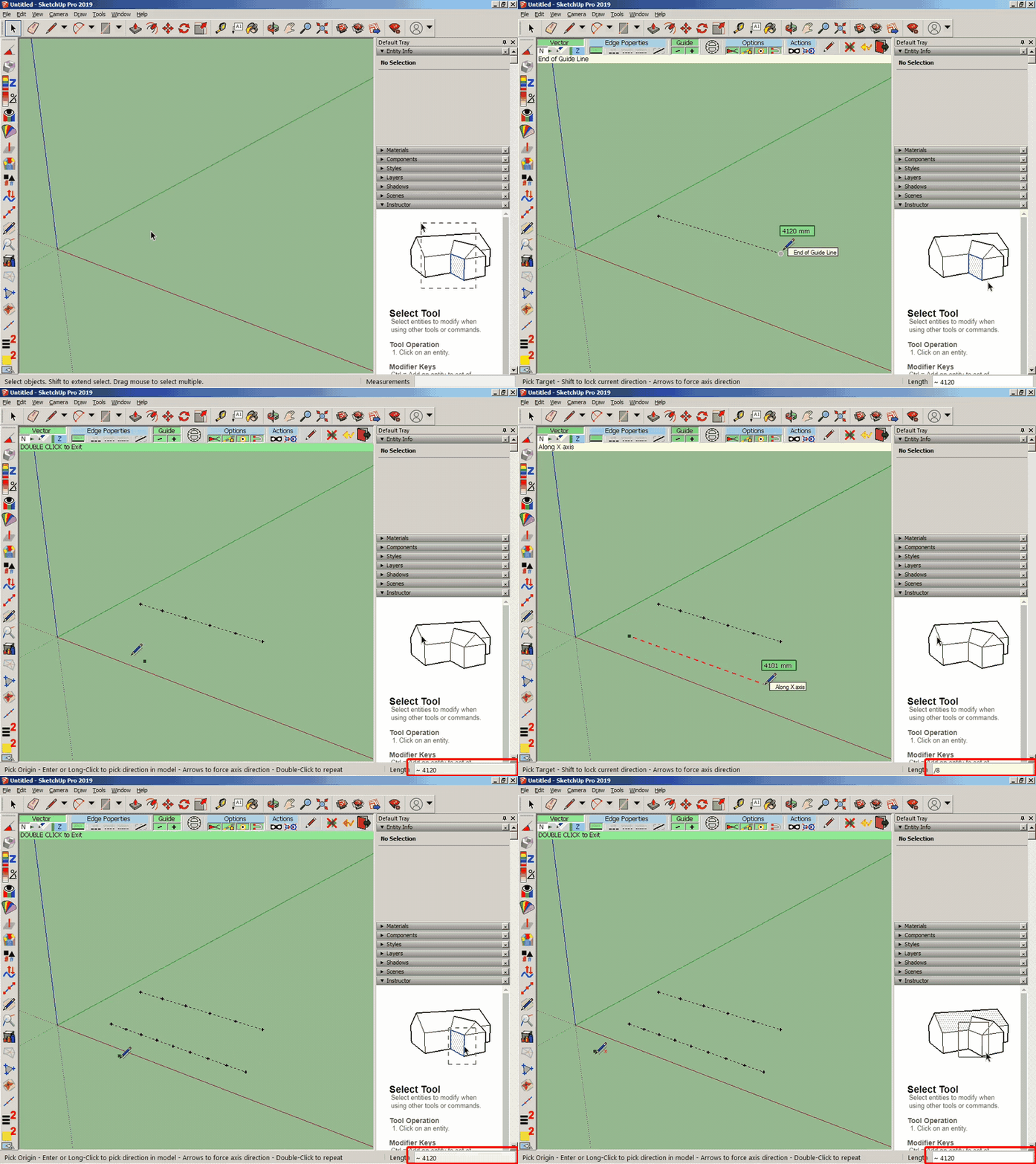
                    https://media.giphy.com/media/dvg4Fslq9q2yr4F08u/source.gif

                    However, in the new version, there is no segment shown up in a guide line. So, is this feature deleted in the new version or is it bugged?
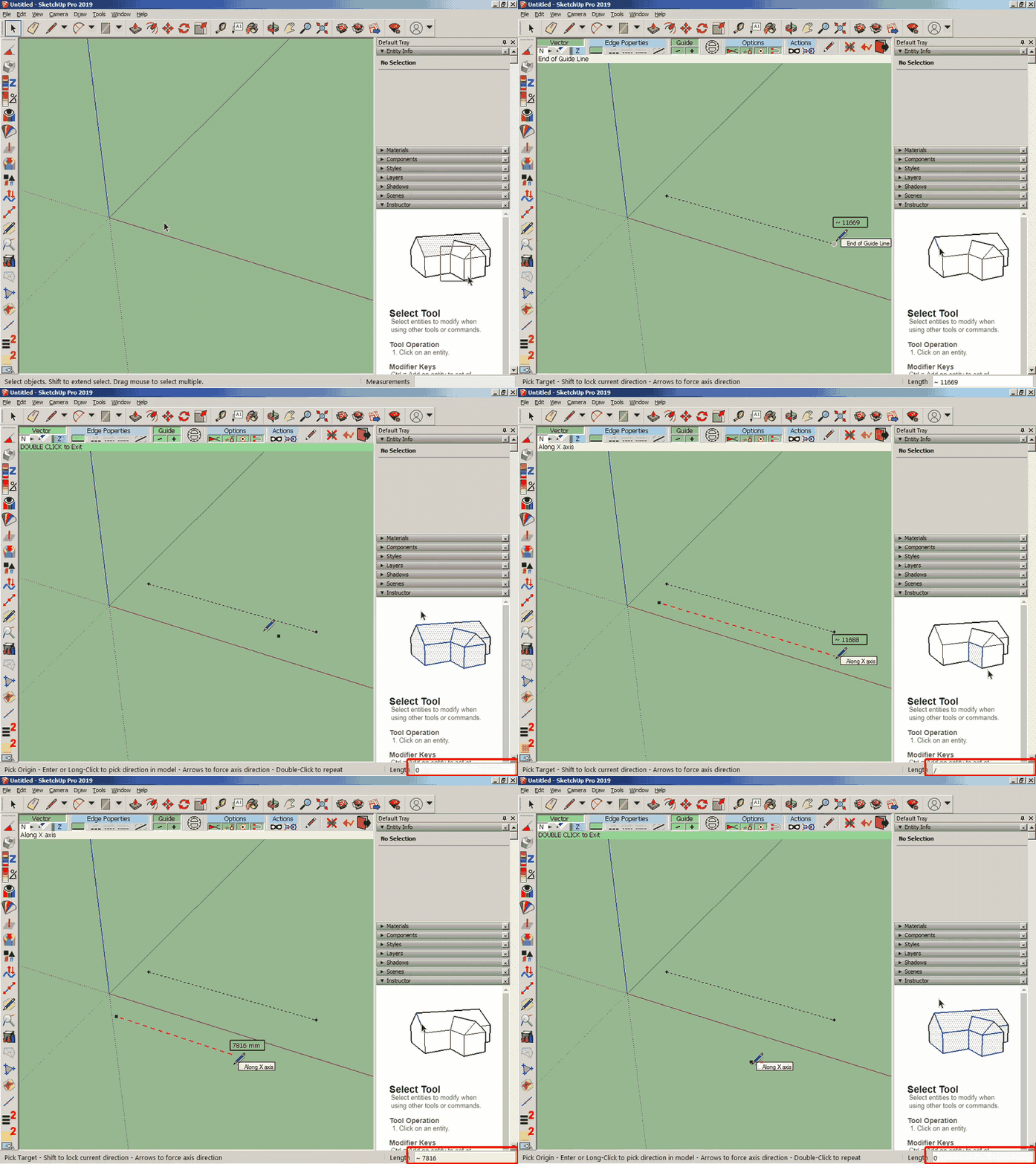
                    https://media.giphy.com/media/MZKjeIrPXAEXvnFJsS/source.gif

                    1 條回覆 最後回覆 回覆 引用 0
                    • fredo6F 離線
                      fredo6
                      最後由 編輯

                      @masloprojekt said:

                      I think this update caused SUClock (which is brilliant btw) to stop working. Is it possible or should i look for a reason elsewhere? Thank You !

                      EDIT:

                      It looks like the time is counting correctly, but it doesn't display the watch.

                      I found the problem. Very strange because it should have been present since long...

                      Anyway, I will publish and update to SUClock (v4.0a).

                      Note however that SUClock 4.0a will only be available for SU 2017 and above.

                      1 條回覆 最後回覆 回覆 引用 0
                      • fredo6F 離線
                        fredo6
                        最後由 編輯

                        @signup said:

                        When drawing guide lines with draw tools in version 8.9b, they are divided automatically into segments like what you see in this gif

                        However, in the new version, there is no segment shown up in a guide line. So, is this feature deleted in the new version or is it bugged?

                        The behaviour you mention with LibFredo6 8.9b (division of guide line) is weird. There has never been a feature to divide guide lines in DrawAlong.

                        IMPORTANT: You seems to be on SU2016. Please note that LibFredo6 v10.0 and above does not support SU2016 and previous versions of Sketchup. It should only be installed for SU2017 and above.

                        Fredo

                        1 條回覆 最後回覆 回覆 引用 0
                        • S 離線
                          signup
                          最後由 編輯

                          @fredo6 said:

                          @signup said:

                          When drawing guide lines with draw tools in version 8.9b, they are divided automatically into segments like what you see in this gif

                          However, in the new version, there is no segment shown up in a guide line. So, is this feature deleted in the new version or is it bugged?

                          The behaviour you mention with LibFredo6 8.9b (division of guide line) is weird. There has never been a feature to divide guide lines in DrawAlong.

                          IMPORTANT: You seems to be on SU2016. Please note that LibFredo6 v10.0 and above does not support SU2016 and previous versions of Sketchup. It should only be installed for SU2017 and above.

                          Fredo

                          I've been using SU for 4 years and I often use this feature in any drawings of mine. It helps me divide lines equally and arrange everything quickly with divided segments.

                          Now, I'm using SU2019 along with new updates of LibFredo 6 which doesn't enable me to have those guiding lines and segments anymore. I hope you will figure it out and recover that feature.

                          Please watch my gifs carefully again.

                          1 條回覆 最後回覆 回覆 引用 0
                          • fredo6F 離線
                            fredo6
                            最後由 編輯

                            I actually forgot about the feature '/', and its dual '*'.

                            I found the problem, and it will go into LibFredo6 v10.4c.

                            Thanks for signaling.

                            Fredo

                            1 條回覆 最後回覆 回覆 引用 0
                            • S 離線
                              signup
                              最後由 編輯

                              @fredo6 said:

                              I actually forgot about the feature '/', and its dual '*'.

                              I found the problem, and it will go into LibFredo6 v10.4c.

                              Thanks for signaling.

                              Fredo

                              Thanks for your help!

                              1 條回覆 最後回覆 回覆 引用 0
                              • Dave RD 離線
                                Dave R
                                最後由 編輯

                                @signup said:

                                Now, I'm using SU2019...

                                Please update your profile. It says you are still using SketchUp 2016 Make which is what made Fredo6 think that's what you are using.

                                Etaoin Shrdlu

                                %

                                (THERE'S NO PLACE LIKE)

                                G28 X0.0 Y0.0 Z0.0

                                M30

                                %

                                1 條回覆 最後回覆 回覆 引用 0
                                • fredo6F 離線
                                  fredo6
                                  最後由 編輯

                                  NEW RELEASE: LibFredo6 v10.4c - 19 May 20

                                  LibFredo6 10.4c is a maintenance release, with bug fixing for FredoTools::DrawAlong


                                  See plugin home page of LibFredo6 for Download of LibFredo6.

                                  Main Post of the LibFredo6 thread

                                  Fredo

                                  1 條回覆 最後回覆 回覆 引用 0
                                  • fredo6F 離線
                                    fredo6
                                    最後由 編輯

                                    NEW RELEASE: LibFredo6 v10.5a - 25 May 20

                                    LibFredo6 10.5a is a maintenance release, with bug fixing and cosmetic adjustments, most for Mac


                                    Requirements: SU2017 and above

                                    See plugin home page of LibFredo6 for Download of LibFredo6.

                                    Main Post of the LibFredo6 thread

                                    Fredo

                                    1 條回覆 最後回覆 回覆 引用 0
                                    • fredo6F 離線
                                      fredo6
                                      最後由 編輯

                                      NEW RELEASE: LibFredo6 v10.6a - 01 Jun 20

                                      LibFredo6 10.6a is a maintenance release, with bug fixing, adjustments for Mac and for FredoSpline v1.4a


                                      Requirements: SU2017 and above

                                      See plugin home page of LibFredo6 for Download of LibFredo6.

                                      Main Post of the LibFredo6 thread

                                      Fredo

                                      1 條回覆 最後回覆 回覆 引用 0
                                      • C 離線
                                        cgarchitekt
                                        最後由 編輯

                                        To all dear FreoTools users,

                                        I've a problem with FredoTools or LibFredo (i can't determine exactly what is causing the problem) because in my Sketchup 2018 installation the Fredo tools are not running. I get the Fredotools Icon in the program but when I click on it to select a tool only a window opens with the Javascript that comes with the LibFredo6.
                                        The computer is only equipped with onboard Intel UHD 630 graphics, but the Sketchup 2018 version runs well and stable.

                                        Can any of you out there tell me what the problem is or is it really the Intel UHD 630 graphics?

                                        Thanks in advance for you appreciated help.
                                        Horst
                                        cgArchitekt

                                        1 條回覆 最後回覆 回覆 引用 0
                                        • Dave RD 離線
                                          Dave R
                                          最後由 編輯

                                          What version of SketchUp are you actually using? Your profile says you are using 2018 Free/Make which does not exist.

                                          If you are using SketchUp 2018 Pro, did you install it correctly by right clicking on the downloaded installer and selecting Run as administrator?

                                          Etaoin Shrdlu

                                          %

                                          (THERE'S NO PLACE LIKE)

                                          G28 X0.0 Y0.0 Z0.0

                                          M30

                                          %

                                          1 條回覆 最後回覆 回覆 引用 0
                                          • fredo6F 離線
                                            fredo6
                                            最後由 編輯

                                            @cgarchitekt said:

                                            I've a problem with FredoTools or LibFredo (i can't determine exactly what is causing the problem) because in my Sketchup 2018 installation the Fredo tools are not running. I get the Fredotools Icon in the program but when I click on it to select a tool only a window opens with the Javascript that comes with the LibFredo6.

                                            @cgarchitekt

                                            Could you confirm you have installed the latest versions of LibFredo6 and FredoTools.

                                            Could you also post or send me a screenshot of the "Javascript".

                                            Fredo

                                            1 條回覆 最後回覆 回覆 引用 0
                                            • 1
                                            • 2
                                            • 85
                                            • 86
                                            • 87
                                            • 88
                                            • 89
                                            • 109
                                            • 110
                                            • 87 / 110
                                            • 第一個貼文
                                              最後的貼文
                                            Buy SketchPlus
                                            Buy SUbD
                                            Buy WrapR
                                            Buy eBook
                                            Buy Modelur
                                            Buy Vertex Tools
                                            Buy SketchCuisine
                                            Buy FormFonts

                                            Advertisement

