sketchucation logo sketchucation
    • 登入
    Oops, your profile's looking a bit empty! To help us tailor your experience, please fill in key details like your SketchUp version, skill level, operating system, and more. Update and save your info on your profile page today!
    🔌 Smart Spline | Fluid way to handle splines for furniture design and complex structures. Download

    [Plugin Library] LibFredo6 - v15.8e - 15 Feb 26


    已排程 已置頂 已鎖定 已移動 Plugins
    2.2k 貼文 573 Posters 4.2m 瀏覽 575 Watching
    正在載入更多貼文
    • 從舊到新
    • 從新到舊
    • 最多點贊
    回覆
    • 在新貼文中回覆
    登入後回覆
    此主題已被刪除。只有擁有主題管理權限的使用者可以查看。
    • S 離線
      spun47x
      最後由 編輯

      Hey is anyone else having issues with Fredotools on 2019? I get this error -
      http://jjg.io/x/Capture.JPG

      http://jjg.io/x/Capture2.JPG

      I've tried installing libfredo6 before, or after, uninstalling reinstalling, doing it via download vs sketchucation store. alll out of ideas

      1 條回覆 最後回覆 回覆 引用 0
      • fredo6F 離線
        fredo6
        最後由 編輯

        @spun47x said:

        Hey is anyone else having issues with Fredotools on 2019? I get this error

        I've tried installing libfredo6 before, or after, uninstalling reinstalling, doing it via download vs sketchucation store. alll out of ideas

        Can you clean and reinstall FredoTools instead.

        1 條回覆 最後回覆 回覆 引用 0
        • TIGT 離線
          TIG Moderator
          最後由 編輯

          I know that these kinds of errors have been seen before... and easily fixed by Fredo.
          I think it involves temporarily deleting some preference file/folder, or removing an old/unneeded 'traductor' file...

          But I'm sure Fredo will be along to advise you later, with the definitive answer...

          TIG

          1 條回覆 最後回覆 回覆 引用 0
          • L 離線
            llammc
            最後由 編輯

            Instalei o LIBfredo6 que funcionava bem. mas por último quando inicio o SketchUP aparece este erro descrito abaixo.

            ""
            ERRO SKETCHUP 2016

            Erro ao carregar o arquivo Fredo6_Curviloft.rb
            Error: #<ArgumentError: wrong number of arguments (2 for 1)>
            C:/Users/Lourival/AppData/Roaming/SketchUp/SketchUp 2016/SketchUp/Plugins/Fredo6_!LibFredo6.rb:308:in top_load' C:/Users/Lourival/AppData/Roaming/SketchUp/SketchUp 2016/SketchUp/Plugins/Fredo6_Curviloft.rb:50:in module:Fredo6'
            C:/Users/Lourival/AppData/Roaming/SketchUp/SketchUp 2016/SketchUp/Plugins/Fredo6_Curviloft.rb:26:in <top (required)>' Erro ao carregar o arquivo Fredo6_FredoTools.rb Error: #<ArgumentError: wrong number of arguments (2 for 1)> C:/Users/Lourival/AppData/Roaming/SketchUp/SketchUp 2016/SketchUp/Plugins/Fredo6_!LibFredo6.rb:308:in top_load'
            C:/Users/Lourival/AppData/Roaming/SketchUp/SketchUp 2016/SketchUp/Plugins/Fredo6_FredoTools.rb:50:in <module:Fredo6>' C:/Users/Lourival/AppData/Roaming/SketchUp/SketchUp 2016/SketchUp/Plugins/Fredo6_FredoTools.rb:26:in <top (required)>'
            ""

            meu sistema é Win7 de 64 bits

            isto tambem passou a aparecer após instalar outro plug-in que tambem teria como base o LIBFREDO6

            1 條回覆 最後回覆 回覆 引用 0
            • A 離線
              adorian
              最後由 編輯

              Help!
              I tried several times and this window still comes out. (>.<)'
              Does anyone know what can I do?
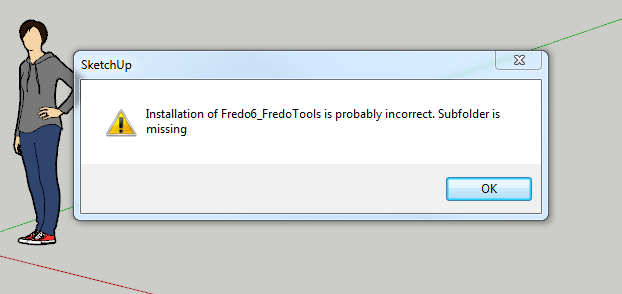

              Capture.PNG

              1 條回覆 最後回覆 回覆 引用 0
              • Dave RD 離線
                Dave R
                最後由 編輯

                How did you install it?

                What version of SketchUp are you using? Please complete your profile.

                Etaoin Shrdlu

                %

                (THERE'S NO PLACE LIKE)

                G28 X0.0 Y0.0 Z0.0

                M30

                %

                1 條回覆 最後回覆 回覆 引用 0
                • TIGT 離線
                  TIG Moderator
                  最後由 編輯

                  @Dave R beat me to it [again!]

                  Anyway...

                  A few things to check...

                  Please complete your details with OS, SUp version etc...

                  When you installed SketchUp did you select the installer file's exe icon and choose the right-click context-menu "Run as administrator" ?
                  You can try a repair [rather than a full uninstall/reinstall]...
                  Whilst logged into Windows as your normal user-account... close SketchUp and use "Run as administrator" - when prompted choose "Repair" [for a fresh installation the option is "Install"]
                  Installing in other ways - e.g. by double-clicking the exe file to "Run" it - can result in weird permission problems, missing files/folders etc...

                  Have you also installed the latest version of LibFredo ?
                  AND restarted SketchUp afterwards to sync everything...

                  After all of these tries, also try to reinstall FredoTools from its RBZ...

                  TIG

                  1 條回覆 最後回覆 回覆 引用 0
                  • L 離線
                    LoulouCaskou
                    最後由 編輯

                    Hello !

                    I installed LibFredo6 as explained in the video, seems to work, but as i try to install RoundCorner from the ExtensionManager, it seems to work as it's written "Signed", but nothing appears in the sketchup page, cannot find the use of the plugin even if it seems to be there somewhere.

                    Do you know what i should do?

                    1 條回覆 最後回覆 回覆 引用 0
                    • Dave RD 離線
                      Dave R
                      最後由 編輯

                      First, try closing and restarting SketchUp.

                      Next, look in View>Tool Palettes. Or look in Tools>Fredo6 Collection.

                      Etaoin Shrdlu

                      %

                      (THERE'S NO PLACE LIKE)

                      G28 X0.0 Y0.0 Z0.0

                      M30

                      %

                      1 條回覆 最後回覆 回覆 引用 0
                      • P 離線
                        PeterHead
                        最後由 編輯

                        need help..
                        I already install round corner but the icon didn't show up

                        1 條回覆 最後回覆 回覆 引用 0
                        • TIGT 離線
                          TIG Moderator
                          最後由 編輯

                          Have you also installed the latest version of Fredo's Lib ?
                          Most of his tools require this.
                          It's also readily available from the PluginStore...

                          Also after installing any tools which use a Lib restart SketchUp to ensure everything gets properly synced...

                          TIG

                          1 條回覆 最後回覆 回覆 引用 0
                          • fredo6F 離線
                            fredo6
                            最後由 編輯

                            NEW RELEASE: LibFredo6 v9.2a - 16 Oct 19

                            LibFredo6 9.2a is a major release for FredoTools v3.6:

                            • FredoTools::ColorByAltitude tool, which create a color mapping for a terrain mesh based on the altitude of its faces.
                            • FredoTools::ColorPaint tool, which is a configurable Color Selector.
                            • A new view 'Outliner' in FredoTools::ReportLabelArea tool, with a hierarchical, expandable tree of groups and components with their individual areas.

                            It also includes various bug fixing and cosmetic adjustments.


                            See plugin home page of LibFredo6 for Download of LibFredo6.

                            Main Post of the LibFredo6 thread

                            Fredo

                            1 條回覆 最後回覆 回覆 引用 0
                            • H 離線
                              Ha Kyoung
                              最後由 編輯

                              I've tried several times to use the plugin you've developed, But everytime I download this'Libfredo6' extension and open sketchup pro, there's a 'Load Error' window saying

                              'Error Loading File Fredo6_!LibFredo6.rb
                              Error: #<ArgumentError: invalid byte sequence in UTF-8>
                              c:/users/오하경/appdata/roaming/sketchup/sketchup 2019/sketchup/plugins/fredo6_!libfredo6/top_libfredo6.rbe:52:in gsub' c:/users/오하경/appdata/roaming/sketchup/sketchup 2019/sketchup/plugins/fredo6_!libfredo6/top_libfredo6.rbe:52:in get_dir_from_ENV'
                              c:/users/오하경/appdata/roaming/sketchup/sketchup 2019/sketchup/plugins/fredo6_!libfredo6/top_libfredo6.rbe:415:in `dir_appdata'
                              c:/users/오하경/appdata/roaming/sketchup/sketchup 2019/sketchup/plugins/fredo6_!
                              ... and the plugins didn't work

                              How can I fix it?

                              1 條回覆 最後回覆 回覆 引用 0
                              • TIGT 離線
                                TIG Moderator
                                最後由 編輯

                                It is your Korean Windows user-name.
                                Ruby used to fail with any text that was not pure ASCII [UTF-8], newer versions have some ways of forcing strings from different alphabets into usable UTF-8 formats.
                                Clearly things are failing in your case...
                                Can you try the following in your Ruby Console, and report back what it prints - it might help Fredo refine his code...

                                Copy/paste this code + <enter>
                                plugins = Sketchup.find_support_file('Plugins') puts plugins puts plugins.encoding

                                It should print the full path to your plugins folder, and also its encoding...

                                TIG

                                1 條回覆 最後回覆 回覆 引用 0
                                • fredo6F 離線
                                  fredo6
                                  最後由 編輯

                                  NEW RELEASE: LibFredo6 v9.3a - 02 Nov 19

                                  LibFredo6 9.3a is a major release for FredoTools v3.7:

                                  • FredoTools::ColorByAltitude --> cosmetic adjustments and bug fixing.
                                  • FredoTools::ColorPaint --> support of transparency, cosmetic adjustments, bug fixing.
                                  • FredoTools::ReportLabelArea --> cosmetic adjustments and bug fixing.

                                  It also includes various bug fixing and cosmetic adjustments useful for my other plugins


                                  See plugin home page of LibFredo6 for Download of LibFredo6.

                                  Main Post of the LibFredo6 thread

                                  Fredo

                                  1 條回覆 最後回覆 回覆 引用 0
                                  • fredo6F 離線
                                    fredo6
                                    最後由 編輯

                                    NEW RELEASE: LibFredo6 v9.4a - 18 Nov 19

                                    LibFredo6 9.4a is a major release for FredoPortrait v2.0 and FredoTools v3.8:

                                    • FredoPortrait::Screenshot --> New plugin to generate images at specified dimensions.
                                    • FredoTools::ColorFlatMode --> New plugin to switch to minimum color shading

                                    It also includes various bug fixing and cosmetic adjustments useful for my other plugins


                                    See plugin home page of LibFredo6 for Download of LibFredo6.

                                    Main Post of the LibFredo6 thread

                                    Fredo

                                    1 條回覆 最後回覆 回覆 引用 0
                                    • fredo6F 離線
                                      fredo6
                                      最後由 編輯

                                      NEW RELEASE: LibFredo6 v9.4b - 25 Nov 19

                                      LibFredo6 9.4b is a minor release for FredoPortrait v2.0:

                                      • for FredoPortrait v2.0b
                                      • add a new color palette ('SVG') for FredoTools::ColorPaint

                                      It also includes various bug fixing and cosmetic adjustments useful for my other plugins


                                      See plugin home page of LibFredo6 for Download of LibFredo6.

                                      Main Post of the LibFredo6 thread

                                      Fredo

                                      1 條回覆 最後回覆 回覆 引用 0
                                      • fredo6F 離線
                                        fredo6
                                        最後由 編輯

                                        NEW RELEASE: LibFredo6 v9.5a - 23 Dec 19

                                        LibFredo6 9.5a is a major release for FredoGuides v1.1.

                                        It also includes various bug fixing and cosmetic adjustments useful for my other plugins


                                        See plugin home page of LibFredo6 for Download of LibFredo6.

                                        Main Post of the LibFredo6 thread

                                        Fredo

                                        1 條回覆 最後回覆 回覆 引用 0
                                        • M 離線
                                          markvladi
                                          最後由 編輯

                                          After installing LibFredo6_v9.4b, an error appears.
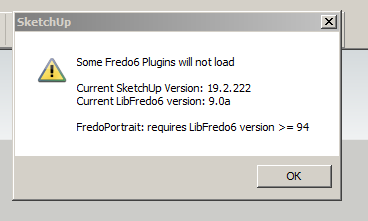

                                          sm23122019210838.png

                                          1 條回覆 最後回覆 回覆 引用 0
                                          • Dave RD 離線
                                            Dave R
                                            最後由 編輯

                                            Did you try restarting SketchUp?

                                            Etaoin Shrdlu

                                            %

                                            (THERE'S NO PLACE LIKE)

                                            G28 X0.0 Y0.0 Z0.0

                                            M30

                                            %

                                            1 條回覆 最後回覆 回覆 引用 0
                                            • 1
                                            • 2
                                            • 105
                                            • 106
                                            • 107
                                            • 108
                                            • 109
                                            • 110
                                            • 107 / 110
                                            • 第一個貼文
                                              最後的貼文
                                            Buy SketchPlus
                                            Buy SUbD
                                            Buy WrapR
                                            Buy eBook
                                            Buy Modelur
                                            Buy Vertex Tools
                                            Buy SketchCuisine
                                            Buy FormFonts

                                            Advertisement



