sketchucation logo sketchucation
    • 登入
    Oops, your profile's looking a bit empty! To help us tailor your experience, please fill in key details like your SketchUp version, skill level, operating system, and more. Update and save your info on your profile page today!
    🔌 Smart Spline | Fluid way to handle splines for furniture design and complex structures. Download

    [Plugin Library] LibFredo6 - v15.8e - 15 Feb 26


    已排程 已置頂 已鎖定 已移動 Plugins
    2.2k 貼文 573 Posters 4.2m 瀏覽 575 Watching
    正在載入更多貼文
    • 從舊到新
    • 從新到舊
    • 最多點贊
    回覆
    • 在新貼文中回覆
    登入後回覆
    此主題已被刪除。只有擁有主題管理權限的使用者可以查看。
    • TIGT 離線
      TIG Moderator
      最後由 編輯

      Please post the actual message's text.
      That way Fredo can see which folder is causing issues...

      TIG

      1 條回覆 最後回覆 回覆 引用 0
      • L 離線
        lyn_z_la_vie
        最後由 編輯

        Hi,

        I just installed Lib Fredo6 v8.8a and then installed Roundcorner. Lib Fredo6 v8.a seems to be installed and Roundcorner is working fine. However, I then installed FredoScale and I cannot get it to work. When I start Sketchup it gives me a pop up message which says 'You must install LibFredo6 version 6.9 or higher to run Fredo_6 FredoScale'. But it seems I have the most up to date version of LibFredo 6. Is there something I am missing? Thanks.

        1 條回覆 最後回覆 回覆 引用 0
        • fredo6F 離線
          fredo6
          最後由 編輯

          You must have an old version of FredoScale (or some old files left in your plugin directory).

          I suggest you do a cleanup and reinstall FredoScale.

          1 條回覆 最後回覆 回覆 引用 0
          • C 離線
            chenamy1997
            最後由 編輯

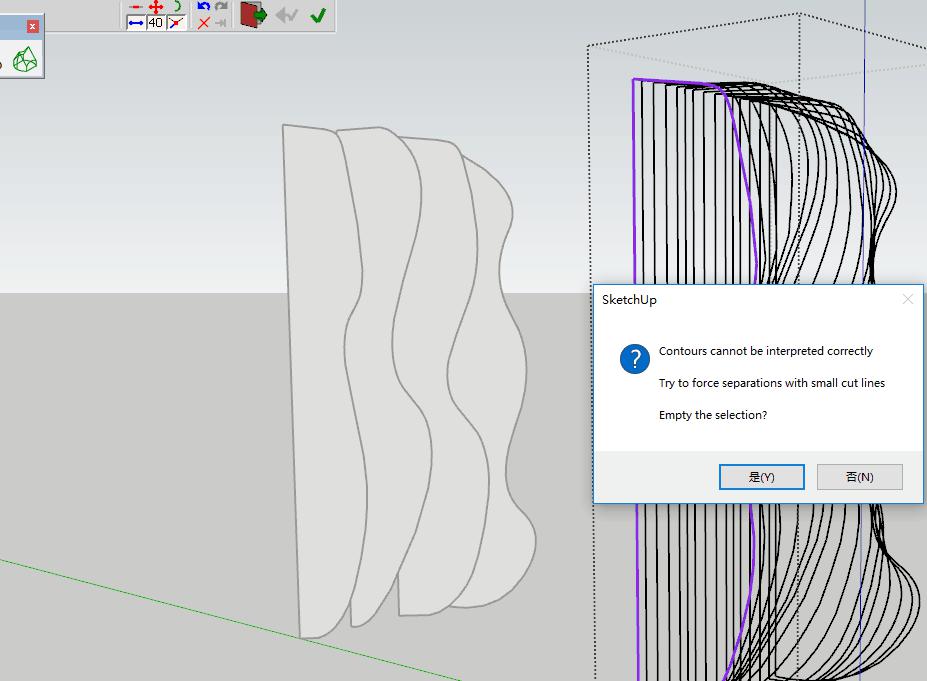
            when using curviloft i got an information saying contours cannot be interpreted correctly. i have some images but i don't know how to upload here,would you mind if can communicate via email?
            amy

            1.jpg

            1 條回覆 最後回覆 回覆 引用 0
            • TIGT 離線
              TIG Moderator
              最後由 編輯

              You managed to attach one image.
              Attaching more images or a SKP is much the same process, using the 'Upload attachment' tab...

              TIG

              1 條回覆 最後回覆 回覆 引用 0
              • S 離線
                sophieo44
                最後由 編輯

                Hello,

                On the 2019 version, I was able to install the Curviloft plugins, frontface and toposhaper out for 1 month, when opening Sketchup now I have this message:
                Error loading Fredo6_FredoScale file / __ loader__FredoScale
                Could not find included file 'Fredo6_FredoScale / __ loader__FredoScale'
                Error loading Fredo6_RoundCorner / __ loader__RoundCorner file
                Could not find included file 'Fredo6_RoundCorner / __ loader__RoundCorner'
                Error loading Fredo6_TopoShaper / __ loader__TopoShaper file
                Could not find included file 'Fredo6_TopoShaper / __ loader__TopoShaper'

                Since I uninstalled them and I can not install them, an error message also appears: "Error: Invalid component file"

                I would like to reuse them do you have a solution to bring me?

                Regards,

                1 條回覆 最後回覆 回覆 引用 0
                • fredo6F 離線
                  fredo6
                  最後由 編輯

                  @sophieo44

                  I think there is something wrong in your Plugin directory.

                  I would suggest you check the footprint of extensions (normally, one .rb file and one folder).

                  Fredo

                  1 條回覆 最後回覆 回覆 引用 0
                  • D 離線
                    dtrachtman
                    最後由 編輯

                    I installed LibFredo6 v8.8a and then Fredo6 FredoScale but in the Extension manager it says "Signature Outdated" and I don't see FredoScale anywhere in Sketchup. What am I missing?

                    1 條回覆 最後回覆 回覆 引用 0
                    • TIGT 離線
                      TIG Moderator
                      最後由 編輯

                      Did you restart SketchUp after the installations ?
                      For me the Lib and ALL of Fredo's Extensions report as being 'signed'...
                      And of course their various menu entries and toolbars appear where they should be...

                      TIG

                      1 條回覆 最後回覆 回覆 引用 0
                      • fredo6F 離線
                        fredo6
                        最後由 編輯

                        NEW RELEASE: LibFredo6 v8.9b - 06 Jun 19

                        LibFredo6 8.9b fixes various bugs and is required for my new plugin FredoGhost 1.2a


                        See plugin home page of LibFredo6 for Download of LibFredo6.

                        Main Post of the LibFredo6 thread

                        Fredo

                        1 條回覆 最後回覆 回覆 引用 0
                        • BrillanteB 離線
                          Brillante
                          最後由 編輯

                          Bonjour Fredo
                          serait il possible de faire qq modifications dans la liste des calques,
                          je m'explique
                          il faudrait rajouter une colonne solo, pour mettre le calque seul visible à l'ecra en masquant tous les autres.
                          Et un petit voyant devant chaques calques pour signaler si il est vide ou pas.
                          Peut etre que cette option existe déjà? si oui fais moi signe, si non à voir.
                          L'idéal serait un plug in pour chaque version

                          RnR
                          Vincent

                          1 條回覆 最後回覆 回覆 引用 0
                          • fredo6F 離線
                            fredo6
                            最後由 編輯

                            @brillante said:

                            Bonjour Fredo
                            serait il possible de faire qq modifications dans la liste des calques

                            There already exists several plugins that provide additional fonctionality with layers.

                            • Layer Organizer, by LawArchitects
                            • Layer Planel by Lindale
                            • SU4U Layers [$], by Suforyou
                            • Layer Manager, by Didier Bur

                            There are also some on EWH (by Eneroth3 for instance)

                            Fredo

                            1 條回覆 最後回覆 回覆 引用 0
                            • E 離線
                              eric29
                              最後由 編輯

                              Bonjour, pouvez vous m'indiquer comment mettre a jour les plugins ?
                              Il n'y a aucun lien direct de mise a jour, du coup , je ne sais quel fichier télécharger et ou; et comment mettre a jour dans sketchup.
                              Sont concernés LibFredo6 et JointPushPull.
                              Merci de vos indications.

                              1 條回覆 最後回覆 回覆 引用 0
                              • javadvklJ 離線
                                javadvkl
                                最後由 編輯

                                my recent issues:
                                error messages:

                                Error Loading File C:/Users/Javad Vakili/AppData/Roaming/SketchUp/SketchUp 2019/SketchUp/Plugins/Fredo6_!LibFredo6/top_LibFredo6.rbe
                                Failed to read RBE/RBS file.
                                Error Loading File Fredo6_!LibFredo6.rb
                                Error: #<NameError: uninitialized constant LibFredo6_Loader::LibFredo6>
                                C:/Users/Javad Vakili/AppData/Roaming/SketchUp/SketchUp 2019/SketchUp/Plugins/Fredo6_!LibFredo6.rb:63:in process' C:/Users/Javad Vakili/AppData/Roaming/SketchUp/SketchUp 2019/SketchUp/Plugins/Fredo6_!LibFredo6.rb:70:in module:LibFredo6_Loader'
                                C:/Users/Javad Vakili/AppData/Roaming/SketchUp/SketchUp 2019/SketchUp/Plugins/Fredo6_!LibFredo6.rb:28:in `<top (required)>'

                                can anyone help me?

                                1 條回覆 最後回覆 回覆 引用 0
                                • fredo6F 離線
                                  fredo6
                                  最後由 編輯

                                  @eric29 said:

                                  Bonjour, pouvez vous m'indiquer comment mettre a jour les plugins ?

                                  You can update the extensions from the Sketchucation ExtensionStore, not just mine.
                                  Here is the link for mine.

                                  1 條回覆 最後回覆 回覆 引用 0
                                  • fredo6F 離線
                                    fredo6
                                    最後由 編輯

                                    NEW RELEASE: LibFredo6 v9.0a - 23 Jun 19

                                    LibFredo6 9.0a fixes various bugs and is required for my new plugin FredoPortrait 1.1a


                                    See plugin home page of LibFredo6 for Download of LibFredo6.

                                    Main Post of the LibFredo6 thread

                                    Fredo

                                    1 條回覆 最後回覆 回覆 引用 0
                                    • C 離線
                                      Caleb_Stanley
                                      最後由 編輯

                                      I keep getting an error message with the plugin ToolsOnSurface upon starting up SketchUp, I think it may have something to do with the new update but I am not sure.

                                      The message reads:
                                      "ToolsOnSurface 2.4a: Error starting up plugin (creating menus and icons)
                                      invalid byte sequence in UTF-8 [in lib6config.rbe - #'===0: line 319]

                                      c:/.../sketchup2019/sketchup/plugins/fredo6_!libfredo6/lib6core.rbe:1058:in 'rescue in block in effective_load_part2' "

                                      Please help me understand if this is an issue with the new update or if there is some way I can fix it myself.

                                      Thank you.

                                      1 條回覆 最後回覆 回覆 引用 0
                                      • fredo6F 離線
                                        fredo6
                                        最後由 編輯

                                        @caleb_stanley said:

                                        I keep getting an error message with the plugin ToolsOnSurface upon starting up SketchUp, I think it may have something to do with the new update but I am not sure.

                                        The message reads:
                                        "ToolsOnSurface 2.4a: Error starting up plugin (creating menus and icons)
                                        invalid byte sequence in UTF-8 [in lib6config.rbe - #'===0: line 319]

                                        For whatever reason, the default parameters file for ToolOnSurface is corrupted or had its encoding changed.

                                        This file should be in
                                        C:/Users/<username>/AppData/Local/LIBFREDO6_DATA_Dir/DefaultParameters/ToolsOnSurface.def

                                        The best is to delete this file. You will just reset the default parameters to their default values. LibFredo6 will recreate it if you change the Default parameters of ToolsOnSurface.

                                        Do you have a similar problem with my other plugins, if you have any installed?

                                        Fredo

                                        1 條回覆 最後回覆 回覆 引用 0
                                        • H 離線
                                          hugomego
                                          最後由 編輯

                                          Hi

                                          Firstly... the plug in is truly amazing, and on viewing the support videos we had a really workable poperty fly through in record short development time. Thank you very much.

                                          Question : is there anyway you can render to chaos groups new cloud render service from animator ?
                                          The ' render to cloud button' in vray next for SU is situated in the asset panel. We usually use their service for larger longer renders.

                                          Thanks again

                                          1 條回覆 最後回覆 回覆 引用 0
                                          • fredo6F 離線
                                            fredo6
                                            最後由 編輯

                                            @hugomego said:

                                            Question : is there anyway you can render to chaos groups new cloud render service from animator ?
                                            The ' render to cloud button' in vray next for SU is situated in the asset panel. We usually use their service for larger longer renders.

                                            Rendering animations created by Animator from the Rendering Software is really something that is left to the developers of the rendering software. I have published an API for these rendering software to interact with Animator and render the frames in batch. So far, only Thea Render has implemented it.

                                            I am not sure however there is enough traction for them to engage into these (small) developments.

                                            Fredo

                                            1 條回覆 最後回覆 回覆 引用 0
                                            • 1
                                            • 2
                                            • 103
                                            • 104
                                            • 105
                                            • 106
                                            • 107
                                            • 108
                                            • 109
                                            • 110
                                            • 105 / 110
                                            • 第一個貼文
                                              最後的貼文
                                            Buy SketchPlus
                                            Buy SUbD
                                            Buy WrapR
                                            Buy eBook
                                            Buy Modelur
                                            Buy Vertex Tools
                                            Buy SketchCuisine
                                            Buy FormFonts

                                            Advertisement