sketchucation logo sketchucation
    • 登入
    Oops, your profile's looking a bit empty! To help us tailor your experience, please fill in key details like your SketchUp version, skill level, operating system, and more. Update and save your info on your profile page today!
    🔌 Smart Spline | Fluid way to handle splines for furniture design and complex structures. Download

    [Plugin Library] LibFredo6 - v15.8e - 15 Feb 26


    已排程 已置頂 已鎖定 已移動 Plugins
    2.2k 貼文 573 Posters 4.2m 瀏覽 575 Watching
    正在載入更多貼文
    • 從舊到新
    • 從新到舊
    • 最多點贊
    回覆
    • 在新貼文中回覆
    登入後回覆
    此主題已被刪除。只有擁有主題管理權限的使用者可以查看。
    • T 離線
      topbobster
      最後由 編輯

      @fredo6 said:

      Rob,

      Something strange.
      You have AdditionalPluginFolders.rb, but not the subfolder.
      Is it an old version.
      Anyway, this is not a correct installation.
      If you don't use the AdditionalPluginFolders features, then I suggest you delete the file.

      Fredo

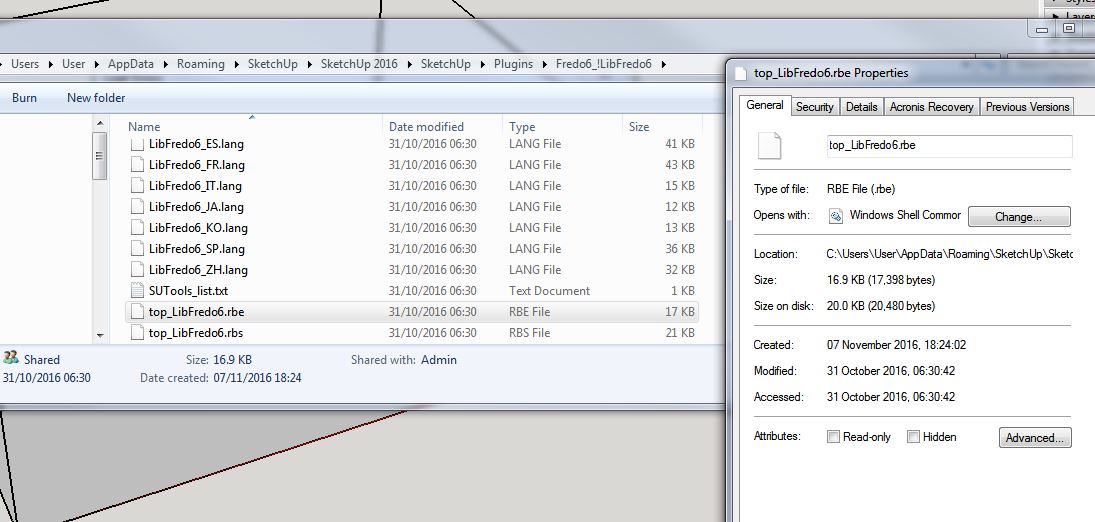
      Hello Fredo, I tried again. Here's my start point:
      LibFredo03 2016 11 07.JPG

      Then I installed '7.2d' and restarted and got the following message:
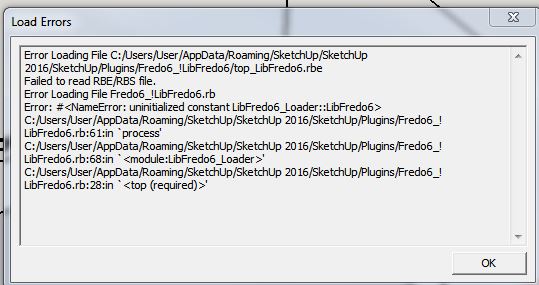
      LibFredo04 2016 11 07.JPG

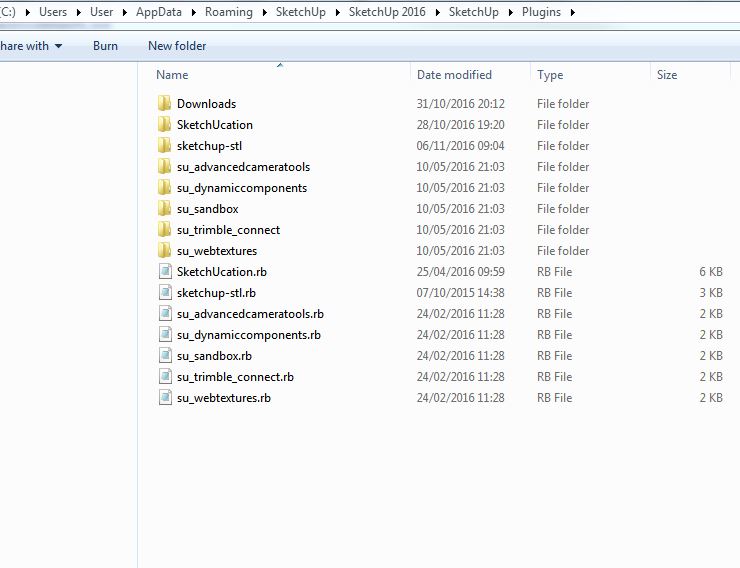
      and checked the plugins folder:

      LibFredo05 2016 11 07.JPG

      I also tried un-installing as TIG mentioned and found the .rbx files. Deleted them and re-installed gain, same error.

      Regards, Rob

      1 條回覆 最後回覆 回覆 引用 0
      • fredo6F 離線
        fredo6
        最後由 編輯

        Rob,

        I don't know what you can do more. This looks clean, but for whatever reason, the rbe file cannot be read.

        So, teh only next steps now are:

        1. If you can, install Sketchup 2015. in SU2015, this will be the rbs file which will be read
        2. re-install SU2016 from the original source on Sketchup.com.

        Fredo

        1 條回覆 最後回覆 回覆 引用 0
        • TIGT 線上
          TIG Moderator
          最後由 編輯

          Also remember that SketchUp must be installed properly.
          That means selecting the installer's exe icon,
          then using the right-click > context-menu > Run as administrator...
          Running the installer by double-clicking the installer's exe will install it,
          BUT that can often result in unexpected weirdness... that might be the case here.
          It is NOT sufficient that you have admin-powers as a user, it must be 'Run as administrator'.

          It's not so painful to correct this...

          You do NOT need to uninstall SketchUp.

          First close SketchUp,
          then you find the installer exe [either the existing in Downloads or perhaps a re-download]
          and then run its exe as explained above...
          When prompted choose to 'Repair'.
          Let it run...
          This should correct any issues, since it will now be properly installed.

          Restart SketchUp to see if that approach has helped...

          TIG

          1 條回覆 最後回覆 回覆 引用 0
          • T 離線
            topbobster
            最後由 編輯

            @tig said:

            Also remember that SketchUp must be installed properly.
            That means selecting the installer's exe icon,
            then using the right-click > context-menu > Run as administrator...
            Running the installer by double-clicking the installer's exe will install it,
            BUT that can often result in unexpected weirdness... that might be the case here.
            It is NOT sufficient that you have admin-powers as a user, it must be 'Run as administrator'.

            It's not so painful to correct this...

            You do NOT need to uninstall SketchUp.

            First close SketchUp,
            then you find the installer exe [either the existing in Downloads or perhaps a re-download]
            and then run its exe as explained above...
            When prompted choose to 'Repair'.
            Let it run...
            This should correct any issues, since it will now be properly installed.

            Restart SketchUp to see if that approach has helped...

            TIG, Fredo many thanks for your help. Before I read TIG's last response my intention was to uninstall Sketchup and re-install on my admin account. I un-installed, then saw TIG's message before re-installing so was able to follow his instructions exactly for the install. Then installed Libfredo tested, ok, then installed round corners and tested and it all worked on my admin account. I then logged into my user account and still got the errors.....I believe I read somewhere regarding permissions on user accounts but I installed files before so not sure if it is that, I will try to fiddle around with it on the user account. Anyway I can and am using it successfully on my admin account so am happy to do that.
            Many thanks to everyone for your time and inclination to help. I look forward to using Fredo's good work and when I have seen the various tools working will surely make a well earned donation.
            Hope I didn't waste anyone's time. Regards, Rob

            1 條回覆 最後回覆 回覆 引用 0
            • fredo6F 離線
              fredo6
              最後由 編輯

              Rob,

              Glad you finally see the light.

              I think it's useful to understand the root cause (permissions on user account) so that we can understand for other users.

              Fredo

              1 條回覆 最後回覆 回覆 引用 0
              • T 離線
                topbobster
                最後由 編輯

                @fredo6 said:

                Rob,

                Glad you finally see the light.

                I think it's useful to understand the root cause (permissions on user account) so that we can understand for other users.

                Fredo

                Hello Fredo, Not sure if this throws any light on the subject but here goes....A while back I had trouble with an online storage account and they suggested it could be a corrupt profile. At the time I started to set up a new profile but had trouble copying over files so stopped there and did not use the account, but it was still there. I thought about trying Sketchup on that new profile (no admin rights), to see what happened......I have loaded all plugins succesfully, no issues whatsoever. I have made no changes to permissions on this account although they do seem to be in order:
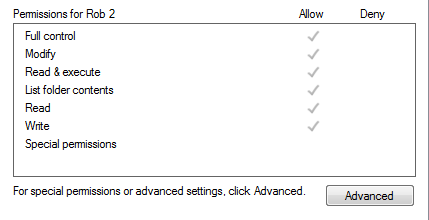
                Fredo 06 2016 11 13.PNG

                1 條回覆 最後回覆 回覆 引用 0
                • fredo6F 離線
                  fredo6
                  最後由 編輯

                  NEW RELEASE: LibFredo6 v7.2e - 15 Nov 16

                  LibFredo6 7.2e fixes somemajor issues having a side effect on [b]Curvizard and Curviloft.

                  See main post of this thread for Download of LibFredo6.

                  Fredo

                  1 條回覆 最後回覆 回覆 引用 0
                  • pilouP 離線
                    pilou
                    最後由 編輯

                    And for 2016 & 2017...
                    Recommanded also ?

                    Frenchy Pilou
                    Is beautiful that please without concept!
                    My Little site :)

                    1 條回覆 最後回覆 回覆 引用 0
                    • fredo6F 離線
                      fredo6
                      最後由 編輯

                      @pilou said:

                      And for 2016 & 2017...
                      Recommanded also ?

                      Yes. LibFredo6 is signed for SU2017 (and SU2016).
                      My other plugins are not signed yet for SU2017. I will release a signed version progressively. I guess not too many people works in SU2017 with Strict Security!

                      Fredo

                      1 條回覆 最後回覆 回覆 引用 0
                      • fredo6F 離線
                        fredo6
                        最後由 編輯

                        NEW RELEASE: LibFredo6 v7.2g - 20 Nov 16

                        LibFredo6 7.2g fixes two **major bug in Animator for:
                        [list]
                        []Orbiting (i.e. rotation around another object)
                        [
                        ]Screw, where the movement was simply wrongly calculated

                        See main post of this thread for [b]Download of LibFredo6**.

                        Fredo

                        1 條回覆 最後回覆 回覆 引用 0
                        • fredo6F 離線
                          fredo6
                          最後由 編輯

                          NEW RELEASE: LibFredo6 v7.2h - 24 Nov 16

                          LibFredo6 7.2h fixes **major bugs in Animator

                          See main post of this thread for [b]Download of LibFredo6**.

                          Fredo

                          1 條回覆 最後回覆 回覆 引用 0
                          • C 離線
                            chriscall
                            最後由 編輯

                            Doesnt seem to be working on su7. Some of the tools stuck while loading; script errors on different lines. Where can I download version 6.9?

                            1 條回覆 最後回覆 回覆 引用 0
                            • fredo6F 離線
                              fredo6
                              最後由 編輯

                              @chriscall said:

                              Doesnt seem to be working on su7. Some of the tools stuck while loading; script errors on different lines. Where can I download version 6.9?

                              Could you be more explicit?
                              Which tools?
                              What is not working?

                              Also when you have problems, could you open the Ruby console and see if there are errors.

                              Fredo

                              1 條回覆 最後回覆 回覆 引用 0
                              • M 離線
                                melmanosul
                                最後由 編輯

                                Can anyone help me pls? I am getting this error at load after installing LibFredo -v7 for sketchup 2016.

                                Error Loading File Fredo6_FredoScale.rb
                                Error: #<ArgumentError: wrong number of arguments (2 for 1)>
                                C:/Users/alexa/AppData/Roaming/SketchUp/SketchUp 2016/SketchUp/Plugins/Fredo6_!LibFredo6.rb:308:in top_load' C:/Users/alexa/AppData/Roaming/SketchUp/SketchUp 2016/SketchUp/Plugins/Fredo6_FredoScale.rb:29:in module:Fredo6'
                                C:/Users/alexa/AppData/Roaming/SketchUp/SketchUp 2016/SketchUp/Plugins/Fredo6_FredoScale.rb:26:in `<top (required)>'

                                Thank you !

                                1 條回覆 最後回覆 回覆 引用 0
                                • fredo6F 離線
                                  fredo6
                                  最後由 編輯

                                  NEW RELEASE: LibFredo6 v7.3a - 24 Dec 16

                                  LibFredo6 7.3a fixes a major bugs for FredoScale to run on SU2017. These bugs were creating bugsplats, in particular with Radial Bend.

                                  See main post of this thread for Download of LibFredo6.

                                  Fredo

                                  1 條回覆 最後回覆 回覆 引用 0
                                  • bazB 離線
                                    baz
                                    最後由 編輯

                                    Thanks Fredo.

                                    1 條回覆 最後回覆 回覆 引用 0
                                    • J 離線
                                      josekvf
                                      最後由 編輯

                                      Thank you Fredo

                                      1 條回覆 最後回覆 回覆 引用 0
                                      • bazB 離線
                                        baz
                                        最後由 編輯

                                        Fredo, sorry to say I am still getting the splat even with the update.

                                        1 條回覆 最後回覆 回覆 引用 0
                                        • fredo6F 離線
                                          fredo6
                                          最後由 編輯

                                          @baz said:

                                          Fredo, sorry to say I am still getting the splat even with the update.

                                          Do you get it at the first radial bending?

                                          Fredo

                                          1 條回覆 最後回覆 回覆 引用 0
                                          • bazB 離線
                                            baz
                                            最後由 編輯

                                            @fredo6 said:

                                            @baz said:

                                            Fredo, sorry to say I am still getting the splat even with the update.

                                            Do you get it at the first radial bending?

                                            Fredo

                                            Yes I did!

                                            1 條回覆 最後回覆 回覆 引用 0
                                            • 1
                                            • 2
                                            • 106
                                            • 107
                                            • 108
                                            • 109
                                            • 110
                                            • 108 / 110
                                            • 第一個貼文
                                              最後的貼文
                                            Buy SketchPlus
                                            Buy SUbD
                                            Buy WrapR
                                            Buy eBook
                                            Buy Modelur
                                            Buy Vertex Tools
                                            Buy SketchCuisine
                                            Buy FormFonts

                                            Advertisement