sketchucation logo sketchucation
    • Login
    Oops, your profile's looking a bit empty! To help us tailor your experience, please fill in key details like your SketchUp version, skill level, operating system, and more. Update and save your info on your profile page today!
    Mac User? | Join the Rayscaper Beta for Mac Learn More

    [Plugin] Material Tools

    Scheduled Pinned Locked Moved Plugins
    124 Posts 44 Posters 204.1k Views 44 Watching
    Loading More Posts
    • Oldest to Newest
    • Newest to Oldest
    • Most Votes
    Reply
    • Reply as topic
    Log in to reply
    This topic has been deleted. Only users with topic management privileges can see it.
    • R
      rv1974
      last edited by

      Fantastic tools! πŸ‘ Thank you.
      What I really miss πŸ˜’ is additional script to assign the front faces material to backfaces (at least
      on geometry with transparent mats).

      1 Reply Last reply
      Reply Quote 0
      • massimoM
        massimo Moderator
        last edited by

        @rv1974 said:

        Fantastic tools! πŸ‘ Thank you.
        What I really miss πŸ˜’ is additional script to assign the front faces material to backfaces (at least
        on geometry with transparent mats).

        404 Not Found

        favicon

        (sketchucation.com)

        1 Reply Last reply
        Reply Quote 0
        • thomthomT
          thomthom
          last edited by

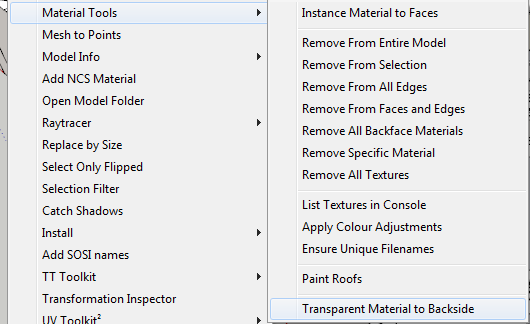
          Transparent.png

          ❓ ❓

          Thomas Thomassen β€” SketchUp Monkey & Coding addict
          List of my plugins and link to the CookieWare fund

          1 Reply Last reply
          Reply Quote 0
          • thomthomT
            thomthom
            last edited by

            oh... I might have forgotten to upload this little update... 😳

            Thomas Thomassen β€” SketchUp Monkey & Coding addict
            List of my plugins and link to the CookieWare fund

            1 Reply Last reply
            Reply Quote 0
            • R
              rv1974
              last edited by

              @thomthom said:

              [attachment=0:37kfn04k]<!-- ia0 -->Transparent.png<!-- ia0 -->[/attachment:37kfn04k]

              ❓ ❓

              What exactly do you ask?
              If it's already there (the last line) I for some mystic reason don't have it (the version is updated)
              If it's a printscreen of the latest future update- it looks awesome (exactly what I mean (if it processes entire model)).
              P.S. How do you make the printscreen of the dropped down list???

              1 Reply Last reply
              Reply Quote 0
              • R
                rv1974
                last edited by

                @thomthom said:

                oh... I might have forgotten to upload this little update... 😳

                unpardonable forgetfulness
                πŸ’š

                1 Reply Last reply
                Reply Quote 0
                • thomthomT
                  thomthom
                  last edited by

                  Give me a couple of days. I need to release an update to TT_Lib2 first.

                  Thomas Thomassen β€” SketchUp Monkey & Coding addict
                  List of my plugins and link to the CookieWare fund

                  1 Reply Last reply
                  Reply Quote 0
                  • R
                    rv1974
                    last edited by

                    Yet another thing:
                    Assign component\group mat to its front faces (to the inner geometry with default mat) would be amazing feature.
                    There's already the great 'remove C-G materials.rb' , something the opposite is also needed.

                    1 Reply Last reply
                    Reply Quote 0
                    • thomthomT
                      thomthom
                      last edited by

                      How would you handle groups with faces of multiple materials? It's just not an symmetrical operation.

                      Thomas Thomassen β€” SketchUp Monkey & Coding addict
                      List of my plugins and link to the CookieWare fund

                      1 Reply Last reply
                      Reply Quote 0
                      • R
                        rv1974
                        last edited by

                        @thomthom said:

                        How would you handle groups with faces of multiple materials? It's just not an symmetrical operation.

                        Only default material within the would inherit the comp\group mat. The manually set multiple mats would survive.

                        1 Reply Last reply
                        Reply Quote 0
                        • thomthomT
                          thomthom
                          last edited by

                          Oh - I misread you. I thought you wanted face material to group materials.

                          You want the instance materials to be applied to all faces with default material in the group/component? That's already there: "Instance Material to Faces"

                          Thomas Thomassen β€” SketchUp Monkey & Coding addict
                          List of my plugins and link to the CookieWare fund

                          1 Reply Last reply
                          Reply Quote 0
                          • R
                            rv1974
                            last edited by

                            damn how could I miss it.

                            1 Reply Last reply
                            Reply Quote 0
                            • R
                              rv1974
                              last edited by

                              @thomthom said:

                              Give me a couple of days. I need to release an update to TT_Lib2 first.

                              ...bump
                              πŸ˜’

                              1 Reply Last reply
                              Reply Quote 0
                              • thomthomT
                                thomthom
                                last edited by

                                Yeeea.... didn't happen... 😞 I've run into a bug that needs fixing.

                                Thomas Thomassen β€” SketchUp Monkey & Coding addict
                                List of my plugins and link to the CookieWare fund

                                1 Reply Last reply
                                Reply Quote 0
                                • thomthomT
                                  thomthom
                                  last edited by

                                  Version 2.6.0

                                  • Added Transparent Material to Backside.
                                  • Added support Fredo updater.

                                  Thomas Thomassen β€” SketchUp Monkey & Coding addict
                                  List of my plugins and link to the CookieWare fund

                                  1 Reply Last reply
                                  Reply Quote 0
                                  • R
                                    rv1974
                                    last edited by

                                    πŸ‘

                                    1 Reply Last reply
                                    Reply Quote 0
                                    • EarthMoverE
                                      EarthMover
                                      last edited by

                                      Thanks for the update! The transparent material to backside is a huge help! πŸ‘

                                      3D Artist at Clearstory 3D Imaging
                                      Guide Tool at Winning With Sketchup
                                      Content Creator at Skapeup

                                      1 Reply Last reply
                                      Reply Quote 0
                                      • L
                                        lubessy
                                        last edited by

                                        Hello,

                                        I have problem installing this tool..

                                        so after i downloaded.. I placed the "material tool rb " into the sketchup-> plugin forlder

                                        and so when i opened a new sketchup.. i still don't see a new plugin for material tool...

                                        could you tell me how to set this up after i download it???

                                        Don't I just need to copy and paste into the sketchup- plugin folder?

                                        and I am using sketchup 8pro version too....

                                        1 Reply Last reply
                                        Reply Quote 0
                                        • thomthomT
                                          thomthom
                                          last edited by

                                          Notice it's an RBZ - not RB file. See this thread on how to install RBZ files: http://sketchucation.com/forums/viewtopic.php?t=42315#InstallRBZ

                                          (I'd forgotten to add the How To link for this download which I usually have)

                                          Thomas Thomassen β€” SketchUp Monkey & Coding addict
                                          List of my plugins and link to the CookieWare fund

                                          1 Reply Last reply
                                          Reply Quote 0
                                          • M
                                            make
                                            last edited by

                                            Nice work, thomthom!!!!

                                            Thanks!

                                            1 Reply Last reply
                                            Reply Quote 0

                                            Hello! It looks like you're interested in this conversation, but you don't have an account yet.

                                            Getting fed up of having to scroll through the same posts each visit? When you register for an account, you'll always come back to exactly where you were before, and choose to be notified of new replies (either via email, or push notification). You'll also be able to save bookmarks and upvote posts to show your appreciation to other community members.

                                            With your input, this post could be even better πŸ’—

                                            Register Login
                                            • 1
                                            • 2
                                            • 3
                                            • 4
                                            • 5
                                            • 6
                                            • 7
                                            • 6 / 7
                                            • First post
                                              Last post
                                            Buy SketchPlus
                                            Buy SUbD
                                            Buy WrapR
                                            Buy eBook
                                            Buy Modelur
                                            Buy Vertex Tools
                                            Buy SketchCuisine
                                            Buy FormFonts

                                            Advertisement