sketchucation logo sketchucation
    • Login
    Oops, your profile's looking a bit empty! To help us tailor your experience, please fill in key details like your SketchUp version, skill level, operating system, and more. Update and save your info on your profile page today!
    ⚠️ Update | Sketchucation Tools 5.0.8 released with licensing improvements and bugfixes Download

    The "Duh!" thread (aka the Doh! thread)

    Scheduled Pinned Locked Moved SketchUp Discussions
    sketchup
    696 Posts 135 Posters 579.6k Views 135 Watching
    Loading More Posts
    • Oldest to Newest
    • Newest to Oldest
    • Most Votes
    Reply
    • Reply as topic
    Log in to reply
    This topic has been deleted. Only users with topic management privileges can see it.
    • S
      slbaumgartner
      last edited by

      @pilou said:

      I don't know why that works not with N*D or N+D or N-D ❓

      It works with N/D as a side effect of supporting fractional inches. Though it's a common request, the measurement box doesn't support arithmetic and doesn't really understand division other than integer ratios.

      1 Reply Last reply
      Reply Quote 0
      • BepB
        Bep
        last edited by

        Don't make this mistake.

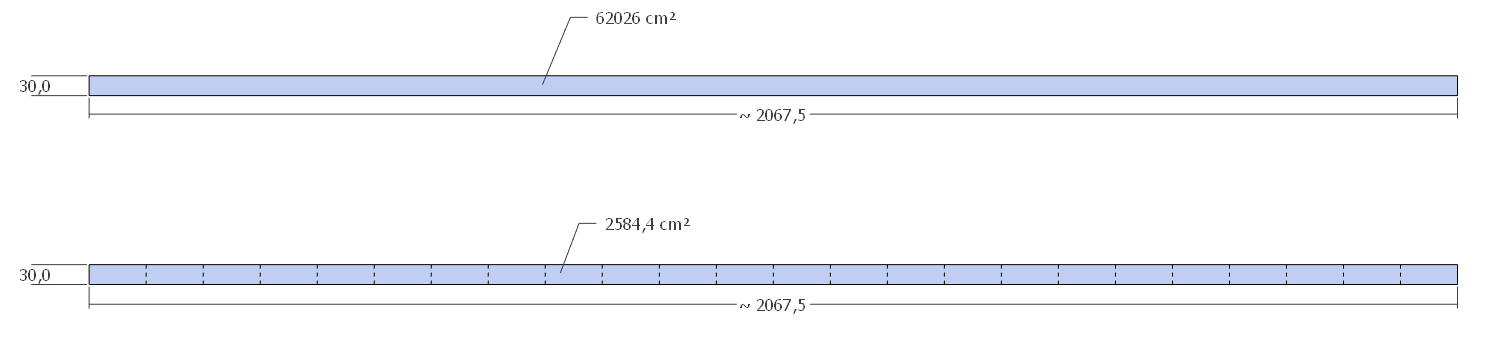
        I unfolded a cilinder/ring, and measured its area (cm²) with the tekst tool, with hidden lines turned off in view. (bottom strip of fig 1)
        The strip at the top drawn with the rectangle tool shows the correct area.
        although the face, when selected looks undivided, the square cm² turn out to be only for a part of the ring.(fig 2)

        I notest, that drawn with the rectangle tool, entity-info identify's the rectangle as a face, and the unfolded rectangle as a surface.

        fig 1
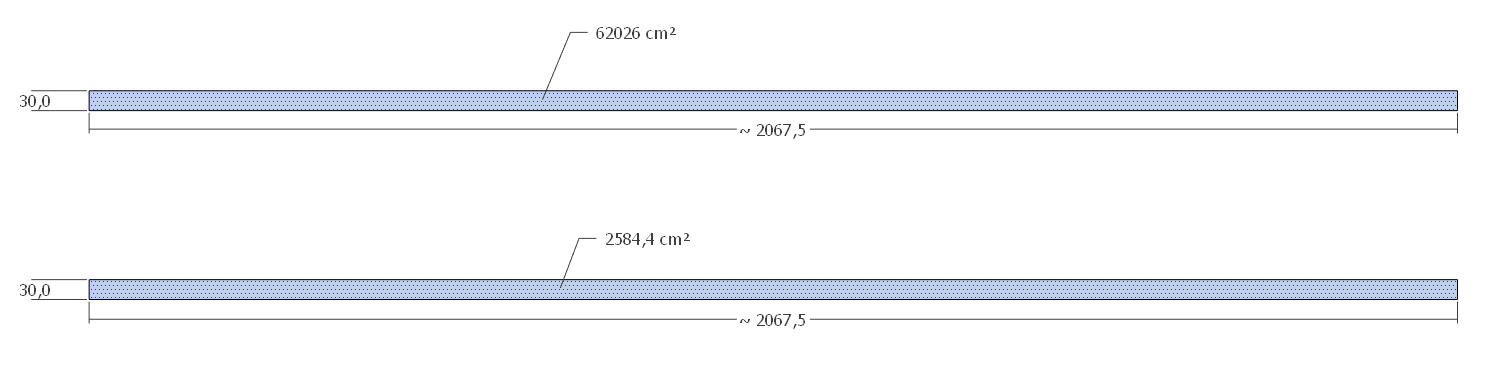
        hidden lines off
        fig 2
        hidden lines on

        test

        "History is written by the winners"

        1 Reply Last reply
        Reply Quote 0
        • david_hD
          david_h
          last edited by

          So I have a question. . .and this is coming from a "Top Sketchucator"

          (try and contain your laughter at least till I pose the question 💚 )

          i am trying to import a collection of materials from a previous version of SU and I can't get those to stay put in my materials pallet. Each time I open us SU I have to reload them.

          What am I doing wrong? Needless to say, I don't do this a lot. 😉

          If I make it look easy...It is probably easy

          1 Reply Last reply
          Reply Quote 0
          • Dave RD
            Dave R
            last edited by

            David, what operating system? What SketchUp version?

            Is this a collection of materials in a folder?

            Etaoin Shrdlu

            %

            (THERE'S NO PLACE LIKE)

            G28 X0.0 Y0.0 Z0.0

            M30

            %

            1 Reply Last reply
            Reply Quote 0
            • TIGT
              TIG Moderator
              last edited by

              From the 'palette' phrasing I guess you are on a MAC ?

              No matter, when you import a collection into a model those collection-materials are available in that model.
              When you open a new model [or an older one] those collection-materials are not there - why would they be ?

              If you want the material-collection to be available in all new models, then open an empty new model from your template, add the collection-materials, then save the model as a template - overwriting your usual template, OR making a new template, and setting that as your default-template.

              Now all new models will have those collection-materials associated with it ?
              You should also be able to associate the collection with existing models ?

              TIG

              1 Reply Last reply
              Reply Quote 0
              • david_hD
                david_h
                last edited by

                Thank you my Brethren.

                I am on 2019, Win 10.

                To TIG's point, I think i need to load these into the template.

                thx,

                D

                If I make it look easy...It is probably easy

                1 Reply Last reply
                Reply Quote 0
                • Dave RD
                  Dave R
                  last edited by

                  The materials are not part of the template. If you have the materials in a SketchUp file, open that file. Then, in the Materials panel, click on the the house icon to show the In Model collection. Then Details menu button to the right of the drop down menu and choose Save collection as... then immediately go to that menu again and choose Add collection to favorites.

                  If you have the materials in a folder containing .skm files already, simply go to Add collection to favorites, choose the folder and you should be all set.

                  Etaoin Shrdlu

                  %

                  (THERE'S NO PLACE LIKE)

                  G28 X0.0 Y0.0 Z0.0

                  M30

                  %

                  1 Reply Last reply
                  Reply Quote 0
                  • david_hD
                    david_h
                    last edited by

                    Thanks Dave. . .I got it solved. . .thanks to you guys.

                    If I make it look easy...It is probably easy

                    1 Reply Last reply
                    Reply Quote 0
                    • Dave RD
                      Dave R
                      last edited by

                      Very good, sir. 👍

                      Etaoin Shrdlu

                      %

                      (THERE'S NO PLACE LIKE)

                      G28 X0.0 Y0.0 Z0.0

                      M30

                      %

                      1 Reply Last reply
                      Reply Quote 0
                      • R
                        rv1974
                        last edited by

                        2 in 1: Select + Recall last tool on one Space key 😮
                        https://gumroad.com/l/cVLyK?fbclid=IwAR3fVsoMNZqhzZJktvIxwtF9W05J2Q39QL2hYze_HPBuv6C1tb6Wz2H7Adg

                        1 Reply Last reply
                        Reply Quote 0
                        • BoxB
                          Box
                          last edited by

                          I've been doing a lot of 2d work lately in sketchup simply as a scene setter for layout floorplans. I've been avoiding using my spacemouse as it tends to orbit when you really only want pan and zoom, and sometimes you slip and it is just off standard view. If you're a space mouser you'll know what I mean by it feeling awkward if you aren't using it.

                          Suddenly dawned on me I can turn off the rotate option of the space mouse and happily zoom and pan to my hearts content without getting out of alignment. D'oh D'oh D'oh

                          I felt so stupid I had to dig up this thread.

                          1 Reply Last reply
                          Reply Quote 0
                          • boofredlayB
                            boofredlay
                            last edited by

                            Ha. Good to know. Thanks.

                            http://www.coroflot.com/boofredlay

                            1 Reply Last reply
                            Reply Quote 0

                            Hello! It looks like you're interested in this conversation, but you don't have an account yet.

                            Getting fed up of having to scroll through the same posts each visit? When you register for an account, you'll always come back to exactly where you were before, and choose to be notified of new replies (either via email, or push notification). You'll also be able to save bookmarks and upvote posts to show your appreciation to other community members.

                            With your input, this post could be even better 💗

                            Register Login
                            • 1
                            • 2
                            • 29
                            • 30
                            • 31
                            • 32
                            • 33
                            • 34
                            • 35
                            • 31 / 35
                            • First post
                              Last post
                            Buy SketchPlus
                            Buy SUbD
                            Buy WrapR
                            Buy eBook
                            Buy Modelur
                            Buy Vertex Tools
                            Buy SketchCuisine
                            Buy FormFonts

                            Advertisement