sketchucation logo sketchucation
    • 登入
    Oops, your profile's looking a bit empty! To help us tailor your experience, please fill in key details like your SketchUp version, skill level, operating system, and more. Update and save your info on your profile page today!
    ⚠️ Important | Libfredo 15.6b introduces important bugfixes for Fredo's Extensions Update

    [Plugin] Components onto Faces v1.2.0 UPDATE May 23, 2013

    已排程 已置頂 已鎖定 已移動 Plugins
    61 貼文 16 Posters 68.6k 瀏覽 16 Watching
    正在載入更多貼文
    • 從舊到新
    • 從新到舊
    • 最多點贊
    回覆
    • 在新貼文中回覆
    登入後回覆
    此主題已被刪除。只有擁有主題管理權限的使用者可以查看。
    • X 離線
      xrok1
      最後由 編輯

      well... are you ready for this?

      1] use construction grid (ruby) to make a grid
      2] use edges from construction lines (ruby) to convert construction lines to lines
      3] delete every second vertical line, staggering each row
      4] use make faces (ruby) to make faces
      5] build a brick and make it a component
      6] run Components onto Faces v0.1 (ruby)
      😆

      i told you there were easier ways.
      if i had to do it all over again i would just make a rectangle the size of a brick with half a mortar joint. inset the face a little...
      you know the rest.

      “There are three classes of people: those who see. Those who see when they are shown. Those who do not see.”

      http://www.Twilightrender.com try it!

      1 條回覆 最後回覆 回覆 引用 0
      • C 離線
        chango70
        最後由 編輯

        Amazing Script! Cheers!

        1 條回覆 最後回覆 回覆 引用 0
        • I 離線
          ilay7k
          最後由 編輯

          Chris, thank you for such panelization tool!
          I attached sample with slightly modified by Fredo's tools
          Uhh, need quads for for beautiful visualization for panels
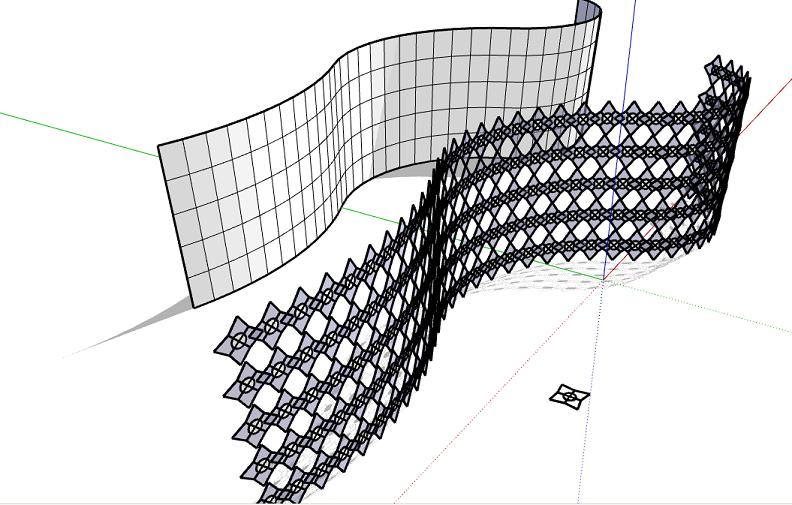

          CoS_panel.JPG

          1 條回覆 最後回覆 回覆 引用 0
          • pilouP 離線
            pilou
            最後由 編輯

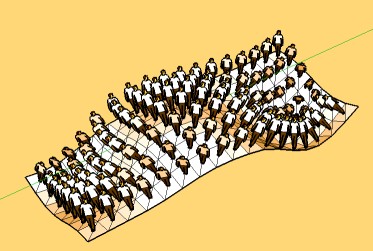
            is that normal?


            faces.jpg

            Frenchy Pilou
            Is beautiful that please without concept!
            My Little site :)

            1 條回覆 最後回覆 回覆 引用 0
            • pilouP 離線
              pilou
              最後由 編輯

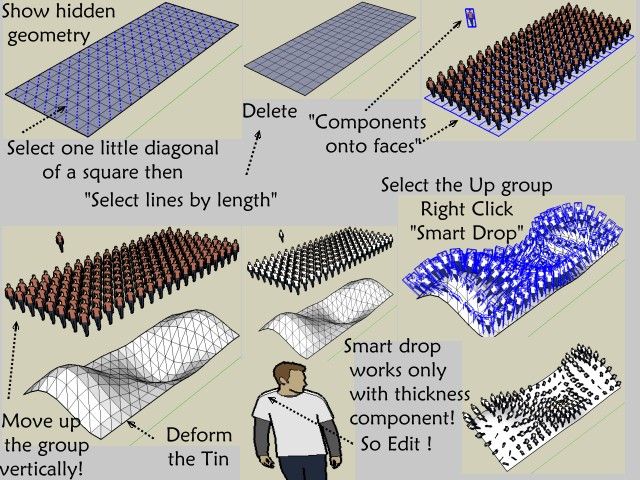
              About your bug of 2 components on a "same face" ☀

              A tricky thing with your "Select lines by lenght" 😉

              Make the Surface with the Sandbox "By scratch"
              Explode it
              Enable Hidden geometry
              Select one little diagonal of a square
              your very tricky "Select lines by lenght"
              Delete it
              "Components onto faces"
              Et voilà! 😎

              Edit hum hum works only if the tin stay "flat" 💚
              Maybe use the Smart Drop in addition! By a4architect ☀
              Soon little tut 😉


              lines.jpg


              smart.jpg


              Drop.jpg

              Frenchy Pilou
              Is beautiful that please without concept!
              My Little site :)

              1 條回覆 最後回覆 回覆 引用 0
              • Chris FullmerC 離線
                Chris Fullmer
                最後由 編輯

                Wow, great stuff everyone! I really like that paneled wall ilay. Looks great. And thats a cool method using smart-drop Frenchy. Thanks for showing it.

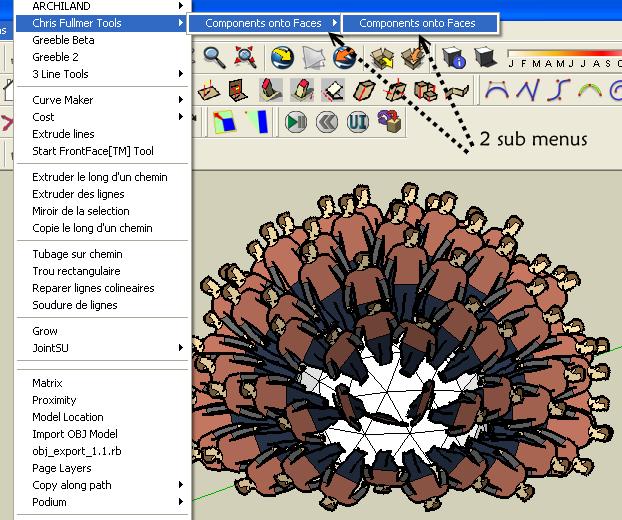
                Oh, and the menu is how I made it, but not really for any good reason I guess. I was hoping to have one or two other items in that sub-sub menu too, but I have not got them written yet. So I was planning ahead, but perhaps too early. Hopefully in time I'll get some more ability written into this script. I am currently working on solving the triangulated faces issue. I think I have a solution. I think.

                Chris

                Lately you've been tan, suspicious for the winter.
                All my Plugins I've written

                1 條回覆 最後回覆 回覆 引用 0
                • boofredlayB 離線
                  boofredlay
                  最後由 編輯

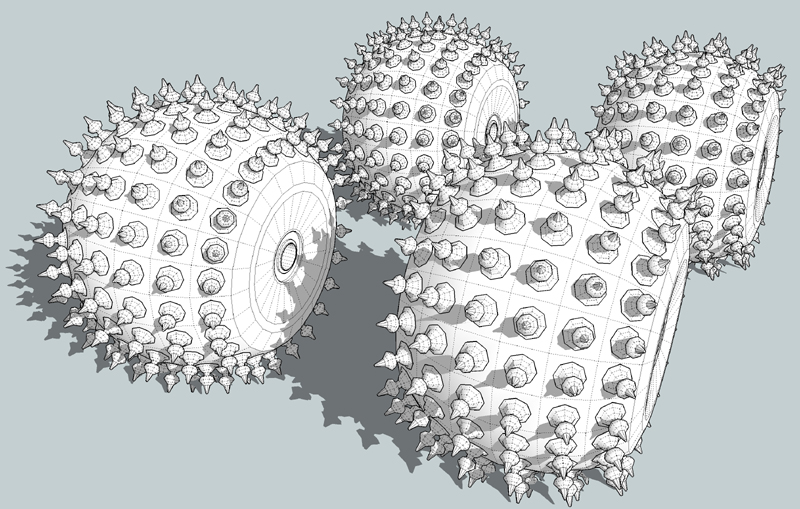
                  Wheels2.jpg

                  http://www.coroflot.com/boofredlay

                  1 條回覆 最後回覆 回覆 引用 0
                  • Chris FullmerC 離線
                    Chris Fullmer
                    最後由 編輯

                    You could do some serious off-roading with those tires! Or some serious damage. Either way, they look super cool!

                    Is each face truly one square face and not 2 triangle faces with the middle line smoothed? If it is 2 triangles, how did you get around that issue where it copies a component to each of the 2 faces?

                    Chris

                    Lately you've been tan, suspicious for the winter.
                    All my Plugins I've written

                    1 條回覆 最後回覆 回覆 引用 0
                    • boofredlayB 離線
                      boofredlay
                      最後由 編輯

                      Each is a single face, not 2 triangles.
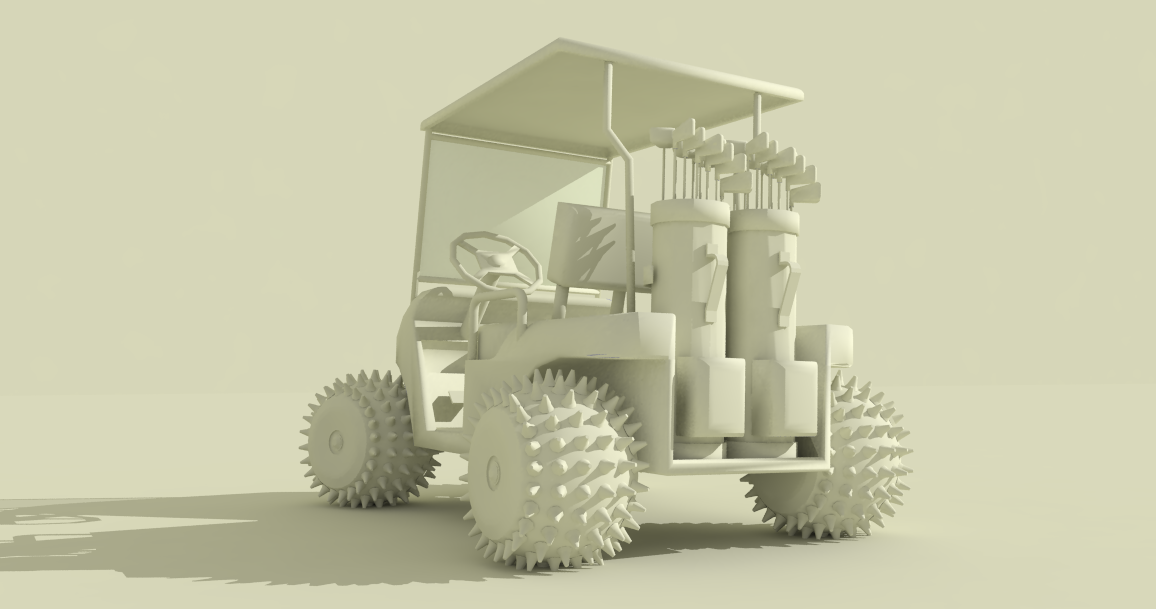
                      I used the sphere ruby to create a sphere then used your script to apply the component to a portion of the sphere. Then I deleted the extra and filled in with sidewalls. The bad part is I cannot think of any cool vehicle to place these under 😆

                      http://www.coroflot.com/boofredlay

                      1 條回覆 最後回覆 回覆 引用 0
                      • boofredlayB 離線
                        boofredlay
                        最後由 編輯

                        Ok, so I found something... 😄


                        Cart3.png

                        http://www.coroflot.com/boofredlay

                        1 條回覆 最後回覆 回覆 引用 0
                        • X 離線
                          xrok1
                          最後由 編輯

                          you best be replac'n them there irons with some shoot'n irons where that thin's gona be a tak'n ya yer gona need 'em. he he... 👍

                          “There are three classes of people: those who see. Those who see when they are shown. Those who do not see.”

                          http://www.Twilightrender.com try it!

                          1 條回覆 最後回覆 回覆 引用 0
                          • Chris FullmerC 離線
                            Chris Fullmer
                            最後由 編輯

                            UPDATE: v1.0 released - The video in the beginning is also updated

                            This new version has a new tool called "Components onto Face Collections". It treats collections of faces that have had their edges smoothed/hidden as a single face. So the terrain issue where it was copying 2 components onto each collection of faces is fixed. The new tool will only copy a single component onto the 2 faces. I hope that makes sense and I hope its helpful,

                            Chris

                            Lately you've been tan, suspicious for the winter.
                            All my Plugins I've written

                            1 條回覆 最後回覆 回覆 引用 0
                            • pilouP 離線
                              pilou
                              最後由 編輯

                              Neat update, save some manipulations 😄

                              Frenchy Pilou
                              Is beautiful that please without concept!
                              My Little site :)

                              1 條回覆 最後回覆 回覆 引用 0
                              • K 離線
                                kwistenbiebel
                                最後由 編輯

                                Wow, very nice update.
                                Thank you Chris.

                                1 條回覆 最後回覆 回覆 引用 0
                                • B 離線
                                  boilingsnow
                                  最後由 編輯

                                  Thank you very much Chris.

                                  A suggestion: If the faces are triangle, I wish your skript still can put the components onto the centroids of them.

                                  http://opxpka.bay.livefilestore.com/y1pXa37O0IxYd-i_HwT22m_Wxw6QQdakV8be3HZGinGru51HMapo4iSCkPzCVPhBImCvOA0PMyHspFs-Oxr0Xi9eQ/3.jpg

                                  1 條回覆 最後回覆 回覆 引用 0
                                  • Chris FullmerC 離線
                                    Chris Fullmer
                                    最後由 編輯

                                    Yes, triangles in general are tricky for this script to comprehend because it is basing the centerpoint on the BoundBox, which is alsway a box, even for triangles. I suppose I could test each single face to see if it is a triangle and then find the center of the 3 points instead of the boundingbox method.

                                    Would it be enough to write a 3rd tool called "Components onto Triangle Faces" or something like that. It would only handle triangle faces and nothing else probably. Or would it be better to try to make the two current versions smarter to handle traingles differently? I think I could do it either way fairly easily. Let me know if anyone has a preference - new tool for triangles, or make the 2 current ones support them. I'll think about it while I'm gone today and I'll get back to it later.

                                    Thanks for the suggestions and comments,

                                    Chris

                                    Lately you've been tan, suspicious for the winter.
                                    All my Plugins I've written

                                    1 條回覆 最後回覆 回覆 引用 0
                                    • thomthomT 離線
                                      thomthom
                                      最後由 編輯

                                      I think it'd make more sense to 'smarten' the original script. Centre of the triangle is most likely expected than centre of bounding box. My 2¢

                                      Thomas Thomassen — SketchUp Monkey & Coding addict
                                      List of my plugins and link to the CookieWare fund

                                      1 條回覆 最後回覆 回覆 引用 0
                                      • X 離線
                                        xrok1
                                        最後由 編輯

                                        i agree, a single tool, that way if you have tri's and quad's on the same selection it would fill both. also i don't know if the new version works this way, but if you turn on hidden geometry causing triangles to appear, it should then respect the triangle faces.

                                        “There are three classes of people: those who see. Those who see when they are shown. Those who do not see.”

                                        http://www.Twilightrender.com try it!

                                        1 條回覆 最後回覆 回覆 引用 0
                                        • X 離線
                                          xrok1
                                          最後由 編輯

                                          as i was watching the video i came up with another idea i think might be kind of handy. what do you think of the idea of copy every [n]face ? where [n] would be 3, every third face would get a copy etc... would probably be fairly easy to implement and could be quite useful. 😄

                                          “There are three classes of people: those who see. Those who see when they are shown. Those who do not see.”

                                          http://www.Twilightrender.com try it!

                                          1 條回覆 最後回覆 回覆 引用 0
                                          • Chris FullmerC 離線
                                            Chris Fullmer
                                            最後由 編輯

                                            @boilingsnow said:

                                            Thank you very much Chris.

                                            A suggestion: If the faces are triangle, I wish your skript still can put the components onto the centroids of them.

                                            Great suggestion, done!

                                            UPDATE: v1.1
                                            Now works much better with triangles. I wrote it so the 2 existing tool are just smarter, and that was definitely the way to go. So hopefully this is helpful. I also updated the video.

                                            Chris

                                            Lately you've been tan, suspicious for the winter.
                                            All my Plugins I've written

                                            1 條回覆 最後回覆 回覆 引用 0
                                            • 1
                                            • 2
                                            • 3
                                            • 4
                                            • 2 / 4
                                            • 第一個貼文
                                              最後的貼文
                                            Buy SketchPlus
                                            Buy SUbD
                                            Buy WrapR
                                            Buy eBook
                                            Buy Modelur
                                            Buy Vertex Tools
                                            Buy SketchCuisine
                                            Buy FormFonts

                                            Advertisement