How to create edges
-
I am trying to make a model of an axe. I can not figure out how to make the edge of the blade where it is supposed to be sharp. How is that done?
-
There are many ways to do that...best if you show a picture of the shape you are trying to make.
-
I am trying to make a 3d model of Gimli's Battle Axe from Lord of The Rings. I need the blade part on both ends. This is a link to the image. Keep in mind I only need to blade.
http://theexcaliber.com/library/UC1397ABNB20on20plaquebataxGimli.jpg
-
I don't know if this is what you want to do or of any use but it's a quick attempt, I'm sure there's a much simpler way of doing it.
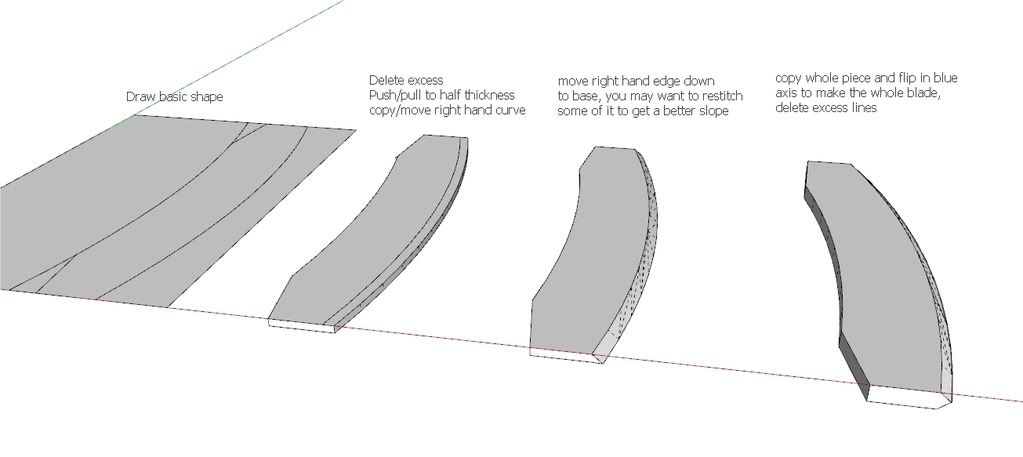
-
another way.
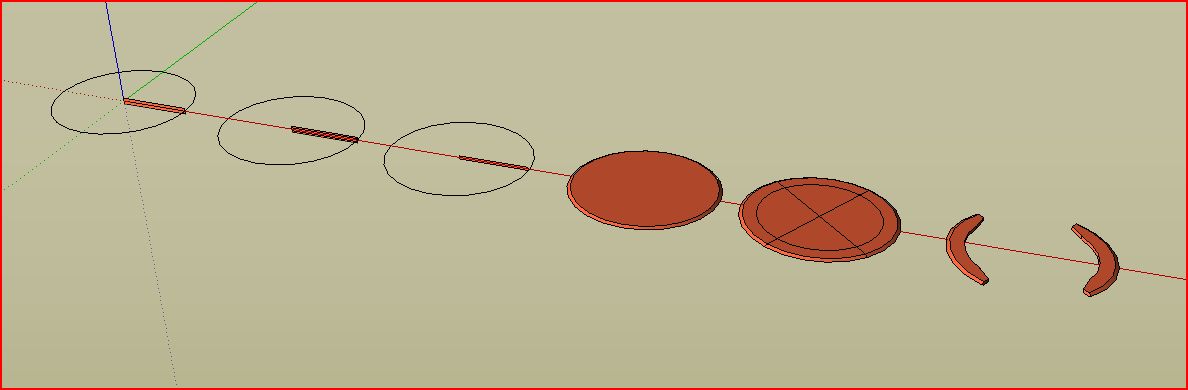
-
OK. I have one more question. Not I have the whole thing completed, but I want to cut out the triangles that are on the blade. Is there any way to do that.
Here is my product so far. I am pretty satisfied.
This is my final, or almost final, product. I am very satisfied.
-
Just draw the triangles where you want them and push/pull them through the blade.
-
I tried that, and I got one side, but the other was not working. Do you think there is any other way that it can be done. If not do you think I should leave it like it is.
-
it works just fine for me. try rotating around while push/pulling to find a vertex on the back side to reference.

Hello! It looks like you're interested in this conversation, but you don't have an account yet.
Getting fed up of having to scroll through the same posts each visit? When you register for an account, you'll always come back to exactly where you were before, and choose to be notified of new replies (either via email, or push notification). You'll also be able to save bookmarks and upvote posts to show your appreciation to other community members.
With your input, this post could be even better 💗
Register Login


Advertisement