sketchucation logo sketchucation
    • Login
    Oops, your profile's looking a bit empty! To help us tailor your experience, please fill in key details like your SketchUp version, skill level, operating system, and more. Update and save your info on your profile page today!
    ⚠️ Update | Sketchucation Tools 5.0.8 released with licensing improvements and bugfixes Download

    How to create edges

    Scheduled Pinned Locked Moved Newbie Forum
    sketchup
    9 Posts 4 Posters 907 Views 4 Watching
    Loading More Posts
    • Oldest to Newest
    • Newest to Oldest
    • Most Votes
    Reply
    • Reply as topic
    Log in to reply
    This topic has been deleted. Only users with topic management privileges can see it.
    • S
      socrman89
      last edited by

      I am trying to make a model of an axe. I can not figure out how to make the edge of the blade where it is supposed to be sharp. How is that done?

      1 Reply Last reply
      Reply Quote 0
      • H
        hebrides
        last edited by

        There are many ways to do that...best if you show a picture of the shape you are trying to make.

        1 Reply Last reply
        Reply Quote 0
        • S
          socrman89
          last edited by

          I am trying to make a 3d model of Gimli's Battle Axe from Lord of The Rings. I need the blade part on both ends. This is a link to the image. Keep in mind I only need to blade.

          http://theexcaliber.com/library/UC1397ABNB20on20plaquebataxGimli.jpg

          1 Reply Last reply
          Reply Quote 0
          • R
            Rodentpete
            last edited by

            I don't know if this is what you want to do or of any use but it's a quick attempt, I'm sure there's a much simpler way of doing it.
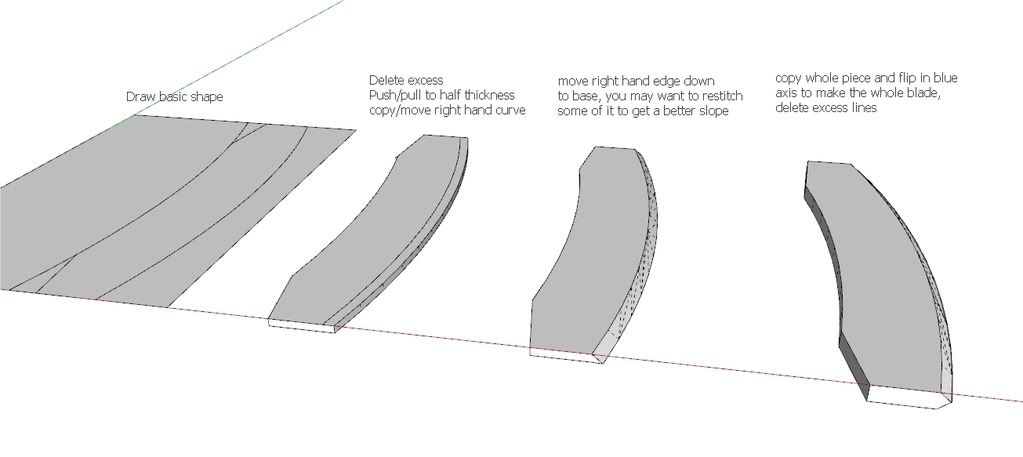
            http://i299.photobucket.com/albums/mm292/rodentpete/axe.jpg

            1 Reply Last reply
            Reply Quote 0
            • X
              xrok1
              last edited by

              another way.


              Capture.JPG

              “There are three classes of people: those who see. Those who see when they are shown. Those who do not see.”

              http://www.Twilightrender.com try it!

              1 Reply Last reply
              Reply Quote 0
              • S
                socrman89
                last edited by

                OK. I have one more question. Not I have the whole thing completed, but I want to cut out the triangles that are on the blade. Is there any way to do that.

                Here is my product so far. I am pretty satisfied.


                This is my final, or almost final, product. I am very satisfied.

                1 Reply Last reply
                Reply Quote 0
                • R
                  Rodentpete
                  last edited by

                  Just draw the triangles where you want them and push/pull them through the blade.

                  1 Reply Last reply
                  Reply Quote 0
                  • S
                    socrman89
                    last edited by

                    I tried that, and I got one side, but the other was not working. Do you think there is any other way that it can be done. If not do you think I should leave it like it is.

                    1 Reply Last reply
                    Reply Quote 0
                    • X
                      xrok1
                      last edited by

                      it works just fine for me. try rotating around while push/pulling to find a vertex on the back side to reference. 😉

                      “There are three classes of people: those who see. Those who see when they are shown. Those who do not see.”

                      http://www.Twilightrender.com try it!

                      1 Reply Last reply
                      Reply Quote 0

                      Hello! It looks like you're interested in this conversation, but you don't have an account yet.

                      Getting fed up of having to scroll through the same posts each visit? When you register for an account, you'll always come back to exactly where you were before, and choose to be notified of new replies (either via email, or push notification). You'll also be able to save bookmarks and upvote posts to show your appreciation to other community members.

                      With your input, this post could be even better 💗

                      Register Login
                      • 1 / 1
                      • First post
                        Last post
                      Buy SketchPlus
                      Buy SUbD
                      Buy WrapR
                      Buy eBook
                      Buy Modelur
                      Buy Vertex Tools
                      Buy SketchCuisine
                      Buy FormFonts

                      Advertisement