sketchucation logo sketchucation
    • 登入
    Oops, your profile's looking a bit empty! To help us tailor your experience, please fill in key details like your SketchUp version, skill level, operating system, and more. Update and save your info on your profile page today!
    🔌 Smart Spline | Fluid way to handle splines for furniture design and complex structures. Download

    [Plugin] Three Line Tools (Updated March 9th, 2009)

    已排程 已置頂 已鎖定 已移動 Plugins
    117 貼文 43 Posters 78.9k 瀏覽 43 Watching
    正在載入更多貼文
    • 從舊到新
    • 從新到舊
    • 最多點贊
    回覆
    • 在新貼文中回覆
    登入後回覆
    此主題已被刪除。只有擁有主題管理權限的使用者可以查看。
    • EdsonE 離線
      Edson
      最後由 編輯

      definitely, yes.

      edson mahfuz, architect| porto alegre • brasil
      http://www.mahfuz.arq.br

      1 條回覆 最後回覆 回覆 引用 0
      • pilouP 離線
        pilou
        最後由 編輯

        Yes that can be helping, but it's not possible to create a new Menu something like "Plugins2"?
        Then it's easy to put inside this new menu some numerous plugins 😄

        Frenchy Pilou
        Is beautiful that please without concept!
        My Little site :)

        1 條回覆 最後回覆 回覆 引用 0
        • thomthomT 離線
          thomthom
          最後由 編輯

          @unknownuser said:

          Yes that can be helping, but it's not possible to create a new Menu something like "Plugins2"?
          Then it's easy to put inside this new menu some numerous plugins 😄

          Nope. No way to create new top level menus in SU. 😞

          Thomas Thomassen — SketchUp Monkey & Coding addict
          List of my plugins and link to the CookieWare fund

          1 條回覆 最後回覆 回覆 引用 0
          • P 離線
            Panga
            最後由 編輯

            Chris you rock !! This tool'll help a lot. Thanks again !!

            Panga.

            1 條回覆 最後回覆 回覆 引用 0
            • T 離線
              Teezer
              最後由 編輯

              Nice extension! Very useful. Thanks... 👍

              Real life is just another website, albeit a rather boring one.

              1 條回覆 最後回覆 回覆 引用 0
              • W 離線
                watkins
                最後由 編輯

                Dear Chris,

                I have just viewed your video tutorial. The plugin is much, much more than I was expecting. Excellent work! It is going to be a very useful construction tool. Perhaps CADFather, or A.N. Other, could make a small toolbar for the three options and one could be selected/deselected either in View>Toolbars or Window>Preferences>Extensions.

                Thanks once again.

                Regards,
                Bob

                1 條回覆 最後回覆 回覆 引用 0
                • B 離線
                  Ben Ritter
                  最後由 編輯

                  Always grateful to those who share their plugins, and you're no exception.

                  Thank you very much.

                  1 條回覆 最後回覆 回覆 引用 0
                  • Chris FullmerC 離線
                    Chris Fullmer
                    最後由 編輯

                    Thanks for checking it out folks. Thanks for normals idea Bob!

                    I would like to implement the toolbar in the next release, or maybe the one after that. This would be a good tool to have in a toolbar I think.

                    Right now I am working on making be registered with SU extensions so it can be turned on and off easier. Also I am working on the VCB input. Its going pretty good. Currently it works like this:
                    (Note: this is in development and is not the posted version yet).
                    Run the plugin for the first time (per SU session).
                    Prompt box asks for initial height
                    Then click anywhere to create lines of that height.
                    Type a new height (into the VCB) and hit enter
                    All new lines will be made according to that size. (this also resizes the last line drawn)
                    Keep going until a different tool is activated.

                    Chris

                    Lately you've been tan, suspicious for the winter.
                    All my Plugins I've written

                    1 條回覆 最後回覆 回覆 引用 0
                    • thomthomT 離線
                      thomthom
                      最後由 編輯

                      You can do it with no prompt at all, just use a default value until the user inputs anything. (Can you tell I'm not a fan of prompts? 😉 )

                      Thomas Thomassen — SketchUp Monkey & Coding addict
                      List of my plugins and link to the CookieWare fund

                      1 條回覆 最後回覆 回覆 引用 0
                      • Chris FullmerC 離線
                        Chris Fullmer
                        最後由 編輯

                        I thought about that option, but I couldn't decide on a starting value. I'm having some VCB display issues which are making my VCB experience rather trying. Hopefully I'll get it worked out (I feel a new newbie ruby question thread coming on shortly).

                        Chris

                        Lately you've been tan, suspicious for the winter.
                        All my Plugins I've written

                        1 條回覆 最後回覆 回覆 引用 0
                        • Chris FullmerC 離線
                          Chris Fullmer
                          最後由 編輯

                          Oops, I think that I don't have it set up to accept clicking on nothing. I think it gets confused and does whatever it feels like doing. Thanks for finding that John, look good 😄

                          Chris

                          Lately you've been tan, suspicious for the winter.
                          All my Plugins I've written

                          1 條回覆 最後回覆 回覆 引用 0
                          • JClementsJ 離線
                            JClements
                            最後由 編輯

                            Chris, keep it as a "Feature".

                            John | Illustrator | Beaverton, Oregon

                            1 條回覆 最後回覆 回覆 引用 0
                            • JClementsJ 離線
                              JClements
                              最後由 編輯

                              Chris, I got this unexpected "cool" result.

                              I drew a cone-shape and turned on hidden edges.
                              Used the draw vertical line to Normal.
                              After doing a few lines I started clicking on white space and and hitting the Return Key.

                              Since the cursor is clicking on white space its registering to elevation zero on the X-Y plane and drawing a line back to a common vertex [Edit(the end-point of the last line drawn as a "normal")[/Edit]]. See red lines.
                              jNormal drawing.png
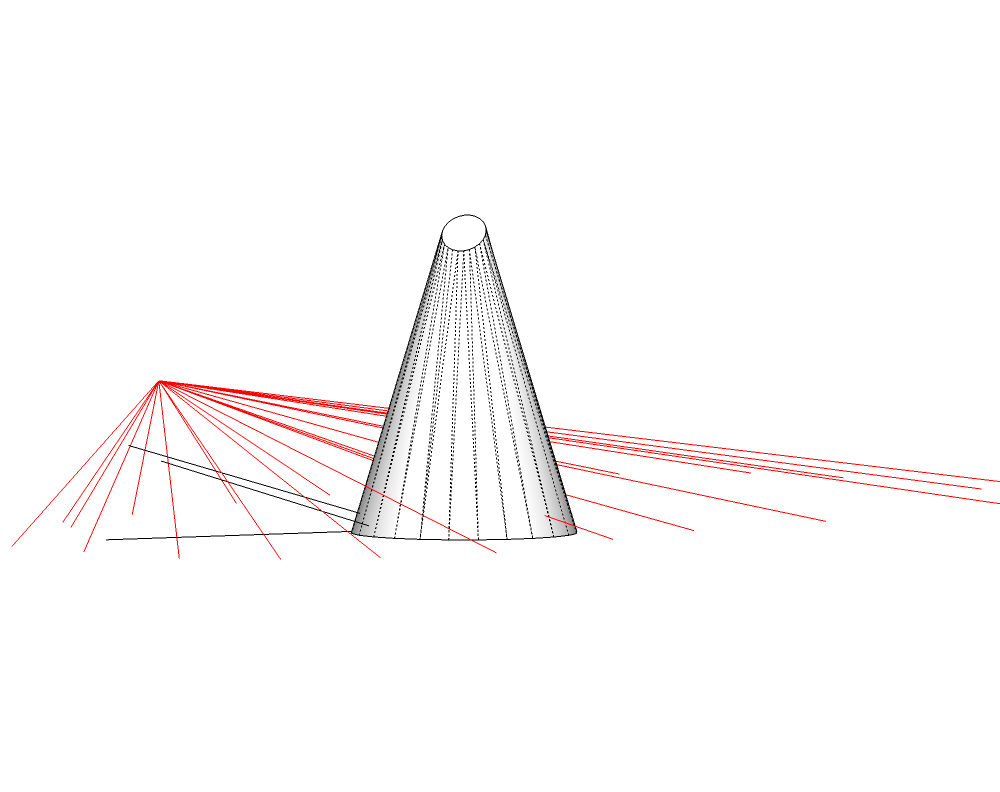
                              Try it and see what happens.


                              Normal drawing.skp

                              John | Illustrator | Beaverton, Oregon

                              1 條回覆 最後回覆 回覆 引用 0
                              • pilouP 離線
                                pilou
                                最後由 編輯

                                @unknownuser said:

                                Nope. No way to create new top level menus in SU.

                                😞

                                Frenchy Pilou
                                Is beautiful that please without concept!
                                My Little site :)

                                1 條回覆 最後回覆 回覆 引用 0
                                • Chris FullmerC 離線
                                  Chris Fullmer
                                  最後由 編輯

                                  SCRIPT UPDATED
                                  All right, I got the VCB integrated now, and it is soo much better! No more prompts, just click click click. When you enter a new value into the VCB and hit enter it will change the length of the previously drawn line.

                                  I also updated the video to reflect these changes (but if you're already familiar with the tool, it shouldn't be that hard to get working).

                                  Thanks for the suggestions.

                                  Chris

                                  Oh yeah, there is a known bug where the undo counts every line change as a separate undo command. So if you use the vcb to change the length of a line multiple times, each change will get its own undo. Sorry, its turned out to be trickier than I thought to fix this in this script but I have some ideas to fix it if its a big problem.

                                  Lately you've been tan, suspicious for the winter.
                                  All my Plugins I've written

                                  1 條回覆 最後回覆 回覆 引用 0
                                  • pilouP 離線
                                    pilou
                                    最後由 編輯

                                    Seems quasi perfect 😄

                                    Frenchy Pilou
                                    Is beautiful that please without concept!
                                    My Little site :)

                                    1 條回覆 最後回覆 回覆 引用 0
                                    • J 離線
                                      jmmad
                                      最後由 編輯

                                      Thxs a lot Chris for this plugin
                                      Really usefull

                                      Get Upa !

                                      1 條回覆 最後回覆 回覆 引用 0
                                      • Chris FullmerC 離線
                                        Chris Fullmer
                                        最後由 編輯

                                        UPDATED (again)
                                        Just in case you were'nt sick of updating this script, I thought I'd make yet another update to it today!

                                        This is the new Visual Graphic User Interface Edition. Or in other words, I added a toolbar.
                                        line_elev.pngline_length.pngline_normals.png
                                        These are (1)Vertical lines of the same length. (2)Vertical lines with the same elevation. (3)An N (for Normal) and 3 lines coming off of its normals.

                                        Also, I made it so it registers with the extension manager. (Go to Preferences>Extensions and you'll see "3 Line Tools" listed. You can uncheck it and it won't be in your Plugins menu the next time you run SketchUp.) Hope these frequent updates aren't obnoxious.

                                        Chris

                                        Lately you've been tan, suspicious for the winter.
                                        All my Plugins I've written

                                        1 條回覆 最後回覆 回覆 引用 0
                                        • L 離線
                                          linea
                                          最後由 編輯

                                          Superb.Thanks

                                          1 條回覆 最後回覆 回覆 引用 0
                                          • Jean-FrancoJ 離線
                                            Jean-Franco
                                            最後由 編輯

                                            Thanks so much Chris.
                                            What a plugin !
                                            And how fast you are in updating it in order to follow our needs and demands !
                                            Seen this way Ruby scripting seems so easy ...
                                            Unfortunately it's not. Or at least for me. 👍

                                            Jean-Franco

                                            1 條回覆 最後回覆 回覆 引用 0
                                            • 1
                                            • 2
                                            • 3
                                            • 4
                                            • 5
                                            • 6
                                            • 3 / 6
                                            • 第一個貼文
                                              最後的貼文
                                            Buy SketchPlus
                                            Buy SUbD
                                            Buy WrapR
                                            Buy eBook
                                            Buy Modelur
                                            Buy Vertex Tools
                                            Buy SketchCuisine
                                            Buy FormFonts

                                            Advertisement



