sketchucation logo sketchucation
    • 登入
    Oops, your profile's looking a bit empty! To help us tailor your experience, please fill in key details like your SketchUp version, skill level, operating system, and more. Update and save your info on your profile page today!
    🔌 Smart Spline | Fluid way to handle splines for furniture design and complex structures. Download

    Proper animation for sketchup 7??

    已排程 已置頂 已鎖定 已移動 Newbie Forum
    sketchup
    23 貼文 8 Posters 2.5k 瀏覽 8 Watching
    正在載入更多貼文
    • 從舊到新
    • 從新到舊
    • 最多點贊
    回覆
    • 在新貼文中回覆
    登入後回覆
    此主題已被刪除。只有擁有主題管理權限的使用者可以查看。
    • GaieusG 離線
      Gaieus
      最後由 編輯

      No, I didn't make a video. I was hoping someone had a simple solution that I overlooked. 😳


      This is the developer: http://www.sketchucation.com/forums/scf/viewtopic.php?f=180&t=10946&st=0&sk=t&sd=a but he hasn't been on-line since Christmas...

      Gai...

      1 條回覆 最後回覆 回覆 引用 0
      • R 離線
        RedQueen
        最後由 編輯

        Hi y'all!
        111!
        I can't figure out how to work this plugin, can anyone give me a more thorough breakdown on how it works? I'm using Google Sketchup 6.

        I tried the above posters process of tagging object as "Set Position 1" for the first scene and then moving the object across red axis and then tagging it as "Set Position 2" and then updating scene two.

        When I click scene 1 again the object doesn't go back to Position 1, and I'm not sure where Start Animation Observer and Stop Animation Observer comes in 😞 I read the txt file provided with the download and opened the "Boxes 2" skp file from the download, but for that file I didn't see an animation when I clicked view animation.

        Any help would be greatly appreciated, as I'm quiet confused right now.

        Thanks!

        1 條回覆 最後回覆 回覆 引用 0
        • GaieusG 離線
          Gaieus
          最後由 編輯

          Believe Pilou! Since I could do it above, I haven't played with it so I'm not ahead even a step.

          Gai...

          1 條回覆 最後回覆 回覆 引用 0
          • pilouP 離線
            pilou
            最後由 編輯

            You don't read my little tut? 😉

            Not drawn and writed in the image but...
            You can address all positions even you are in the scene 1 !!! 😮
            Just don't overpass the number of scene existing for give a number to positions! ☀

            Start and stop Observer will be used only when your all objects will be adressed!

            Frenchy Pilou
            Is beautiful that please without concept!
            My Little site :)

            1 條回覆 最後回覆 回覆 引用 0
            • R 離線
              RedQueen
              最後由 編輯

              Thanks for the reference!
              I get how it works now, at the same time it didn't work for what I wanted to do. As you can see now for my avatar, I modeled a sentry gun from TeamFortress2 (cuz I love that game so much) and wanted to animated it so the body would rotate from left to right. The Proper Animation couldn't create a fixed center pt for rotation. Nevertheless this is a cool plug-in for other applications. I'm looking at SketchyPhysics now.

              1 條回覆 最後回覆 回覆 引用 0
              • pilouP 離線
                pilou
                最後由 編輯

                @unknownuser said:

                The Proper Animation couldn't create a fixed center pt for rotation

                Why not?


                rotation.skp

                Frenchy Pilou
                Is beautiful that please without concept!
                My Little site :)

                1 條回覆 最後回覆 回覆 引用 0
                • R 離線
                  RedQueen
                  最後由 編輯

                  Yeah! the way you did it is what I want. Gah, I'm missing something, here is my failed attempt. whats wrong?


                  test.skp

                  1 條回覆 最後回覆 回覆 引用 0
                  • pilouP 離線
                    pilou
                    最後由 編輯

                    Launch only Start Observer when you have finished the Address objects!
                    If you want change something! Stop Observer first !

                    I don't know what to say! 😳
                    If I make a new session, I have no problem for make any rotations!
                    So I must miss something also with your file 😒
                    Maybe orientation, order of Pushpulling...I am in the fog 💚
                    Maybe something with the use of the rotation tool? (Click, click and drag,...? )

                    Frenchy Pilou
                    Is beautiful that please without concept!
                    My Little site :)

                    1 條回覆 最後回覆 回覆 引用 0
                    • pilouP 離線
                      pilou
                      最後由 編輯

                      Ok I believe have found something 😉
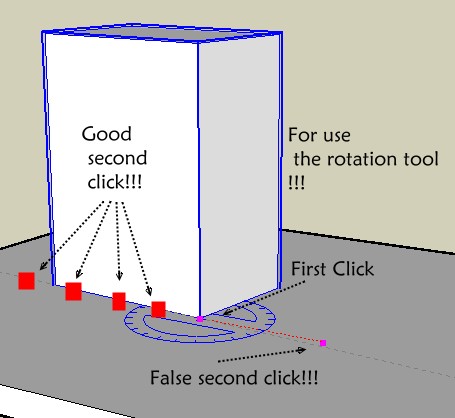
                      If you rotate your object with the "false second click" you will obtain the "crazy" rotation!
                      Position of the object seems the same but the axe rotation will be not for the plug!
                      So try it! 😉(click on image if scrollbars)
                      rtool.jpg

                      Frenchy Pilou
                      Is beautiful that please without concept!
                      My Little site :)

                      1 條回覆 最後回覆 回覆 引用 0
                      • R 離線
                        RedQueen
                        最後由 編輯

                        yeah I'm doing my second click on the edge of the object. but still its wacky. Here is a screen capture of what I'm doing.


                        rotate2.rar

                        1 條回覆 最後回覆 回覆 引用 0
                        • pilouP 離線
                          pilou
                          最後由 編輯

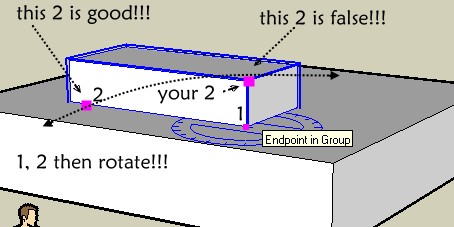
                          Bingo! 💚
                          It was a vicious thing! 😆


                          bingo.jpg

                          Frenchy Pilou
                          Is beautiful that please without concept!
                          My Little site :)

                          1 條回覆 最後回覆 回覆 引用 0
                          • R 離線
                            RedQueen
                            最後由 編輯

                            here 😞 still doesn't work.


                            rotate3.rar

                            1 條回覆 最後回覆 回覆 引用 0
                            • pilouP 離線
                              pilou
                              最後由 編輯

                              hum hum 😢
                              Your video don't show all the screen! ?

                              When you load my first example "Why not" working and draw after a volume in the same file is that the same?

                              Frenchy Pilou
                              Is beautiful that please without concept!
                              My Little site :)

                              1 條回覆 最後回覆 回覆 引用 0
                              • R 離線
                                RedQueen
                                最後由 編輯

                                Hey.. I think I got it! 😍 you have to set your component axis to the hinge point! omg finally! I tried it and it worked if I wanted an object to have a rotation point from the center, then that object has to have a component with its axis set up at that point!

                                Thanks for your help! I did solve it by looking more closely at your file.

                                1 條回覆 最後回覆 回覆 引用 0
                                • pilouP 離線
                                  pilou
                                  最後由 編輯

                                  So cool for you 😉
                                  And then use only components as I understand 😉

                                  PS Maybe you can also try Mover.rb
                                  Some similar & more intuitive but you must go to each scenes for address your object position
                                  Maybe with this one you will have no problem 😉

                                  Frenchy Pilou
                                  Is beautiful that please without concept!
                                  My Little site :)

                                  1 條回覆 最後回覆 回覆 引用 0
                                  • E 離線
                                    Ecuadorian
                                    最後由 編輯

                                    @gaieus said:

                                    My problem is (was) the same; I could make the animation in SU but couldn't export it.

                                    It's been a month, so you probably already know this: You can export the "proper animation" with Whaat's "Smooth animation" plug-in.

                                    -Miguel Lescano
                                    Subscribe to my house plans YouTube channel! (30K+ subs)

                                    1 條回覆 最後回覆 回覆 引用 0
                                    • 1
                                    • 2
                                    • 2 / 2
                                    • 第一個貼文
                                      最後的貼文
                                    Buy SketchPlus
                                    Buy SUbD
                                    Buy WrapR
                                    Buy eBook
                                    Buy Modelur
                                    Buy Vertex Tools
                                    Buy SketchCuisine
                                    Buy FormFonts

                                    Advertisement