sketchucation logo sketchucation
    • 登入
    Oops, your profile's looking a bit empty! To help us tailor your experience, please fill in key details like your SketchUp version, skill level, operating system, and more. Update and save your info on your profile page today!
    🔌 Smart Spline | Fluid way to handle splines for furniture design and complex structures. Download

    [Plugin] FollowMe and keep (v0.04 update 20090210)

    已排程 已置頂 已鎖定 已移動 Plugins
    223 貼文 79 Posters 186.3k 瀏覽 79 Watching
    正在載入更多貼文
    • 從舊到新
    • 從新到舊
    • 最多點贊
    回覆
    • 在新貼文中回覆
    登入後回覆
    此主題已被刪除。只有擁有主題管理權限的使用者可以查看。
    • C 離線
      callinas
      最後由 編輯

      Hi, have installed the plug-in and worked fine. Today i m trying to use the tool, but simply dont work. What may i do ?

      1 條回覆 最後回覆 回覆 引用 0
      • cottyC 離線
        cotty
        最後由 編輯

        You may upload an image or the model...

        my SketchUp gallery

        1 條回覆 最後回覆 回覆 引用 0
        • T 離線
          tailgater
          最後由 編輯

          @callinas said:

          Hi, have installed the plug-in and worked fine. Today i m trying to use the tool, but simply dont work. What may i do ?

          Is it in your plugins folder? Are you using an updated version of SketchUp?

          I somehow find out how I solved mine.

          If your problem is same as mine, open your FAK.rb and paste this line of code on the very top line:
          require 'sketchup.rb'
          Save it, then make sure the rb file is in the tools folder and not in the plugins folder.

          1 條回覆 最後回覆 回覆 引用 0
          • T 離線
            terrylewis
            最後由 編輯

            Incredible!

            Thank you! Why don't you distribute this through sketchup and sign it? It is very nice work and it would make it easier for the user.

            1 條回覆 最後回覆 回覆 引用 0
            • I 離線
              idcampza
              最後由 編輯

              👍 👍 👍 👍 👍 gggg

              1 條回覆 最後回覆 回覆 引用 0
              • R 離線
                ricdach
                最後由 編輯

                Do you have an English version?

                1 條回覆 最後回覆 回覆 引用 0
                • TIGT 離線
                  TIG Moderator
                  最後由 編輯

                  This is a really old plugin, it's encrypted and terribly out of date !
                  Also it ships in its RBZ in two versions - the EN one is actually in Chinese and always fails, the other file [CN?] is actually in ENglish and works !
                  There are instructions in earlier posts on how to fix this...

                  In any case it may well prove flaky in newer versions of SketchUp, but you can try it and see...

                  TIG

                  1 條回覆 最後回覆 回覆 引用 0
                  • J 離線
                    JohnMTB
                    最後由 編輯

                    Wikii,

                    I can see the extension in my Extension Manager, but it shows up as, ‘Blocked’. If I click on the arrow, I am advised that it is unsigned.

                    What do I do please?

                    johnmtb

                    1 條回覆 最後回覆 回覆 引用 0
                    • jujuJ 離線
                      juju
                      最後由 編輯

                      @johnmtb said:

                      Wikii,

                      I can see the extension in my Extension Manager, but it shows up as, ‘Blocked’. If I click on the arrow, I am advised that it is unsigned.

                      What do I do please?

                      johnmtb

                      unsigned isn't a problem the extension will work just fine, just relax your extension loading policies

                      Save the Earth, it's the only planet with chocolate.

                      1 條回覆 最後回覆 回覆 引用 0
                      • J 離線
                        JohnMTB
                        最後由 編輯

                        juju,

                        I have done as you suggest and it is now in the Extension Manager as enabled.

                        It also appears as FollowMeAndKeep, under Extensions, but I do not see it in the Toolbars, so how do I get it onto the main screen?

                        johnmtb

                        1 條回覆 最後回覆 回覆 引用 0
                        • TIGT 離線
                          TIG Moderator
                          最後由 編輯

                          Read the tool's usage notes.
                          Many Extensions don't appear under the Extensions menu !
                          Some appear elsewhere - e.g. for Fredo's tools are under:
                          Tools > Fredo Collection OR Fredo Tools...

                          The Toolbars are activated separately...

                          To use Extensions/Plugins effectively you must read their usage notes...
                          So don't even have menu items - e.g SectionCutFace which is a context-menu tool only available when there's a selection of a single Section-Plane...

                          TIG

                          1 條回覆 最後回覆 回覆 引用 0
                          • J 離線
                            JohnMTB
                            最後由 編輯

                            TIG,

                            where do I find the usage notes?

                            johnmtb

                            1 條回覆 最後回覆 回覆 引用 0
                            • TIGT 離線
                              TIG Moderator
                              最後由 編輯

                              The '[More ]Info' button when considering downloading/installing etc is a good starting point, but also read the main thread's posts for each tool - there are often good tips and advice in those...

                              TIG

                              1 條回覆 最後回覆 回覆 引用 0
                              • J 離線
                                JohnMTB
                                最後由 編輯

                                TIG,

                                It was from clicking on the, ‘More Info’, that I got to this forum. And, I have read all of the posts but found nothing that would help me.

                                Also, as I mentioned earlier, on the menu line, under Extensions, I have FollowMeAndKeep and Mirror Selection. Mirror Selection works, but FollowMeAndKeep does nothing.

                                Any ideas?

                                johnmtb

                                1 條回覆 最後回覆 回覆 引用 0
                                • TIGT 離線
                                  TIG Moderator
                                  最後由 編輯

                                  The FaK instructions are in the first post: https://sketchucation.com/forums/viewtopic.php?p=129504#p129504
                                  There's also some discussion in subsequent posts...

                                  It is old and unsupported for many years, so it's unsigned - set your Extension Manager > Extensions Loading Policy to 'Unrestricted' and restart SketchUp to see the menu-item if needed...

                                  There's no Toolbar...

                                  It appears under the Plugins menu - which is now known as 'Extensions' in newer SketchUp versions...

                                  put simply, preselect a path and a face and run the tool, it should extrude OK...
                                  Run it with the Ruby Console open to see if there are any issues...

                                  TIG

                                  1 條回覆 最後回覆 回覆 引用 0
                                  • J 離線
                                    JohnMTB
                                    最後由 編輯

                                    TIG,

                                    In the Extension Manager, FAK is there and it is marked as Enabled.

                                    As I mentioned previously, under Extensions, I have FollowMeAndKeep and Mirror Selection. Mirror Selection works, but FollowMeAndKeep does nothing. However, when I downloaded FAK.skp, at the beginning of this forum, and clicked on FollowMeAndKeep it worked; why?

                                    Unfortunately, I am very new to SketchUp and I do not know what you mean by, ‘Run it with the Ruby Console open to see if there are any issues.’ Where do I find the Ruby Console?

                                    johnmtb

                                    1 條回覆 最後回覆 回覆 引用 0
                                    • pilouP 離線
                                      pilou
                                      最後由 編輯

                                      Menu Window / Ruby Console 😉 (till 2017... i suppose that is the same for new versions)
                                      Sorry in French but ... 😄
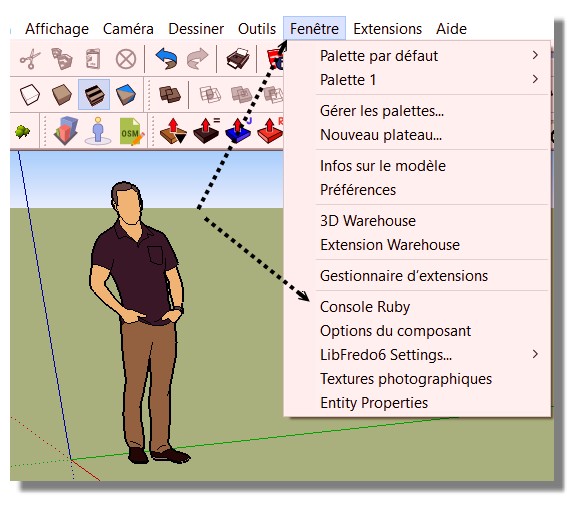
                                      menuConsole.jpg

                                      Frenchy Pilou
                                      Is beautiful that please without concept!
                                      My Little site :)

                                      1 條回覆 最後回覆 回覆 引用 0
                                      • J 離線
                                        JohnMTB
                                        最後由 編輯

                                        Pilou,

                                        Thank you for that information.

                                        TIG,

                                        The Ruby Console was blank when I used FollowMeAndKeep but when I used Mirror the console was populated with information.

                                        johnmtb

                                        1 條回覆 最後回覆 回覆 引用 0
                                        • TIGT 離線
                                          TIG Moderator
                                          最後由 編輯

                                          Please copy/paste those messages from the Ruby Console, explaining which tool was being used...

                                          My Mirror should not produce any error-messages in the RC...
                                          Sometimes the FAK tool can produce error messages - usually around 'zero-length' vectors when the path is overly complex...

                                          Perhaps conflating these two tools is confusing ?

                                          TIG

                                          1 條回覆 最後回覆 回覆 引用 0
                                          • J 離線
                                            JohnMTB
                                            最後由 編輯

                                            TIG,

                                            When I used the Mirror Extension (which I assume was written by you), the console was populated with information, because I made a mistake in the way I used the extension.

                                            When I used the FollowMeAndKeep Extension there were no comments in the Ruby Console, but nothing happened either.

                                            However, subsequently, I changed the position of the surface from horizontal to vertical, and changed the path from pointing downwards at an angle of about 42° to 0° which then created the extrusion. But it did not correctly follow the path will have to try other angles, dimensions, etc. until I get it right.

                                            Previously I have used the Eneroth Upright extruder, but I had problems with that one as well.

                                            I shall keep on trying.

                                            Thank you all for your help.

                                            johnmtb

                                            1 條回覆 最後回覆 回覆 引用 0
                                            • 1
                                            • 2
                                            • 3
                                            • 4
                                            • 5
                                            • 6
                                            • 7
                                            • 8
                                            • 11
                                            • 12
                                            • 6 / 12
                                            • 第一個貼文
                                              最後的貼文
                                            Buy SketchPlus
                                            Buy SUbD
                                            Buy WrapR
                                            Buy eBook
                                            Buy Modelur
                                            Buy Vertex Tools
                                            Buy SketchCuisine
                                            Buy FormFonts

                                            Advertisement

