sketchucation logo sketchucation
    • Login
    Oops, your profile's looking a bit empty! To help us tailor your experience, please fill in key details like your SketchUp version, skill level, operating system, and more. Update and save your info on your profile page today!
    ⚠️ Update | Sketchucation Tools 5.0.8 released with licensing improvements and bugfixes Download

    [Plugin] FollowMe and keep (v0.04 update 20090210)

    Scheduled Pinned Locked Moved Plugins
    223 Posts 79 Posters 220.5k Views 79 Watching
    Loading More Posts
    • Oldest to Newest
    • Newest to Oldest
    • Most Votes
    Reply
    • Reply as topic
    Log in to reply
    This topic has been deleted. Only users with topic management privileges can see it.
    • U
      uma30
      last edited by

      good day can someone help me off here im having problem with downloading and installing of follo me tool please help thank you

      1 Reply Last reply
      Reply Quote 0
      • BurkhardB
        Burkhard
        last edited by

        How can we help with no information of what you tried to do?
        Downloading in general is basic knowled. You should tell a bit more.
        Installation problems is not possible when you could not download it.

        http://www.ia-plus.de

        1 Reply Last reply
        Reply Quote 0
        • A
          Aroundthebend
          last edited by

          Hi can someone help. I'm trying to create a Spiral Guard see attached image.

          I've created a Helix (The path used to create the helix was also used to create the wire/cable that runs inside the Helix). Using the helix I'm trying to create the Spiral Guard that will wrap around the wire. But I've had no luck. The profile I've created is not following the helix the way I want. any ideas?

          Please find attached a SU example.


          This is an image of a Spiral Guard.


          attached a SU example of helix and profile used when trying create Spiral Guard using FollowMe and Keep

          1 Reply Last reply
          Reply Quote 0
          • BoxB
            Box
            last edited by

            You might have more luck with ...
            Follow me Helix
            http://sketchucation.com/forums/viewtopic.php?p=353956
            or Helix along curve
            http://sketchucation.com/forums/viewtopic.php?t=51770

            1 Reply Last reply
            Reply Quote 0
            • A
              Aroundthebend
              last edited by

              @box said:

              You might have more luck with ...
              Follow me Helix
              http://sketchucation.com/forums/viewtopic.php?p=353956
              or Helix along curve
              http://sketchucation.com/forums/viewtopic.php?t=51770

              Thanks for the quick reply Box.

              I used Helix along curve to create the Helix. I'm having trouble creating the 'Spiral Guard'. I've drawn a profile (cross section of the 'Spiral Guard') but I can't get it to follow the Helix the way I would like Using FMK or SUs Follow Me tool. I'll have a look at Follow me Helix

              1 Reply Last reply
              Reply Quote 0
              • C
                callinas
                last edited by

                Hi, have installed the plug-in and worked fine. Today i m trying to use the tool, but simply dont work. What may i do ?

                1 Reply Last reply
                Reply Quote 0
                • cottyC
                  cotty
                  last edited by

                  You may upload an image or the model...

                  my SketchUp gallery

                  1 Reply Last reply
                  Reply Quote 0
                  • T
                    tailgater
                    last edited by

                    @callinas said:

                    Hi, have installed the plug-in and worked fine. Today i m trying to use the tool, but simply dont work. What may i do ?

                    Is it in your plugins folder? Are you using an updated version of SketchUp?

                    I somehow find out how I solved mine.

                    If your problem is same as mine, open your FAK.rb and paste this line of code on the very top line:
                    require 'sketchup.rb'
                    Save it, then make sure the rb file is in the tools folder and not in the plugins folder.

                    1 Reply Last reply
                    Reply Quote 0
                    • T
                      terrylewis
                      last edited by

                      Incredible!

                      Thank you! Why don't you distribute this through sketchup and sign it? It is very nice work and it would make it easier for the user.

                      1 Reply Last reply
                      Reply Quote 0
                      • I
                        idcampza
                        last edited by

                        👍 👍 👍 👍 👍 gggg

                        1 Reply Last reply
                        Reply Quote 0
                        • R
                          ricdach
                          last edited by

                          Do you have an English version?

                          1 Reply Last reply
                          Reply Quote 0
                          • TIGT
                            TIG Moderator
                            last edited by

                            This is a really old plugin, it's encrypted and terribly out of date !
                            Also it ships in its RBZ in two versions - the EN one is actually in Chinese and always fails, the other file [CN?] is actually in ENglish and works !
                            There are instructions in earlier posts on how to fix this...

                            In any case it may well prove flaky in newer versions of SketchUp, but you can try it and see...

                            TIG

                            1 Reply Last reply
                            Reply Quote 0
                            • J
                              JohnMTB
                              last edited by

                              Wikii,

                              I can see the extension in my Extension Manager, but it shows up as, ‘Blocked’. If I click on the arrow, I am advised that it is unsigned.

                              What do I do please?

                              johnmtb

                              1 Reply Last reply
                              Reply Quote 0
                              • jujuJ
                                juju
                                last edited by

                                @johnmtb said:

                                Wikii,

                                I can see the extension in my Extension Manager, but it shows up as, ‘Blocked’. If I click on the arrow, I am advised that it is unsigned.

                                What do I do please?

                                johnmtb

                                unsigned isn't a problem the extension will work just fine, just relax your extension loading policies

                                Save the Earth, it's the only planet with chocolate.

                                1 Reply Last reply
                                Reply Quote 0
                                • J
                                  JohnMTB
                                  last edited by

                                  juju,

                                  I have done as you suggest and it is now in the Extension Manager as enabled.

                                  It also appears as FollowMeAndKeep, under Extensions, but I do not see it in the Toolbars, so how do I get it onto the main screen?

                                  johnmtb

                                  1 Reply Last reply
                                  Reply Quote 0
                                  • TIGT
                                    TIG Moderator
                                    last edited by

                                    Read the tool's usage notes.
                                    Many Extensions don't appear under the Extensions menu !
                                    Some appear elsewhere - e.g. for Fredo's tools are under:
                                    Tools > Fredo Collection OR Fredo Tools...

                                    The Toolbars are activated separately...

                                    To use Extensions/Plugins effectively you must read their usage notes...
                                    So don't even have menu items - e.g SectionCutFace which is a context-menu tool only available when there's a selection of a single Section-Plane...

                                    TIG

                                    1 Reply Last reply
                                    Reply Quote 0
                                    • J
                                      JohnMTB
                                      last edited by

                                      TIG,

                                      where do I find the usage notes?

                                      johnmtb

                                      1 Reply Last reply
                                      Reply Quote 0
                                      • TIGT
                                        TIG Moderator
                                        last edited by

                                        The '[More ]Info' button when considering downloading/installing etc is a good starting point, but also read the main thread's posts for each tool - there are often good tips and advice in those...

                                        TIG

                                        1 Reply Last reply
                                        Reply Quote 0
                                        • J
                                          JohnMTB
                                          last edited by

                                          TIG,

                                          It was from clicking on the, ‘More Info’, that I got to this forum. And, I have read all of the posts but found nothing that would help me.

                                          Also, as I mentioned earlier, on the menu line, under Extensions, I have FollowMeAndKeep and Mirror Selection. Mirror Selection works, but FollowMeAndKeep does nothing.

                                          Any ideas?

                                          johnmtb

                                          1 Reply Last reply
                                          Reply Quote 0
                                          • TIGT
                                            TIG Moderator
                                            last edited by

                                            The FaK instructions are in the first post: https://sketchucation.com/forums/viewtopic.php?p=129504#p129504
                                            There's also some discussion in subsequent posts...

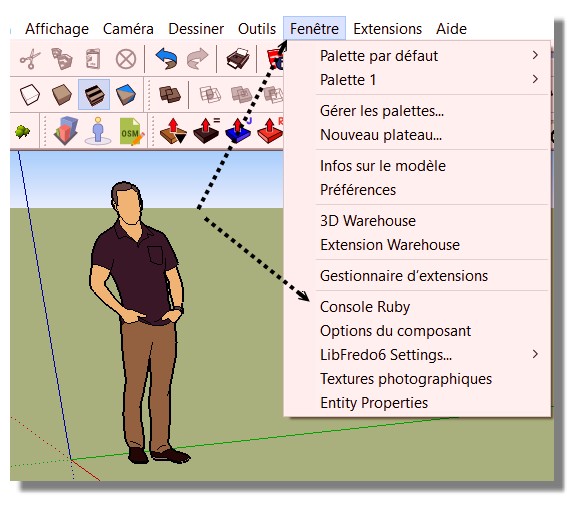
                                            It is old and unsupported for many years, so it's unsigned - set your Extension Manager > Extensions Loading Policy to 'Unrestricted' and restart SketchUp to see the menu-item if needed...

                                            There's no Toolbar...

                                            It appears under the Plugins menu - which is now known as 'Extensions' in newer SketchUp versions...

                                            put simply, preselect a path and a face and run the tool, it should extrude OK...
                                            Run it with the Ruby Console open to see if there are any issues...

                                            TIG

                                            1 Reply Last reply
                                            Reply Quote 0

                                            Hello! It looks like you're interested in this conversation, but you don't have an account yet.

                                            Getting fed up of having to scroll through the same posts each visit? When you register for an account, you'll always come back to exactly where you were before, and choose to be notified of new replies (either via email, or push notification). You'll also be able to save bookmarks and upvote posts to show your appreciation to other community members.

                                            With your input, this post could be even better 💗

                                            Register Login
                                            • 1
                                            • 2
                                            • 8
                                            • 9
                                            • 10
                                            • 11
                                            • 12
                                            • 11 / 12
                                            • First post
                                              Last post
                                            Buy SketchPlus
                                            Buy SUbD
                                            Buy WrapR
                                            Buy eBook
                                            Buy Modelur
                                            Buy Vertex Tools
                                            Buy SketchCuisine
                                            Buy FormFonts

                                            Advertisement