New, free, add-on for SketchUp - RpWallMaker
-
We have released a new, free add-on for SketchUp and we would love to have your comments and suggestions.
RpWallMaker is a free add-on for SketchUp (Windows only for now - we should have the Mac version tested in a week or so) to create wide walls (3D walls with thickness), edit them and cut holes in them.
You can read more about it and download a copy from here: RpWallMaker

It has 5 basic functions.
- Place wide walls behind a running-line cursor
- Cut holes in walls to match glued opening components
- Cut holes in walls of a specific size
- Edit walls to change width or heights
- Create a simple report using the Dynamic Component reporting system
Go ahead and add any questions or comments to this thread and we will respond.
(RpWallMaker is based on software which will be included in RpWalls Pro when it is released. We have decided to release them as a separate, free, add-on for SketchUp so that more people may put them to use. RpWallMaker will remain a free product.)
Al Hart

IRender nXt from Render Plus -
This sounds very interesting. I'll have to give this a whirl when I get into office today.
Al, are you converting SU into Revit? Sure seems like it. and I like it!

-
Yeah, it may simplify some rooms drawings

MALAISE -
How come it has an installation file?
-
How do you make it close the last corner when you make a closed loop?
-
Al
Thankyou, brilliant.
-
@unknownuser said:
RpWallMaker is a free add-on for SketchUp (Windows only for now - we should have the Mac version tested in a week or so) to create wide walls (3D walls with thickness), edit them and cut holes in them.
thanks, al. we mac users have been envying everyone who is able to use all the wonderful products you have been releasing. it seems to be close now. please let us know when the mac version is ready.
-
Yes, it's definitely one of the coolest freebies lately (though sometimes it's hard to choose who is the "winner"
) and I hope you Mac guys can use it soon, too. -
@thomthom said:
How come it has an installation file?
Is this a "negative" feature?
The MAC version will be just a zip file. And that same ZIP file should work for Windows.
We like an installation, because it makes it easier to locate the proper place to install the plugin.
(Our other apps require an installation, because we install them into Program Files, rather than the plugins folder.)Al Hart
IRender nXt from Render Plus -
@thomthom said:
How do you make it close the last corner when you make a closed loop?
Good point.
We need to fix this, and also operate better when you start a new wall from the edge of an existing wall. Also, we should add a "draw 4 walls in a rectangle" feature. We will make some changes and put out a new version.
Al Hart
IRender nXt from Render Plus -
I just puzzled me. As every other plugin I've used I've just put into the plugin folder myself. (I got a shortcut to it on my desktop.)
The exe installation was very easy though, I have to admit that.
-
@thomthom said:
This sounds very interesting. I'll have to give this a whirl when I get into office today.
Al, are you converting SU into Revit? Sure seems like it. and I like it!
We wrote the first microprocessor based CAD system (then a Z80) back in 1979, SigmaGraphics - now called ARRIS, and have been competing with AutoDesk ever since they joined the scene in 1982. Many years ago, we abandoned the idea of developing a "general purpose" CAD system, and decided to work on application specific CAD packages instead - House Design, Office Furniture, 3D Modeling - but SketchUp seems to have proven that a general purpose CAD system could be created. Now we would love to make SketchUp more application specific.
We have been trying to define what a good walls system for SketchUp would look like. RpWallMaker is not that. It is just a start. However, by providing a free walls system for SketchUp, we are hoping to learn more about what a good, (non free) Walls system should include. We will make some improvements to the free RpWallMaker, but higher end ideas (such as the multiple core walls requested by user), will probably be reserved for the non-free system.
Still, I would love to have your reaction, and the reactions of other who have downloaded and tried out RpWallMaker.

The Window cutter (where you place a glueable window on a wall, and then use it to cut a hole in both sides of the wall) is pretty neat. (I get to say that because Rich wrote it, not me). My problem is that every time I try to show it, I cannot locate a good, gluable, door or window. (The new on-line components libraries for SU 7 make it a lot harder to find good components. When I search for window on the 3D Warehouse, I get a lot of windows which don't place well.)
Al Hart
IRender nXt from Render Plus -
@edson said:
thanks, al. we mac users have been envying everyone who is able to use all the wonderful products you have been releasing. it seems to be close now. please let us know when the mac version is ready.
This application is entirely in Web Dialog and Ruby, so the Mac version should be pretty easy.
Several of our other applications require C-code, and third party c-code, so they will be much harder to port to the mac.
We are working on an iPhone application as well, which will tie into SketchUp, so we have started doing some Mac C programming as well.
Al Hart
IRender nXt from Render Plus -
I noticed something, when I edited the thinkness of a wall, the other connected walls didn't adjust the corners to match the new thickness of the wall I changed.
-
@thomthom said:
I noticed something, when I edited the thickness of a wall, the other connected walls didn't adjust the corners to match the new thickness of the wall I changed.
Right,
If you want wider walls, you need to set a wider thickness and remake the walls.
In our "CAD" world, we spent a lot of time working on a feature to let the user design a house with 6" walls, and then convert it to 9" walls. It turned out that this wasn't really practical. Because of the questions like "Do you keep the inside dimensions of a room the same, and increase the size of the whole building", or "do you keep the exterior dimensions the same, and decrease the size of the interior rooms", or a combination of both.
Or, If a door is 18" from the outside corner of the building, do you want to mode the door, because of the wider walls, to make room for the framing?
It is a nice feature, but we decided that our users would almost never use it.
The value here is to adjust individual walls, but you will have to stretch the other walls and put the room back together yourself.
Note: The length of a wall is not one of the parameters. You can use SketchUp to stretch the wall group, and if will still redraw properly when you make other changes - width, height, or add an opening.
Note also: You can use SketchUp to move an opening. It should work properly, so that when we remake the wall we find the new opening size and position, and re-cut it properly.
Al Hart
IRender nXt from Render Plus -
Al:
This link For more information and documentation see: RpWallMaker
**For more information and documentation see: RpWallMaker ** on your site takes you to documentation about Project Sketch, not WallMaker. -
I can't find the bad link, but the place you want to go is here:
[Added later: Thanks - got it now]
Al Hart
IRender nXt from Render Plus -
We tested this on our Apple and it seems to work.
You can download it here:
ftp;//ftp.renderplus.com/_download/RpWallMaker/RpWallMaker_IB16.zip
and unzip it into the SketchUp Plugins folder to try it.
-
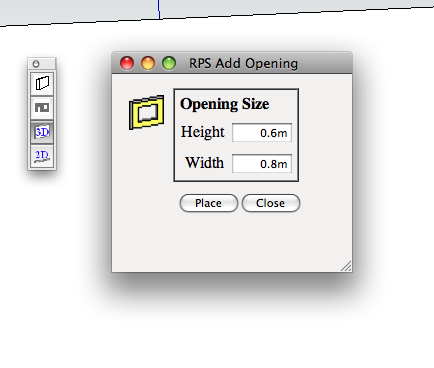
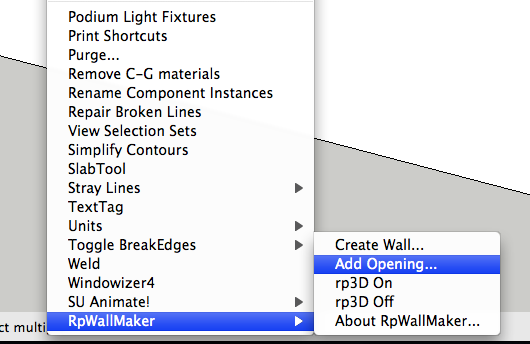
it seems that the mac version does not have the same funcionality as the windows one. the site describes the possibility of inserting complete windows on walls, but all i can do on my mac is to create walls and add openings to walls.
-
After placing a glueable window on the wall, right click on the window and select "Cut Opening in Wall". That seems to be working on our Mac.








Advertisement