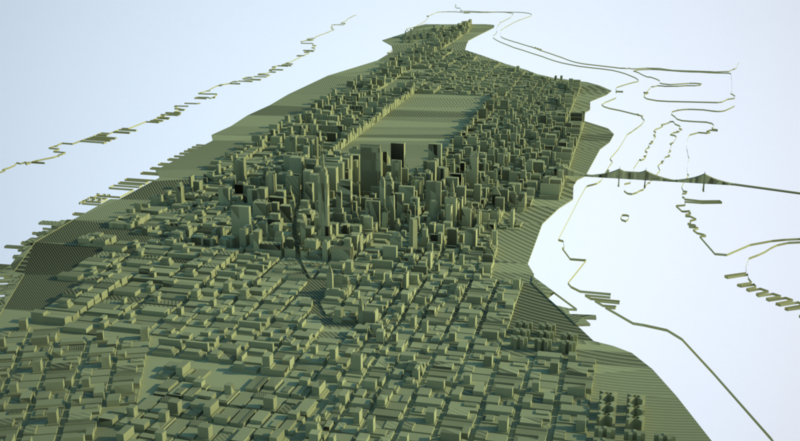
Manhattan sketchup model
-
Looks like it is done in Rhino (or another solid modeler) as often geometry is imported double (disconnected edges).
Probably the author forget to convert his model to a mesh and weld the edges.... -
Quite disappointing. I was sort of excited when I saw the original image. Anyone have a similar city model they'd like to share? I looked a bit on the warehouse but didn't run across anything very appealing.
-Brodie
-
I wonder if somone in the sketchup team has access to one? I am working on a game project and wanted to use a model like Manhattan to compare relative sizes of very large objects. Hope it's not too much of a big ask if anyone is listening.
If not, I will have a bash at tidying this model - but don't hold your breath...
-
I would be willing to clean the model but I can't get the damn thing to open... if someone can just clean it to where I can open it without sketchup crashing... i'll finish the rest!
-
I found this resource in the meantime:
And this utility may help to remove double-faces (haven't tested):
http://www.deep-shadows.com/hax/3DRipperDX.htm (3d Studio Max and Maya only)
-
I noticed the double faces were on separate layers then the one below it. I deleted all of the "poly surface" (I think thats what they were called, I don't want to open the original again to find out) layers, now the model is much easier to use.
-
cheers bordominic, its pretty usable now

-
Thank you Bordominc!
-
Great job! It's working great now.
BTW, there's still some purging that can be done and the option for shadows to be displayed "On Faces" is turned off.
Great model
-Brodie
-
There are a bunch of extra lines and missing faces but it is fun to play around with!
-
Don't try this with Sketchup, your machine will explode.
I converted the .skp to .3ds, imported into Vue, added displacement to every building and then added 2500 trees to Central park, rendered in 6m 35s, using a basic spectral atmosphere.

-
Once again Pete. . .you just fail to impress. . . ho-hum
(jus kiddin'!

 )
) -
Thanks mate.
America 2019, we never saw the Somalian pirates coming.

-
He he, Great!
Just wonderful. -
Pete, that's sick. You are a pervert.

(I like it though)
-
A not very quick clay render:
-
It(s possible to have the file with a 6.0 version
I'm using a sketchup pro 6
thx guys -
Hi Charly, could you PM me your email address? the file is to big to upload to SCF.
-
sure:)
I'm so impress about the sketchup's community..
All the time someone is here to help.
Thx for all (users) and the sketchup's team
Hip hip hip?

-
@simon b said:
I found this resource in the meantime:
Someone has an account on it?
I had create a free one and I just sent some files (3ds) to have the acces to download some files like manhattan or another models
maybe we can share this account together to have much more model to upload and so more download modelssorry for the double post
I forgot to edit




Hello! It looks like you're interested in this conversation, but you don't have an account yet.
Getting fed up of having to scroll through the same posts each visit? When you register for an account, you'll always come back to exactly where you were before, and choose to be notified of new replies (either via email, or push notification). You'll also be able to save bookmarks and upvote posts to show your appreciation to other community members.
With your input, this post could be even better 💗
Register Login


Advertisement