sketchucation logo sketchucation
    • 登入
    Oops, your profile's looking a bit empty! To help us tailor your experience, please fill in key details like your SketchUp version, skill level, operating system, and more. Update and save your info on your profile page today!
    🔌 Smart Spline | Fluid way to handle splines for furniture design and complex structures. Download

    [Plugin] Zorro2 (beta)

    已排程 已置頂 已鎖定 已移動 Plugins
    314 貼文 154 Posters 365.7k 瀏覽 154 Watching
    正在載入更多貼文
    • 從舊到新
    • 從新到舊
    • 最多點贊
    回覆
    • 在新貼文中回覆
    登入後回覆
    此主題已被刪除。只有擁有主題管理權限的使用者可以查看。
    • BoxB 離線
      Box
      最後由 編輯

      There is an issue installing Zorro2 from Pluginstore. Zorro1 will install.
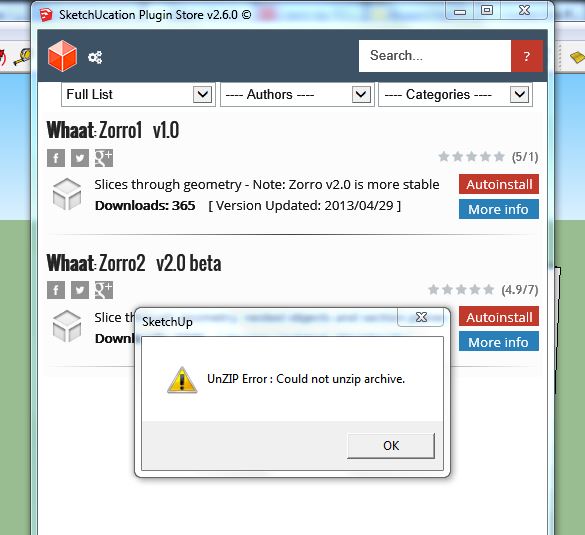

      Zorro.JPG

      1 條回覆 最後回覆 回覆 引用 0
      • N 離線
        Nilez83
        最後由 編輯

        Yep,the same screen I get

        1 條回覆 最後回覆 回覆 引用 0
        • Dave RD 離線
          Dave R
          最後由 編輯

          @nilez83 said:

          Hi TIG,

          I've put the file in the \program files\Sketchup\Sketchup 2014\plugins folder.

          Wrong folder. It should be in the User (your username)/App Data/SketchUp 2014/... Plugins folder.

          @nilez83 said:

          I downloaded the file as .rb not rbz, from the first post of this thread. Because I don't have it as a rbz file it doesn't show up when I try to install it using preferences>extensions>install.

          It wouldn't show with Install Extension, would it?

          Move it to the right location and all should be fine.

          Etaoin Shrdlu

          %

          (THERE'S NO PLACE LIKE)

          G28 X0.0 Y0.0 Z0.0

          M30

          %

          1 條回覆 最後回覆 回覆 引用 0
          • N 離線
            Nilez83
            最後由 編輯

            Ok installed it in the right directory and it's working again. Thanks very much!

            1 條回覆 最後回覆 回覆 引用 0
            • TIGT 離線
              TIG Moderator
              最後由 編輯

              @Box

              There is indeed an issue with 'Zorro2'...

              The version includes a space before the 'beta' in the RBZ name.
              It should be replaced by a '_' when the path is setup server-side [Gábor !]
              I have fixed it... it's now versioned as '_beta'.
              I've also done similar fixes for some others Plugins in the Store.

              It will now install properly from the dialog 😄

              TIG

              1 條回覆 最後回覆 回覆 引用 0
              • N 離線
                Nilez83
                最後由 編輯

                Thanks TIG!

                1 條回覆 最後回覆 回覆 引用 0
                • TIGT 離線
                  TIG Moderator
                  最後由 編輯

                  OK. 😄
                  That issue should have never happened in the first place, and hopefully it won't recur in the future [Gábor !]

                  Incidentally you should NEVER have a Plugins folder for v2014 inside the its 'Programs Files' folder-path.
                  It should default to each Users' Plugins folder - as Dave explained.
                  There is another potential 'shared' Plugins folder that you can make in the ProgramData tree... BUT do not make this unless you really really want to 'share' plugins...
                  All Plugins AutoInstall into the User's Plugins folder anyway - using the native installer.
                  The SketchUcation PluginStore's equivalent AutoInstaller will prompt for an alternative destination, but only IF it'd been defined and in $: [Fredo's AdditionalPluginsFolder tool allows you to specify alternative custom-plugins folders BUT is only necessary if you need them - e.g. you are on a commercial/educational network with restricted permissions, or you have several computers and want to share one folder via DropBox, or similar...]

                  TIG

                  1 條回覆 最後回覆 回覆 引用 0
                  • B 離線
                    beardj0dj0
                    最後由 編輯

                    GOODDDDDDDDDDDDDDDDDDDDDDDDDDDDDDDDDDDDDDDDDDDDDDDDDDDDDDDDDDDDDDDD

                    1 條回覆 最後回覆 回覆 引用 0
                    • I 離線
                      Ibragol09
                      最後由 編輯

                      Hi
                      I'm a newbie
                      I downloded Zorro that i found in page 1 of this thread

                      So i copy the file .rb in /library/app support/sketchup ......

                      So it don't work on my sketchUp 2013 and 2014 for MAC!...

                      However CutFace work on it...

                      What wrong?

                      Sorry for my brutal english....i'm italian ...

                      Bye bye

                      1 條回覆 最後回覆 回覆 引用 0
                      • TIGT 離線
                        TIG Moderator
                        最後由 編輯

                        Why not get the RBZ version from the PlugniStore ?
                        http://sketchucation.com/pluginstore?listtype=1%26amp;author=0%26amp;category=0%26amp;search=zorro%26amp;submit=%3F
                        Then use the v2013/v2014 Preferences >Extensions > Install button to properly install the contents into the correct Plugins folder.
                        The correct Plugins folder is also found using the Ruby Console command: Sketchup.find_support_file('Plugins')
                        If you have manually installed files elsewhere remove them... 😕

                        TIG

                        1 條回覆 最後回覆 回覆 引用 0
                        • D 離線
                          DADAZ
                          最後由 編輯

                          Very nice zorro 2..... thank very for this....

                          1 條回覆 最後回覆 回覆 引用 0
                          • masterpaulM 離線
                            masterpaul
                            最後由 編輯

                            Hi,
                            This plugin doesn't cut objects into separate components? It just slices through the model?

                            1 條回覆 最後回覆 回覆 引用 0
                            • Dave RD 離線
                              Dave R
                              最後由 編輯

                              @masterpaul said:

                              Hi,
                              This plugin doesn't cut objects into separate components? It just slices through the model?

                              Right. It just does what it says in the first post of the thread. 😒

                              Etaoin Shrdlu

                              %

                              (THERE'S NO PLACE LIKE)

                              G28 X0.0 Y0.0 Z0.0

                              M30

                              %

                              1 條回覆 最後回覆 回覆 引用 0
                              • BoxB 離線
                                Box
                                最後由 編輯

                                I have a banana that won't cut bread no matter how hard I try.

                                1 條回覆 最後回覆 回覆 引用 0
                                • Dave RD 離線
                                  Dave R
                                  最後由 編輯

                                  Yer holding yer tongue wrong. 😄

                                  Etaoin Shrdlu

                                  %

                                  (THERE'S NO PLACE LIKE)

                                  G28 X0.0 Y0.0 Z0.0

                                  M30

                                  %

                                  1 條回覆 最後回覆 回覆 引用 0
                                  • masterpaulM 離線
                                    masterpaul
                                    最後由 編輯

                                    @dave r said:

                                    @masterpaul said:

                                    Hi,
                                    This plugin doesn't cut objects into separate components? It just slices through the model?

                                    Right. It just does what it says in the first post of the thread. 😒

                                    "- Cutting through nested components results in creation of many unique components"

                                    Yeah it says it creates new components in nested components, but it doesn't create new components on my PC. That's why I asked.

                                    SU 2014, windows 7.

                                    1 條回覆 最後回覆 回覆 引用 0
                                    • BoxB 離線
                                      Box
                                      最後由 編輯

                                      It's not quite what that means.
                                      Zorro will make a component unique when it cuts it. Not make separate unique components from the cuts.

                                      Make a simple component, make a copy of it and use ctrl with zorro to slice the second one. Look at the entity info and you will see it has changed the name therefore making that a unique component.
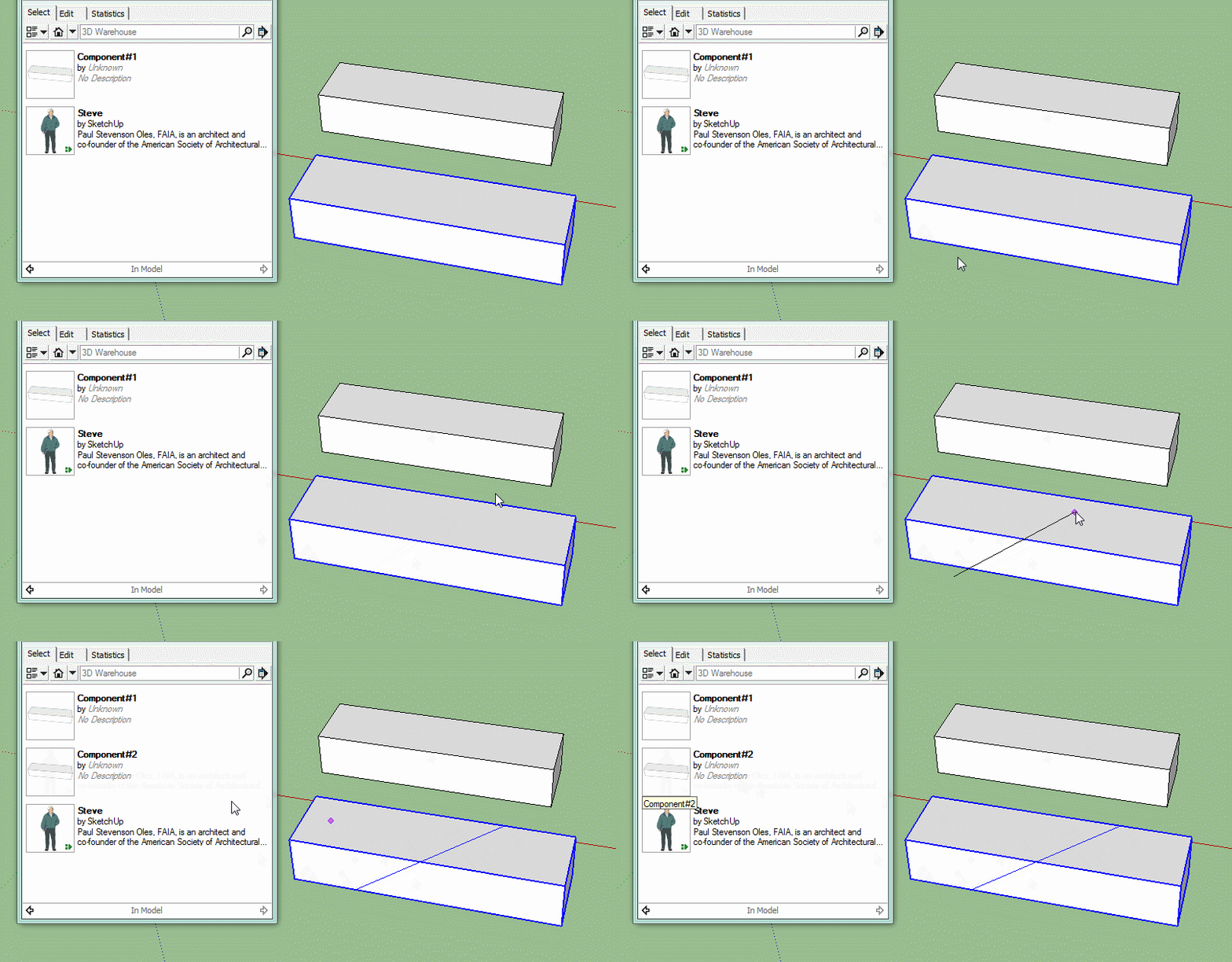

                                      Click me to animate

                                      1 條回覆 最後回覆 回覆 引用 0
                                      • masterpaulM 離線
                                        masterpaul
                                        最後由 編輯

                                        @BOX

                                        Cheers for clearing that up, I thought it was an error originally. Guess will have to take that extra step.

                                        Is there an alternative that divides components into separate components after cutting?

                                        1 條回覆 最後回覆 回覆 引用 0
                                        • BoxB 離線
                                          Box
                                          最後由 編輯

                                          Yes, S4u Slice, not free, but very cheap.
                                          http://sketchucation.com/forums/viewtopic.php?f=323%26amp;t=59170

                                          1 條回覆 最後回覆 回覆 引用 0
                                          • R 離線
                                            reauen
                                            最後由 編輯

                                            WHAAAAAAAAT!! this is amazing!! i need to hug you!

                                            thanks!

                                            Especially slice model at section is freaking awsome!!
                                            👍 👍 👍 👍 👍 👍

                                            1 條回覆 最後回覆 回覆 引用 0
                                            • 1
                                            • 2
                                            • 12
                                            • 13
                                            • 14
                                            • 15
                                            • 16
                                            • 14 / 16
                                            • 第一個貼文
                                              最後的貼文
                                            Buy SketchPlus
                                            Buy SUbD
                                            Buy WrapR
                                            Buy eBook
                                            Buy Modelur
                                            Buy Vertex Tools
                                            Buy SketchCuisine
                                            Buy FormFonts

                                            Advertisement


