sketchucation logo sketchucation
    • 登入
    Oops, your profile's looking a bit empty! To help us tailor your experience, please fill in key details like your SketchUp version, skill level, operating system, and more. Update and save your info on your profile page today!
    🔌 Smart Spline | Fluid way to handle splines for furniture design and complex structures. Download

    [Plugin] 1001bit Tools - Architectural tools for SketchUp

    已排程 已置頂 已鎖定 已移動 Plugins
    243 貼文 65 Posters 234.4k 瀏覽 65 Watching
    正在載入更多貼文
    • 從舊到新
    • 從新到舊
    • 最多點贊
    回覆
    • 在新貼文中回覆
    登入後回覆
    此主題已被刪除。只有擁有主題管理權限的使用者可以查看。
    • A 離線
      archworks
      最後由 編輯

      Downloaded install and tried out a couple of the items - this is the right way for architects - thanks

      1 條回覆 最後回覆 回覆 引用 0
      • G 離線
        gohch
        最後由 編輯

        hi everyone,
        Sharing something that is unique to Vista; which might explain some setting up issues and ruby issues on Vista;

        In part of Vista's security control; sometimes Vista automatically creates a new separate 'mirror' folder in the following location:

        "C:\Users*username*\AppData\Local*VirtualStore*\Program Files\Google\Google SketchUp 7\Plugins\1001bit"

        because of this, you now have 2 sets of 1001bit folder; one in the above while the other in

        "C:\Program Files\Google\Google SketchUp 7\Plugins\1001bit"

        The folder in the VirtualStore takes precedence over the one in c:\Program Files....
        If windows find a duplicate file in VirtualStore and the other location, it runs the one in VirtualStore and ignore the other copy.
        This explains why sometimes when you've editted something in the plugin folder but nothings seems to change.

        There are 2 ways to work around this

        1. Find this VirtualStore and work directly in it.

        2. Remove the 1001bit folder or any file inside the VirtualStore that is a duplicate of the file you want to modify or replace. For example, if you've editted the 1001bit_path_win_su7.rb file, you should have only one copy of this file. I suggest remove the duplicate copy in the VirtualStore.

        Anyone having problem setting up in Vista, please double check this folder. Any issues feel free to write to me. Thanks

        1 條回覆 最後回覆 回覆 引用 0
        • G 離線
          gohch
          最後由 編輯

          @unknownuser said:

          Note for installation on Vista 64bit (and on XP 64 too I guess):

          Modify the path in 1001bit_path_win_su7.rb to
          $GH1001bit_path="C:/Program Files (x86)/Google/Google SketchUp 7/Plugins/1001bit" in order to get the path to work, otherwise the ruby looks in the 64bit program files path (with 64bit OS, the 32bit programs are placed in the "program files (x86)" folder).
          Thanks for the good work!

          Ryo

          hi, above is another feedback on installation for windows 64bit, from a registered beta tester, Ryo

          Thanks Ryo

          1 條回覆 最後回覆 回覆 引用 0
          • utilerU 離線
            utiler
            最後由 編輯

            GOHCH, I am experiencing Bugsplats when I 'Ctrl Copy and divide' in SU. Not sure it if there is a bug with yor offset or array tools that are effecting the standard SU functions.....
            Also, I have noticed a slight delay with my screen graphics; when I pushpull it is most noticed.... Not sure if you or others using this toolset are experiencing this.

            Just Curious...

            1 條回覆 最後回覆 回覆 引用 0
            • G 離線
              gohch
              最後由 編輯

              @utiler said:

              GOHCH, I am experiencing Bugsplats when I 'Ctrl Copy and divide' in SU. Not sure it if there is a bug with yor offset or array tools that are effecting the standard SU functions.....
              Also, I have noticed a slight delay with my screen graphics; when I pushpull it is most noticed.... Not sure if you or others using this toolset are experiencing this.

              hi Andrew, does that happens in new model? or is it something that is accumulative?
              Does it occur if you exit Sketchup and start Sketchup again?
              Is anybody experiencing similar problem?
              Thanks

              1 條回覆 最後回覆 回覆 引用 0
              • utilerU 離線
                utiler
                最後由 編輯

                thanks GOHCH, only experienced it in a new model...
                Have closed the file and opened it and still occurs. I purged the file and is only about 3Mb...

                Just Curious...

                1 條回覆 最後回覆 回覆 引用 0
                • F 離線
                  fakircho
                  最後由 編輯

                  Thank you for the great plugins. They have this ArchiCAD feel to them, love it. I am glad to see someone
                  focusing on architectural tools and doing it well.
                  Have been playing around with it on Windows and all looks quite promising. One thing i have
                  noticed is that when you use the build wall tool you can not follow the axis. Ideally you should be able to inference
                  the normal way and use shift to lock on one axis or another. Same goes for the other plugins.

                  Waiting for the working MAC version and the Tool bar 😄

                  1 條回覆 最後回覆 回覆 引用 0
                  • G 離線
                    gohch
                    最後由 編輯

                    hi Fakircho,
                    Thanks for the feedback, Yes, I should have the inference added in the next upgrade soon.
                    As for the Mac, ordered a Macbook but the earliest they can deliver is 2 weeks later; seems like Apple is pushing out a new model. I'm eagerly waiting for my Macbook to start working on the mac version. 🎉

                    1 條回覆 最後回覆 回覆 引用 0
                    • G 離線
                      gohch
                      最後由 編輯

                      hi guys,
                      i've added some inference to the Vertical Wall tool;
                      pressing the down button will cycle through the following inference modes

                      1 - lock current direction, next if the cursor is on an edge, projects to intersection point, else project to point nearest to the cursor position on the current direction.

                      2 - lock current direction, project to point on the x axis of cursor

                      3 - lock current direction, project to point on the y axis of cursor

                      4 - release

                      upwards button release the lock

                      right button - locks in x axis

                      left button - locks in y axis

                      Note that you can enter exact distance anytime.

                      Anyone want to try out please replace the attached vx_wall.rbs file with the one you have. (not sure whether i can attach rbs file here, zipped it just in case)

                      cheers!


                      updated vx_wall.rbs

                      1 條回覆 最後回覆 回覆 引用 0
                      • D 離線
                        dizain
                        最後由 編輯

                        Error:
                        No such file to load -- C:/Program Files/Google/Google SketchUp 7/Plugins/1001bit/1001bit_loader.rb

                        1 條回覆 最後回覆 回覆 引用 0
                        • F 離線
                          fakircho
                          最後由 編輯

                          Thanks for the inference addition to the wall tool.

                          I hate to be difficult but can it work the same way as the rest of the Sketchup tools. That is
                          when you pint with your mouse it should pick up the red or green axis and then you lock it with the shift key? That would be perfect

                          1 條回覆 最後回覆 回覆 引用 0
                          • G 離線
                            gohch
                            最後由 編輯

                            @dizain said:

                            Error:
                            No such file to load -- C:/Program Files/Google/Google SketchUp 7/Plugins/1001bit/1001bit_loader.rb

                            hi dizain,
                            can you double check whether you have moved the 1001bit_loader.rb file to the Plugins folder?
                            1001bit_loader.rb file should be in 1001bit folder while
                            1001bit_tools.rbs file should be in Plugins folder.
                            thanks

                            1 條回覆 最後回覆 回覆 引用 0
                            • A 離線
                              Aidus
                              最後由 編輯

                              Well I rather do all work by myself organized like I want it 😄

                              CPU: Intel Core i7 Extreme Edition 965
                              RAM: OCZ Gold DDR3 1600MHz 12Gb
                              Video: Asus Radeon HD4870 X2 2Gb
                              Mobo: Asus P6T Deluxe 1366 Intel X58

                              1 條回覆 最後回覆 回覆 引用 0
                              • D 離線
                                dizain
                                最後由 編輯

                                Hi GOHCH,
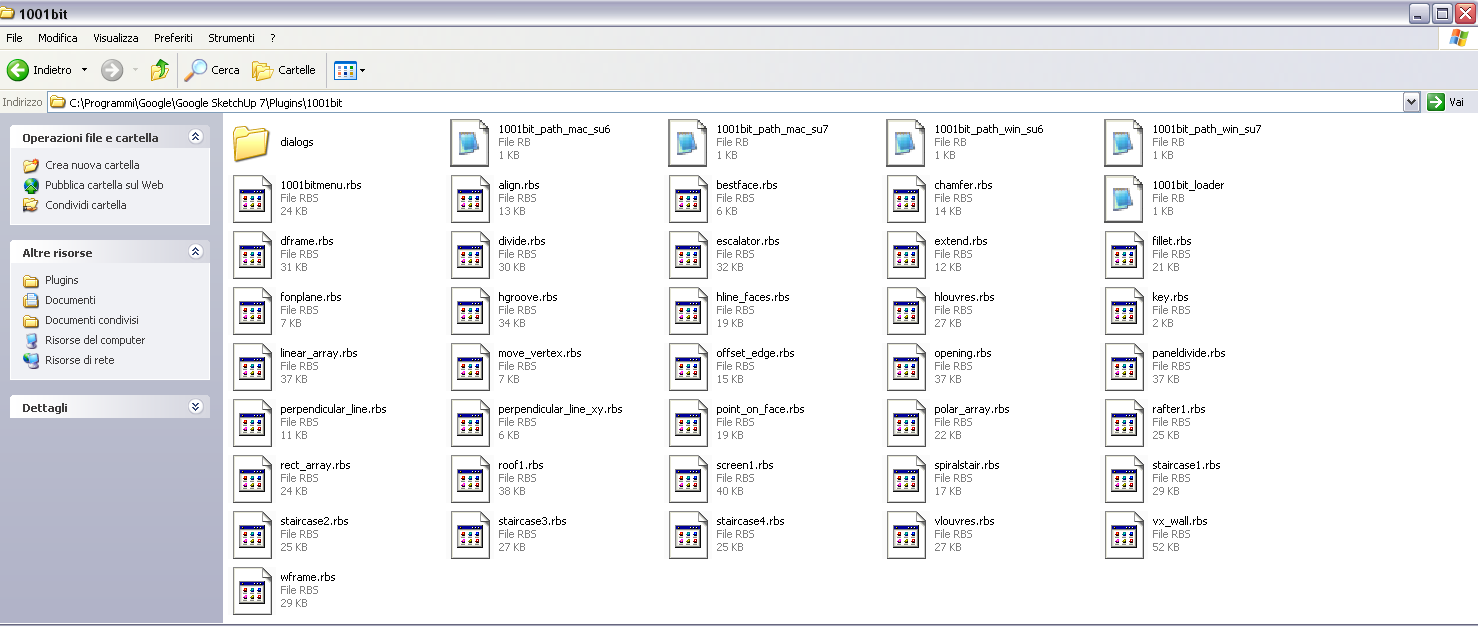
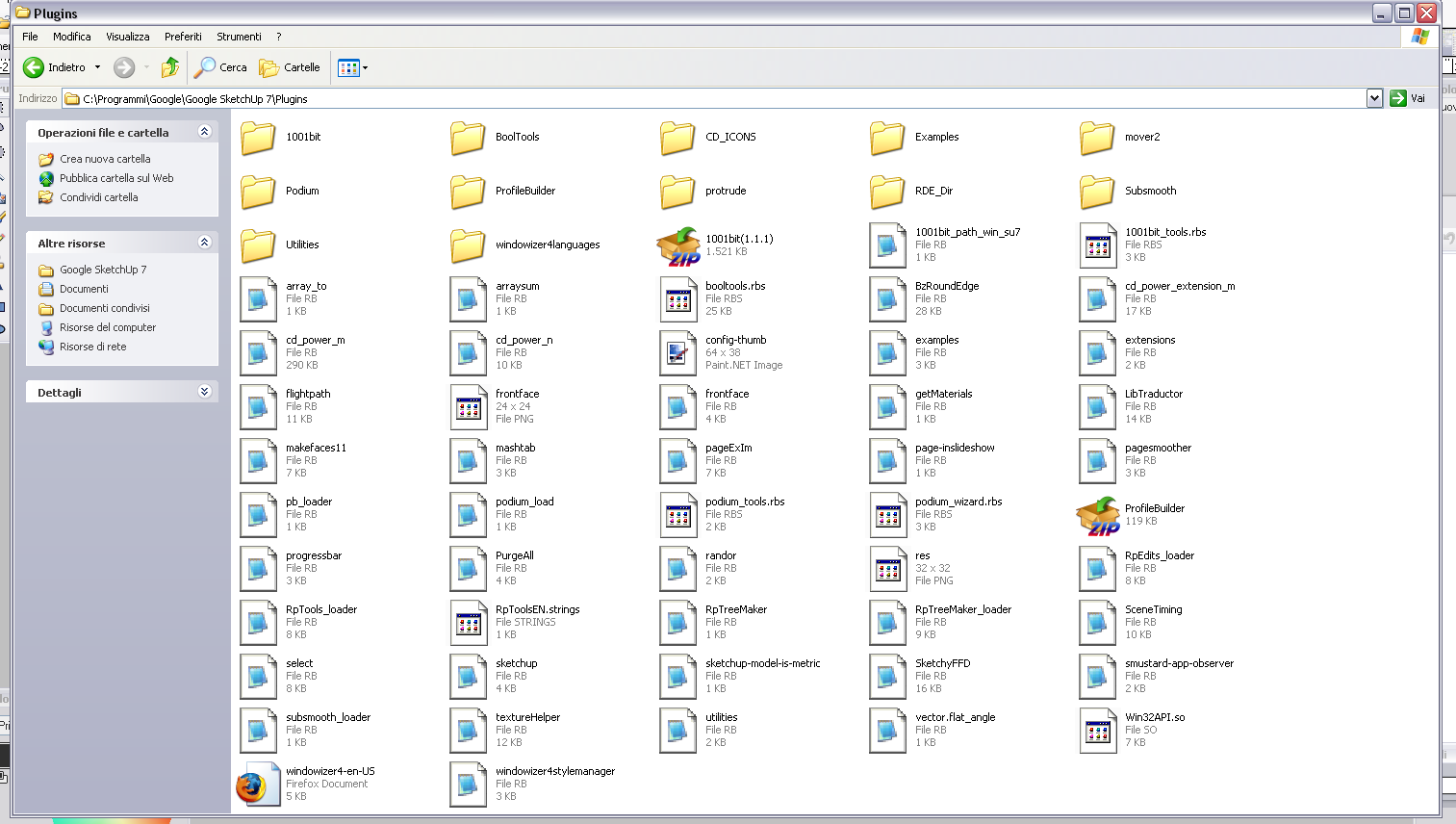
                                the files are in the folders as specified but the error continues ...
                                the file 1001bit_tools.rbs must be in both folders, 1001bit and Plugins folder?
                                Thanks

                                1 條回覆 最後回覆 回覆 引用 0
                                • D 離線
                                  dizain
                                  最後由 編輯

                                  For GOHCH
                                  My folders...


                                  1001bit folder.png


                                  Plugins folder.png

                                  1 條回覆 最後回覆 回覆 引用 0
                                  • F 離線
                                    fakircho
                                    最後由 編輯

                                    Some questions about the stair components. Will it be possible to have some attribute options
                                    on a stair so that you can select different handrails for example and also give it some parametric options
                                    or would one always have to make a new stair if changes are needed ?

                                    1 條回覆 最後回覆 回覆 引用 0
                                    • G 離線
                                      gohch
                                      最後由 編輯

                                      @dizain said:

                                      For GOHCH
                                      My folders...

                                      hi dizain,
                                      i believe it's the path/language:
                                      please use notepad to edit the 1001bit_path_win_su7.rb file in Sketchup's plugins folder.
                                      change the path
                                      $GH1001bit_path="C:/Program Files/Google/Google SketchUp 7/Plugins/1001bit"
                                      to
                                      $GH1001bit_path="C:/Programmi/Google/Google SketchUp 7/Plugins/1001bit"

                                      cheers!

                                      1 條回覆 最後回覆 回覆 引用 0
                                      • G 離線
                                        gohch
                                        最後由 編輯

                                        @fakircho said:

                                        Some questions about the stair components. Will it be possible to have some attribute options
                                        on a stair so that you can select different handrails for example and also give it some parametric options
                                        or would one always have to make a new stair if changes are needed ?

                                        hi fakircho,

                                        Current tools creates a new set of staircase and doesn't allow for real time editing of parameters.

                                        As for handrails, you can use the vertical wall tool to create handrails. (the vertical wall tool can allow for selection of custom drawn profile)
                                        meanwhile, i am working on a handrail tool that can extrude along curve-twist path correctly.

                                        cheers!

                                        1 條回覆 最後回覆 回覆 引用 0
                                        • D 離線
                                          dizain
                                          最後由 編輯

                                          Everything works ok ...
                                          For the cost of the plugins?
                                          Thanks Gohch.

                                          1 條回覆 最後回覆 回覆 引用 0
                                          • G 離線
                                            gohch
                                            最後由 編輯

                                            @dizain said:

                                            Everything works ok ...
                                            For the cost of the plugins?
                                            Thanks Gohch.

                                            hi dizain,

                                            Don't want to charge anything until i've sorted out the Mac version, and make sure that it is stable.
                                            after that we'll have to put a stop to the free license.

                                            The current beta test license is valid without time limit for this version of 1001bit tools.
                                            Mac users can register for beta test license now and keep it for the Mac version later.
                                            (sorry guys, still waiting for may macbook.... no stock, i hope they can deliver soon...)

                                            As for retail price of 1001bit... 😐 😐 😐 please let me keep it secret for a little while longer. 😒 😒 😒
                                            cheers! 😄

                                            1 條回覆 最後回覆 回覆 引用 0
                                            • 1
                                            • 2
                                            • 8
                                            • 9
                                            • 10
                                            • 11
                                            • 12
                                            • 13
                                            • 10 / 13
                                            • 第一個貼文
                                              最後的貼文
                                            Buy SketchPlus
                                            Buy SUbD
                                            Buy WrapR
                                            Buy eBook
                                            Buy Modelur
                                            Buy Vertex Tools
                                            Buy SketchCuisine
                                            Buy FormFonts

                                            Advertisement