sketchucation logo sketchucation
    • 登入
    Oops, your profile's looking a bit empty! To help us tailor your experience, please fill in key details like your SketchUp version, skill level, operating system, and more. Update and save your info on your profile page today!
    🔌 Smart Spline | Fluid way to handle splines for furniture design and complex structures. Download

    Construction & Working Drawings - Discussion

    已排程 已置頂 已鎖定 已移動 LayOut Discussions
    layout
    453 貼文 114 Posters 406.1k 瀏覽 114 Watching
    正在載入更多貼文
    • 從舊到新
    • 從新到舊
    • 最多點贊
    回覆
    • 在新貼文中回覆
    登入後回覆
    此主題已被刪除。只有擁有主題管理權限的使用者可以查看。
    • S 離線
      sonder
      最後由 編輯

      Beautiful drawings Pirun! Really like that style.

      1 條回覆 最後回覆 回覆 引用 0
      • daleD 離線
        dale
        最後由 編輯

        @tim said:

        I'm going to toot my own horn a little here because I've just released a plugin intended to help with getting things set up to make doing the LO pages for components easier. See http://forums.sketchucation.com/viewtopic.php?f=323&t=45790

        Tim this looks like a really helpful tool. Thanks

        Just monkeying around....like Monsanto

        1 條回覆 最後回覆 回覆 引用 0
        • T 離線
          tim
          最後由 編輯

          @dale said:

          Tim this looks like a really helpful tool. Thanks

          Thanks - do please add any problems or suggestions to the relevant thread -http://forums.sketchucation.com/viewtopic.php?f=323&t=45790&p=410067#p410067

          1 條回覆 最後回覆 回覆 引用 0
          • K 離線
            khintanar
            最後由 編輯

            Pirun,
            Fantastic use of LayOut. I would like to hear about your workflow from Su to LO.
            Thanks for sharing...

            1 條回覆 最後回覆 回覆 引用 0
            • Dave RD 離線
              Dave R
              最後由 編輯

              Mike, that's pretty good. 👍

              Etaoin Shrdlu

              %

              (THERE'S NO PLACE LIKE)

              G28 X0.0 Y0.0 Z0.0

              M30

              %

              1 條回覆 最後回覆 回覆 引用 0
              • GaieusG 離線
                Gaieus
                最後由 編輯

                Yes, indeed! +1 👍

                Gai...

                1 條回覆 最後回覆 回覆 引用 0
                • HumpmetwiceH 離線
                  Humpmetwice
                  最後由 編輯

                  Very nice work indeed,but and this may be a stupid question but how to you combine two sketch-up models into one layout file?

                  1 條回覆 最後回覆 回覆 引用 0
                  • bmikeB 離線
                    bmike
                    最後由 編輯

                    @unknownuser said:

                    Very nice work indeed,but and this may be a stupid question but how to you combine two sketch-up models into one layout file?

                    Just insert another from the file menu. I've had 3-4 in a single LO drawing.

                    I'll do another vid next week on getting started.

                    mike beganyi design + consulting llc

                    1 條回覆 最後回覆 回覆 引用 0
                    • bmikeB 離線
                      bmike
                      最後由 編輯

                      Thanks all. I have a few more video ideas to come.

                      mike beganyi design + consulting llc

                      1 條回覆 最後回覆 回覆 引用 0
                      • pbacotP 離線
                        pbacot
                        最後由 編輯

                        That's excellent Mike! Thank you. 👍

                        The idea of the whiteout mask: feels like a candidate for a plugin, or perhaps sections should have a built-in, definable "limit". I use fog often in detail shots to filter out complicated backgrounds and give depth & emphasis. Good ideas.

                        Peter

                        MacOSX MojaveSketchUp Pro v19 Twilight v2 Thea v3 PowerCADD

                        1 條回覆 最後回覆 回覆 引用 0
                        • bmikeB 離線
                          bmike
                          最後由 編輯

                          @pbacot said:

                          That's excellent Mike! Thank you. 👍

                          The idea of the whiteout mask: feels like a candidate for a plugin, or perhaps sections should have a built-in, definable "limit". I use fog often in detail shots to filter out complicated backgrounds and give depth & emphasis. Good ideas.

                          Peter

                          Yes, I wish that section could show to infinity or to limit back to some distance. I haven't had luck with fog.

                          I should note I only use that whiteout technique when I do shop drawings, as i need to isolate each bent or section for the shop crew. Very rarely when I do a typical building section, as I want to show what is goIng on throughout.

                          A nice feature of the whiteout block is that they are all the same size for each direction of the building - so when I set up my scenes I can zoom extents each one and when I place them in LayOut when I go from one to the next they stay in the same place. Very cool bonus that tends to keep my grid lines and floor lines and height callouts in the same location from page to page.

                          I'll have to contact TIG. Man that would be sweet to have built in. It could take the raw width and height of the sectioned area , add a user defined margin, and then offset back a chosen distance. Create a white plane, hide edges, place on same layer (or layername-WO) and get it all done.

                          mike beganyi design + consulting llc

                          1 條回覆 最後回覆 回覆 引用 0
                          • bmikeB 離線
                            bmike
                            最後由 編輯

                            @pbacot said:

                            That's excellent Mike! Thank you. 👍

                            The idea of the whiteout mask: feels like a candidate for a plugin, or perhaps sections should have a built-in, definable "limit". I use fog often in detail shots to filter out complicated backgrounds and give depth & emphasis. Good ideas.

                            Peter

                            TIG wrote me a quick standalone plugin to do this...!
                            Not sure if he's posted it yet to the forums.

                            mike beganyi design + consulting llc

                            1 條回覆 最後回覆 回覆 引用 0
                            • bmikeB 離線
                              bmike
                              最後由 編輯

                              My drawings snuck into a news spot on a recent timber frame workshop here in VT. Here's the screen cap: (and a link)
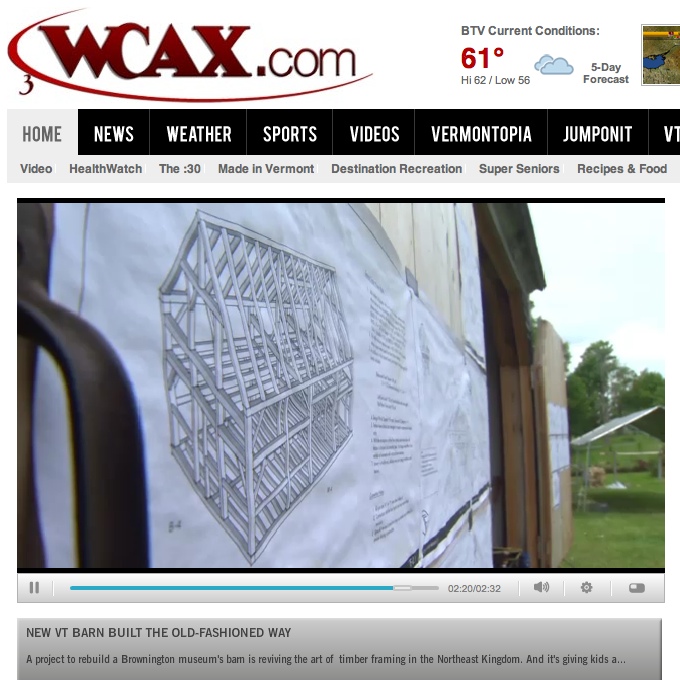
                              osm-screencap.jpg

                              No mention of me or my work, but good press for the TFG and their continuing hands on approach to education and the building arts.

                              mike beganyi design + consulting llc

                              1 條回覆 最後回覆 回覆 引用 0
                              • pbacotP 離線
                                pbacot
                                最後由 編輯

                                Demand Royalties, Mike! (looks great--congratulations!) 😄

                                MacOSX MojaveSketchUp Pro v19 Twilight v2 Thea v3 PowerCADD

                                1 條回覆 最後回覆 回覆 引用 0
                                • bmikeB 離線
                                  bmike
                                  最後由 編輯

                                  @pbacot said:

                                  Demand Royalties, Mike! (looks great--congratulations!) 😄

                                  Ha....!
                                  Thanks. I need to start embedding my logo with the clients logo on this stuff.
                                  Then I can send takedown notices... (kidding...)

                                  I should have asked the big G for royalties. I was on their LayOut page for quite a while.

                                  mike beganyi design + consulting llc

                                  1 條回覆 最後回覆 回覆 引用 0
                                  • bmikeB 離線
                                    bmike
                                    最後由 編輯

                                    Overview of my process:

                                    [flash=500,281:p7rcnvxb]http://vimeo.com/moogaloop.swf?clip_id=44538194[/flash:p7rcnvxb]

                                    mike beganyi design + consulting llc

                                    1 條回覆 最後回覆 回覆 引用 0
                                    • C 離線
                                      caronte01
                                      最後由 編輯

                                      Hey Nicholas (sonder). Just saw you on video. Cool! Great inspiration and hopefully a way to show other people the possibilites of sketchup+layout!

                                      Santiago

                                      1 條回覆 最後回覆 回覆 引用 0
                                      • S 離線
                                        sonder
                                        最後由 編輯

                                        @caronte01 said:

                                        Hey Nicholas (sonder). Just saw you on video. Cool! Great inspiration and hopefully a way to show other people the possibilites of sketchup+layout!

                                        Santiago

                                        Thanks!. One of the crew from Trimble (Google at the time) came out to interview me and made the video.

                                        1 條回覆 最後回覆 回覆 引用 0
                                        • pbacotP 離線
                                          pbacot
                                          最後由 編輯

                                          Wow, that IS fantastic, for you and SketchUp. Well done too. I like the sheets flopping one after another onto the screen. What's the renderer for those interior shots that show while Marshall is speaking? Good job! Peter

                                          MacOSX MojaveSketchUp Pro v19 Twilight v2 Thea v3 PowerCADD

                                          1 條回覆 最後回覆 回覆 引用 0
                                          • cottyC 離線
                                            cotty
                                            最後由 編輯

                                            @caronte01 said:

                                            Hey Nicholas (sonder). Just saw you on video. Cool! Great inspiration and hopefully a way to show other people the possibilites of sketchup+layout!
                                            http://www.youtube.com/watch?v=JnHrdUCenzs&feature=g-all-u
                                            Santiago

                                            Definitely a video that people should be shown saying that Sketchup is only a toy. 👍

                                            my SketchUp gallery

                                            1 條回覆 最後回覆 回覆 引用 0
                                            • 1
                                            • 2
                                            • 19
                                            • 20
                                            • 21
                                            • 22
                                            • 23
                                            • 22 / 23
                                            • 第一個貼文
                                              最後的貼文
                                            Buy SketchPlus
                                            Buy SUbD
                                            Buy WrapR
                                            Buy eBook
                                            Buy Modelur
                                            Buy Vertex Tools
                                            Buy SketchCuisine
                                            Buy FormFonts

                                            Advertisement



