sketchucation logo sketchucation
    • Login
    Oops, your profile's looking a bit empty! To help us tailor your experience, please fill in key details like your SketchUp version, skill level, operating system, and more. Update and save your info on your profile page today!
    Mac User? | Join the Rayscaper Beta for Mac Learn More

    [Plugin] Blackout

    Scheduled Pinned Locked Moved Plugins
    23 Posts 15 Posters 25.8k Views 15 Watching
    Loading More Posts
    • Oldest to Newest
    • Newest to Oldest
    • Most Votes
    Reply
    • Reply as topic
    Log in to reply
    This topic has been deleted. Only users with topic management privileges can see it.
    • plot-parisP
      plot-paris
      last edited by

      sounds cool and useful 👍

      immediately the 'Greyscale' by Jim Foltz springs to my mind.
      the script turns all colours to greyscale. then you can one or several textures to be changed back to colour to make them stand out more clearly. somehow Jim managed to preserve all the colour information, the script lets you toggle between 'Greyscale-' and 'Colour-mode'.
      that would be the perfect thing to take your script to the next step - make the changes undoable...

      1 Reply Last reply
      Reply Quote 0
      • thomthomT
        thomthom
        last edited by

        The original colour could be stored in an attribute dictionary. But I'm not sure about textures. I didn't find a way to turn them off. Only remove them. Will have a look at Jim's script and see if he handles textures. I've not spent much time on this. Just quickly whipped it together while working on some other stuff.

        Thomas Thomassen — SketchUp Monkey & Coding addict
        List of my plugins and link to the CookieWare fund

        1 Reply Last reply
        Reply Quote 0
        • K
          kwistenbiebel
          last edited by

          Cool script thomthom! 👍
          Very useful. Thank you.

          1 Reply Last reply
          Reply Quote 0
          • B
            bianhai
            last edited by

            👍
            Thank you thomthom.

            1 Reply Last reply
            Reply Quote 0
            • GaieusG
              Gaieus
              last edited by

              Tom,

              In SU you can undo an operation after saving, too. Does it not work in this case?

              Gai...

              1 Reply Last reply
              Reply Quote 0
              • thomthomT
                thomthom
                last edited by

                I suppose so. But I make the warning just in case as there isn't any built in restore in the function. Also, with V-Ray for SketchUp I've experienced that it can some times interfere with the undo operations of scripts. Especially if it manipulates materials.
                It's a better safe than sorry warning. 😉

                Thomas Thomassen — SketchUp Monkey & Coding addict
                List of my plugins and link to the CookieWare fund

                1 Reply Last reply
                Reply Quote 0
                • S
                  sepo
                  last edited by

                  This is useful. Thanks.

                  1 Reply Last reply
                  Reply Quote 0
                  • JClementsJ
                    JClements
                    last edited by

                    ThomThom:

                    I think this might have been discussed a year or two ago.

                    I make masks for postprocessing by turning all my layer colors to black and turn on Color By Layer in the Layer Manager. This eliminates messing with the material colors directly. I hardly ever organize my layers via a color scheme so this method is relatively fast to do and doesn't screw up the model. Also, SU shadows are exported with their greyscale value which can be interpreted in post processing as semi-transparent.

                    I often create a style for Color by Layer in my model and assign it Scene named "MASK" which only remembers style parameters. I can then use this scene to on toggle Color by Layer for any of the other scenes.

                    My workflow would be to click on any Camera view or Scene and select the "MASK" Scene, and export the current view as your mask for post processing.

                    Now IF Ruby can remember and store a model's existing Layer Colors and later restore them, then a script to temporarily change the model's layer colors to black, turn on Color by Layer, queue the File > Export > 2D Graphic dialog and then restore the layer colors after printing, might be pretty quick and handy.

                    John | Illustrator | Beaverton, Oregon

                    1 Reply Last reply
                    Reply Quote 0
                    • thomthomT
                      thomthom
                      last edited by

                      Interesting.
                      I made this script very very quickly. I might revise it and implement some more stuff suggested. Appears that there was more use for this than I thought. And there's some good ideas here.

                      Thomas Thomassen — SketchUp Monkey & Coding addict
                      List of my plugins and link to the CookieWare fund

                      1 Reply Last reply
                      Reply Quote 0
                      • MALAISEM
                        MALAISE
                        last edited by

                        THanks Thomthom

                        Back to the forum after a while and discovering new rubies 😄 😄

                        MALAISE

                        La Connaissance n'a de valeur que partagée

                        1 Reply Last reply
                        Reply Quote 0
                        • M
                          me3mar
                          last edited by

                          can you please show some pics on how to use, and what for ?
                          that would be great
                          thanks in advance

                          1 Reply Last reply
                          Reply Quote 0
                          • S
                            sepo
                            last edited by

                            Would it be possible to include transparency of .png . Give you an example. If you for instance have a .png tree in front of the material than tree should go black instead of rectangle. It would make life much easieer if possible.
                            Thanks

                            1 Reply Last reply
                            Reply Quote 0
                            • thomthomT
                              thomthom
                              last edited by

                              Nope. Can't read transparency info. If I had access to the V-Ray maps I could have replaced the texture with the alpha texture - but I don't have access to that either.

                              Thomas Thomassen — SketchUp Monkey & Coding addict
                              List of my plugins and link to the CookieWare fund

                              1 Reply Last reply
                              Reply Quote 0
                              • S
                                sepo
                                last edited by

                                Thanks for the reply.

                                1 Reply Last reply
                                Reply Quote 0
                                • xiombargX
                                  xiombarg
                                  last edited by

                                  This is actually another really good plugin for character and product design and a standard feature of high end modelling programs. Animation modelling programs implement this feature to help the designer get a better idea of a characters posture and demeanor which subtly reflects their personality. Product designers also use it for similar purposes.

                                  Probably is a good idea to do a quick save before using it though, just in case.

                                  1 Reply Last reply
                                  Reply Quote 0
                                  • onzkiO
                                    onzki
                                    last edited by

                                    Hi I know it's an old thread. Is there a way to customize the color, instead of black maybe something else, like red or any RBG code? Thanks!


                                    [/hr]Dell Alienware Area-51. SKU 2021 Pro. AutoCAD 2023. Landscape design firm

                                    1 Reply Last reply
                                    Reply Quote 0
                                    • Didier BurD
                                      Didier Bur
                                      last edited by

                                      Hi onzki,

                                      Go to your 'Plugins' folder and open 'blackout.rb' in a pure text editor (Notepad++ for instance).

                                      Search for lines like this one:

                                      material.color = 'Black'
                                      

                                      Replace 'Black' with the color you want, like 'red', 'green', 'blue' and so on.

                                      Lines to be modified are: 42, 69,91, if i'm not mistaken.

                                      The names of available colors can be found on this page:
                                      https://ruby.sketchup.com/Sketchup/Color.html

                                      To customize the color with RGB values will be a little longer to explain 😉
                                      Save the file blackout.rb, quit SketchUp and restart.

                                      Regards,

                                      DB

                                      1 Reply Last reply
                                      Reply Quote 0
                                      • Didier BurD
                                        Didier Bur
                                        last edited by

                                        Hi, me again,

                                        Here is an enhanced version with which you can select your color in a list.
                                        Menu can still be found in the 'Extensions' menu but I've put the 3 options in a sub-menu to spare your menu space 😉
                                        Hope Thomthom won't mind if I modified his script.
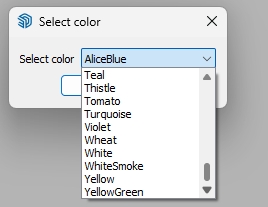

                                        blackout_dialog.jpg
                                        blackout_menu.jpg

                                        Regards,


                                        blackout.rb

                                        DB

                                        1 Reply Last reply
                                        Reply Quote 0
                                        • onzkiO
                                          onzki
                                          last edited by

                                          @didier bur said:

                                          Hi, me again,

                                          Here is an enhanced version with which you can select your color in a list.

                                          Regards,

                                          Amazing! Big Thanks! 😄 👍


                                          [/hr]Dell Alienware Area-51. SKU 2021 Pro. AutoCAD 2023. Landscape design firm

                                          1 Reply Last reply
                                          Reply Quote 0

                                          Hello! It looks like you're interested in this conversation, but you don't have an account yet.

                                          Getting fed up of having to scroll through the same posts each visit? When you register for an account, you'll always come back to exactly where you were before, and choose to be notified of new replies (either via email, or push notification). You'll also be able to save bookmarks and upvote posts to show your appreciation to other community members.

                                          With your input, this post could be even better 💗

                                          Register Login
                                          • 1
                                          • 2
                                          • 1 / 2
                                          • First post
                                            Last post
                                          Buy SketchPlus
                                          Buy SUbD
                                          Buy WrapR
                                          Buy eBook
                                          Buy Modelur
                                          Buy Vertex Tools
                                          Buy SketchCuisine
                                          Buy FormFonts

                                          Advertisement