Profile Builder released!
-
Hello Whaat,
I bought the plugin just now and I'm happy to have the excellent tool in my sketchup.
But I also found a problem while using it.
If I have a closed path (rectangular for example)and use the "follow me" tool, the result I get is NOT closed but open at one point. It doesn't work either even when I weld them into a polyline. -
Just bought it and can't wait to get some time to play around with it.
Thanks Dale, great work!!!
-
Howard'L
This is really super and gota have utility but does need some way to get into the Libraries to view / select etc without having to scroll through the profiles one at a time.
They are just ascii files and if anyone knows how to view and or convert each to a vector graphic that would be good start.
Not my expertise but sure would be a "Giant Step" (Trane) to make PB more versatile.

dtr
-
Im starting to run out of cool ways of describing your plugins, i think that says it all really. Thanks again.
-
Dale,
Thanks for creating this plug-in - its brilliant.
I'm just trying it out at the moment.
See below - possible bug and a request.
.......
A Possible Bug:-
When you assign Mark numbers - ie a Prefix or Suffix eg #1,
I was expecting the original Group Name to still remain - is this deliberate or a bug ???
eg Original Group Name = UB_152x89x16
After applying Mark (Suffix) I would expect to see:
UB_152x89x16#1, UB_152x89x16#2, UB_152x89x16#3 etc
What I get is #1, #2, #3 etc
Could you please take a look at this if you get time as this feature will be so useful.
(Make original group name remain by default - unless users actually DO want to get rid of it). -
Something for you to ponder:
I have folders containing many profiles. One skp file = One Profile. I'm sure I'm not alone.
(eg Steel Sections).
Traditionally, this would be imported into a skp file (it would now be a component) and then extruded manually. Profile Builder gives us the ability to do our extruding a bit smarter and quicker than this - Halleluljah !!!.
My request is, could you either:
a. Add in a feature to import profiles from a directory THAT ARE INDIVIDUAL *.skp files into a Profile Library (profiles retaining their skp filenames minus the *.skp file extension ie UB_123_567.skp = UB_123_567 in profile library OR
b. A feature so that these profiles can be utilised directly (ie without importing them).The alternative to this at the moment is to add all profiles one by one. This is possible but tedious.
.........
Any help you can give much appreciatedThanks once again for all your hard work with this script.
Regards
Howard L' -
-
Thanks for the plugin. Can I explain to a simpleton how I can have the walls intersect and mitre correctly when the the walls are created separately.
Walter
-
Thanks Dale, I'm having heaps of fun with this....
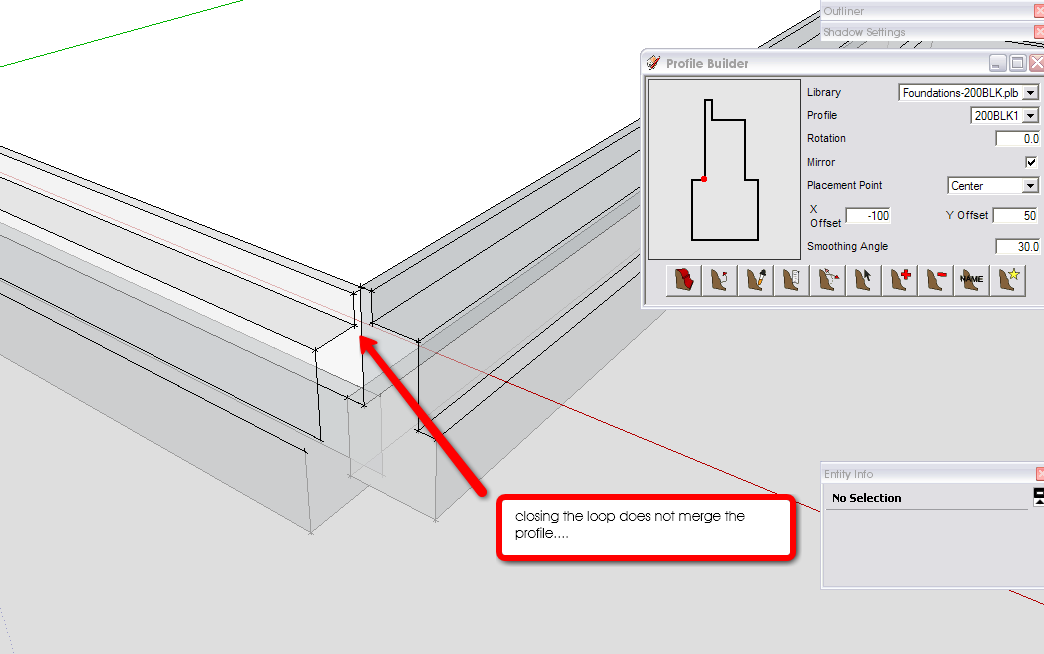
One questions: when creating a closed profile member, picking the point where you started doesn;t merge the profile. [see attached] I understand I could do it 'building along a predefined path' but seems it appears to be the long way around....
Thanks in advance.
-
Another few things:
-
the "build" icon sit right over the cursor which makes it difficult to snap to points... in your video you used the standard cursor which was a little easier, can you look at this?
-
the X and Y offset values don't seem to be saved with the profile. I think this is imperative that they are. When you chose another library and or profile the offset values stay the same as the previous profile which means working it out for each one. For simple profiles, sure it's easy but complex profiles this is very tedious....
-
Can you set 'exit' the fuction of a profile member to be "right button" as with all other SU functions rather than "Esc"? Would make for more streamlined use...
Anyone else please let me know if you find it difficult to use....
-
-
use right mouse button to exit a function in SketchUP? I always get the context menu if I try that.
sure you are not talking about Rhino?
-
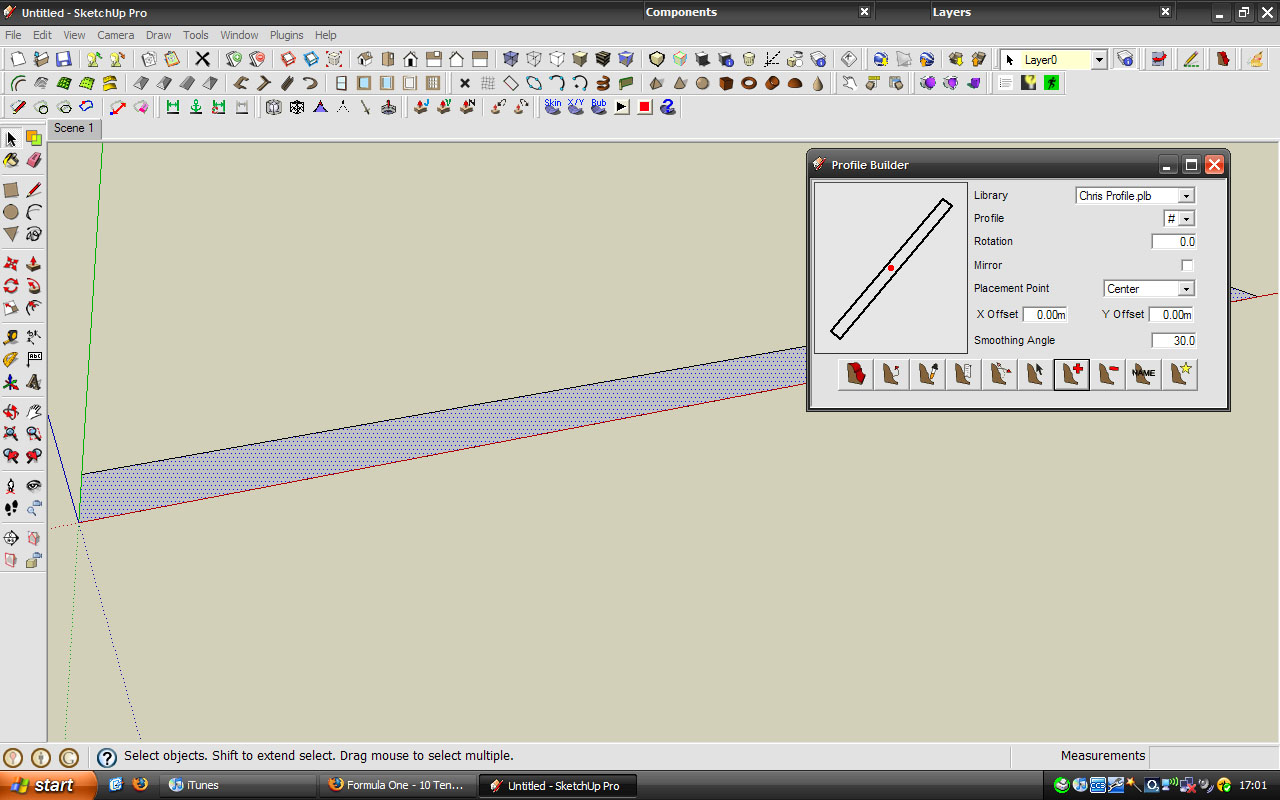
I have a problem ...

why is the profile at an angle ?
-
@haynesc said:
I have a problem ...
why is the profile at an angle ?
Strange...this should not occur if the profile was created from the face that is shown in your screenshot. Is it possible that you modified your axis?? Right click on the axis and choose reset. Then, try to make the profile again.
Is this problem repeatable?
-
I just replicated what you appear to show in your image, and this is the result
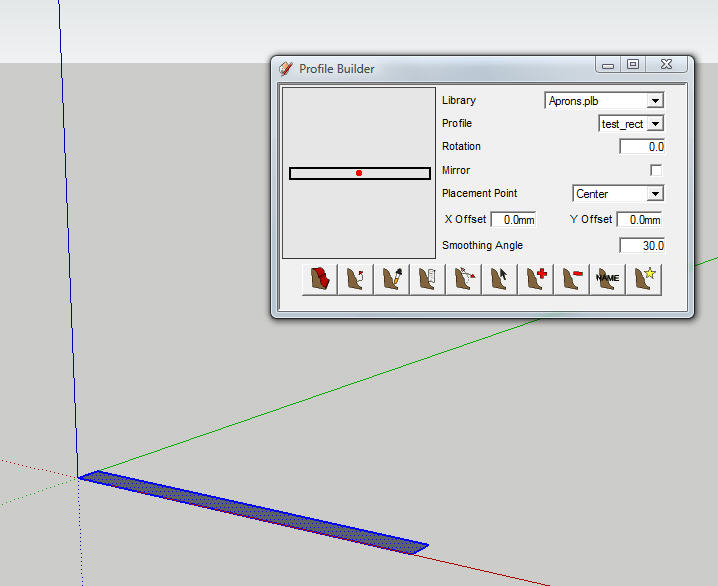
Maybe there is something different about the angle that the face used to create the profile was created relative to the X and Y axis?
Make sure the face sides are parallel to the X, Y axis before your select the option to make the profile.
-
@utiler said:
Thanks Dale, I'm having heaps of fun with this....
One questions: when creating a closed profile member, picking the point where you started doesn;t merge the profile. [see attached] I understand I could do it 'building along a predefined path' but seems it appears to be the long way around....
Thanks in advance.Refer to the troubleshooting section of the manual. My only suggestion is to try using a bottom-left or bottom-right placement point with no offset. I know that this might not be the ideal location of the origin but in some cases, it is the only way to create a closed loop. I am meaning to report this as a possible SketchUp bug because this occurs far less frequent when using the standard follow-me tool, even though Profile Builder uses the follow-me method from the SketchUp API.
-
@utiler said:
Thanks Dale, I'm having heaps of fun with this....
One questions: when creating a closed profile member, picking the point where you started doesn;t merge the profile. [see attached] I understand I could do it 'building along a predefined path' but seems it appears to be the long way around....
Thanks in advance.Refer to the troubleshooting section of the manual. My only suggestion is to try using a bottom-left or bottom-right placement point with no offset. I know that this might not be the ideal location of the origin but in some cases, it is the only way to create a closed loop (i.e. placement point at corner of profile). I am meaning to report this as a possible SketchUp bug because this occurs far less frequent when using the standard follow-me tool, even though Profile Builder uses the follow-me method from the SketchUp API.
-
@seasdes said:
Thanks for the plugin. Can I explain to a simpleton how I can have the walls intersect and mitre correctly when the the walls are created separately.
Walter
If you have two walls that are in separate groups and you want to intersect or mitre them, you could try doing a 'union' operation with BoolTools http://www.smustard.com/script/BoolTools.
I am not sure how else to do it (there is no function in ProfileBuilder do this). Maybe someone else could suggest an alternative method...
-
@unknownuser said:
- When you assign Mark numbers - ie a Prefix or Suffix eg #1,
I was expecting the original Group Name to still remain - is this deliberate or a bug ???
eg Original Group Name = UB_152x89x16
After applying Mark (Suffix) I would expect to see:
UB_152x89x16#1, UB_152x89x16#2, UB_152x89x16#3 etc
What I get is #1, #2, #3 etc
Could you please take a look at this if you get time as this feature will be so useful.
(Make original group name remain by default - unless users actually DO want to get rid of it).
Check the manual. To keep the profile name in the group name, use '$P' in the suffix or prefix.
@unknownuser said:
- Something for you to ponder:
I have folders containing many profiles. One skp file = One Profile. I'm sure I'm not alone.
(eg Steel Sections).
Traditionally, this would be imported into a skp file (it would now be a component) and then extruded manually. Profile Builder gives us the ability to do our extruding a bit smarter and quicker than this - Halleluljah !!!.
My request is, could you either:
a. Add in a feature to import profiles from a directory THAT ARE INDIVIDUAL *.skp files into a Profile Library (profiles retaining their skp filenames minus the *.skp file extension ie UB_123_567.skp = UB_123_567 in profile library OR
b. A feature so that these profiles can be utilised directly (ie without importing them).Do you know that I have steel section libraries already created and ready for download on the Smustard website? As for your suggestion, it is a good idea for the next version. I will consider it. Thanks!
BTW, I intend to create more free downloadable profile libraries based on user requests. There are also ways to create to Profile Libraries from an Excel spreadsheet. I hope to create a tutorial for this someday. If you take a look at the file format for the PLB files, you can probably figure it out. The format is 'NAME x1 y1 x2 y2 x3 y3 ....'
- When you assign Mark numbers - ie a Prefix or Suffix eg #1,
-
Thanks Whaat. I am sure there is a Knighthood in this for you.

David -
Dale
You saidBTW, I intend to create more free downloadable profile libraries based on user requests. There are also ways to create to Profile Libraries from an Excel spreadsheet. I hope to create a tutorial for this someday. If you take a look at the file format for the PLB files, you can probably figure it out. The format is 'NAME x1 y1 x2 y2 x3 y3 ....'<
Please explain how to format for spread sheet (CSV ?) and also how to convert the spread sheet to a vector graphic of each profile.
We all would like to share libraries and just need a little help to set them up and edit outside of PB.
Thank you
dtr
-
problem fixed, my axis were incorrect ...
-
@utiler said:
Another few things:
-
the "build" icon sit right over the cursor which makes it difficult to snap to points... in your video you used the standard cursor which was a little easier, can you look at this?
-
the X and Y offset values don't seem to be saved with the profile. I think this is imperative that they are. When you chose another library and or profile the offset values stay the same as the previous profile which means working it out for each one. For simple profiles, sure it's easy but complex profiles this is very tedious....
Dale, any comment on these issues...?
-





Advertisement