[Plugin] Selection Toys
-
@jclements said:
Do you have dual monitor? If so and you are only using one, then connect to a second monitor and then drag the entire toolbar into the first monitor,
Thank you! I did it. I was using a tablet with video cable which was connected to computer. Computer detected the second monitor.
-
Hi!
I'd have a couple ideas for selection methods.
One would be selecting edges by crease, which is SubD parameter - one could select only creased or non-creased edges or even the ones within certain crease range (0-1), for example: select only edges with crease value from 0.5 to 1. This would significantly improve subdivision modelling workflow.
Another is adding "sharp edges" definition next to soft, smooth and hidden edges. I know this is achievable by reversing selection and subtracting faces from selection, but it adds a couple of extra steps. I'd gladly assign hotkey for selecting only sharp edges cuz I do it a lot.
Filtering out solid groups/ components would also be a cool feature!
-
"Select (only)/ deselect stray edges" would be very useful too!
The definition of a stray edge would be the same as in Clean Up tools. -
Hello,
Is this thread totally dead?
I was wondering if there's a chance of implementing my suggestions
-
Bug report for SketchUp 2023
Convert Group into components behaves weirdly in SketchUp 2023
After converting:
Selected Group not immediately change to component in entity info
All copy group when selected is not shown in entity info when selected
as if there is no object selected, but it is selected in viewport (blue bounding box)It also creates new exactly same item on the first copy ever created,
reulting in 2 object exactly the same, the group and the component -
Bug report in SketchUp 2023
Convert group behaves weirdly.
- Converted group when converted is not shown in entity info
- All copy of the group, including those are not selected are converted to component
- It creates a duplicate of the group on the first ever copy of the group ever created,
resulting in 2 exact looking object but 1st on is a group, the 2nd is a component
-
When I install this plugin "ae_LaunchUp"; I get the console error
C:/Users/User/AppData/Roaming/SketchUp/SketchUp 2021/SketchUp/Plugins/tt_selection_toys/json.rb:39:in
each' C:/Users/User/AppData/Roaming/SketchUp/SketchUp 2021/SketchUp/Plugins/tt_selection_toys/ui_manager.rb:280:inbuild_menus'
C:/Users/User/AppData/Roaming/SketchUp/SketchUp 2021/SketchUp/Plugins/tt_selection_toys/ui_manager.rb:262:in `block (2 levels) in build_ui' -
Hello how are you.
First, thank you for this great tool and the collaboration for everyone.What is the difference between Border Edges and Selection Border?
You could add icons for Border Edges and Selection Border.
And so I can add it to the toolbar.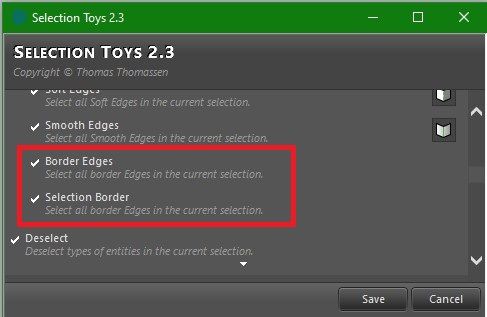
I also wanted to ask you, if you can add a new border selection tool with vertices.
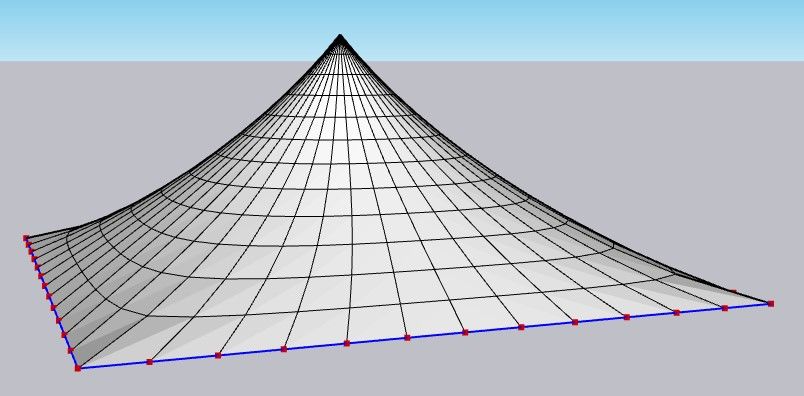
If you can help me, I would appreciate it with all my heart.
Greetings. -
a little late to the game (by 20 yrs or so)
 but that "Selection Toys is ON-POINT!! thanks man!
 -
@thomthom said in [Plugin] Selection Toys:
Hello ThomThom,
I would like to report a possible compatibility issue with the Selection Toys plugin when using SketchUp 2026.
After updating to SketchUp 2026, Selection Toys no longer behaves as expected. In my case (and according to other user reports), the plugin causes problems related to the interface and toolbars, such as tools not appearing correctly or toolbar customization not working properly. When Selection Toys is disabled or removed, SketchUp 2026 appears to function normally again.
This issue seems to be related to changes introduced in SketchUp 2026 rather than a specific workflow error, as the plugin works correctly in previous versions.
I wanted to bring this to your attention in case it helps with investigation or future updates.
Thank you very much for your work and for maintaining such an essential extension for the SketchUp community.


Hello! It looks like you're interested in this conversation, but you don't have an account yet.
Getting fed up of having to scroll through the same posts each visit? When you register for an account, you'll always come back to exactly where you were before, and choose to be notified of new replies (either via email, or push notification). You'll also be able to save bookmarks and upvote posts to show your appreciation to other community members.
With your input, this post could be even better 💗
Register Login


Advertisement