sketchucation logo sketchucation
    • 登入
    Oops, your profile's looking a bit empty! To help us tailor your experience, please fill in key details like your SketchUp version, skill level, operating system, and more. Update and save your info on your profile page today!
    🔌 Smart Spline | Fluid way to handle splines for furniture design and complex structures. Download

    [Plugin] Selection Toys

    已排程 已置頂 已鎖定 已移動 Plugins
    594 貼文 121 Posters 399.0k 瀏覽 121 Watching
    正在載入更多貼文
    • 從舊到新
    • 從新到舊
    • 最多點贊
    回覆
    • 在新貼文中回覆
    登入後回覆
    此主題已被刪除。只有擁有主題管理權限的使用者可以查看。
    • thomthomT 離線
      thomthom
      最後由 編輯

      What function are you trying to use?

      Thomas Thomassen — SketchUp Monkey & Coding addict
      List of my plugins and link to the CookieWare fund

      1 條回覆 最後回覆 回覆 引用 0
      • K 離線
        Khai
        最後由 編輯

        Select Ngon

        1 條回覆 最後回覆 回覆 引用 0
        • thomthomT 離線
          thomthom
          最後由 編輯

          Select Only -> Polygons ?

          Note that Select Only and Deselect modifies your current selection - doesn't add to it.

          Thomas Thomassen — SketchUp Monkey & Coding addict
          List of my plugins and link to the CookieWare fund

          1 條回覆 最後回覆 回覆 引用 0
          • K 離線
            Khai
            最後由 編輯

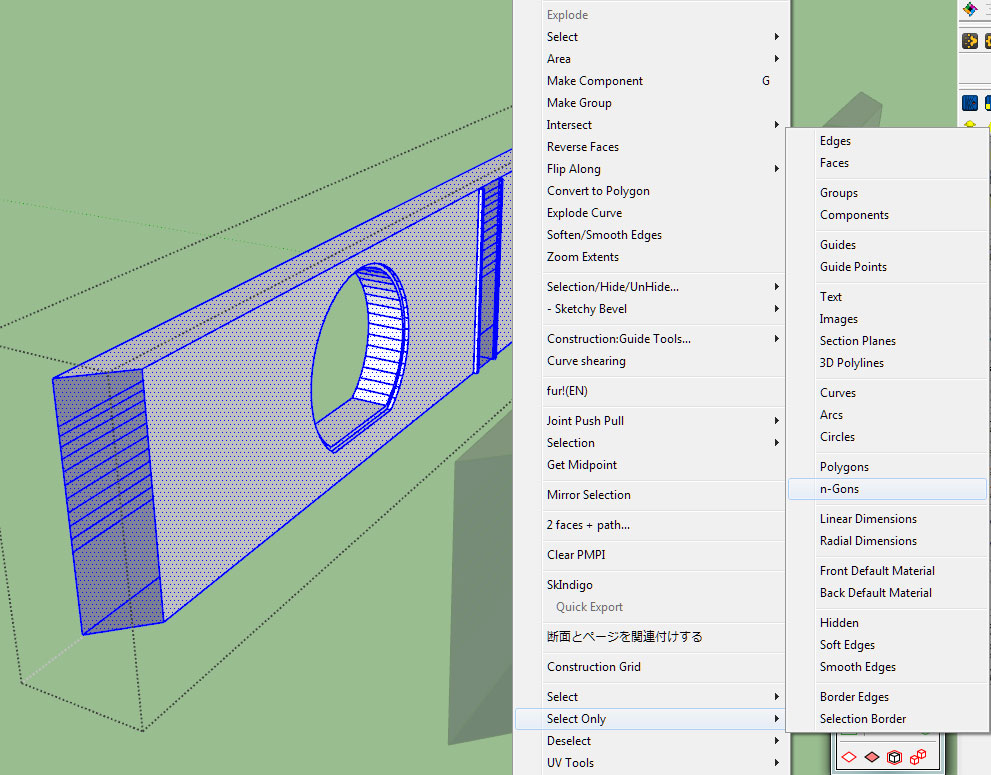
            that's exactly what I'm doing.
            select the model, then Select Only -> N-Gons and nothing is selected, even tho I can see Ngon's.

            to clarify :Stoys.jpg

            1 條回覆 最後回覆 回覆 引用 0
            • pilouP 離線
              pilou
              最後由 編輯

              Better if you post your SKP file 😉

              Frenchy Pilou
              Is beautiful that please without concept!
              My Little site :)

              1 條回覆 最後回覆 回覆 引用 0
              • K 離線
                Khai
                最後由 編輯

                @unknownuser said:

                Better if you post your SKP file 😉

                sorry cannot do that, it's copyrighted work that will be for sale, and it's not just the mesh in the image above.

                1 條回覆 最後回覆 回覆 引用 0
                • thomthomT 離線
                  thomthom
                  最後由 編輯

                  Polygon and N-Gon refer to entities where the Entity Info display Polygon.
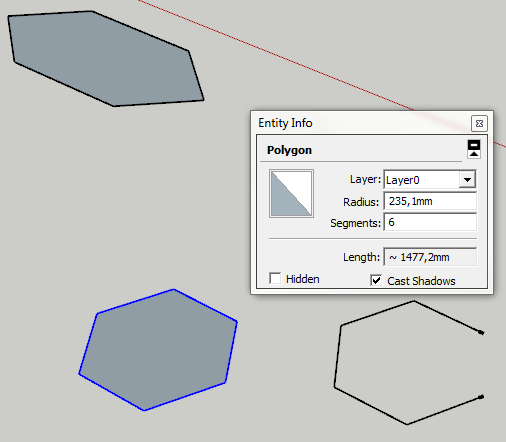
                  ST_Polygon.png

                  Thomas Thomassen — SketchUp Monkey & Coding addict
                  List of my plugins and link to the CookieWare fund

                  1 條回覆 最後回覆 回覆 引用 0
                  • K 離線
                    Khai
                    最後由 編輯

                    erm... pardon?

                    ok I must be being dense... that made no sense at all?

                    1 條回覆 最後回覆 回覆 引用 0
                    • pilouP 離線
                      pilou
                      最後由 編輯

                      In fact i believe this N Gon function shown only figures who are made with the tool "Polygon" 😉
                      And not geometric figures that you can see as Ngons 😉

                      Frenchy Pilou
                      Is beautiful that please without concept!
                      My Little site :)

                      1 條回覆 最後回覆 回覆 引用 0
                      • thomthomT 離線
                        thomthom
                        最後由 編輯

                        @unknownuser said:

                        In fact i believe this N Gon function shown only figures who are made with the tool "Polygon" 😉
                        And not geometric figures that you can see as Ngons 😉

                        Exactly - the selection tool doesn't look at the shape of the geometry, but filters the selection based on the types of entities SketchUp reports.

                        When you select something in SU, the Entity Info window will say what type it is - all the filtering is based on these types.

                        Thomas Thomassen — SketchUp Monkey & Coding addict
                        List of my plugins and link to the CookieWare fund

                        1 條回覆 最後回覆 回覆 引用 0
                        • K 離線
                          Khai
                          最後由 編輯

                          ah. thanks for your help then.. this explains all my problems with this Ruby. we're not compatible.. but thats ok.

                          1 條回覆 最後回覆 回覆 引用 0
                          • N3TON 離線
                            N3TO
                            最後由 編輯

                            @thomthom said:

                            I can make so sense why you would not have a Selection Toys menu item under tools and various Context Menu entries (which depend on what you right-click)

                            I was about to ask if you'd checked the Preferences for Selection Toys, but if you have not menu... I'm really stomped.

                            Can you post a screenshot of your Tools menu?

                            Hello Thomas!
                            It happens with me also! You can see a screenshot here
                            http://www.netcond.net/N3TO/Screenshot_toolsmenu.jpg
                            I see all posts but I can't resolve the trouble.
                            apologies for my bad english...
                            Thanks

                            1 條回覆 最後回覆 回覆 引用 0
                            • thomthomT 離線
                              thomthom
                              最後由 編輯

                              Check the Tools menu.

                              Tools -> Selection Toys -> Enable Toolbar
                              then after you do that - check the menu you showed in the screenshot.

                              Thomas Thomassen — SketchUp Monkey & Coding addict
                              List of my plugins and link to the CookieWare fund

                              1 條回覆 最後回覆 回覆 引用 0
                              • thomthomT 離線
                                thomthom
                                最後由 編輯

                                Version 2.2.1

                                • Fixed Select DC Instances

                                Thomas Thomassen — SketchUp Monkey & Coding addict
                                List of my plugins and link to the CookieWare fund

                                1 條回覆 最後回覆 回覆 引用 0
                                • thomthomT 離線
                                  thomthom
                                  最後由 編輯

                                  Sorry - I forgot to include a file. Redownload.

                                  Thomas Thomassen — SketchUp Monkey & Coding addict
                                  List of my plugins and link to the CookieWare fund

                                  1 條回覆 最後回覆 回覆 引用 0
                                  • brookefoxB 離線
                                    brookefox
                                    最後由 編輯

                                    It was working in V7, but I can't get Sel Toys working in V8. Feeling stupid for a number of reasons.

                                    My configurtion of Sel Toys:

                                    C:\Program Files (x86)\Google\Google SketchUp 8\Plugins\TT_Lib
                                    C:\Program Files (x86)\Google\Google SketchUp 8\Tools\TT_Select_Toys

                                    After SU8 re-start:

                                    no context picks for Sel Toys
                                    no pick for Sel Toys in Tools menu drop down

                                    ~ Brooke

                                    1 條回覆 最後回覆 回覆 引用 0
                                    • thomthomT 離線
                                      thomthom
                                      最後由 編輯

                                      @brookefox said:

                                      C:\Program Files (x86)\Google\Google SketchUp 8\Plugins\TT_Lib
                                      C:\Program Files (x86)\Google\Google SketchUp 8\Tools\TT_Select_Toys

                                      Don't put plugins in the Tools folder.

                                      There should be

                                      C:\Program Files (x86)\Google\Google SketchUp 8\Plugins\TT_Lib\ - (inside, lots of .rb files)

                                      C:\Program Files (x86)\Google\Google SketchUp 8\Plugins\tt_selection_toys.rb
                                      C:\Program Files (x86)\Google\Google SketchUp 8\Plugins\TT_Select_Toys\

                                      Thomas Thomassen — SketchUp Monkey & Coding addict
                                      List of my plugins and link to the CookieWare fund

                                      1 條回覆 最後回覆 回覆 引用 0
                                      • brookefoxB 離線
                                        brookefox
                                        最後由 編輯

                                        OK. Thank you. I thought that since it is accessed by the tools menu..., but thinking is not my strong suite.

                                        @unknownuser said:

                                        You must enable it from Tools->Selection Toys->Enable Toolbar before it appears under View->Toolbars->Selection Toys.

                                        While the install didn't seem that clear to me, I didn't notice many install problems in the thread, so likely I am being thick. Perhaps because I assumed it was different than the norm when it is not. (Is the download count related to this, only 141 for such a useful tool? Or is that count only since the last update or somehow not reliable?)

                                        Thanks, again.

                                        ~ Brooke

                                        1 條回覆 最後回覆 回覆 引用 0
                                        • thomthomT 離線
                                          thomthom
                                          最後由 編輯

                                          Since last update - there's been thousands of downloads all together of the previous versions.

                                          With my more recent plugins I've started to add more detailed descriptions of how they should be installed.

                                          Thomas Thomassen — SketchUp Monkey & Coding addict
                                          List of my plugins and link to the CookieWare fund

                                          1 條回覆 最後回覆 回覆 引用 0
                                          • brookefoxB 離線
                                            brookefox
                                            最後由 編輯

                                            I will remove and try to re-install as now for me under Tools, there is no 'Selection Toys'; and so not surprisingly, under View->Toolbars there is no 'Selection Toys'. After entity pick, context menu does not show sel toy choices.

                                            Folders TT_Lib and TT_Select_Toys are both in Plugins, as is file tt_selection_toys.rb.
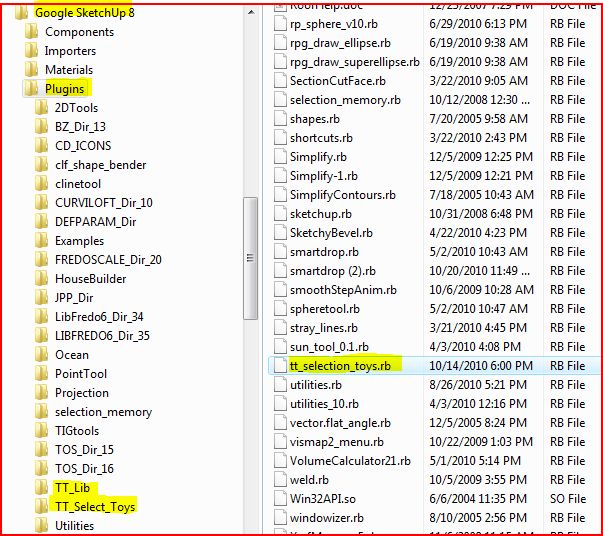

                                            sel toys.JPG

                                            ~ Brooke

                                            1 條回覆 最後回覆 回覆 引用 0
                                            • 1
                                            • 2
                                            • 12
                                            • 13
                                            • 14
                                            • 15
                                            • 16
                                            • 29
                                            • 30
                                            • 14 / 30
                                            • 第一個貼文
                                              最後的貼文
                                            Buy SketchPlus
                                            Buy SUbD
                                            Buy WrapR
                                            Buy eBook
                                            Buy Modelur
                                            Buy Vertex Tools
                                            Buy SketchCuisine
                                            Buy FormFonts

                                            Advertisement