sketchucation logo sketchucation
    • 登入
    Oops, your profile's looking a bit empty! To help us tailor your experience, please fill in key details like your SketchUp version, skill level, operating system, and more. Update and save your info on your profile page today!
    🔌 Smart Spline | Fluid way to handle splines for furniture design and complex structures. Download

    [Plugin] Selection Toys

    已排程 已置頂 已鎖定 已移動 Plugins
    594 貼文 121 Posters 399.0k 瀏覽 121 Watching
    正在載入更多貼文
    • 從舊到新
    • 從新到舊
    • 最多點贊
    回覆
    • 在新貼文中回覆
    登入後回覆
    此主題已被刪除。只有擁有主題管理權限的使用者可以查看。
    • thomthomT 離線
      thomthom
      最後由 編輯

      @jclements said:

      Hi Thom:

      Selection Tools must be a labor of love! 😄

      Selecting Instances on same layer (both all and active) not working? See attached.

      Confirmed and fixed internally.

      Thanks for reporting.

      Thomas Thomassen — SketchUp Monkey & Coding addict
      List of my plugins and link to the CookieWare fund

      1 條回覆 最後回覆 回覆 引用 0
      • thomthomT 離線
        thomthom
        最後由 編輯

        @jclements said:

        Select Default Front and Default Back not working?

        Can't reproduce.

        Thomas Thomassen — SketchUp Monkey & Coding addict
        List of my plugins and link to the CookieWare fund

        1 條回覆 最後回覆 回覆 引用 0
        • thomthomT 離線
          thomthom
          最後由 編輯

          @thomthom said:

          @jclements said:

          Select Default Front and Default Back not working?

          Can't reproduce.

          Saying that, as it works now, the edges also needs to have the same material for the Select Connected by Material to select the neighbouring face... Might have to revise this function. ...and I wonder why I haven't added one that doesn't select connected....

          Thomas Thomassen — SketchUp Monkey & Coding addict
          List of my plugins and link to the CookieWare fund

          1 條回覆 最後回覆 回覆 引用 0
          • thomthomT 離線
            thomthom
            最後由 編輯

            @jclements said:

            Another Bug; Select Edge Loops?

            If after an edge loop is selected, then using the Layers Toolbar (PC) dropdown list to move the edge to a new layer does not work. Interestly though, using Entity Info to move the selected edge to a new layer does.
            [attachment=0:137w7llf]<!-- ia0 -->Layers Toolbar, PC.png<!-- ia0 -->[/attachment:137w7llf]

            This is very odd. But it seems to be a Sketchup bug. I can't see anything in my code that'd do this. And as you say, the Entitiy Info works. I'll try to forward this to Google.

            Thomas Thomassen — SketchUp Monkey & Coding addict
            List of my plugins and link to the CookieWare fund

            1 條回覆 最後回覆 回覆 引用 0
            • R 離線
              rv1974
              最後由 編輯

              Hi!
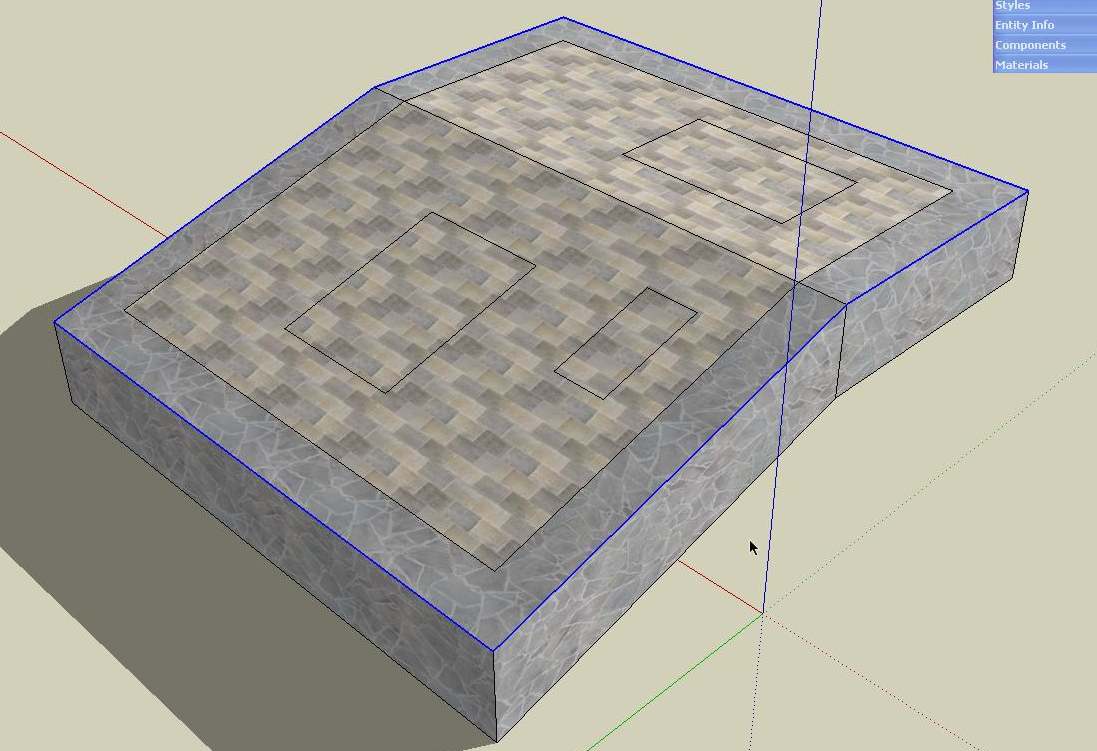
              What I really missinng is option to select all edges bitween "90 degrees faces" (the exact degree number should be ajustable)

              ScreenShot098.jpg

              1 條回覆 最後回覆 回覆 引用 0
              • thomthomT 離線
                thomthom
                最後由 編輯

                Ah - took me a little while to understand this one, but being able to select edges where the angle between connected faces are larger than a given angle?
                This would be something that filters an existing selection? Or make a new selection in the active space?

                Thomas Thomassen — SketchUp Monkey & Coding addict
                List of my plugins and link to the CookieWare fund

                1 條回覆 最後回覆 回覆 引用 0
                • R 離線
                  rv1974
                  最後由 編輯

                  ...being able to select edges where the angle between connected faces are larger than a given angle?..
                  -yes
                  ...filters an existing selection?
                  -yes

                  1 條回覆 最後回覆 回覆 引用 0
                  • juan974J 離線
                    juan974
                    最後由 編輯

                    good idea rv1974, kind of : "select string edges", useful for complicated shape

                    juan974 (Réunion island)
                    website : http://sketchucation.com/click.php?url=http://www.tarn.us

                    1 條回覆 最後回覆 回覆 引用 0
                    • N3TON 離線
                      N3TO
                      最後由 編輯

                      Where can I download Seletcion Toys (2.1.0)???
                      thanks

                      1 條回覆 最後回覆 回覆 引用 0
                      • thomthomT 離線
                        thomthom
                        最後由 編輯

                        @n3to said:

                        Where can I download Seletcion Toys (2.1.0)???
                        thanks

                        Bottom of the first post on the first page of this thread.

                        Thomas Thomassen — SketchUp Monkey & Coding addict
                        List of my plugins and link to the CookieWare fund

                        1 條回覆 最後回覆 回覆 引用 0
                        • Dan RathbunD 離線
                          Dan Rathbun
                          最後由 編輯

                          @unknownuser said:

                          Selection Modifier
                          Selection Submenu - Currently there's two kinds of modifiers.
                          The explanations are a bit confusing for me... I have alot of experience in Electronic Radio Frequency / Broadcast Engineering, where Filters are a very important device. So when I think of Filters I think of them in that respect. See if you think I'm correct here:

                          @unknownuser said:

                          One filters out the type of entity you want.
                          This would be a 'Pass' filter?
                          http://en.wikipedia.org/wiki/Band-pass_filter

                          @unknownuser said:

                          The other deselects the entity you specify.
                          This is a 'Reject' Filter? (also sometimes called a 'Trap' or 'Notch' Filter from the way the signal looks on a Spectrum Analyser.)
                          http://en.wikipedia.org/wiki/Notch_filter

                          I'm not here much anymore.

                          1 條回覆 最後回覆 回覆 引用 0
                          • thomthomT 離線
                            thomthom
                            最後由 編輯

                            I think so ... from what I understood of that definition of filters... unfamiliar territory to me.

                            Thomas Thomassen — SketchUp Monkey & Coding addict
                            List of my plugins and link to the CookieWare fund

                            1 條回覆 最後回覆 回覆 引用 0
                            • D 離線
                              DIEGO-RODRIGUEZ
                              最後由 編輯

                              hi tom.
                              a question
                              as I select only:

                              1 - Lines with a free end (no connection with another line or entity)
                              2 - lines with the two free ends (no connection with another line or entity, in its extreme ningudo)

                              http://img534.imageshack.us/img534/1747/sinttulo1zd.jpg

                              1 條回覆 最後回覆 回覆 引用 0
                              • A 離線
                                arjunmax09
                                最後由 編輯

                                please help me.... i'm not getting all the buttons in the toolbar... only able to get faces, edges, groups and component options

                                when you fail at something....you haven't really failed...you've found one way the thing will not work out

                                1 條回覆 最後回覆 回覆 引用 0
                                • thomthomT 離線
                                  thomthom
                                  最後由 編輯

                                  @arjunmax09 said:

                                  please help me.... i'm not getting all the buttons in the toolbar... only able to get faces, edges, groups and component options

                                  Tools->Selection Toys->UI Settings

                                  Thomas Thomassen — SketchUp Monkey & Coding addict
                                  List of my plugins and link to the CookieWare fund

                                  1 條回覆 最後回覆 回覆 引用 0
                                  • thomthomT 離線
                                    thomthom
                                    最後由 編輯

                                    @diego-rodriguez said:

                                    hi tom.
                                    a question
                                    as I select only:

                                    1 - Lines with a free end (no connection with another line or entity)
                                    2 - lines with the two free ends (no connection with another line or entity, in its extreme ningudo)

                                    Never noticed this post.
                                    I'm adding it to my list.

                                    Thomas Thomassen — SketchUp Monkey & Coding addict
                                    List of my plugins and link to the CookieWare fund

                                    1 條回覆 最後回覆 回覆 引用 0
                                    • D 離線
                                      DIEGO-RODRIGUEZ
                                      最後由 編輯

                                      I think it would be a useful tool for working with drawings imported from autocad.
                                      drawings with many lines, could detect lines, what not intersect

                                      1 條回覆 最後回覆 回覆 引用 0
                                      • thomthomT 離線
                                        thomthom
                                        最後由 編輯

                                        @diego-rodriguez said:

                                        I think it would be a useful tool for working with drawings imported from autocad.
                                        drawings with many lines, could detect lines, what not intersect

                                        favicon

                                        (www.smustard.com)

                                        Thomas Thomassen — SketchUp Monkey & Coding addict
                                        List of my plugins and link to the CookieWare fund

                                        1 條回覆 最後回覆 回覆 引用 0
                                        • D 離線
                                          DIEGO-RODRIGUEZ
                                          最後由 編輯

                                          oooooo. 😄
                                          excellent, thank you very much. did not know

                                          1 條回覆 最後回覆 回覆 引用 0
                                          • A 離線
                                            arjunmax09
                                            最後由 編輯

                                            @thomthom said:

                                            @arjunmax09 said:

                                            please help me.... i'm not getting all the buttons in the toolbar... only able to get faces, edges, groups and component options

                                            Tools->Selection Toys->UI Settings

                                            well thomthom... i tried doin' it but i can't go further down the options.. see the video


                                            This is the video file .... unrar it ..

                                            when you fail at something....you haven't really failed...you've found one way the thing will not work out

                                            1 條回覆 最後回覆 回覆 引用 0
                                            • 1
                                            • 2
                                            • 24
                                            • 25
                                            • 26
                                            • 27
                                            • 28
                                            • 29
                                            • 30
                                            • 26 / 30
                                            • 第一個貼文
                                              最後的貼文
                                            Buy SketchPlus
                                            Buy SUbD
                                            Buy WrapR
                                            Buy eBook
                                            Buy Modelur
                                            Buy Vertex Tools
                                            Buy SketchCuisine
                                            Buy FormFonts

                                            Advertisement