[Plugin] Selection Toys
-
All of this suggests that it is not a valid Ruby file ?
Oddly encoded?
Opened in a word-processor??
Incorrectly unzipped???
Who knows... -
Looks like corrupted download, or corrupted unzipping. What's the content ofvthe .rb file when you open it in a text editor - a plain text editor like Notepad?
I've never ever seen such error.
-
i've downloaded both again twice. TTLib and Selection Toys.
either 7zip or winrar seems to work just fine.
i'll try to unzip them with 7zip then.[Edit]
Problem solved. Old corrupted files sometimes need to be erased first
and not just overwrite it. Both works fine now. Checked with Notepad++.
Thank you all.
-
Does exist a selection of segments of an explosed curve 1/x ? (Maybe I have missed that in the list)
So
for 1/2 ( 1,3,5,7...
for 1/3 (1,4,7,10...
for 1/4 (1,5,9,13...
etc... -
what..?


-
Like this for select all segments of a curve by 1 / x
Here x = 2 or x = 3
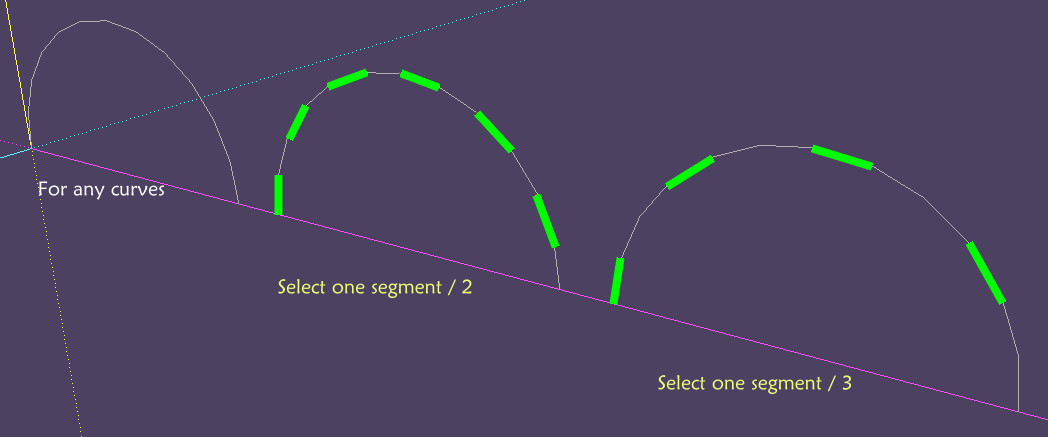
-
I was thinking of something like that for V3 - and QuadFace Tools.
-
Cool!

-
Select edges by length(?)
Hi thomthom,
Any chance we could have a feature to select edges by length? For examples, select edges <X, =X, >X, where X is the length of a pre-selected edge?
I'm doing some work involving mapping of components to edges, and this could be a pretty handy tool to have.
Cheers
Joel
-
Right now I'm very busy with Vertex Tools - getting it ready to ship.
-
@ivreich said:
Select edges by length(?)
Hi thomthom,
Any chance we could have a feature to select edges by length? For examples, select edges <X, =X, >X, where X is the length of a pre-selected edge?
I'm doing some work involving mapping of components to edges, and this could be a pretty handy tool to have.
Cheers
Joel
Maybe this can help you: http://forums.sketchucation.com/viewtopic.php?t=16915#p134106 ?
-
Just wanted to thank Thomthom again. I'm currently working on a project that has a lot of junk in a certain layer, and found no other way to do the job but to use his plugin.
Thanks!
-
Select loop does not work for me on sketchup 8.. it only select edges but there is no loop selected on faces..
-
@dollmaker said:
Select loop does not work for me on sketchup 8.. it only select edges but there is no loop selected on faces..
Screenshots? Sample model?
-
Hi, great tool. Works on my google su 8 but not my trimble version. Any thoughts? the plugins are installed, but when you context click nothing happens
-
I have the latest Trimble version, used every one f them. Always worked.
Can you be more specific to "when you context click nothing happens"?
What are you clicking on?
Surely there is a menu appearing? Missing menu items?
Any errors? (If you keep the Ruby Console open?) -
Hi
In trimble SU 8 I double click Susan (SU's default component) to enter it for editing. Click her grey shirt so only that is selected. right click it, then click select & then hit "coplanar faces". nothing changes.
the exact same process in google SU 8 works how it should.
ruby console displays nothing in both cases
there are no missing menu items, it appears the same in both su versions.
thanks
-
@fullyfledgeded said:
In trimble SU 8 I double click Susan (SU's default component) to enter it for editing. Click her grey shirt so only that is selected. right click it, then click select & then hit "coplanar faces". nothing changes.
Works fine on my computer. Might be some other plugin interfering. Try with just Selection Toys installed.
-
If you click on just her 'gray' shirt then only one face will be selected, there are no edges in the selection to be considered for coplanar-ness...
BUT if you double-click the shirt-face so that its edges also select... then some of those edges can be considered 'coplanar', because they border two same-plane-faces which also have the same 'gray' material... -
Do the conditions of dependency mean that one cannot have both Quad Tools and the Selection Toys installed simultaneously? (Because of the different TT-Lib versions involved?)
Cheers,
Peter





Hello! It looks like you're interested in this conversation, but you don't have an account yet.
Getting fed up of having to scroll through the same posts each visit? When you register for an account, you'll always come back to exactly where you were before, and choose to be notified of new replies (either via email, or push notification). You'll also be able to save bookmarks and upvote posts to show your appreciation to other community members.
With your input, this post could be even better 💗
Register Login


Advertisement