sketchucation logo sketchucation
    • 登入
    Oops, your profile's looking a bit empty! To help us tailor your experience, please fill in key details like your SketchUp version, skill level, operating system, and more. Update and save your info on your profile page today!
    🔌 Smart Spline | Fluid way to handle splines for furniture design and complex structures. Download

    [Plugin] Selection Toys

    已排程 已置頂 已鎖定 已移動 Plugins
    594 貼文 121 Posters 397.3k 瀏覽 121 Watching
    正在載入更多貼文
    • 從舊到新
    • 從新到舊
    • 最多點贊
    回覆
    • 在新貼文中回覆
    登入後回覆
    此主題已被刪除。只有擁有主題管理權限的使用者可以查看。
    • free agentF 離線
      free agent
      最後由 編輯

      wow another old request of mine you've made a reality, so it converts all "similar" groups into instances of a component?!!! i wonder if i would be the only one to make use of this script when i made this request i got a lot of technique suggestions 😒

      http:i167.photobucket.comalbumsu143FreeAgent84bug.gif

      1 條回覆 最後回覆 回覆 引用 0
      • EarthMoverE 離線
        EarthMover
        最後由 編輯

        Right on Thomas! Thanks for your efforts! Now if I can only get that damn loop selection tool. 😄

        3D Artist at Clearstory 3D Imaging
        Guide Tool at Winning With Sketchup
        Content Creator at Skapeup

        1 條回覆 最後回覆 回覆 引用 0
        • thomthomT 離線
          thomthom
          最後由 編輯

          @unknownuser said:

          wow another old request of mine you've made a reality, so it converts all "similar" groups into instances of a component?!!! i wonder if i would be the only one to make use of this script when i made this request i got a lot of technique suggestions 😒

          Didn't know it was requested. heh 😄

          It will only convert the groups that are copies of each other. If you where to even just open up one of the group copies SU breaks the link and makes it unique. Even though you've not actually after anything. In fact, SU will even make the group unique if you select the group, minimize SU then restore the window. Go figure...

          I suppose it would be possible to compare the content of each group and calculate which ones are 'similar' even though SU claims they are unique. But, I think that'd have to be for when I'm getting more warmed up with this Ruby thing.

          Thomas Thomassen — SketchUp Monkey & Coding addict
          List of my plugins and link to the CookieWare fund

          1 條回覆 最後回覆 回覆 引用 0
          • free agentF 離線
            free agent
            最後由 編輯

            yup the thread was called [Req] Similar groups to Components, i bumped it for your viewing pleaure.

            http:i167.photobucket.comalbumsu143FreeAgent84bug.gif

            1 條回覆 最後回覆 回覆 引用 0
            • thomthomT 離線
              thomthom
              最後由 編輯

              Ah, wonder how I missed such a recent thread on this. Oh well.

              So did you also want to make a selection of instances into individual group?

              Thomas Thomassen — SketchUp Monkey & Coding addict
              List of my plugins and link to the CookieWare fund

              1 條回覆 最後回覆 回覆 引用 0
              • free agentF 離線
                free agent
                最後由 編輯

                ? no just similar groups to components... 👍

                http:i167.photobucket.comalbumsu143FreeAgent84bug.gif

                1 條回覆 最後回覆 回覆 引用 0
                • bagateloB 離線
                  bagatelo
                  最後由 編輯

                  thomthom

                  Very good, I like the script very much.

                  Maybe you can improve the script by make loop selection also in horizontal, not only vertical.

                  While the cat's away, the mice will play

                  1 條回覆 最後回覆 回覆 引用 0
                  • thomthomT 離線
                    thomthom
                    最後由 編輯

                    @bagatelo said:

                    thomthom

                    Very good, I like the script very much.

                    Maybe you can improve the script by make loop selection also in horizontal, not only vertical.

                    It has not concept of horizontal or vertical. Effectively if you have a cube, select an horizontal line to get a vertical selection, select a vertical line to get a horizontal selection.

                    It simply starts with the faces on either side of the edge you select and keeps on selecting the opposite faces and edges.

                    Thomas Thomassen — SketchUp Monkey & Coding addict
                    List of my plugins and link to the CookieWare fund

                    1 條回覆 最後回覆 回覆 引用 0
                    • bagateloB 離線
                      bagatelo
                      最後由 編輯

                      I'm sorry to not explain corret to you, before.

                      http://i37.tinypic.com/29yfwqq.jpg.gif

                      While the cat's away, the mice will play

                      1 條回覆 最後回覆 回覆 引用 0
                      • thomthomT 離線
                        thomthom
                        最後由 編輯

                        Ah, yes. I understand now. I will be looking into more looping variations. But no guaranties. This first type was very easy to do.

                        btw, what application did you use to create the animation?

                        Thomas Thomassen — SketchUp Monkey & Coding addict
                        List of my plugins and link to the CookieWare fund

                        1 條回覆 最後回覆 回覆 引用 0
                        • F 離線
                          Fletch
                          最後由 編輯

                          Thanks Thomas!

                          please only update original post with new plugin release... now I'm confused which is latest version of the ruby I should d/l thanks.

                          re: converting similar groups to components - I seconded the request! and I will use it!

                          re: loop selection... I have desired this many times... we will see how well it works in practice 😄

                          Fletch
                          Twilight Render Cross-platform Plugin for SketchUp on PC or Mac

                          1 條回覆 最後回覆 回覆 引用 0
                          • thomthomT 離線
                            thomthom
                            最後由 編輯

                            @earthmover said:

                            Right on Thomas! Thanks for your efforts! Now if I can only get that damn loop selection tool. 😄

                            Here's a beta of version 1.1.1b.
                            (beta removed. obsolete)

                            Highlight one edge and click 'Select Loop'.

                            I've only tried this is faces of four sides. The script currently make this assumption as well, so I don't know how it behaves if you throw in less or more edges.

                            Here's my test model:
                            loop selection test.skp
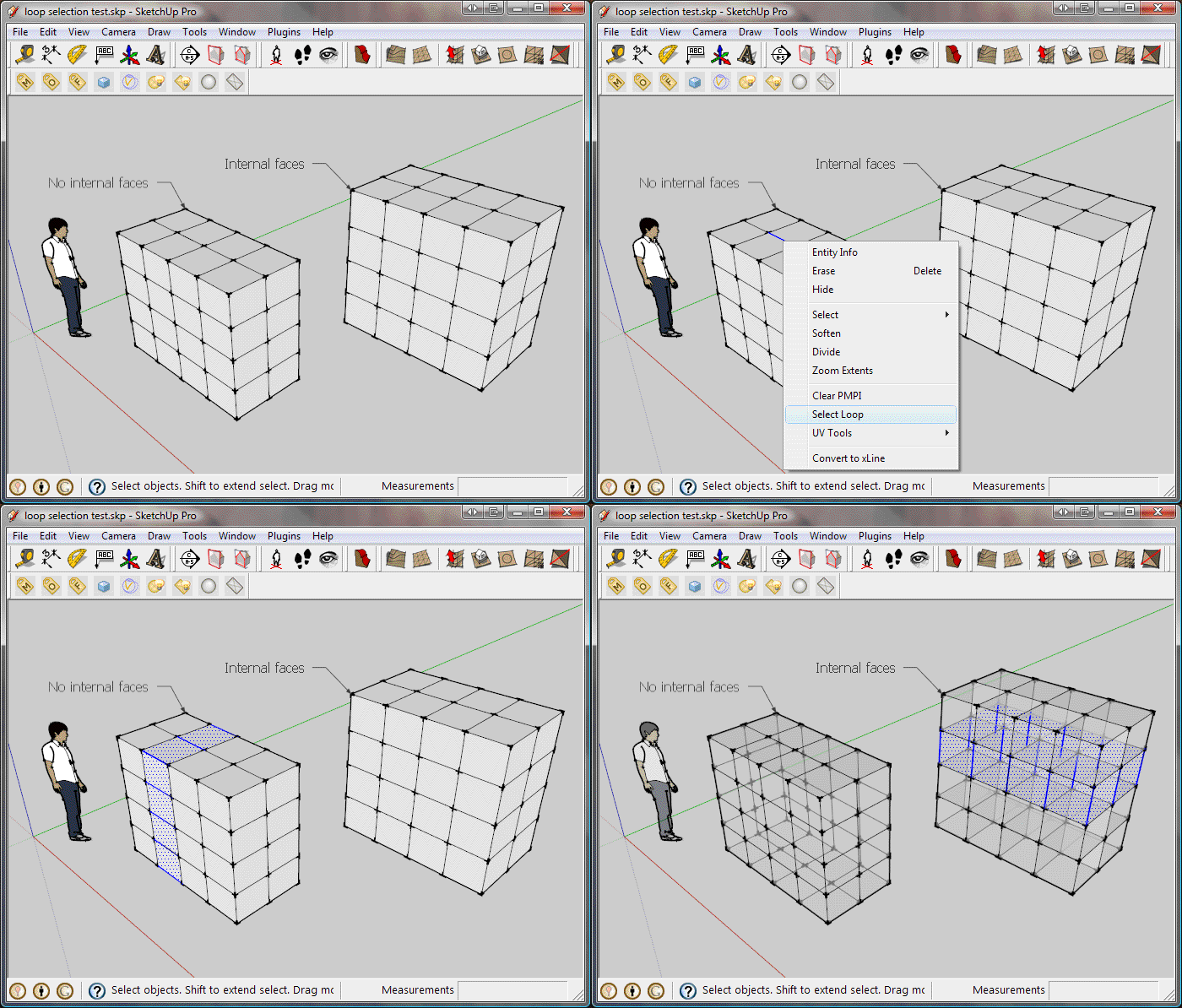

                            loop_ani.gif

                            Thomas Thomassen — SketchUp Monkey & Coding addict
                            List of my plugins and link to the CookieWare fund

                            1 條回覆 最後回覆 回覆 引用 0
                            • thomthomT 離線
                              thomthom
                              最後由 編輯

                              @fletch said:

                              please only update original post with new plugin release... now I'm confused which is latest version of the ruby I should d/l thanks.

                              Sorry for the confusion. The one I posted further down in this thread was a beta. Experimental. After some more testing making sure it did what it should do I updated the one in the original post. To avoid further confusion I've removed the other versions now.

                              @fletch said:

                              re: loop selection... I have desired this many times... we will see how well it works in practice 😄

                              Yea, I've not tried it out on very irregular cases. Not sure how it will handle really weird geometry. In order to improve the edge/face selection tool I need to study more the SU API on how to deal with edges, faces and determining their direction and relationships. If anyone with some experience would like to jump in and add some more tools I'd be most happy.

                              Thomas Thomassen — SketchUp Monkey & Coding addict
                              List of my plugins and link to the CookieWare fund

                              1 條回覆 最後回覆 回覆 引用 0
                              • U 離線
                                urs0815
                                最後由 編輯

                                thank you for this useful tool!

                                1 條回覆 最後回覆 回覆 引用 0
                                • G 離線
                                  GUNAWAN W
                                  最後由 編輯

                                  thank's a milion Thomas.

                                  1 條回覆 最後回覆 回覆 引用 0
                                  • bigstickB 離線
                                    bigstick
                                    最後由 編輯

                                    Nice one Thomas! This should improve my productivity no end! 👍

                                    1 條回覆 最後回覆 回覆 引用 0
                                    • K 離線
                                      Kyprus
                                      最後由 編輯

                                      Hello:
                                      New to the forum. Had to join when I found this tool.
                                      Saves me a ton of time. Thanks for the plug-in. 😃

                                      I was however wondering if there is a plug-in that
                                      once you have selected a bunch of polygon's that you
                                      could evenly subtract or add to your selection by using
                                      the "plus" and "minus" keys. I'll try to elaborate a bit.
                                      Say you have a a rectangle evenly divided into five
                                      sections you select the end polygon and you can then press
                                      the "plus" key and it will select the polygon's next to it.
                                      Then you can press the "minus" key to subtract. this would
                                      work the same as if you used the "select/connection faces"
                                      in the right click menu, but sadly there is no subtracting.
                                      The reason for this request is = if you have allot of
                                      polygons selected, and you move the selection and you want
                                      to subtract a row of polygon, you have to unselect all,
                                      reselect one row less and make change and repeat each time.

                                      Unless I'm missing something that pre-exists in SU
                                      already, this would be great.

                                      1 條回覆 最後回覆 回覆 引用 0
                                      • jim smithJ 離線
                                        jim smith
                                        最後由 編輯

                                        Thanks Thomas, I will find being able to turn a number of groups into components very usefull. 😄

                                        "Out of clutter find simplicity,
                                        from discord find harmony,
                                        In the middle of difficulty lies opportunity"
                                        Albert Einstein

                                        1 條回覆 最後回覆 回覆 引用 0
                                        • thomthomT 離線
                                          thomthom
                                          最後由 編輯

                                          Updated with some more selection tools.

                                          Thomas Thomassen — SketchUp Monkey & Coding addict
                                          List of my plugins and link to the CookieWare fund

                                          1 條回覆 最後回覆 回覆 引用 0
                                          • thomthomT 離線
                                            thomthom
                                            最後由 編輯

                                            @kyprus said:

                                            Hello:
                                            New to the forum. Had to join when I found this tool.
                                            Saves me a ton of time. Thanks for the plug-in. 😃

                                            I was however wondering if there is a plug-in that
                                            once you have selected a bunch of polygon's that you
                                            could evenly subtract or add to your selection by using
                                            the "plus" and "minus" keys. I'll try to elaborate a bit.
                                            Say you have a a rectangle evenly divided into five
                                            sections you select the end polygon and you can then press
                                            the "plus" key and it will select the polygon's next to it.
                                            Then you can press the "minus" key to subtract. this would
                                            work the same as if you used the "select/connection faces"
                                            in the right click menu, but sadly there is no subtracting.
                                            The reason for this request is = if you have allot of
                                            polygons selected, and you move the selection and you want
                                            to subtract a row of polygon, you have to unselect all,
                                            reselect one row less and make change and repeat each time.

                                            Unless I'm missing something that pre-exists in SU
                                            already, this would be great.

                                            This is one of the things I'd like to add. I have a few more ideas for selection tools that are a bit more interactive allowing the user to play around with the selection.

                                            Thomas Thomassen — SketchUp Monkey & Coding addict
                                            List of my plugins and link to the CookieWare fund

                                            1 條回覆 最後回覆 回覆 引用 0
                                            • 1
                                            • 2
                                            • 3
                                            • 4
                                            • 5
                                            • 29
                                            • 30
                                            • 1 / 30
                                            • 第一個貼文
                                              最後的貼文
                                            Buy SketchPlus
                                            Buy SUbD
                                            Buy WrapR
                                            Buy eBook
                                            Buy Modelur
                                            Buy Vertex Tools
                                            Buy SketchCuisine
                                            Buy FormFonts

                                            Advertisement



