Windowizer4 now available!
-
Cheers Rick.
BTW, any plans for a doorizer? would be real handy to keep it 'in house'.....

-
@rickw said:
@chango70 said:
Rick I can't get it to work for some reason. I've unzipped everything into the plugins folder. When I use the Windowizer4 dialogue it creates a single group. Am I doing something wrong?
For metric, you need a dot between the number and the units, i.e. 50.mm
Hope that helps.
EDIT: I looked again at the image you posted. My first answer is still correct, but I see something I need to try to fix for default metric users: the default settings are 2" and 4", which are being converted to '~51mm' and '~102mm' without the dot, so that's my problem to fix. But, at least there's an easy workaround - make sure there's a dot.

Thanks for making me aware of that issue.
Hi Rick. Thanks for the quick reply. I still have the same problem this morning after following your instructions. I'll post an image when I have time.
-
Hi rick again,
I think that I'm running into some isues (I can elaborate later and attach images).
The Max wall thicknes doesn't sem to work for me; it's always the sum of the frame thicknes nd frame inset (OR I am doing something wrong).
I see your script is not scrambled so I can re-write my version to start with some more handy values in metric (although I hate ruining others' work)

Anyway, I will include a re-translation of the html file to be added instead of this one now. Can I place charset metatags into the <head>?
-
@utiler said:
Cheers Rick.
BTW, any plans for a doorizer? would be real handy to keep it 'in house'.....
I'm Voting for Doorizer also!!!
-
@gaieus said:
Hi rick again,
I think that I'm running into some isues (I can elaborate later and attach images).
The Max wall thicknes doesn't sem to work for me; it's always the sum of the frame thicknes nd frame inset (OR I am doing something wrong).
I see your script is not scrambled so I can re-write my version to start with some more handy values in metric (although I hate ruining others' work)
Anyway, I will include a re-translation of the html file to be added instead of this one now. Can I place charset metatags into the <head>?
It's clear I need to make some modifications for metric users, so I'll try to get that done ASAP.
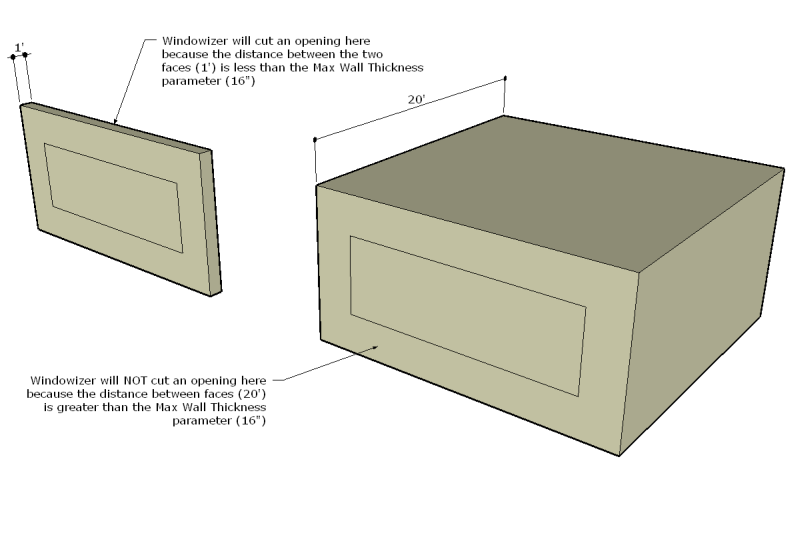
"Max Wall Thickness" simply describes the maximum distance between 2 faces for them to be considered a "wall". If two faces are within the distance, Windowizer will cut an opening; otherwise, it will not. This is applicable primarily when using it for full 3D buildings where you have interior and exterior areas modeled.
-
@chango70 said:
@rickw said:
@chango70 said:
Rick I can't get it to work for some reason. I've unzipped everything into the plugins folder. When I use the Windowizer4 dialogue it creates a single group. Am I doing something wrong?
For metric, you need a dot between the number and the units, i.e. 50.mm
Hope that helps.
Hi Rick. Thanks for the quick reply. I still have the same problem this morning after following your instructions. I'll post an image when I have time.
Try again with the Ruby Console open, and let me know if you see any error messages.
-
-
@utiler said:
Thanks so much Rick, bought it and loving it!!!
A few questions:
- Great to see it cuts both faces; when deleting a window, the hole still remains. Is this normal? I just assumes that the whole window would act like a component but it appears that the opening is separate from the window [if grouped]...
- When extracting Windowizer4, i over-road a few rubies, I assume were part of windowizer30b5. Which files do I delete from the plugins folder that are only associated with windowizer30b5? I want to get rid of what i don't need...
- Color selection - there is 7 options for coloring both the frame and glass, is there a way to access the materials palette?
Way

Glad you're happy with it!
- Yes, the hole becomes part of the geometry of the model, just as if you had created the hole manually and then put a window in it (since components only auto-cut a hole in one face, it was the only way to penetrate a wall). I haven't yet decided the best way to handle deleting the windows yet. Part of the challenge is that things can be edited, and there's no guarantees of what geometry should stay or go.
- You can probably safely delete "EntsGetAtt.rb" (or move it to a subfolder to make sure everything else still works, prior to deleting it)
- Windowizer can currently only access the materials in the model. I know it's a pain, but you'll need to paint something with the materials you want to use before they'll show up in the list. I haven't given up, though - I'm still investigating how to get to the material palettes.
-
Hi Rick
Thank you for this great plugin. I have a issue on my Mac. I can not select any of the drop down options
, such as frame material, glass material, make group and front side only. They just don't work, nothing
happens when you click on them. Also i saved a style but then when i tried to make another window it just vanished.It would be great if this can be looked at for us Mac users.
Thanks a lot, loving the new Windowizer
-
Looks like I've fallen prey to the infamous Safari-SU-Ruby bug.

I think I know how to work around it, but it will take some time.I'll post a notice when the updated files are ready to download.
Thanks,
-
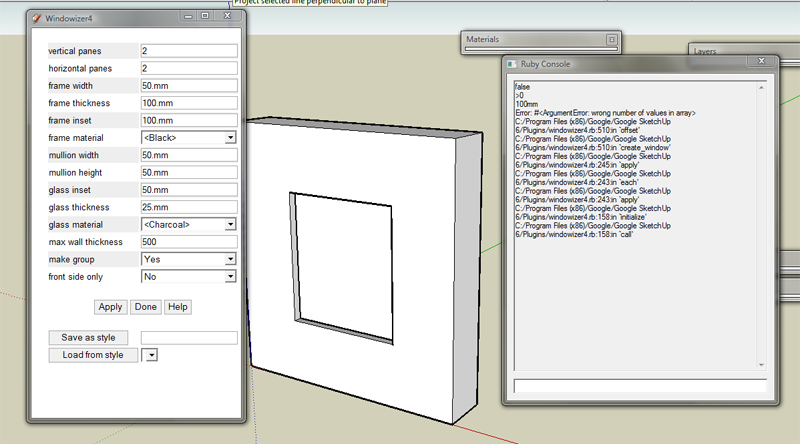
Rick what is the Safari Su bug? Anyway I've tried it with Ruby Console open and it went like this:
-
Rick, will W4 work in SketchUp 5?
-
@chango70 said:
Rick what is the Safari Su bug? Anyway I've tried it with Ruby Console open and it went like this:[attachment=0:10baznmq]<!-- ia0 -->Question.jpg<!-- ia0 -->[/attachment:10baznmq]
If you had Windowizer3, you would have an older version of offset.rb. Did you overwrite that one with the offset.rb from the Windowizer4 .zip file? The error messages suggest that could be the problem.
The Safari-SU-Ruby bug is a problem where webDialogs don't communicate back and forth with SU as they should. In this case, the plugin tries to add dropdown menu items to the webDialog (list of materials for frames and glass, and Yes/No preferences for "Group" and "Front Only" options). I suspect the bug is causing the blank dropdown menus.
@putnik said:
Rick, will W4 work in SketchUp 5?
Unfortunately, no. Because it uses WebDialogs, it requires SU6. If there's enough interest, I could try to rework it for SU5, but it would lose some functionality.
-
Hi Rick.
It is working now. Thanks alot!
One thing. I can't get it to cut walls still. When I made a 500mm thick wall and tried to use the plugin (i tried 500mm and 1000mm for max wall thickness) it didn't cut a hole through the wall. Am I doing something wrong?
Cheers
-
Urgh. Typo on my part. Re-download to get the fixed version.
-
@rickw said:
Urgh. Typo on my part. Re-download to get the fixed version.
Rick, stupid question but, do I use the same link Smustard sent me to Re-download? I tried that and it say it can't verify my email.
-
@rickw said:
Looks like I've fallen prey to the infamous Safari-SU-Ruby bug.
I think I know how to work around it, but it will take some time.I'll post a notice when the updated files are ready to download.
Thanks,
looking forward to it.
-
@chango70 said:
do I use the same link Smustard sent me to Re-download? I tried that and it say it can't verify my email.
This may seem like a dumb question, but did you use the correct email address? Some people have a seldom-used email address for PayPal, and sometimes forget that's the one to use to access the download.
-
To recreate a lost post:
I have uploaded an update to Windowizer4 that fixes an obscure bug (could cause a bugsplat when using Windowizer4 inside a group with "Front only" set to "Yes").
The next planned update will include a right-click-menu option to start Windowizer4, and I hope to have style exporting/importing done as well.
-
Uploaded the update to smustard, Rick?





Advertisement