sketchucation logo sketchucation
    • 登入
    Oops, your profile's looking a bit empty! To help us tailor your experience, please fill in key details like your SketchUp version, skill level, operating system, and more. Update and save your info on your profile page today!
    🔌 Smart Spline | Fluid way to handle splines for furniture design and complex structures. Download

    Pipe-along-path

    已排程 已置頂 已鎖定 已移動 Newbie Forum
    sketchup
    64 貼文 9 Posters 5.7k 瀏覽 9 Watching
    正在載入更多貼文
    • 從舊到新
    • 從新到舊
    • 最多點贊
    回覆
    • 在新貼文中回覆
    登入後回覆
    此主題已被刪除。只有擁有主題管理權限的使用者可以查看。
    • P 離線
      pipingguy
      最後由 編輯

      @tig said:

      Notepad++ is a respectable product and if installed from their site it should not have other hidden baddies... http://notepad-plus-plus.org/download/v6.5.4.html
      I'll be reissuing PipeAlongPath shortly [edited entirely in Notepad++ !]
      I will be adding some optimistation tools...

      Good Day
      Are you still working on the PAP upgrade, or shall I stick with version 2.0?
      Thanks!

      1 條回覆 最後回覆 回覆 引用 0
      • TIGT 離線
        TIG Moderator
        最後由 編輯

        v2.0 is the newest.

        TIG

        1 條回覆 最後回覆 回覆 引用 0
        • P 離線
          pipingguy
          最後由 編輯

          OK! Super good work! (seriously)

          1 條回覆 最後回覆 回覆 引用 0
          • P 離線
            pipingguy
            最後由 編輯

            Attached, find model containing additional paths that will not extrude with PIPE-ALONG-PATH. 😞


            PIPE-ALONG-PATH FAIL TO EXTRUDE COLLECTION.skp

            1 條回覆 最後回覆 回覆 引用 0
            • TIGT 離線
              TIG Moderator
              最後由 編輯

              The default diameter for the pipe is < 1/4" - which will mean some very tiny facets at bends etc.

              Can you purge your SKP and include only the paths that still cause problems - I can't readily tell what's what - information overload !

              Odd that FollowMe works on some and PipeAlongPath does not ?

              TIG

              1 條回覆 最後回覆 回覆 引用 0
              • P 離線
                pipingguy
                最後由 編輯

                Not sure what you mean by purge. Just try any of the paths. You may want to avoid the ones labelled they will freeze the program. They should almost all be ''square''. I test that by creating temporary faces between vertices and placing the circle tool on the face. If the tool is red, green or blue, the linework is orthogonal and not skewed.

                1 條回覆 最後回覆 回覆 引用 0
                • TIGT 離線
                  TIG Moderator
                  最後由 編輯

                  Model Info > Statistics > Purge Unused...
                  Removes the dross...
                  Makes the file much smaller and quicker to load/navigate...

                  There are so many examples, if you could offer a reduced set that includes only those paths which fail, then it'd be much easier to find what's up...

                  TIG

                  1 條回覆 最後回覆 回覆 引用 0
                  • P 離線
                    pipingguy
                    最後由 編輯

                    Please see attached samples. FYI - my diameters are normally between 2'' and 18'' with 8 segments.


                    SAMPLES FROM PIPE-ALONG-PATH FAIL TO EXTRUDE COLLECTION 3-20-16.skp

                    1 條回覆 最後回覆 回覆 引用 0
                    • TIGT 離線
                      TIG Moderator
                      最後由 編輯

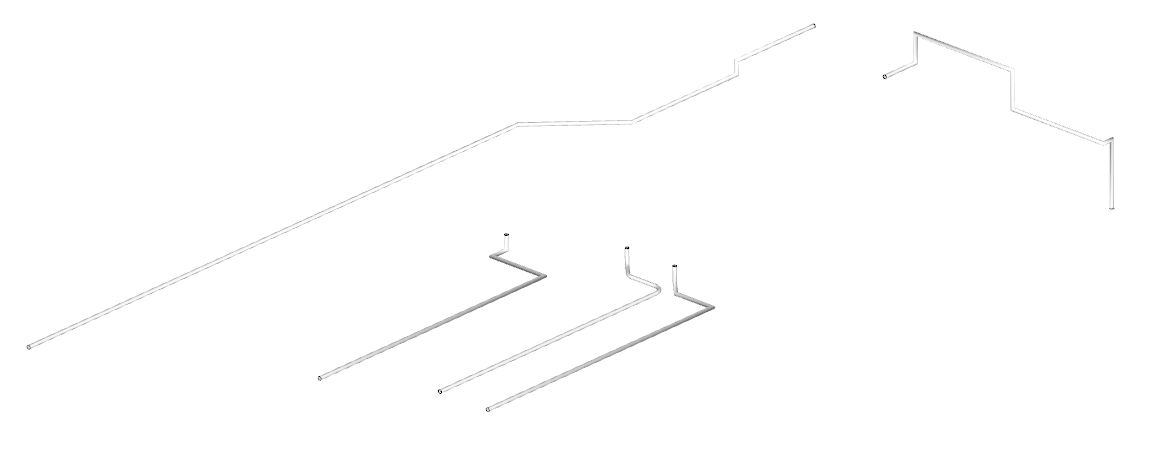
                      All of those provided paths extruded a 4" diam pipe with PipeAlongPath, without any issues...

                      However, I did Select the entire path, then chose to Explode any Curves, and then used TIG-Weld to make a single bound path, which I then Selected and used with PiprAlongPath...

                      Can you try that ?

                      Capture.PNG

                      TIG

                      1 條回覆 最後回覆 回覆 引用 0
                      • P 離線
                        pipingguy
                        最後由 編輯

                        I tried that, without luck. The weld extension I use looks like this:

                        LOAD SUPPORT FILES

                        require 'sketchup.rb'
                        require 'extensions.rb'

                        CREATE EXTENSION

                        ext = SketchupExtension.new('Weld', 'smustard_Weld/weld.rb')

                        EXTENSION INFORMATION

                        ext.creator = 'Rick Wilson'
                        ext.version = '3.0.1'
                        ext.copyright = '2004, Rick Wilson'
                        ext.description = 'Create custom toolbars through a WebDialog'

                        REGISTER AND LOAD THE EXTENSION

                        Sketchup.register_extension(ext, true)

                        1 條回覆 最後回覆 回覆 引用 0
                        • TIGT 離線
                          TIG Moderator
                          最後由 編輯

                          I did NOT say to use RickW's old version. 😕
                          I said 'TIG-Weld'...
                          My simplified version is available here http://sketchucation.com/pluginstore?pln=TIG-weld

                          Download/install it.
                          Select the entire path.
                          Use the Explode Curves in the context-menu [if any are found].
                          Use TIG-Weld to make a bound-curve from the whole path.
                          Select that... and use PipeAlongPath on it...

                          TIG

                          1 條回覆 最後回覆 回覆 引用 0
                          • P 離線
                            pipingguy
                            最後由 編輯

                            OK - so I deleted the old weld plugin and installed the TIG-weld ver-2.0 plugin. However, the plugin will not work. See attached.....


                            TIG-weld ver 2.0 will not work.pdf

                            1 條回覆 最後回覆 回覆 引用 0
                            • Dave RD 離線
                              Dave R
                              最後由 編輯

                              How did you attempt to install TIG-Weld? Did you just put the downloaded RBZ file into Plugins?

                              Etaoin Shrdlu

                              %

                              (THERE'S NO PLACE LIKE)

                              G28 X0.0 Y0.0 Z0.0

                              M30

                              %

                              1 條回覆 最後回覆 回覆 引用 0
                              • TIGT 離線
                                TIG Moderator
                                最後由 編輯

                                Looks like you have not installed the RBZ, but rather just saved it into the ../Plugins folder...
                                There seem to be a few RBZs in there !

                                There is NO need for any RBZ to be in the ../Plugins folder - it does nothing any way.
                                The normal 'manual' practice is to keep these RBZs in your 'Downloads folder, then install them...

                                You install RBZ files.
                                This has been the norm since v8M2.
                                Use SketchUp's Preferences > Extensions > Install Extensions... button.
                                Choose the RBZ and it then installs automatically, extracting the required files, subfolder of files and so on into your ../Plugins folder...

                                If you had downloaded/installed the SkethUcation Toolset's RBZ [linked in menu above], then there is not even a need to download any RBZ - its ExtensionStore tool, when used from within SketchUp. automates the whole process behind the scenes ans downloads/extracts/installs the whole set of files for you, effortlessly...

                                TIG

                                1 條回覆 最後回覆 回覆 引用 0
                                • P 離線
                                  pipingguy
                                  最後由 編輯

                                  @dave r said:

                                  How did you attempt to install TIG-Weld? Did you just put the downloaded RBZ file into Plugins?

                                  Yes

                                  1 條回覆 最後回覆 回覆 引用 0
                                  • Dave RD 離線
                                    Dave R
                                    最後由 編輯

                                    @pipingguy said:

                                    @dave r said:

                                    How did you attempt to install TIG-Weld? Did you just put the downloaded RBZ file into Plugins?

                                    Yes

                                    So as you can see from TIG's remarks, you didn't actually install TIG-Weld at all.

                                    Etaoin Shrdlu

                                    %

                                    (THERE'S NO PLACE LIKE)

                                    G28 X0.0 Y0.0 Z0.0

                                    M30

                                    %

                                    1 條回覆 最後回覆 回覆 引用 0
                                    • P 離線
                                      pipingguy
                                      最後由 編輯

                                      OK - so I tried the window > preferences > extensions > install extensions button and navigated to the download folder. I picked TIG-weld.RBZ and sure enough it installed. 😄 I did the same for the cut-face extension (and all this time I was wondering why it didn't show up in SketchUp) as well as for for TT_lib. Not sure what the latter does though.
                                      Anyway, I TIG-welded a couple paths but they still did not extrude. 😕

                                      1 條回覆 最後回覆 回覆 引用 0
                                      • TIGT 離線
                                        TIG Moderator
                                        最後由 編輯

                                        I demonstrated that ALL of the 'problem paths' you supplied can be made to extrude with PipeAlongPath.

                                        You need to select one full path [double-click part of it so it all selects], then use the right-click context-menu.
                                        If 'Explode Curve' appears, then choose it, some oddly made curves seem to be causing issues.
                                        but it it's not there there might still be some issues with short or reversed edges etc, so do this next step in all cases...
                                        With those edges [re]selected use TIG-Weld to combine them all into one bound curve.
                                        Now reselect that curve and use PipeAlongPath on that.

                                        Following these steps I have not had a single failure with your 'problem paths'...

                                        TIG

                                        1 條回覆 最後回覆 回覆 引用 0
                                        • P 離線
                                          pipingguy
                                          最後由 編輯

                                          OK
                                          Thanks!

                                          1 條回覆 最後回覆 回覆 引用 0
                                          • 1
                                          • 2
                                          • 3
                                          • 4
                                          • 4 / 4
                                          • 第一個貼文
                                            最後的貼文
                                          Buy SketchPlus
                                          Buy SUbD
                                          Buy WrapR
                                          Buy eBook
                                          Buy Modelur
                                          Buy Vertex Tools
                                          Buy SketchCuisine
                                          Buy FormFonts

                                          Advertisement

