Vray for Sketchup - Materials
-
Mr S,
Alright it sounds like you are still having some issues. I will try to be as descriptive as possible.
Open the material editor
Right click on "Scene Materials" and select "add material" and then "AddVrayMtl". (this will then add "default material" in the editor).
Now go through and create a new material just as you would in the material editor within Vray for Sketchup.
Once you have the material the way you like it go to "File" and select "Pack Material" (make a folder wherever you want to save the material" and put it in the folder.
Now go back to Sketchup and in the material editor (within Vray for Sketchup) go to "Scene Materials" and right click.
select "import new material" and browse to the .vismat material you just saved.
Once you import that material it will also show up in the native Sketchup material editor.
Now paint whatever you want with your new material in Sketchup.
Hit render.
Now you should see your newly created Vray material in your render.
That should do it.If you make some good custom materials make sure we try to share them either in the material forum or on the Vray material section of their forum.
Let me know if you need anymore help.
Scott
-
Hi,
That is what I have been doing.
But when I reach this point:
@unknownuser said:
select "import new material" and browse to the .vismat material you just saved.
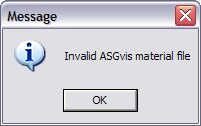
I get the error message.
If you have the time, could you try importing one of the materials I have made and see if you experience the same problem?I have attached the following:
BrickRedCladding.vismat (Vray file)
tiles-25_b005.jpg (Bump Map Image)
tiles-25_d100.jpg (Diffuse Image)Saved as one zip file.
See attached.
Thanks.Regards
Mr S
-
i think in a first moment it did work...
give it a check in the zip file... i've imported your material, and exported from the Material Studio...
-
Thanks very much for trying.
I, or the software on my machine, must be doing something different to you.
I am still getting the same error message with the file you supplied.
The thing is, I have seen on the ASGvis forums that others or having the same problem as me.
But no solution has been provided.Regards
Mr S
======
-
Mr. S,
I also got it to work fine. I would do a (this is going to hurt) uninstall of both Sketchup and Vray and then do a reinstall. I had this issue with a client I went to see yesturday and after the reinstall of both they got it working. What version of Vray are you using? If it is not the latest I would do the update as well.
Let me know after that if you are still having issues.
Scott
-
Hi,
I have just noticed that I am using v6.1 (not the latest SR1) of Vray.
As my trial period has almost expired anyway I will this latest version.
Sorry for not checking this first.
But to be honest, these small incremental releases v6.0, v6.1 v6.1 SR1 doesn't help matters much.Also, it would be good idea if you got a bit more than 30 days to try and get to grips with this software.
Does anybody know what the terms, conditions and restrictions are for the "Academic" version?Thanks
Mr S
-
It is worth going to SR1. Far more stable and a lot of bug fixes. I am hoping this solves your issue.
Scott
-
Here's a link to the ASGvis materials repository.
Just remember to re-link the maps to their respective areas.http://asgvis.com/index.php?option=com_remository&Itemid=47&func=select&id=16
-
As a heads up, the Material Studio that you guys are referring to does NOT convert 3DS Max materials to be compatible with Vray for Sketchup. It is for making your own materials as Scott said. ASGvis has put out a Material Converter for this purpose, but this requires you to have a copy of Max on your computer as the conversion is done inside of 3DS. Still with this method, you would only be able to convert those materials that do not have attributes that are not supported in sketchup, i.e. fur, toon, etc. The material converter is here - http://asgvis.com/index.php?option=com_remository&Itemid=0&func=search ...and here's a thread with a discussion about how to use the converter and issues users are having, as well as a bunch of successfully converted material. - http://asgvis.com/index.php?option=com_smf&Itemid=90&topic=3190.0
-
Hey scottpara
thats great Man !
-
hi guys...do you know how i can download materials to use in vray for sketchup?
-
@unknownuser said:
Once you import that material it will also show up in the native Sketchup material editor
Thanks Scott,
a great tutorial.
I can't seem to find the material in the native editor though it shows in the render.
Any ideas?
Also do you know how to convert png's, jpg's etc into vismat files?
Thanks again
Ed -
Ed,
I would suggest reviewing the manual first and then go to the argvis website and review the tutorials there. It is a general question you asked and can take a good deal of time to explain. It is actually better to go through the tutorials and that way you will pick it up much quicker. I am not trying to dodge your question but this is something better learned hands on. If you still have questions let me know and I will see what I can do.
Scott
-
Will do.
Cheers -
i also have to create my owns, but the most are terrible.
i think this community is the perfect place to have a databank of vray for sketckup materials( .vismats ).
-
Hi, can someone help me please, I am using SketchUp 7.1 with the latest version of V-ray on a Mac 10.6.2 and every time I tried to use the material editor, SketchUp just quits. Even with vismat or jpg image by creating v-ray material in the material editor it quits and also when using the bump and displacement the same thing happens. Any ideas please.
-
I am not sure that sounds like a material editor issue. Sounds more like an installation problem. Have you uninstalled and then reinstalled Vray? Have you contacted Vray support with your issue. They are good about getting back to you.
Scott
-
Thanks, I have not tried that yet but I have contacted them over a week and I am still waiting on them. Everything works, it renders and all the other parameters works fine. It only happens when am trying to import v-ray materials in to the materials editor and I don't know why.
Thank you. -
Raddern, please dont post the same question multiple times. Nobody is more likely to answer your question because youve posted it 10 times.
-
That was not my intension and its the first time am using forum. I taught people are in to different topics and I am just trying to get help that all. Any way I tried the uninstall and reinstall but the same things happens, thanks.



Advertisement