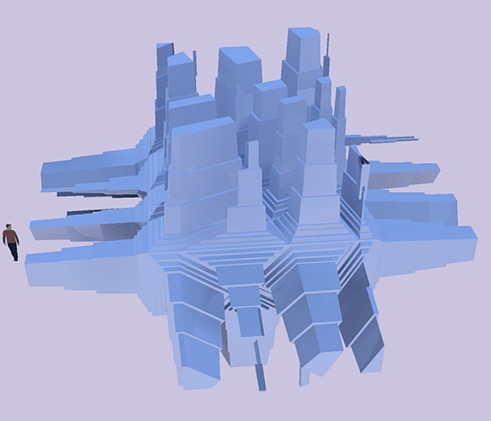
sketchucation logo sketchucation
    • 登入
    Oops, your profile's looking a bit empty! To help us tailor your experience, please fill in key details like your SketchUp version, skill level, operating system, and more. Update and save your info on your profile page today!
    🔌 Smart Spline | Fluid way to handle splines for furniture design and complex structures. Download

    WIP -- 'Protrude' ruby from Jim Foltz

    已排程 已置頂 已鎖定 已移動 Developers' Forum
    49 貼文 24 Posters 26.1k 瀏覽 24 Watching
    正在載入更多貼文
    • 從舊到新
    • 從新到舊
    • 最多點贊
    回覆
    • 在新貼文中回覆
    登入後回覆
    此主題已被刪除。只有擁有主題管理權限的使用者可以查看。
    • J 離線
      Jim
      最後由 編輯

      PRSS, would you open the Ruby Console and try running the plugin? Then copy and paste the output, and PM or email it to me. Also, Mac or PC?

      Thank you.

      @sepo said:

      Really nice plugin Jim. Thanks....

      I'm glad you like it. It's sort of fun to play with.

      @cadfather said:

      doesn't like curves, domes etc. no cutting on some faces in this shape

      Yes, faces need to be rectangles. I plan on making it divide almost any face in the future. And since domes and curves are made of polygons that are not rectangles, they can be offset and protruded but not divided.

      @petruscaleus said:

      Right now you can only taper the extrusion up to 99%,

      This was a design decision - designed to make things easy on me! I use the scale function to scale the new protruded face, and so I don't think it can eliminate the top face altogether. I would need to rewrite that part of the plugin, so maybe in the future.

      @prss said:

      The 'progressbar.rb" was not there in my plugins folder.

      And you need ProgressBar.rb from smustard.com.

      I have a number of ideas for the plugin. If you open the ui.html file, you can see some of them (commented out.)

      Anyone on a Mac able to use this?

      Hi

      1 條回覆 最後回覆 回覆 引用 0
      • J 離線
        Jim
        最後由 編輯

        Also, here's a few examples of things I did while testing this plugin:

        http://picasaweb.google.com/lh/view?uname=jim.foltz&isOwner=true&tags=greeble#

        Error 404 (Not Found)!!1

        favicon

        (sketchup.google.com)

        Hi

        1 條回覆 最後回覆 回覆 引用 0
        • CadFatherC 離線
          CadFather
          最後由 編輯

          @petruscaleus said:

          CadFather, as the name of the function "Divide Rectangles" implies, it only works with rectangles ^^

          👊 😆

          got it now Jim - an update to divide any face would make it into a supertool
          not that it isn't already! 😄

          1 條回覆 最後回覆 回覆 引用 0
          • P 離線
            PRSS
            最後由 編輯

            Thank you Jim, it is now working fine. Thanks again for the wonderful things you give
            to SU lovers.

            With best regards
            PRSS

            1 條回覆 最後回覆 回覆 引用 0
            • K 離線
              kwistenbiebel
              最後由 編輯

              I needed to reinstall the Protrude ruby from Jims blog site.
              Unfortunately the 'divide rectangle' function is not present anymore.
              Don't know why that is, but would someone be so kind to upload the version of this plugin that includes the divide function here?

              1 條回覆 最後回覆 回覆 引用 0
              • J 離線
                Jim
                最後由 編輯

                @kwistenbiebel said:

                I needed to reinstall the Protrude ruby from Jims blog site.
                Unfortunately the 'divide rectangle' function is not present anymore.
                Don't know why that is, but would someone be so kind to upload the version of this plugin that includes the divide function here?

                Huh? It's still there, or at least is on my version which is the same as the most recent release. Have a screenshot?

                Hi

                1 條回覆 最後回覆 回覆 引用 0
                • K 離線
                  kwistenbiebel
                  最後由 編輯

                  Funny 😄

                  Here is the screenshot. As you can see, no divide rectangles option there:
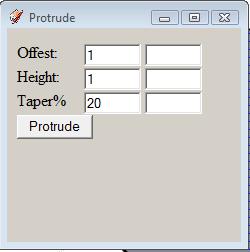

                  protrude.jpg

                  1 條回覆 最後回覆 回覆 引用 0
                  • K 離線
                    kwistenbiebel
                    最後由 編輯

                    Problem solved: There was a problem with overwriting a former protrude version.
                    Sorry for the confusion, the plugin now works just as it should.

                    Thanks again,Jim, for this plugin. It is a gem!

                    1 條回覆 最後回覆 回覆 引用 0
                    • olisheaO 離線
                      olishea
                      最後由 編輯

                      Hi there.

                      I installed both the protrude.rb and progressbar.rb but when i select a face and then divide, nothing happens.

                      no warnings or errors, the model just stays the same.

                      I have attached a picture of where I placed the rb file. I also copied the protrude folder into my plugins (not sure if this is where it should be!!)
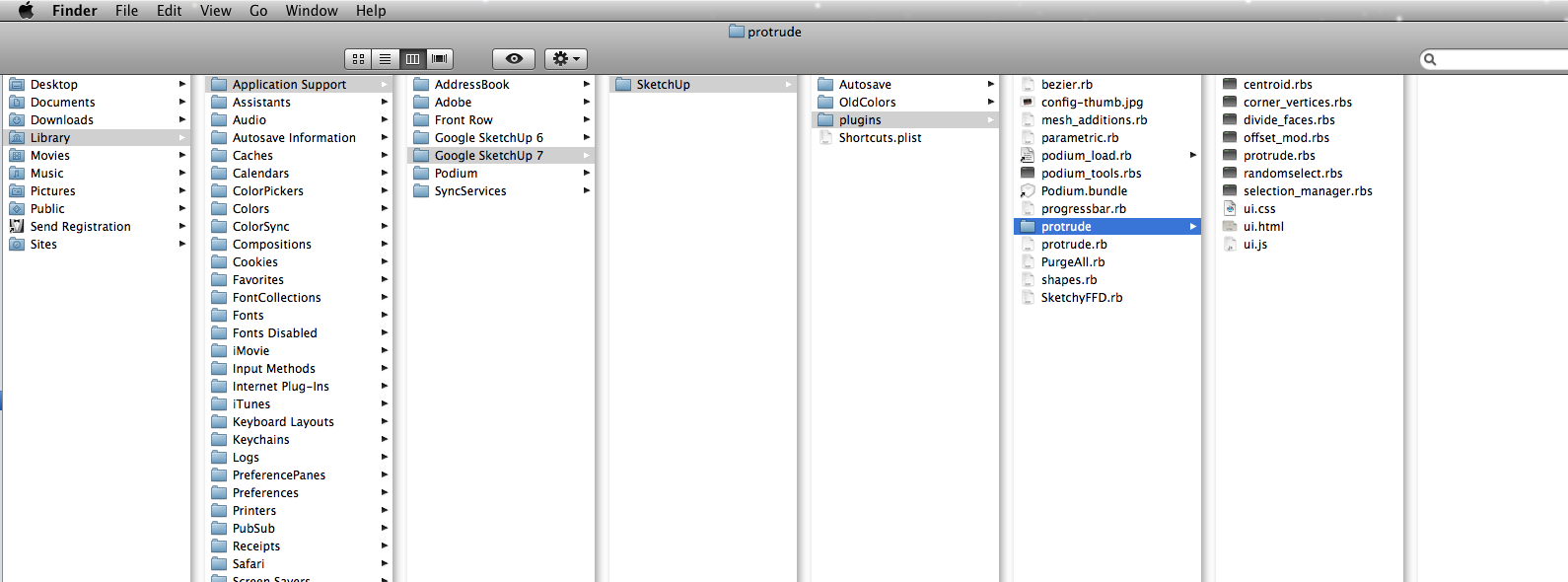

                      Picture 2.png

                      oli

                      1 條回覆 最後回覆 回覆 引用 0
                      • pilouP 離線
                        pilou
                        最後由 編輯

                        Zorro + Protrude = super fun result in a second! 😎 👍 ☀


                        protube.jpg

                        Frenchy Pilou
                        Is beautiful that please without concept!
                        My Little site :)

                        1 條回覆 最後回覆 回覆 引用 0
                        • pilouP 離線
                          pilou
                          最後由 編輯

                          😉prot.jpg

                          Frenchy Pilou
                          Is beautiful that please without concept!
                          My Little site :)

                          1 條回覆 最後回覆 回覆 引用 0
                          • J 離線
                            Jim
                            最後由 編輯

                            @olishea said:

                            Hi there.

                            I installed both the protrude.rb and progressbar.rb but when i select a face and then divide, nothing happens.

                            no warnings or errors, the model just stays the same.

                            I have attached a picture of where I placed the rb file. I also copied the protrude folder into my plugins (not sure if this is where it should be!!)

                            Hi olishea, welcome to the forums.

                            I do believe this is a Mac problem, and I may be able to find a fix when there is more time. I don't have a Mac to test and it's hard to debug without one.

                            Hi

                            1 條回覆 最後回覆 回覆 引用 0
                            • olisheaO 離線
                              olishea
                              最後由 編輯

                              thanks jim im keen to give it a go!!

                              oli

                              1 條回覆 最後回覆 回覆 引用 0
                              • broomstickB 離線
                                broomstick
                                最後由 編輯

                                Hoping a working mac version is on the way. This is one nifty little plugin!!

                                1 條回覆 最後回覆 回覆 引用 0
                                • B 離線
                                  bugmcw
                                  最後由 編輯

                                  any news on mac-ready version!? i wanna play with it!!!

                                  1 條回覆 最後回覆 回覆 引用 0
                                  • J 離線
                                    Jim
                                    最後由 編輯

                                    Would some kind and generous Mac user be able to test this version for me? 😄

                                    Unzip and replace all previous protrude files and folders in your Plugins directory.

                                    Thanks

                                    edit -
                                    Ok, thanks BTM. This is a new file.

                                    Hi

                                    1 條回覆 最後回覆 回覆 引用 0
                                    • B 離線
                                      BTM
                                      最後由 編輯

                                      Error Loading File protrude.rb
                                      no such file to load -- jf_menu

                                      when I take off the require 'jf_menu', the web dialog that appears when used is white and blank.

                                      1 條回覆 最後回覆 回覆 引用 0
                                      • olisheaO 離線
                                        olishea
                                        最後由 編輯

                                        hi jim,

                                        the protrude window pops up now with no warning messages.....but.....it doesn't work.

                                        I take it you have to select a face then divide then protrude....but when I click divide nothings happens, I have tried entering different values too (and reversing faces)

                                        oli

                                        1 條回覆 最後回覆 回覆 引用 0
                                        • P 離線
                                          pedromarmol
                                          最後由 編輯

                                          @jim said:

                                          Would some kind and generous Mac user be able to test this version for me? 😄

                                          Unzip and replace all previous protrude files and folders in your Plugins directory.

                                          Thanks

                                          edit -
                                          Ok, thanks BTM. This is a new file.

                                          Hello!
                                          I'm spanish Mac user, i works with sketchup 6, the plugin no works, when you select it in the menu of plugin, it appears a blank window and nothing more.
                                          I hope your help, and thanks!

                                          1 條回覆 最後回覆 回覆 引用 0
                                          • mariochaM 離線
                                            mariocha
                                            最後由 編輯

                                            Same here on Mac. Selecting a face and then hitting "Divide" doesn't do anything at all.
                                            Snif 😢
                                            In fact, the Divide part is the one I need most since the Greeble plugins works very well.
                                            Updt: Ok, been using FFD to divide.

                                            %(#008000)[Mario C.
                                            Every rule has exceptions, but some.]

                                            1 條回覆 最後回覆 回覆 引用 0
                                            • 1
                                            • 2
                                            • 3
                                            • 2 / 3
                                            • 第一個貼文
                                              最後的貼文
                                            Buy SketchPlus
                                            Buy SUbD
                                            Buy WrapR
                                            Buy eBook
                                            Buy Modelur
                                            Buy Vertex Tools
                                            Buy SketchCuisine
                                            Buy FormFonts

                                            Advertisement