sketchucation logo sketchucation
    • 登入
    Oops, your profile's looking a bit empty! To help us tailor your experience, please fill in key details like your SketchUp version, skill level, operating system, and more. Update and save your info on your profile page today!
    🔌 Smart Spline | Fluid way to handle splines for furniture design and complex structures. Download

    WIP -- 'Protrude' ruby from Jim Foltz

    已排程 已置頂 已鎖定 已移動 Developers' Forum
    49 貼文 24 Posters 26.1k 瀏覽 24 Watching
    正在載入更多貼文
    • 從舊到新
    • 從新到舊
    • 最多點贊
    回覆
    • 在新貼文中回覆
    登入後回覆
    此主題已被刪除。只有擁有主題管理權限的使用者可以查看。
    • TaffGochT 離線
      TaffGoch
      最後由 編輯

      Jim has been working on his generator for greebles/nurnies (look it up), the "Protrude" ruby plugin.

      Plugin: Protrude

      This tool so easily produces geometry, that I'm sure I can only underestimate its potential uses.

      The attached sample only took a couple of minutes, starting with a regular pentagon. Great fun!

      Regards,
      Taff
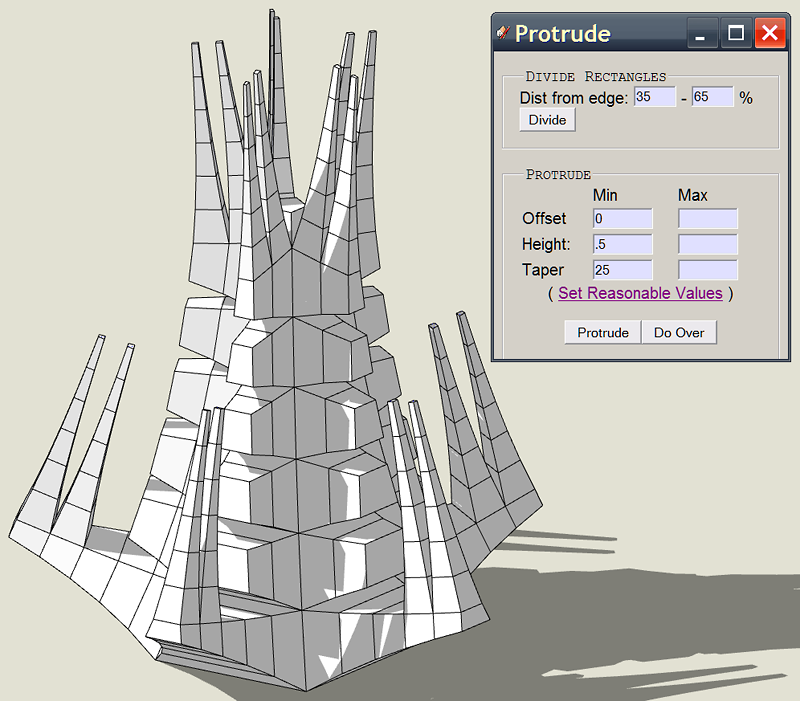

      Protrude.png

      "Information is not knowledge." -- Albert Einstein

      1 條回覆 最後回覆 回覆 引用 0
      • GaieusG 離線
        Gaieus
        最後由 編輯

        Ha! It does indeed look fun!

        Gai...

        1 條回覆 最後回覆 回覆 引用 0
        • W 離線
          watkins
          最後由 編輯

          Dear Taff,

          I should put some cream on that if I were you. It looks nasty.

          Regards,
          Bob

          1 條回覆 最後回覆 回覆 引用 0
          • K 離線
            kwistenbiebel
            最後由 編輯

            I installed it but get this error message when trying to open the 'Protrude Dialog' from the Plugins menu:

            Error: #<NameError: uninitialized constant ProtrudeDialog>
            C:/Program Files/Google/Google SketchUp 6/Plugins/protrude.rb:6
            C:/Program Files/Google/Google SketchUp 6/Plugins/protrude.rb:4:in `call'

            Anyone else experiences this?

            1 條回覆 最後回覆 回覆 引用 0
            • J 離線
              Jim
              最後由 編輯

              @kwistenbiebel said:

              I installed it but get this error message when trying to open the 'Protrude Dialog' from the Plugins menu:

              Error: #<NameError: uninitialized constant ProtrudeDialog>
              C:/Program Files/Google/Google SketchUp 6/Plugins/protrude.rb:6
              C:/Program Files/Google/Google SketchUp 6/Plugins/protrude.rb:4:in `call'

              Anyone else experiences this?

              At least one other person is having the same issue. I've uploaded a new version just now, so maybe give that a try.

              Hi

              1 條回覆 最後回覆 回覆 引用 0
              • K 離線
                kwistenbiebel
                最後由 編輯

                wow, that's fast Jim. 👍
                Thanks, I will try it.

                [EDIT]: Works like a charm !
                (An extra ruby needs to be downloaded from smustard to make it work: progressbar.rb)

                1 條回覆 最後回覆 回覆 引用 0
                • K 離線
                  kwistenbiebel
                  最後由 編輯

                  I love the plugin 😄 .

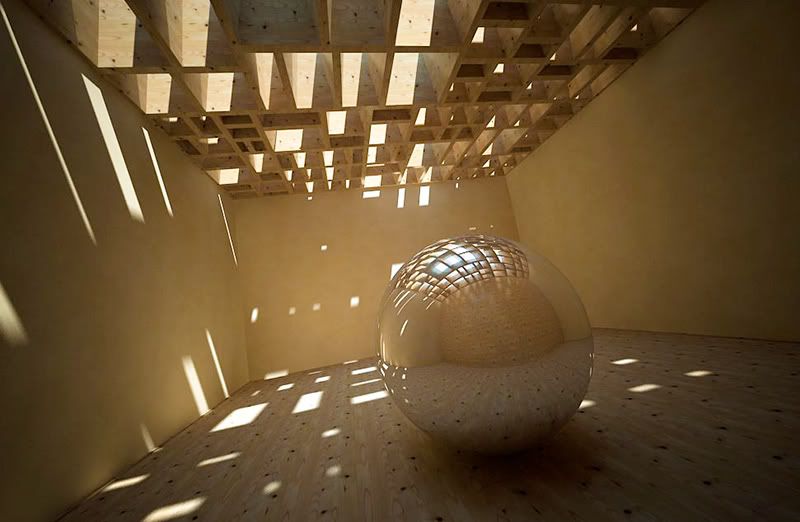
                  A quick play:

                  http://i140.photobucket.com/albums/r3/kwistenbiebel1/greeble-ceiling.jpg

                  1 條回覆 最後回覆 回覆 引用 0
                  • GaieusG 離線
                    Gaieus
                    最後由 編輯

                    Fantastic scene, kwist! 👍

                    Gai...

                    1 條回覆 最後回覆 回覆 引用 0
                    • C 離線
                      chango70
                      最後由 編輯

                      WOW! Fantastic plugin! This is where plugins are no longer just tools, they are becoming creative works of art! Thanks!

                      1 條回覆 最後回覆 回覆 引用 0
                      • plot-parisP 離線
                        plot-paris
                        最後由 編輯

                        phantastic plugin, Jim. real fun to use it. its almost addictive 😄
                        one minor thing: when I open the prodrude dialog window, it is allways to small. I have to rescale it first to see all the buttons. is there anything that can be done about it from within ruby?

                        @kwistenbiebel:
                        beautyful render! you immediately managed to think of a practical way to make use of this tool in architecture. the image has a great, artistic feeling to it, really looks like an exhibition room in an art gallery.
                        which render engine did you use for that and how long did it take?

                        [Edit] oh, and Dave: thanks for making us aware of this great new plugin 👍

                        1 條回覆 最後回覆 回覆 引用 0
                        • R 離線
                          remus
                          最後由 編輯

                          I can imagine playing with this for a few hours at least 👍

                          http://remusrendering.wordpress.com/

                          1 條回覆 最後回覆 回覆 引用 0
                          • P 離線
                            Petruscaleus
                            最後由 編輯

                            Really a nice bit of ruby to toy around with...! 👍

                            But there's a little problem using it on a localized (german) OS - as some of you may know we're using a comma to separate the decimal places (and a point for the thousands); but the protrude plugin can't handle that, every floating point value is truncated to the integer value.

                            @unknownuser said:

                            {"dmax"=>["65"], "7"=>[nil], "omin"=>["0"], "dmin"=>["35"], "hmax"=>["1"], "1"=>[nil], "tmin"=>["0"], "hmin"=>["1"]}
                            rcvd callback: "protrude()"
                            (values were 1,1 for hmin & and 1,7 for hmax)

                            If I call the 'Set Reasonable Values' function, the calculated values also use the decimal comma format - and protrude won't work, too.

                            @unknownuser said:

                            rcvd callback: "setReasonableValues()"
                            setResonableValues:
                            {"dmax"=>["65"], "00m"=>[nil], "omin"=>["0"], "dmin"=>["35"], "tmin"=>["0"], "60m"=>[nil], "hmin"=>["6"]}
                            rcvd callback: "protrude()"
                            (hmin=6,00m & omin=0,60m)

                            When trying values with a decimal point an error occurs:

                            @unknownuser said:

                            {"dmax"=>["65"], "omin"=>["0"], "dmin"=>["35"], "hmax"=>["1.7"], "tmin"=>["0"], "hmin"=>["1.1"]}
                            rcvd callback: "protrude()"
                            Error: #<ArgumentError: (eval):269:in to_l': Cannot convert "1.1" to Length> (eval):66:in initialize'
                            (eval):63:in eval' (eval):66:in initialize'
                            (eval):63:in `call'

                            The only workaround that will work is to adjust the numbers format (decimal point and comma separating the thousands) in windows itself, so SU will use the same number format as the plugin; the disadvantage is, every other program uses it as well.
                            Is there a (known) way to adjust the script to accept the comma values as well, or do I have to dig into ruby scripting myself...?

                            Regards,
                            Stefan

                            1 條回覆 最後回覆 回覆 引用 0
                            • J 離線
                              Jim
                              最後由 編輯

                              Thanks for the report, Stefan. I had no idea the plugin was not working with a comma.

                              I am relying on the SketchUp API to process the string into lengths, and I am not directly manipulating the values. I assumed the API would handle the conversion. I will need to learn how to write the plugin to work in all circumstances.

                              Hi

                              1 條回覆 最後回覆 回覆 引用 0
                              • T 離線
                                tomot
                                最後由 編輯

                                Great stuff! makes it easy to build sculptures.
                                After which one could add some "catmull clark or doo sabin" meshing.

                                It might nice to add negative stepping as well. Perhaps by adding another button. Hence one can toggle between either negative or positive stepping.

                                my plugins
                                tomot

                                1 條回覆 最後回覆 回覆 引用 0
                                • J 離線
                                  Jim
                                  最後由 編輯

                                  @petruscaleus said:

                                  But there's a little problem using it on a localized (german) OS - as some of you may know we're using a comma to separate the decimal places (and a point for the thousands); but the protrude plugin can't handle that, every floating point value is truncated to the integer value.

                                  Stefan, I have sent you a revised version that I hope will solve this issue. Please let me know if I was successful, and I will release it to everyone.

                                  @tomot said:

                                  Great stuff! makes it easy to build sculptures.
                                  After which one could add some "catmull clark or doo sabin" meshing.

                                  It might nice to add negative stepping as well. Perhaps by adding another button. Hence one can toggle between either negative or positive stepping.

                                  Thanks tomot. I think it should be no problem to have negative values for the protrusion.

                                  Hi

                                  1 條回覆 最後回覆 回覆 引用 0
                                  • CadFatherC 離線
                                    CadFather
                                    最後由 編輯

                                    fantastic plugin Jim, thanks

                                    just reporting on some issues:

                                    doesn't like curves, domes etc
                                    no cutting on some faces in this shape
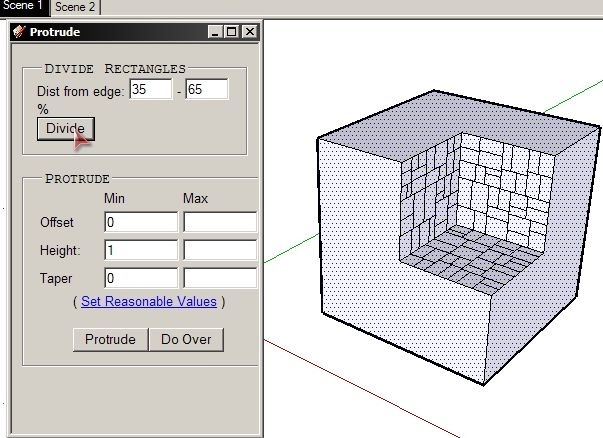
                                    prot.png

                                    1 條回覆 最後回覆 回覆 引用 0
                                    • P 離線
                                      Petruscaleus
                                      最後由 編輯

                                      CadFather, as the name of the function "Divide Rectangles" implies, it only works with rectangles ^^
                                      In your simple case case it would be only one line for each L-shaped polygon to divide them in two rectangles on which Divison can be applied.
                                      As for arcs, domes and spheres - it works fine for me scratches his head
                                      What exactly did you try?

                                      Jim, you already have a reply to your PM; works fine now!
                                      A new bug report/feature request: Right now you can only taper the extrusion up to 99%, if you enter 100 no tapering is done at all. Would it be possible to allow a taper of 100%, resulting in a single endpoint (top of the pyramid) instead of a small face at 99%? Optically this is no big matter, but it would save 3 vertices, 4 lines and one face which could matter in a big model including a few hundred extrusions.

                                      1 條回覆 最後回覆 回覆 引用 0
                                      • S 離線
                                        sepo
                                        最後由 編輯

                                        Really nice plugin Jim. Thanks....


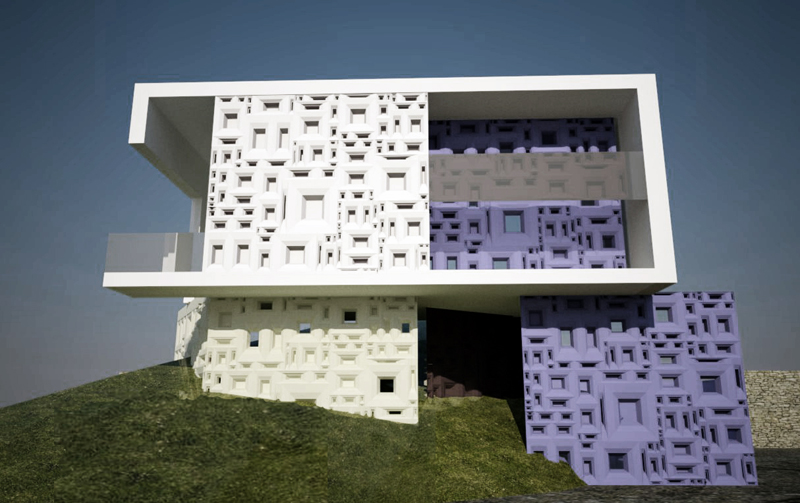
                                        deco.jpg

                                        1 條回覆 最後回覆 回覆 引用 0
                                        • P 離線
                                          PRSS
                                          最後由 編輯

                                          Hello everybody!

                                          I just installed this Protrude ruby. I do get the dialog. But when I select a face and aplly
                                          "divide" nothing happens. When I press "protrude" also nothing happens. I am using SU 6 Free.

                                          I downloaded the older version of ruby without the option of this "divide" from Crai Library.
                                          This works fine. But not the new one from SketchUP Plugins download. I did delete the previous
                                          ruby and the previous folder before copying the new ruby. Nothing works.

                                          Help will be greatly appreciated.

                                          Thanks in advance
                                          With best regards
                                          PRSS

                                          1 條回覆 最後回覆 回覆 引用 0
                                          • P 離線
                                            PRSS
                                            最後由 編輯

                                            Sorry!!

                                            The 'progressbar.rb" was not there in my plugins folder.
                                            It is working fine now after I copied it.

                                            With best regards
                                            PRSS

                                            1 條回覆 最後回覆 回覆 引用 0
                                            • 1
                                            • 2
                                            • 3
                                            • 1 / 3
                                            • 第一個貼文
                                              最後的貼文
                                            Buy SketchPlus
                                            Buy SUbD
                                            Buy WrapR
                                            Buy eBook
                                            Buy Modelur
                                            Buy Vertex Tools
                                            Buy SketchCuisine
                                            Buy FormFonts

                                            Advertisement