sketchucation logo sketchucation
    • Login
    Oops, your profile's looking a bit empty! To help us tailor your experience, please fill in key details like your SketchUp version, skill level, operating system, and more. Update and save your info on your profile page today!
    Mac User? | Join the Rayscaper Beta for Mac Learn More

    [Plugin] Point v1.2

    Scheduled Pinned Locked Moved Plugins
    42 Posts 25 Posters 83.0k Views 25 Watching
    Loading More Posts
    • Oldest to Newest
    • Newest to Oldest
    • Most Votes
    Reply
    • Reply as topic
    Log in to reply
    This topic has been deleted. Only users with topic management privileges can see it.
    • simon le bonS
      simon le bon
      last edited by

      👍 😉 😄

      1 Reply Last reply
      Reply Quote 0
      • MALAISEM
        MALAISE
        last edited by

        Obviously useful 👍 👍

        MALAISE 😄

        La Connaissance n'a de valeur que partagée

        1 Reply Last reply
        Reply Quote 0
        • M
          Matt666
          last edited by

          Thank you Pierre!
          A new version 1.2 is available... Try to fix Mac problems.

          Frenglish at its best !
          My scripts

          1 Reply Last reply
          Reply Quote 0
          • jeff hammondJ
            jeff hammond
            last edited by

            Merci!

            it's working nicely now on my mac.
            btw, i think the provided icon is too small.. it's 16x16 but SU can use 24x24 as well..

            @simon le bon said:

            But at the end we need to erase all those construction points!!!
            No problem! Just use the so powerful Matt666's Selection Manager 😉 😉

            another option is edit->delete guides.. not as powerful as selection manager but it will get rid of the points as well.

            dotdotdot

            1 Reply Last reply
            Reply Quote 0
            • A
              agrazdi
              last edited by

              I found this plugin great.
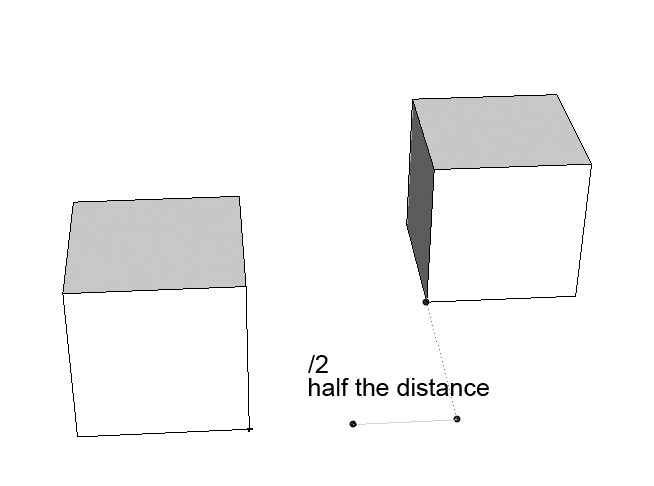
              But it could be excelent if after you inferrenced the distance with another object you could tape /# of spaces and add constructions points. Sort of dividing a line in 2,3,4.... spaces.
              Is it possible to add this request ?

              Thanks

              agrazdi


              point half.jpg

              1 Reply Last reply
              Reply Quote 0
              • I
                ilay7k
                last edited by

                Matthieu, thank you
                great addition for making of general plans

                1 Reply Last reply
                Reply Quote 0
                • M
                  Matt666
                  last edited by

                  Thank you!
                  agrazdi, I will see what I can do!

                  Frenglish at its best !
                  My scripts

                  1 Reply Last reply
                  Reply Quote 0
                  • simon le bonS
                    simon le bon
                    last edited by

                    Hi NewOne,
                    Your icons are NumberOne 😉
                    But when i try to use them (32x32), their quality isn't at the "rendez-vous" . Why? I can't say.
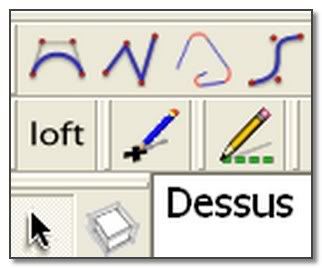
                    http://i274.photobucket.com/albums/jj245/Spendauballet/SketchUp/Matt_Point.jpg

                    simon

                    1 Reply Last reply
                    Reply Quote 0
                    • N
                      NewOne
                      last edited by

                      @simon le bon said:

                      Hi NewOne,
                      Your icons are NumberOne 😉
                      But when i try to use them (32x32), their quality isn't at the "rendez-vous" . Why? I can't say.
                      simon

                      Well... This is what I do now: try to figure out why on image viewer and on forum page the icon looks nice, but in Sketchup is a little messed up.
                      QUESTION: how many colors does sketchup accept for icons? true color, 256, or less? 😳

                      1 Reply Last reply
                      Reply Quote 0
                      • J
                        Jim
                        last edited by

                        Sketchup Toolbar icons are 24x24, or 16x16 for the small icons. Tool cursors are 32x32.

                        Hi

                        1 Reply Last reply
                        Reply Quote 0
                        • N
                          NewOne
                          last edited by

                          @jim said:

                          Sketchup Toolbar icons are 24x24, or 16x16 for the small icons. Tool cursors are 32x32.

                          THANK YOU !!
                          I tested with 24x24 and it looks wonderfull.

                          1 Reply Last reply
                          Reply Quote 0
                          • N
                            NewOne
                            last edited by

                            --EDITED POST-- changed the files, and added code suggestion.

                            Alternate icons for PointTool
                            Matt666, if you like this icons, please edit your script to use 24x24px and 16x16px icons.

                            The changes I made to your script to accept those icons and cursor icon are:

                            
                            cmd.large_icon = File.join(p, "PointTool", "PointTool24x24.png")
                            cmd.small_icon = File.join(p, "PointTool", "PointTool16x16.png")


                            and

                            
                            def initialize
                            #...your previous code
                            p=Sketchup.find_support_file("Plugins")
                            pointTool_cursor_path = File.join(p,  "PointTool", "PointTool cursor.png")
                            @@pointTool_cursor = UI;;create_cursor(pointTool_cursor_path, 3, 30)
                            end
                            
                            def onSetCursor
                            UI;;set_cursor(@@pointTool_cursor)
                            end


                            I am not sure if this is entirely correct, but it works for me.
                            If you decide to change the icons, pay attention on hotspot coordinates of the cursor 😉
                            Suggestion: add getExtents method to avoid disappearance of the OpenGL line.

                            
                            def getExtents
                            bbox = Geom;;BoundingBox.new
                            	bbox.add @ip1.position
                            	if (@state == 0)
                            		bbox.add @ip.position if (@ip.valid? && @ip.display?)
                            	elsif
                            		bbox.add @ip2.position
                            	end
                            	bbox
                            end


                            P.S. I like your script very much, it ease my work a lot! It's a simple, but strong idea!


                            contains 16x16, 24x24 and 32x32 PNG


                            visual example

                            1 Reply Last reply
                            Reply Quote 0
                            • N
                              NewOne
                              last edited by

                              The Blue Icon, because Simon Le Bon loved it...PointTool-blue.png
                              for making the script to show cursor, see this post: http://forums.sketchucation.com/viewtopic.php?f=180&t=13077&st=0&sk=t&sd=a&start=15#p184325


                              contains icons (24x24, 16x16) and cursor (32x32)

                              1 Reply Last reply
                              Reply Quote 0
                              • simon le bonS
                                simon le bon
                                last edited by

                                Hi NewOne,
                                Thank for it (the blue pen) . Now adopted 👍 😉
                                simon

                                1 Reply Last reply
                                Reply Quote 0
                                • W
                                  watkins
                                  last edited by

                                  Dear Matt,

                                  I have downloaded your version 1.2, but cannot work out how to draw a single point other than hitting the Esc key. What should I do?

                                  Kind regards,
                                  Bob

                                  1 Reply Last reply
                                  Reply Quote 0
                                  • utilerU
                                    utiler
                                    last edited by

                                    @simon le bon said:

                                    Hi NewOne,
                                    Your icons are NumberOne 😉
                                    But when i try to use them (32x32), their quality isn't at the "rendez-vous" . Why? I can't say.

                                    http://i274.photobucket.com/albums/jj245/Spendauballet/SketchUp/Matt_Point.jpg

                                    simon

                                    I think JClements made the Construction line tool Icon. Would be good to see a similar icon for the point tool also.

                                    Both point and Construction line tool I use all the time, thanks heaps guys!!!!!

                                    Just Curious...

                                    1 Reply Last reply
                                    Reply Quote 0
                                    • JClementsJ
                                      JClements
                                      last edited by

                                      Try one of these.
                                      16x16

                                      John | Illustrator | Beaverton, Oregon

                                      1 Reply Last reply
                                      Reply Quote 0
                                      • JClementsJ
                                        JClements
                                        last edited by

                                        Or this one.24x24

                                        John | Illustrator | Beaverton, Oregon

                                        1 Reply Last reply
                                        Reply Quote 0
                                        • JClementsJ
                                          JClements
                                          last edited by

                                          Or this one 😄PointTool 32x32.png

                                          John | Illustrator | Beaverton, Oregon

                                          1 Reply Last reply
                                          Reply Quote 0
                                          • JClementsJ
                                            JClements
                                            last edited by

                                            and the master file.
                                            Xara format.

                                            Great app. Cheap. Free trial down load at http://www.xara.com

                                            Point Tool Icon for Utiller.zip

                                            John | Illustrator | Beaverton, Oregon

                                            1 Reply Last reply
                                            Reply Quote 0

                                            Hello! It looks like you're interested in this conversation, but you don't have an account yet.

                                            Getting fed up of having to scroll through the same posts each visit? When you register for an account, you'll always come back to exactly where you were before, and choose to be notified of new replies (either via email, or push notification). You'll also be able to save bookmarks and upvote posts to show your appreciation to other community members.

                                            With your input, this post could be even better 💗

                                            Register Login
                                            • 1
                                            • 2
                                            • 3
                                            • 3 / 3
                                            • First post
                                              Last post
                                            Buy SketchPlus
                                            Buy SUbD
                                            Buy WrapR
                                            Buy eBook
                                            Buy Modelur
                                            Buy Vertex Tools
                                            Buy SketchCuisine
                                            Buy FormFonts

                                            Advertisement