sketchucation logo sketchucation
    • 登入
    Oops, your profile's looking a bit empty! To help us tailor your experience, please fill in key details like your SketchUp version, skill level, operating system, and more. Update and save your info on your profile page today!
    🔌 Smart Spline | Fluid way to handle splines for furniture design and complex structures. Download

    [Plugin] Align tool 3D (bug fix)

    已排程 已置頂 已鎖定 已移動 Plugins
    58 貼文 38 Posters 144.7k 瀏覽 38 Watching
    正在載入更多貼文
    • 從舊到新
    • 從新到舊
    • 最多點贊
    回覆
    • 在新貼文中回覆
    登入後回覆
    此主題已被刪除。只有擁有主題管理權限的使用者可以查看。
    • B 離線
      bonzi_ses
      最後由 編輯

      Thank you very mauch

      1 條回覆 最後回覆 回覆 引用 0
      • Z 離線
        ZyberCool
        最後由 編輯

        thanks bro..

        1 條回覆 最後回覆 回覆 引用 0
        • R 離線
          redgray
          最後由 編輯

          i like align tool just like in autocad command, thanks a lot for this tool.

          1 條回覆 最後回覆 回覆 引用 0
          • D 離線
            desunvn
            最後由 編輯

            @didier bur said:

            Hi,
            Here is an updated version of my align tool with a bug fix (components were deformed when non orthogonal axis were clicked). User guide also added.
            Regards,

            thank for sharing

            1 條回覆 最後回覆 回覆 引用 0
            • R 離線
              rv1974
              最後由 編輯

              Didier, could you please add 'multiple copy' and 'preserve original instance' options (may be with say CNTRL key pressed once)?
              P.S. I hope I post in the right topic: is it Tools\Align command?
              (Align, align tool, align 2D, align 3D.. I'm confused a bit).

              1 條回覆 最後回覆 回覆 引用 0
              • irwanwrI 離線
                irwanwr
                最後由 編輯

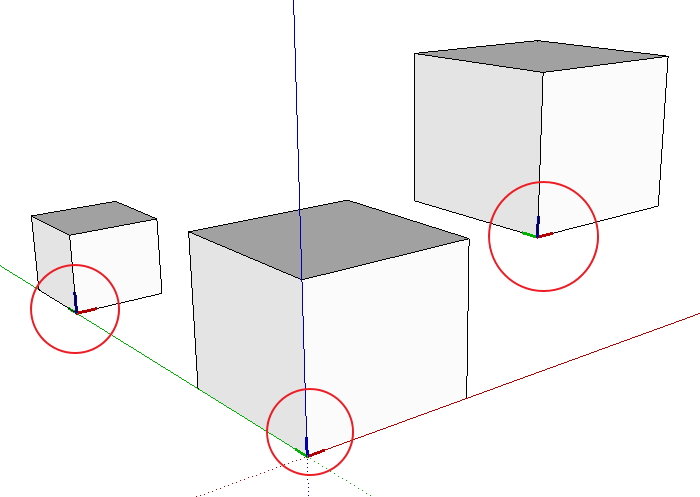
                Anyone experienced groups/components axes that cannot be hidden or erased?
                I've this plugin for quite long. But lately just realise that axes cannot be hidden or removed from the groups/components on the screen.
                How should i clear those axes after aligning groups/components?
                Thank you.

                align plugin test.jpg

                1 條回覆 最後回覆 回覆 引用 0
                • cottyC 離線
                  cotty
                  最後由 編輯

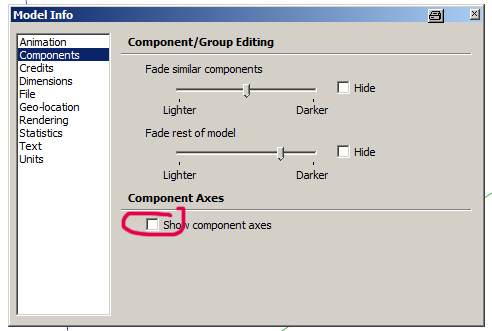
                  You can change the visibility of the component axes here:

                  caxes.jpg

                  my SketchUp gallery

                  1 條回覆 最後回覆 回覆 引用 0
                  • irwanwrI 離線
                    irwanwr
                    最後由 編輯

                    I forgot to check that 😳
                    Checked Window - Preference only several times.
                    Seems that I forgot how to read and use SketchUp.

                    Thanks a lot, Cotty.

                    1 條回覆 最後回覆 回覆 引用 0
                    • J 離線
                      JPC2j3
                      最後由 編輯

                      I recently down loaded and installed the plug-in in the zip file. I have been experimenting with the plug-in to learn how it works. When I try to use the tool, my SketchUp crashes every time. Let me explain as best as I can what happens.
                      I create two objects (usually two cubes or rectangles; I’m just experimenting). I pick a corner of one object and create an X and Y axis (should there be a Z axis showing at this point?). When I try to connect the origin point of the first object to the corner of the second object, I get a crash.
                      I have viewed the training video numerous times so I believe I am using the plug-in correctly. I’m seeking some help in understanding what I am doing wrong.
                      Thanks

                      1 條回覆 最後回覆 回覆 引用 0
                      • robertWanR 離線
                        robertWan
                        最後由 編輯

                        Could you add an option to copy (Ctrl) for plugin ALIGN 3D? Now objects are moved.

                        Robert

                        1 條回覆 最後回覆 回覆 引用 0
                        • kuponoK 離線
                          kupono
                          最後由 編輯

                          Align tool 3D doesn't want to work with SU 2014. Is this a ruby version thing? I miss being able to use it.

                          1 條回覆 最後回覆 回覆 引用 0
                          • O 離線
                            otb designworks
                            最後由 編輯

                            Can anyone confirm that this is not working in Su14 on a mac mavericks?

                            I installed the plugin both through the sketchucation plugin store and also through Didier's thread here.

                            Neither plugin appears in TOOLS and there is no align choice in the context menu when something is selected.

                            It's like the plugin doesn't exist, though it shows up in the plugin manager, and is in the user/library.../plugins location.

                            Thoughts?

                            Cheers, Chuck

                            OTB Designworks is on Youtube

                            6 core nMP, 32 gig RAM, (2) D700 GPU's, dual monitors

                            1 條回覆 最後回覆 回覆 引用 0
                            • BoxB 離線
                              Box
                              最後由 編輯

                              This might get it going for you. On the appropriate file, this is copied from the lines to tubes thread.

                              @tig said:

                              Didier needs to rework his rb file for v2014 compatibility and republish it...

                              BUT you can do it temporarily for your own use, even though his script is 'packed'.
                              Open the file lines2tubes.rb in Notepad, and go to the end:
                              Change
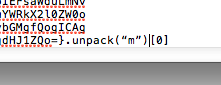
                              ...}.unpack("m")**.to_s**
                              to read
                              ...}.unpack("m")**[0]**
                              Save the changes.
                              Restart SketchUp.

                              The script will then load and work in v2014 !

                              This simple fix can be applied to any of Didier's 'packed' scripts that aren't working in v2014.

                              These edited scripts will also load and work in earlier SketchUp versions too... 🤓

                              1 條回覆 最後回覆 回覆 引用 0
                              • kuponoK 離線
                                kupono
                                最後由 編輯

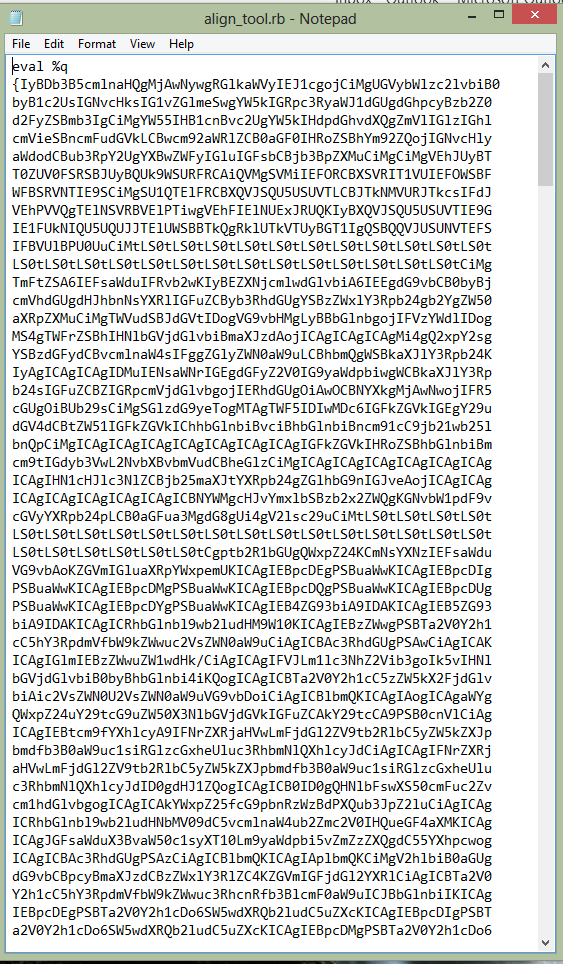
                                This is what I get when opening align_tool.rb in notepad.Bytecode?
                                Capture.PNG

                                1 條回覆 最後回覆 回覆 引用 0
                                • BoxB 離線
                                  Box
                                  最後由 編輯

                                  And if you scroll to the end as Tig says do you not see the bit that needs to be changed.

                                  1 條回覆 最後回覆 回覆 引用 0
                                  • O 離線
                                    otb designworks
                                    最後由 編輯

                                    Thanks for the response!

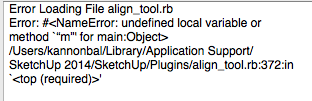
                                    I changed the code to read as TIG said it should (image 1). I also tried it with a space between the ) and the [ with no difference

                                    Now, when I start SU, I get this error message (image 2)

                                    thoughts?

                                    Screen Shot 2014-03-28 at 6.47.47 AM.png


                                    Screen Shot 2014-03-28 at 6.47.32 AM.png

                                    Cheers, Chuck

                                    OTB Designworks is on Youtube

                                    6 core nMP, 32 gig RAM, (2) D700 GPU's, dual monitors

                                    1 條回覆 最後回覆 回覆 引用 0
                                    • BoxB 離線
                                      Box
                                      最後由 編輯

                                      Sorry, I only know it works on windows.

                                      1 條回覆 最後回覆 回覆 引用 0
                                      • O 離線
                                        otb designworks
                                        最後由 編輯

                                        Weird...

                                        While I understand the drive to "upgrade" to Ruby 2.0, it is pretty frustrating that many old plugins don't work any more.

                                        Cheers, Chuck

                                        OTB Designworks is on Youtube

                                        6 core nMP, 32 gig RAM, (2) D700 GPU's, dual monitors

                                        1 條回覆 最後回覆 回覆 引用 0
                                        • N 離線
                                          nagrom345
                                          最後由 編輯

                                          I can't get this plugin to work with Sketchup 2014. Does anyone have and ideas about this. Thanks.

                                          1 條回覆 最後回覆 回覆 引用 0
                                          • A 離線
                                            agrazdi
                                            最後由 編輯

                                            Is it posible to update it for SU 2014 ?

                                            Thanks

                                            1 條回覆 最後回覆 回覆 引用 0
                                            • 1
                                            • 2
                                            • 3
                                            • 1 / 3
                                            • 第一個貼文
                                              最後的貼文
                                            Buy SketchPlus
                                            Buy SUbD
                                            Buy WrapR
                                            Buy eBook
                                            Buy Modelur
                                            Buy Vertex Tools
                                            Buy SketchCuisine
                                            Buy FormFonts

                                            Advertisement