sketchucation logo sketchucation
    • Login
    Oops, your profile's looking a bit empty! To help us tailor your experience, please fill in key details like your SketchUp version, skill level, operating system, and more. Update and save your info on your profile page today!
    Mac User? | Join the Rayscaper Beta for Mac Learn More

    [Plugin] Proper Animation V1.08 Beta(Updated 14/11/10)

    Scheduled Pinned Locked Moved Plugins
    246 Posts 108 Posters 229.7k Views 108 Watching
    Loading More Posts
    • Oldest to Newest
    • Newest to Oldest
    • Most Votes
    Reply
    • Reply as topic
    Log in to reply
    This topic has been deleted. Only users with topic management privileges can see it.
    • M
      morisdov
      last edited by

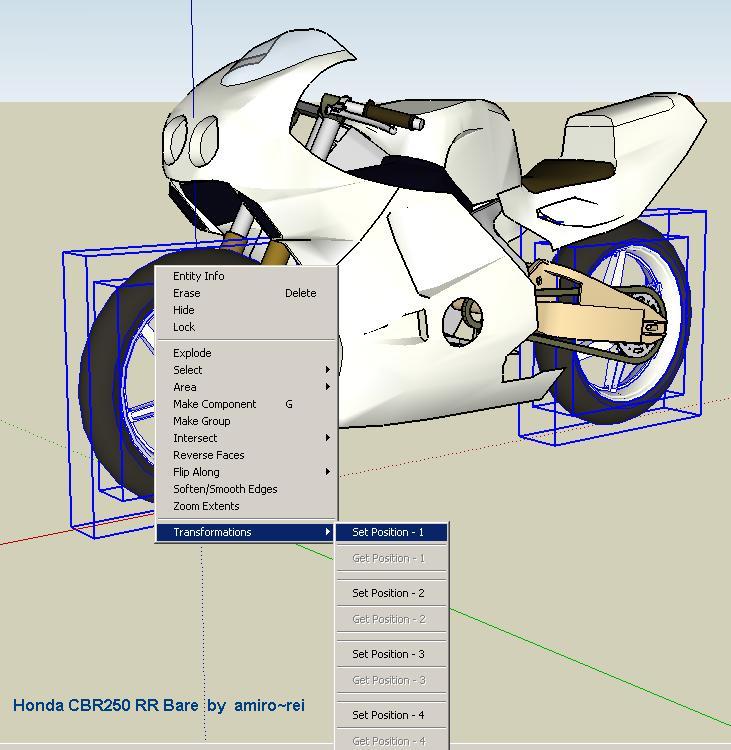
      Animate the model entities on each scene, not just the views.
      Make SketchUp models live by integrating movements to preset positions
      to demonstrate models in real life action from closed and opened doors
      to full progress of a construction site or assembly procedures... etc

      download "proper_animation.zip" file from http://morisdov.googlepages.com

      review attached demo video "proper_animation.wmv"
      I trust you to come up with better animation ideas and uses

      Moris

      Proper_animation_1.08.beta.zip


      proper_animation.wmv


      proper_animation1.JPG

      1 Reply Last reply
      Reply Quote 0
      • T
        tomasz
        last edited by

        Moris,

        Thank you very much for this plugin. I believe it will find many applications!
        I haven't tested it yet, but what I have seen in the preview looks VERY promising.

        I will have to add it to SU2KT animation export 😄. Now each frame will have to be exported!

        Tomasz

        Author of Thea Render for SketchUp

        1 Reply Last reply
        Reply Quote 0
        • S
          Shotster
          last edited by

          Will this work on either Windows or Mac?

          1 Reply Last reply
          Reply Quote 0
          • CadFatherC
            CadFather
            last edited by

            Thanks Moris, shall be good fun.. ehm, on holiday 😄

            Right on Tomasz, we are waiting for you now!

            1 Reply Last reply
            Reply Quote 0
            • K
              kwistenbiebel
              last edited by

              This is amazing ! Thank you very much for this plugin.
              So this actually is object animation for Sketchup right?
              I must try it. It appears to be quite easy to use.

              Now the cheesy question: Will this work with Vray and Indigo to render animations?
              I know making an object animation manually by tweaking the hiding options does not hold in both render apps.....Would be awesome if it could.

              1 Reply Last reply
              Reply Quote 0
              • Dave RD
                Dave R
                last edited by

                Thank you. Thank you.

                My question, Morris, is this. Can I save the SKP file and send it to someone so they can see the action? Or is there a way to export the animation?

                Etaoin Shrdlu

                %

                (THERE'S NO PLACE LIKE)

                G28 X0.0 Y0.0 Z0.0

                M30

                %

                1 Reply Last reply
                Reply Quote 0
                • D
                  Daniel S
                  last edited by

                  Thank you!!! 😍 😍 😍
                  It works Great!!! And the plugin supports position and scale transformations!
                  I only have problems with some rotations.. look at the attach video. The simple box is rotated 90° from the center point but in the animation looks strange.
                  Now you can set up to 4 positions. Can you add more?? 4 is not sufficient for this so amazing plugin.

                  Thank You!!!
                  Daniel S


                  rotate video .wmv

                  1 Reply Last reply
                  Reply Quote 0
                  • chrisglasierC
                    chrisglasier
                    last edited by

                    @morisdov said:

                    ... full progress of a construction site or assembly procedures... etc

                    Under Way of Working on June 9th I wrote " ... this could mean more Pro versions, more scripts, a new profession of nameset makers, animations in addition to bar charts ..."; so you can imagine I am very happy to see you have come up with this. But unfortuately I cannot open your googlepage from here for some reason; would you be kind enough to upload the zip file or send it to me by PM?

                    Thanks

                    Chris

                    With TBA interfaces we can analyse what is to be achieved so that IT can help with automation to achieve it.

                    1 Reply Last reply
                    Reply Quote 0
                    • D
                      digby dart
                      last edited by

                      Thank You! Yet another very impressive plug-in. 😄

                      1 Reply Last reply
                      Reply Quote 0
                      • B
                        bianhai
                        last edited by

                        Thank You!!!

                        1 Reply Last reply
                        Reply Quote 0
                        • J
                          Jon
                          last edited by

                          This looks like a great plugin! 😄

                          Jon
                          KT Team member

                          1 Reply Last reply
                          Reply Quote 0
                          • bigstickB
                            bigstick
                            last edited by

                            Any chance of either posting a version of the video we can view on OS X? I get a codec error in Quicktime using the WMV plugin. No Xvid for the Mac AFAIK.

                            1 Reply Last reply
                            Reply Quote 0
                            • M
                              morisdov
                              last edited by

                              I am glad you like this, now lets see your creativity results.

                              1. this plugin is written only in ruby, so it should be good for both mac & windows.

                              2. when saving your sketchup model the "positions" are saved in it too, so if you email your model to a friend and he downloads this plugin, he should have the same animation functionality.

                              3. this plugin uses the new SU version 6 "observer" class to hook into the "scenes" change, this "observer" is not called by SketchUp "Export -> Animation" so right now you cant standard export this to an AVI - just see it in sketchup.
                                http://www.sketchucation.com/forums/scf/viewtopic.php?f=180&t=10926
                                for the mean time hide the axes and use some screen capture utility to export videos.

                              4. later i will add more than 4 positions, start experimenting very slowly.

                              5. Youtube too does not like my wmv9 video - try
                                http://www.metacafe.com/watch/1455250/morisdov_plugin_proper_animation_rb_for_sketchup/
                                the resolution is terrrible but better than nothing

                                i trust you come up with better viedos


                              proper_animation_pics.zip

                              1 Reply Last reply 👍
                              Reply Quote 0
                              • M
                                marcosrodrigues
                                last edited by

                                Amazing! Thank you!

                                | menos é mais

                                1 Reply Last reply
                                Reply Quote 0
                                • K
                                  kwistenbiebel
                                  last edited by

                                  @morisdov said:

                                  ...
                                  3) this plugin uses the new SU version 6 "observer" class to hook into the "scenes" change, this "observer" is not called by SketchUp "Export -> Animation" so right now you cant standard export this to an AVI - just see it in sketchup.
                                  http://www.sketchucation.com/forums/scf/viewtopic.php?f=180&t=10926
                                  for the mean time hide the axes and use some screen capture utility to export videos.

                                  Yes, it would be awesome if that could be supported.
                                  Great job on that plugin 👍

                                  1 Reply Last reply
                                  Reply Quote 0
                                  • JClementsJ
                                    JClements
                                    last edited by

                                    Morris:

                                    Great work. I think everyone's hopes have been elevated.

                                    We need to have a way for all .skps using your scripts to have a link embedded that will enable the anyone opening them to easily downloaded and install the proper script.

                                    I suppose it could something as basic as floating text label with instructions if there was not a way to automate the process.

                                    John | Illustrator | Beaverton, Oregon

                                    1 Reply Last reply
                                    Reply Quote 0
                                    • FrederikF
                                      Frederik
                                      last edited by

                                      Looks very promissing, but why does the object you animate "shrink" during the animation..?? 😕
                                      I.e. a wheel turning on a motorbike will look a bit strange since it constantly change size during the animation... 😕

                                      Cheers
                                      Kim Frederik

                                      1 Reply Last reply
                                      Reply Quote 0
                                      • Mike LuceyM
                                        Mike Lucey
                                        last edited by

                                        Morisdov, Wow, this looks amazing and I think the word 'PROPER'
                                        well descibes what you have achieved. This is indeed very generous
                                        of you 👍

                                        Mike

                                        Support us so we can support you! Upgrade to Premium Membership!

                                        1 Reply Last reply
                                        Reply Quote 0
                                        • erikBE
                                          erikB
                                          last edited by

                                          Yes, Morisdov great plugin but I also wonder why when rotating (p.e. doors) it isn't rotating but a sort of (as Kim stated)'shrinking, turning and expancing' movement.
                                          greetings,
                                          ErikB

                                          1 Reply Last reply
                                          Reply Quote 0
                                          • M
                                            morisdov
                                            last edited by

                                            please download latest version 1.01 - should fix "shrink" on rotation.

                                            1 Reply Last reply
                                            Reply Quote 0

                                            Hello! It looks like you're interested in this conversation, but you don't have an account yet.

                                            Getting fed up of having to scroll through the same posts each visit? When you register for an account, you'll always come back to exactly where you were before, and choose to be notified of new replies (either via email, or push notification). You'll also be able to save bookmarks and upvote posts to show your appreciation to other community members.

                                            With your input, this post could be even better 💗

                                            Register Login
                                            • 1
                                            • 2
                                            • 3
                                            • 4
                                            • 5
                                            • 12
                                            • 13
                                            • 1 / 13
                                            • First post
                                              Last post
                                            Buy SketchPlus
                                            Buy SUbD
                                            Buy WrapR
                                            Buy eBook
                                            Buy Modelur
                                            Buy Vertex Tools
                                            Buy SketchCuisine
                                            Buy FormFonts

                                            Advertisement